Demo

Flow
接入你的智能体
從發布者安裝。不是 PlugMCP 端點。
遠端 URL 還是本機指令? 兩種安裝方式的差異
來自發布者
Model Context Protocol (MCP) server that provides access to Azure Resource Graph queries. It allows you to retrieve information about Azure resources across your subscriptions using Resource Graph queries.
This is a Model Context Protocol (MCP) server that provides access to Azure Resource Graph queries. It allows you to retrieve information about Azure resources across your subscriptions using Resource Graph queries.
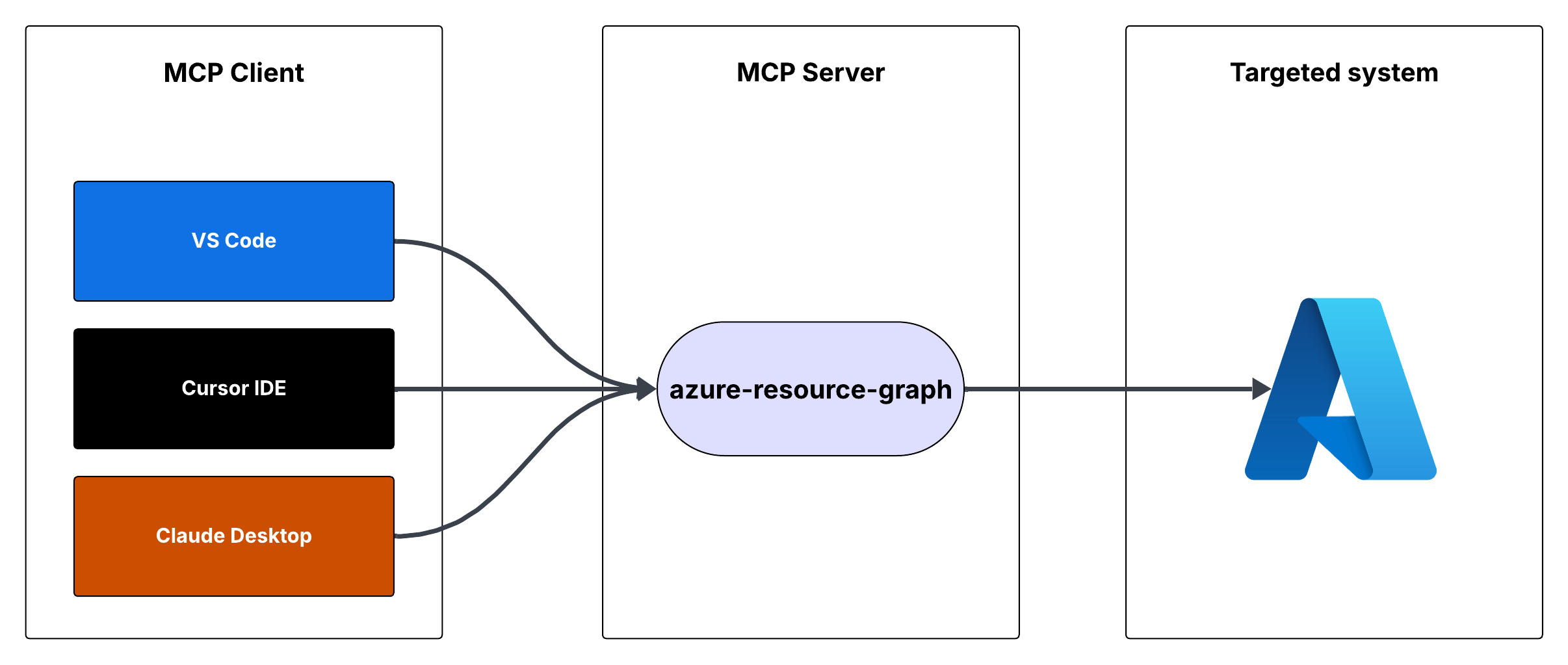
You can run the MCP server using either Cursor IDE or Visual Studio Code.
To integrate the MCP server with Cursor IDE:
C:\YOUR_WORKSPACE\azure-resource-graph-mcp-server)npm install
npm run build
{
"mcpServers": {
"azure-resource-graph-mcp-server": {
"command": "node",
"args": [
"C:\\YOUR_WORKSPACE\\azure-resource-graph-mcp-server\\build\\index.js"
],
"env": {
"SUBSCRIPTION_ID": "xxxxxx-xx-xx-xx-xxxxxx"
},
}
}
}
Note: Make sure to update the path to match your local repository location.
To integrate the MCP server with Visual Studio Code:
npm install
npm run build
Ctrl+Shift+P, type "Settings (JSON)" and select "Preferences: Open User Settings (JSON)"{
"mcp": {
"servers": {
"azure-resource-graph": {
"type": "stdio",
"command": "node",
"args": [
"C:\\YOUR_WORKSPACE\\azure-resource-graph-mcp-server\\build\\index.js"
],
"env": {
"SUBSCRIPTION_ID": "xxxxxx-xx-xx-xx-xxxxxx"
},
}
}
}
}
Note: Make sure to update the path to match your local repository location.
The MCP server will now be available to use within VS Code with cursor integration.
The server provides the following tool:
Retrieves resources and their details from Azure Resource Graph.
Parameters:
subscriptionId (optional): Azure subscription ID (defaults to configured ID)query (optional): Custom Resource Graph query (defaults to "Resources | project id, name, type, location")First, make sure you're logged in to Azure CLI by running:
az login
This step is crucial for local development as the DefaultAzureCredential will automatically use your Azure CLI credentials.
Set up your environment variables:
.env.example to .envAZURE_SUBSCRIPTION_ID in .env with your actual subscription IDAZURE_TENANT_ID, AZURE_CLIENT_ID, AZURE_CLIENT_SECRET) are optional when using Azure CLI authenticationMake sure you have proper Azure credentials configured. The server uses DefaultAzureCredential which supports:
If using environment variables, set up:
The server includes robust error handling for:
To work on this project:
src directorynpm run buildThis project is licensed under the MIT License. See the LICENSE file for details.
Model Context Protocol (MCP) server that provides access to Azure Resource Graph queries. It allows you to retrieve information about Azure resources across your subscriptions using Resource Graph que
總覽
Model Context Protocol (MCP) server that provides access to Azure Resource Graph queries. It allows you to retrieve information about Azure resources across your subscriptions using Resource Graph queries.
工具
尚無工具清單。遠端伺服器會在首次健康檢查後取得工具清單。
常見問題
在本頁複製適用於 Cursor、Claude Desktop、Claude Code 或 VS Code 的 stdio 設定。它使用發布者的安裝方式,而不是 PlugMCP 代理伺服器。
這筆記錄未列出必要的環境變數。
Azure Resource Graph 透過 stdio 在本機執行。
上次檢查時間:2026-10-28。 Model Context Protocol (MCP) server that provides access to Azure Resource Graph queries. It allows you to retrieve information about Azure resources across your subscriptions using Resource Graph queries.
