接入你的智能体
發布者自己的 URL。不是 PlugMCP 端點。
用我們的金鑰與日誌託管一份副本。
https://nanobanana.mcp.acedata.cloud/mcp上方的 Claude 按鈕會開啟 Claude,並填好名稱和 URL。你仍需在那裡確認。
claude mcp add --transport http io.github.acedatacloud-mcp-nanobanana-pro https://nanobanana.mcp.acedata.cloud/mcpRun in a terminal.
{ "mcpServers": { "io.github.acedatacloud-mcp-nanobanana-pro": { "command": "npx", "args": [ "-y", "mcp-remote", "https://nanobanana.mcp.acedata.cloud/mcp" ] } }}claude_desktop_config.json
遠端 URL 還是本機指令? 兩種安裝方式的差異
來自發布者
Generate and edit Nano Banana images with Ace Data Cloud; retrieve the same task for results.
A Model Context Protocol (MCP) server for AI image generation and editing using Google's Nano Banana model through the AceDataCloud API.
Generate and edit AI images directly from Claude, VS Code, or any MCP-compatible client.
Find the Ace-provided Nano Banana source listing or remote connector. Follow the Glama installation, API Token and first-use guide. Public discovery and a successful personal connection are separate checks; generation uses your Ace account balance.
Use the independent Nano Banana by Ace Data Cloud native goose plugin: install and API Token guide · 简体中文. It reuses this MCP server and does not imply goose Marketplace or default-provider inclusion.
Open Nano Banana in the official MCP Registry, expand the matching io.github.AceDataCloud entry, and use its Packages or Remotes installation information in a client that consumes MCP catalogs. This is the Nano Banana integration provided by Ace Data Cloud; it is not an endorsement by the model vendor. The Registry is a directory, not the app that runs a tool.
Search for mcp-nanobanana-pro (or io.github.AceDataCloud/mcp-nanobanana-pro) to locate the exact entry. The official Registry search currently matches server names; spaces in a display title do not create extra search aliases. If your client does not consume the catalog, use the client-specific connection instructions below and check Applications → General application for your token, service permissions, balance and current price. Keep the original task ID when checking asynchronous results.
The hosted endpoint is https://nanobanana.mcp.acedata.cloud/mcp. Choose one route for the MCP client:
The hosted service advertises OAuth metadata and Dynamic Client Registration (DCR). DCR registers the client application; it is not an API key. OAuth signs you in and the client sends the resulting Bearer token; it may reuse or create an API credential for the account. Browser sign-in still requires an AceDataCloud account. The hosted service can be metered: review current service documentation and displayed pricing before a real operation. Do not configure both an OAuth login and a fixed Authorization header for the same server.
Customize → Connectors → Add custom connector, enter https://nanobanana.mcp.acedata.cloud/mcp, select sign-in, and choose Register automatically if Claude asks how to register its OAuth client. Complete consent. Claude Desktop's local claude_desktop_config.json is a separate setup. Claude connector guide.claude mcp add --transport http --scope user nanobanana https://nanobanana.mcp.acedata.cloud/mcp, then claude mcp login nanobanana. Check /mcp. Claude Code MCP guide.https://nanobanana.mcp.acedata.cloud/mcp. For a project, merge the entry below into <project>/.cursor/mcp.json; for personal use, use ~/.cursor/mcp.json. Cursor MCP guide.https://nanobanana.mcp.acedata.cloud/mcp, then finish the browser sign-in. New portable workspace configs use <project>/.mcp.json; the VS Code-specific format below uses <project>/.vscode/mcp.json or the user profile. Check MCP: List Servers. VS Code MCP setup.codex mcp add nanobanana --url https://nanobanana.mcp.acedata.cloud/mcp, then codex mcp login nanobanana. Its user settings are in ~/.codex/config.toml. Official Codex MCP guide.Cursor project config (OAuth):
{
  "mcpServers": {
    "nanobanana": {"url": "https://nanobanana.mcp.acedata.cloud/mcp"}
  }
}
VS Code-specific workspace config (OAuth):
{
  "servers": {
    "nanobanana": {"type": "http", "url": "https://nanobanana.mcp.acedata.cloud/mcp"}
  }
}
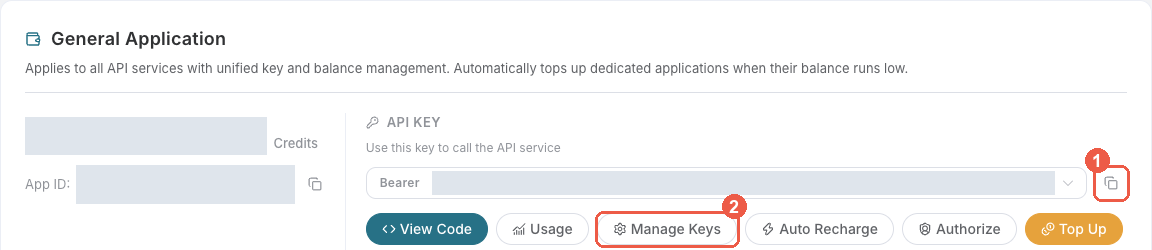
Bearer . An API Key / API Token field expects this raw value; only a manually configured HTTP Authorization header needs the Bearer prefix. A platform-... account-management token cannot replace a generation API key.
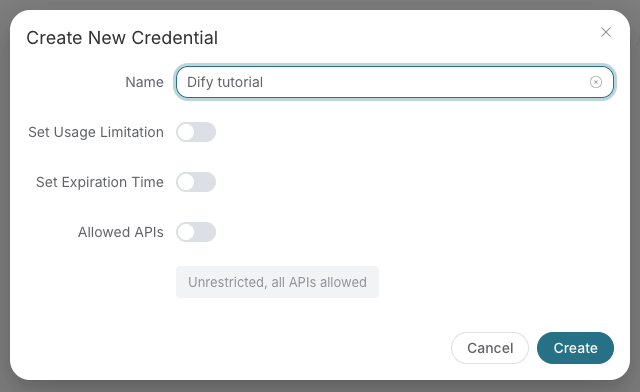
Save the key in the client's credential store or the environment variable shown below. Never put it in a prompt, shared workflow, screenshot, or Git commit. If authentication fails, check the full copied value, application/service access, expiration, usage limit, and balance before creating another key.
A fixed Bearer header bypasses OAuth. If the header is invalid, remove it before trying browser sign-in; keep the saved credential private.
For Claude Code, the shell expands the token when you add the server; treat the saved user MCP config as a secret:
export ACEDATACLOUD_API_TOKEN='YOUR_API_TOKEN'
claude mcp add --transport http --scope user nanobanana https://nanobanana.mcp.acedata.cloud/mcp \
  --header "Authorization: Bearer $ACEDATACLOUD_API_TOKEN"
For a Claude Code project config, put a variable reference in <project>/.mcp.json and set that variable in the environment that launches Claude Code:
{
  "mcpServers": {
    "nanobanana": {
      "type": "http",
      "url": "https://nanobanana.mcp.acedata.cloud/mcp",
      "headers": {"Authorization": "Bearer ${ACEDATACLOUD_API_TOKEN}"}
    }
  }
}
Cursor uses a different environment-variable syntax in ~/.cursor/mcp.json or an uncommitted project config:
{
  "mcpServers": {
    "nanobanana": {
      "url": "https://nanobanana.mcp.acedata.cloud/mcp",
      "headers": {"Authorization": "Bearer ${env:ACEDATACLOUD_API_TOKEN}"}
    }
  }
}
In VS Code, run MCP: Open User Configuration and merge this server plus its masked input; ${input:...} is for VS Code's user/workspace format and is not portable to the Agent Host .mcp.json format:
{
  "inputs": [
    {"id": "acedata-nanobanana-token", "type": "promptString", "description": "AceDataCloud API token", "password": true}
  ],
  "servers": {
    "nanobanana": {
      "type": "http",
      "url": "https://nanobanana.mcp.acedata.cloud/mcp",
      "headers": {"Authorization": "Bearer ${input:acedata-nanobanana-token}"}
    }
  }
}
For Cline, use its MCP configuration UI or CLI file ~/.cline/data/settings/cline_mcp_settings.json; its remote transport value is streamableHttp. For JetBrains AI Assistant, add a remote URL from Settings → Tools → AI Assistant → Model Context Protocol (MCP). For Zed, use a context_servers entry with the URL only for OAuth or add a local Bearer header. These clients have different configuration schemas; follow their current UI rather than copying another client's JSON. Cline · JetBrains · Zed.
Install the package and give the local process an API token:
python -m pip install mcp-nanobanana-pro
export ACEDATACLOUD_API_TOKEN='YOUR_API_TOKEN'
mcp-nanobanana-pro
For Claude Desktop local MCP, merge this entry into the file opened by its developer settings (~/Library/Application Support/Claude/claude_desktop_config.json on macOS). uvx requires uv on PATH:
{
  "mcpServers": {
    "nanobanana": {
      "command": "uvx",
      "args": ["mcp-nanobanana-pro"],
      "env": {"ACEDATACLOUD_API_TOKEN": "YOUR_API_TOKEN"}
    }
  }
}
Keep this user-level file private. Self-hosted HTTP uses mcp-nanobanana-pro --transport http --port 8000; expose it only with suitable network and TLS controls. Local execution still calls the AceDataCloud API.
https://nanobanana.mcp.acedata.cloud/health returning {"status":"ok"} checks endpoint reachability only.nanobanana_generate_image with your own valid input after reviewing current service documentation and displayed pricing. If the result contains a task ID, call nanobanana_get_task on that same ID until terminal success or failure. Do not resubmit the operation just to check progress.For 401, check which auth route the client used and whether the token or OAuth session is valid. A 403 may mean an account permission or content moderation failure; read the returned error. Insufficient balance and downstream service failures need their own diagnosis. A listed tool or submitted task does not prove a successful result.
All five models support generation and editing. The existing nano-banana, nano-banana-2-lite, nano-banana-2, and nano-banana-pro models also have :official variants. Nano Banana 2.1 has no :official variant; use exactly nano-banana-2.1. Omitting model still selects nano-banana.
Pass these arguments to nanobanana_generate_image:
{
  "prompt": "A blue ceramic vase on a cream background, soft side lighting, no text",
  "model": "nano-banana-2.1",
  "aspect_ratio": "1:1",
  "resolution": "2K",
  "count": 2
}
For nanobanana_edit_image, supply your reference image URL:
{
  "prompt": "Change the vase to green while preserving the background and lighting",
  "image_urls": ["https://example.com/vase.png"],
  "model": "nano-banana-2.1",
  "resolution": "4K"
}
Generation and editing submit asynchronously. Keep the returned task_id and query nanobanana_get_task until terminal success or failure; submission alone is not a completed image. Editing without aspect_ratio preserves the first reference image's aspect ratio; resolution defaults to 1K if omitted. Review the final image and pixel dimensions before using it.
User: Create an image of a sunset over mountains

Claude: I'll generate that image for you.
[Calls nanobanana_generate_image with detailed prompt]
User: Put this shirt on this model
[Provides two image URLs]

Claude: I'll combine these images.
[Calls nanobanana_edit_image with both image URLs]
User: Place this product in a modern kitchen scene
[Provides product image URL]

Claude: I'll create a product scene for you.
[Calls nanobanana_edit_image with scene description]
For best results, include these elements in your prompts:
A photorealistic close-up portrait of an elderly Japanese ceramicist
with deep wrinkles and a warm smile. Soft golden hour light streaming
through a window. Captured with an 85mm portrait lens, soft bokeh
background. Serene and masterful mood.
mcp-nanobanana-pro --help

Options:
  --version          Show version
  --transport        Transport mode: stdio (default) or http
  --port             Port for HTTP transport (default: 8000)
# Clone repository
git clone https://github.com/AceDataCloud/NanoBananaMCP.git
cd NanoBananaMCP

# Create virtual environment
python -m venv .venv
source .venv/bin/activate  # or `.venv\Scripts\activate` on Windows

# Install with dev dependencies
pip install -e ".[dev,test]"
# Run unit tests
pytest

# Run with coverage
pytest --cov=core --cov=tools

# Run integration tests (requires API token)
pytest tests/test_integration.py -m integration
# Format code
ruff format .

# Lint code
ruff check .

# Type check
mypy core tools
# Install build dependencies
pip install -e ".[release]"

# Build package
python -m build

# Upload to PyPI
twine upload dist/*
NanoBanana/
├── core/                   # Core modules
│   ├── __init__.py
│   ├── client.py          # HTTP client for NanoBanana API
│   ├── config.py          # Configuration management
│   ├── exceptions.py      # Custom exceptions
│   ├── server.py          # MCP server initialization
│   ├── types.py           # Type definitions
│   └── utils.py           # Utility functions
├── tools/                  # MCP tool definitions
│   ├── __init__.py
│   ├── image_tools.py     # Image generation/editing tools
│   └── task_tools.py      # Task query tools
├── prompts/                # MCP prompt templates
│   └── __init__.py
├── tests/                  # Test suite
├── deploy/                 # Deployment configs
│   └── production/
│       ├── deployment.yaml
│       ├── ingress.yaml
│       └── service.yaml
├── .env.example           # Environment template
├── .gitignore
├── Dockerfile             # Docker image for HTTP mode
├── docker-compose.yaml    # Docker Compose config
├── LICENSE
├── main.py                # Entry point
├── pyproject.toml         # Project configuration
└── README.md
This server wraps the AceDataCloud NanoBanana API:
Contributions are welcome! Please:
git checkout -b feature/amazing)git commit -m 'Add amazing feature')git push origin feature/amazing)MIT License - see LICENSE for details.
Made with love by AceDataCloud
Nano Banana by Ace Data Cloud — English guide · 完整中文图文步骤. The Cline marketplace submission is pending review as of 2026-10-18; the guide labels the manual fallback separately. / Cline 官方目录投稿仍待审核,手动接入不等于已上架。
Generate and edit Nano Banana images with Ace Data Cloud; retrieve the same task for results.
{ "mcpServers": { "io.github.acedatacloud-mcp-nanobanana-pro": { "url": "https://nanobanana.mcp.acedata.cloud/mcp", "headers": {} } }}工具
尚無工具清單。遠端伺服器會在首次健康檢查後取得工具清單。
常見問題
在本頁複製適用於 Cursor、Claude Desktop、Claude Code 或 VS Code 的 http 設定。它使用發布者的安裝方式,而不是 PlugMCP 代理伺服器。
發布者列出了以下環境變數:ACEDATACLOUD_API_TOKEN。
Nano Banana By Ace Data Cloud 透過 HTTP 存取。
上次檢查時間:2026-11-17。 Generate and edit Nano Banana images with Ace Data Cloud; retrieve the same task for results.