Universal Database MCP Server
The security-first, Python-native MCP server for database access from AI agents.
接入你的智能体
發布者自己的指令。不是 PlugMCP 端點。
用我們的金鑰與日誌託管一份副本。
uvx universal-db-mcp==1.1.2Claude Code 沒有本機指令的安裝連結。複製下方指令並在終端機中執行。
POSTGRES_URI=<secret> SQLITE_PATH=<value> MYSQL_URI=<secret> DUCKDB_PATH=<value> ALLOW_DESTRUCTIVE=<value> MAX_RESULT_ROWS=<value> claude mcp add io.github.fashad-ahmed-universal-db-mcp -- uvx universal-db-mcp==1.1.2在終端機中執行。
{ "mcpServers": { "io.github.fashad-ahmed-universal-db-mcp": { "command": "uvx", "args": [ "universal-db-mcp==1.1.2" ], "env": { "POSTGRES_URI": "<secret>", "SQLITE_PATH": "<value>", "MYSQL_URI": "<secret>", "DUCKDB_PATH": "<value>", "ALLOW_DESTRUCTIVE": "<value>", "MAX_RESULT_ROWS": "<value>" } } }}claude_desktop_config.json
遠端 URL 還是本機指令? 兩種安裝方式的差異
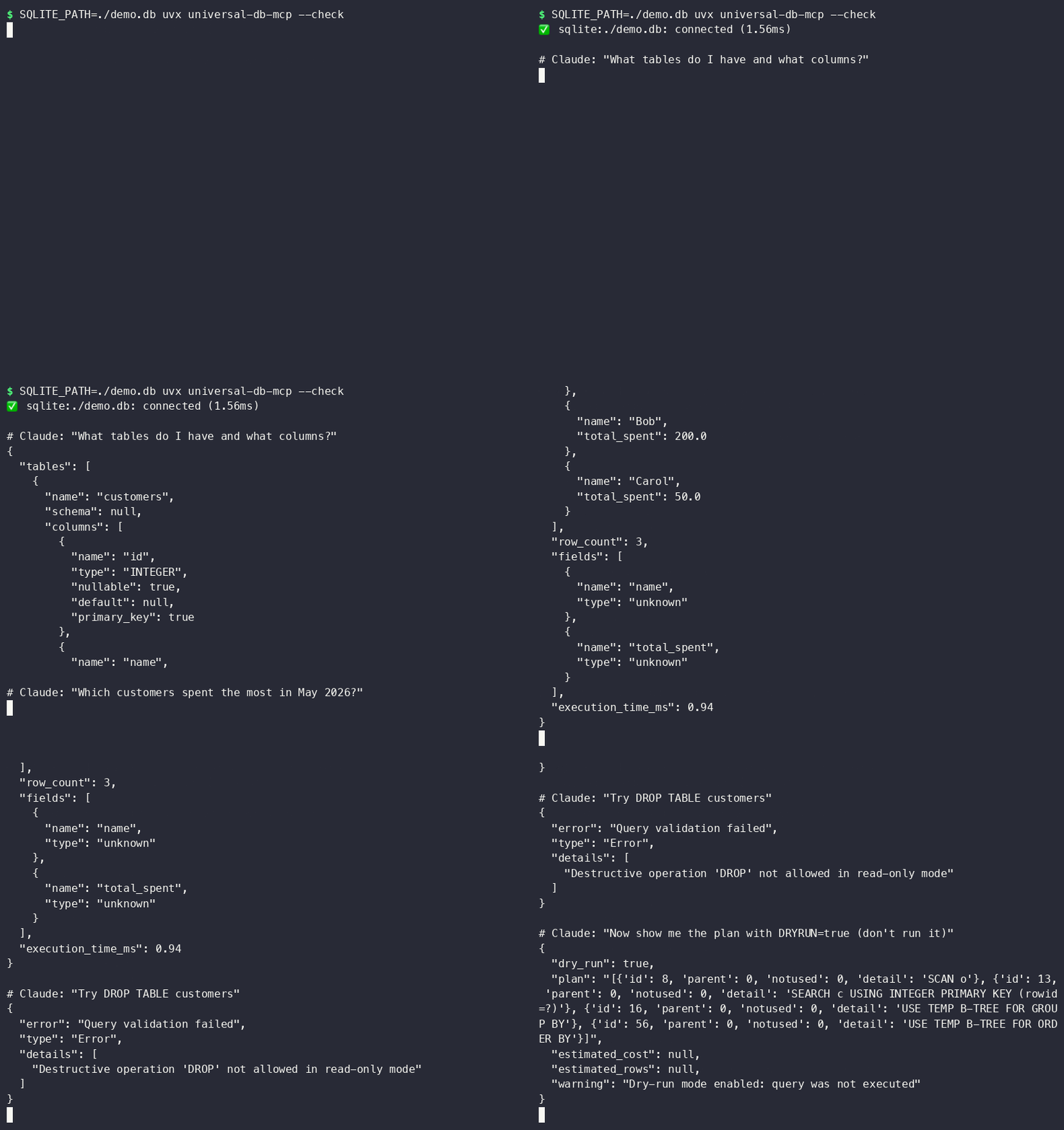
Most database MCP servers give AI agents raw SQL access and hope for the best. This server assumes the LLM is untrusted input and applies 8 layers of injection prevention before any query reaches your database — including blocking UNION attacks, stacked statements, time-based injection, and comment bypasses.
Supports: PostgreSQL · SQLite · MySQL · DuckDB (columnar analytics)
No Docker. No cloud account. No database server to install. DuckDB and SQLite run in-process:
# Query a local SQLite database — one command, zero infra
SQLITE_PATH=./myapp.db uvx universal-db-mcp

# Query a local DuckDB file or parquet files
DUCKDB_PATH=./analytics.duckdb uvx universal-db-mcp

# In-memory DuckDB for throwaway analysis
DUCKDB_PATH=:memory: uvx universal-db-mcp
Add to Claude Code in ~/.claude/mcp_servers.json, or to Claude Desktop in
~/Library/Application Support/Claude/claude_desktop_config.json (macOS) /
%APPDATA%\Claude\claude_desktop_config.json (Windows):
{
  "mcpServers": {
    "mydb": {
      "command": "uvx",
      "args": ["universal-db-mcp"],
      "env": {
        "SQLITE_PATH": "/Users/you/projects/myapp/db.sqlite3",
        "ALLOW_DESTRUCTIVE": "false"
      }
    }
  }
}
Restart Claude Desktop / Claude Code after saving — that's it.
That's it. Claude Code discovers the tools automatically.
More client configs (Claude Desktop, Cursor, Windsurf, Docker) in
examples/.
Read-only by default. Defense-in-depth. Every query validated before it touches the driver.
Full threat model: docs/SECURITY.md
DuckDB runs in-process (no server) and reads Parquet, CSV, JSON natively. Connect AI agents to your analytics data without spinning up a warehouse:
# Query parquet files directly
DUCKDB_PATH=:memory: uvx universal-db-mcp
Then in Claude Code:
You: "Load sales.parquet and show me monthly revenue by region"
Claude: [uses query tool → SELECT region, strftime('%Y-%m', date) AS month, SUM(revenue) ...]
No separate NL-to-SQL tool needed — Claude already does this. Give it the
schema tool and ask in plain English:
You: "Which customers placed more than 5 orders last month?"
Claude: [calls schema() to see table structure, then query() with the
         generated SQL — every query still passes through all 8 security
         layers before touching your database]
Pair with dry_run: true (DRYRUN=true) while prototyping — Claude gets the
query plan back without anything executing.
docker build -t universal-db-mcp .
docker run -i --rm \
  -e POSTGRES_URI=postgresql://readonly:[email protected]:5432/mydb \
  -e ALLOW_DESTRUCTIVE=false \
  universal-db-mcp
See examples/docker_mcp_config.json for
wiring this into an MCP client.
# PostgreSQL
POSTGRES_URI=postgresql://readonly:pass@localhost/mydb uvx universal-db-mcp

# SQLite (local file, zero infra)
SQLITE_PATH=./db.sqlite3 uvx universal-db-mcp

# MySQL
MYSQL_URI=mysql://readonly:pass@localhost/mydb uvx universal-db-mcp

# DuckDB (columnar, in-process analytics)
DUCKDB_PATH=./analytics.duckdb uvx universal-db-mcp

# Multiple databases simultaneously
POSTGRES_URI=... SQLITE_PATH=... uvx universal-db-mcp
v1.1.0: dry-run mode (DRYRUN=true), table allowlists (WHITELISTED_TABLES), query
complexity warnings, structured audit logs, and a --check CLI flag for connectivity
validation. See CHANGELOG.md.
# ── PostgreSQL ─────────────────────────────────────
POSTGRES_URI=postgresql://user:pass@host:5432/db
POSTGRES_READONLY=true          # default: true

# ── SQLite ─────────────────────────────────────────
SQLITE_PATH=/path/to/database.db
SQLITE_READONLY=true            # default: true

# ── MySQL ──────────────────────────────────────────
MYSQL_URI=mysql://user:pass@host:3306/db
MYSQL_READONLY=true             # default: true

# ── DuckDB ─────────────────────────────────────────
DUCKDB_PATH=/path/to/analytics.duckdb   # or :memory:
DUCKDB_READONLY=true            # default: true

# ── Security ───────────────────────────────────────
ALLOW_DESTRUCTIVE=false         # default: false — blocks INSERT/UPDATE/DELETE/DROP
MAX_RESULT_ROWS=1000            # truncate large results
ENABLE_LOGGING=true             # log queries to stderr
QUERY_TIMEOUT=30                # seconds
RATE_LIMIT_RPM=60               # requests per minute
Always use a dedicated read-only account. Never give the MCP server credentials that can modify data.
PostgreSQL:
CREATE USER mcp_agent WITH PASSWORD 'strong_random_password';
GRANT CONNECT ON DATABASE mydb TO mcp_agent;
GRANT USAGE ON SCHEMA public TO mcp_agent;
GRANT SELECT ON ALL TABLES IN SCHEMA public TO mcp_agent;
MySQL:
CREATE USER 'mcp_agent'@'localhost' IDENTIFIED BY 'strong_random_password';
GRANT SELECT ON mydb.* TO 'mcp_agent'@'localhost';
FLUSH PRIVILEGES;
git clone <repo-url>
cd universal-db-mcp
python -m venv .venv && source .venv/bin/activate
pip install -e ".[dev]"

# Run tests (67+ passing, no external DB required for SQLite + DuckDB)
pytest

# Security tests only
pytest tests/test_security.py -v

# With coverage
pytest --cov=src/universal_db_mcp --cov-report=term-missing
src/universal_db_mcp/
├── server.py          # FastMCP server — 5 tools
├── config.py          # Env-var config via Pydantic
├── adapters/
│   ├── base.py        # Abstract adapter + result dataclasses
│   ├── postgresql.py  # asyncpg, connection pool, read-only via init callback
│   ├── sqlite.py      # aiosqlite, read-only via file URI mode=ro
│   ├── mysql.py       # aiomysql, DictCursor
│   └── duckdb.py      # duckdb, thread-pool executor, lock-guarded
└── security/
    └── sanitizer.py   # SQLSanitizer — 8-layer injection prevention

docs/
└── SECURITY.md        # Full security architecture and threat model
Different tools for different jobs. Use this when you want Python-native, local-first, security-hardened access without cloud dependencies.
MIT — LICENSE
Security Notice: This server provides AI agents with database access. Always
use read-only credentials, review docs/SECURITY.md before
production deployment, and never commit .env files.
Security-first MCP server for PostgreSQL, SQLite, MySQL, DuckDB with SQL injection prevention.
{ "mcpServers": { "io.github.fashad-ahmed-universal-db-mcp": { "command": "uvx", "args": [ "universal-db-mcp==1.1.2" ], "env": { "POSTGRES_URI": "<secret>", "SQLITE_PATH": "<value>", "MYSQL_URI": "<secret>", "DUCKDB_PATH": "<value>", "ALLOW_DESTRUCTIVE": "<value>", "MAX_RESULT_ROWS": "<value>" } } }}工具
尚無工具清單。遠端伺服器會在首次健康檢查後取得工具清單。
常見問題
在本頁複製適用於 Cursor、Claude Desktop、Claude Code 或 VS Code 的 stdio 設定。它使用發布者的安裝方式,而不是 PlugMCP 代理伺服器。
發布者列出了以下環境變數:POSTGRES_URI, SQLITE_PATH, MYSQL_URI, DUCKDB_PATH, ALLOW_DESTRUCTIVE, MAX_RESULT_ROWS。
Universal Db 透過 stdio 在本機執行。
上次檢查時間:2026-11-09。 Security-first MCP server for PostgreSQL, SQLite, MySQL, DuckDB with SQL injection prevention.
