Hermes Pentest Lab
Turn any Kali Linux laptop into a production-grade pentesting workstation — with AI agent orchestration, native tooling, VPN OPSEC, encrypted storage, and automated report generation.
⚠️ Requires Kali Linux — tools run natively on the host for raw sockets, SMB, and packet capture. Docker is used only for lab targets and Neo4j.
What It Looks Like
$ hermes
/skill pentest-engage

Agent: Validating scope...  ✓ 192.168.1.0/24 authorized
       VPN check...  ✓ wg0 UP
       LUKS check...  ✓ /dev/mapper/pentest mounted
       Pre-flight checks complete. 7/7 subagents ready.

Agent: OSINT agent → 12 subdomains, 47 email addresses found
       Recon agent → 14 live hosts, 3 high-value services
       Web agent → SQLi confirmed on /login (CVSS 9.8)
       Network agent → Kerberoastable account: svc_sql
       Verify agent → 5 DRAFT findings verified: 2 CORROBORATED, 1 GATED

Agent: Building report...
       Findings: 2 Critical, 1 High, 4 Medium, 3 Low
       Risk level: Critical
       Verification: 2 corroborated · 1 gated · 2 unverified · 0 refuted

Report saved: reports/acme-corp-2026-07/report-2026-07-01.pdf
Engagement complete. All actions logged to audit trail.
Architecture
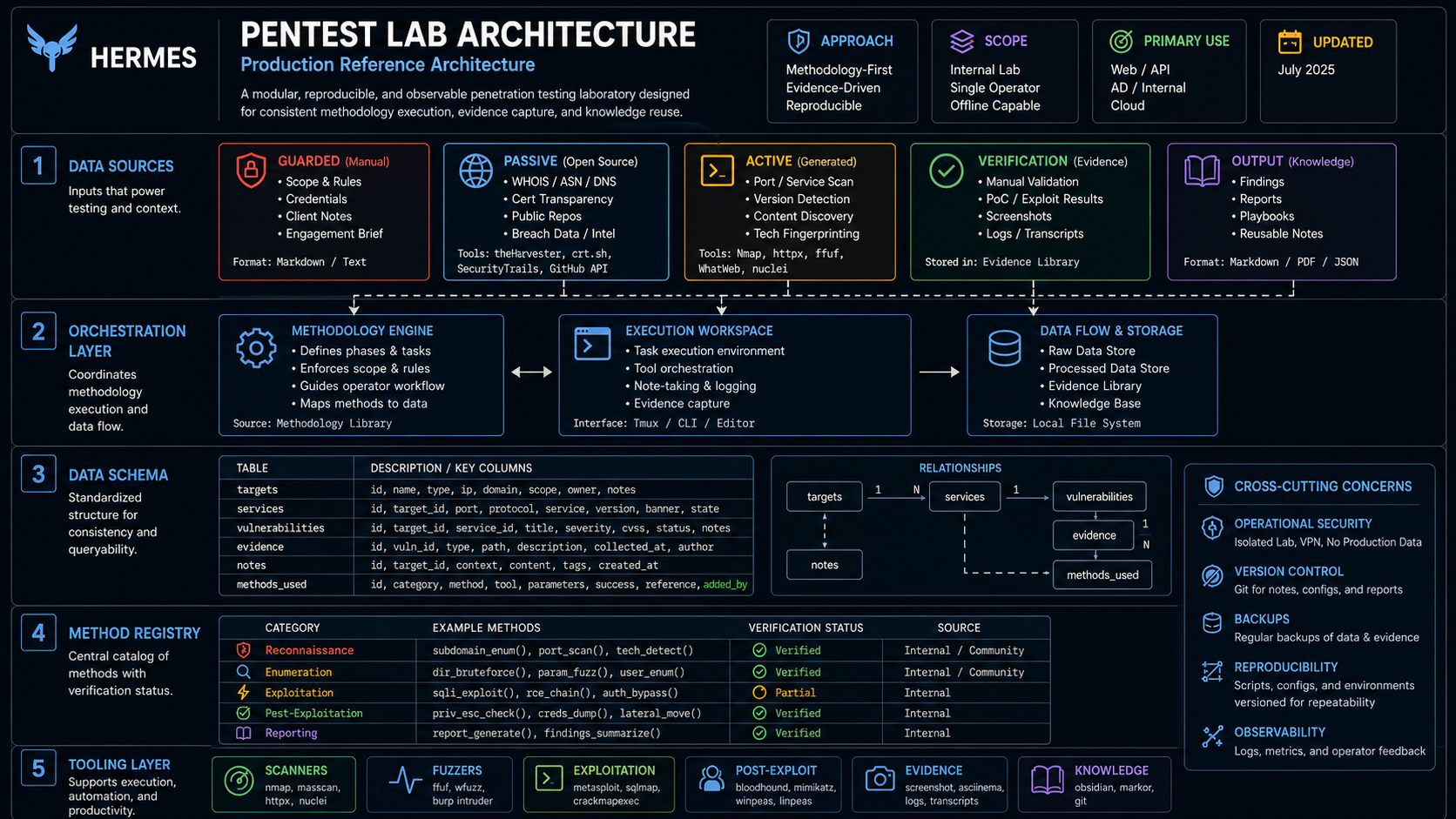
System Architecture — full inventory: subagents, DB schema, OPSEC
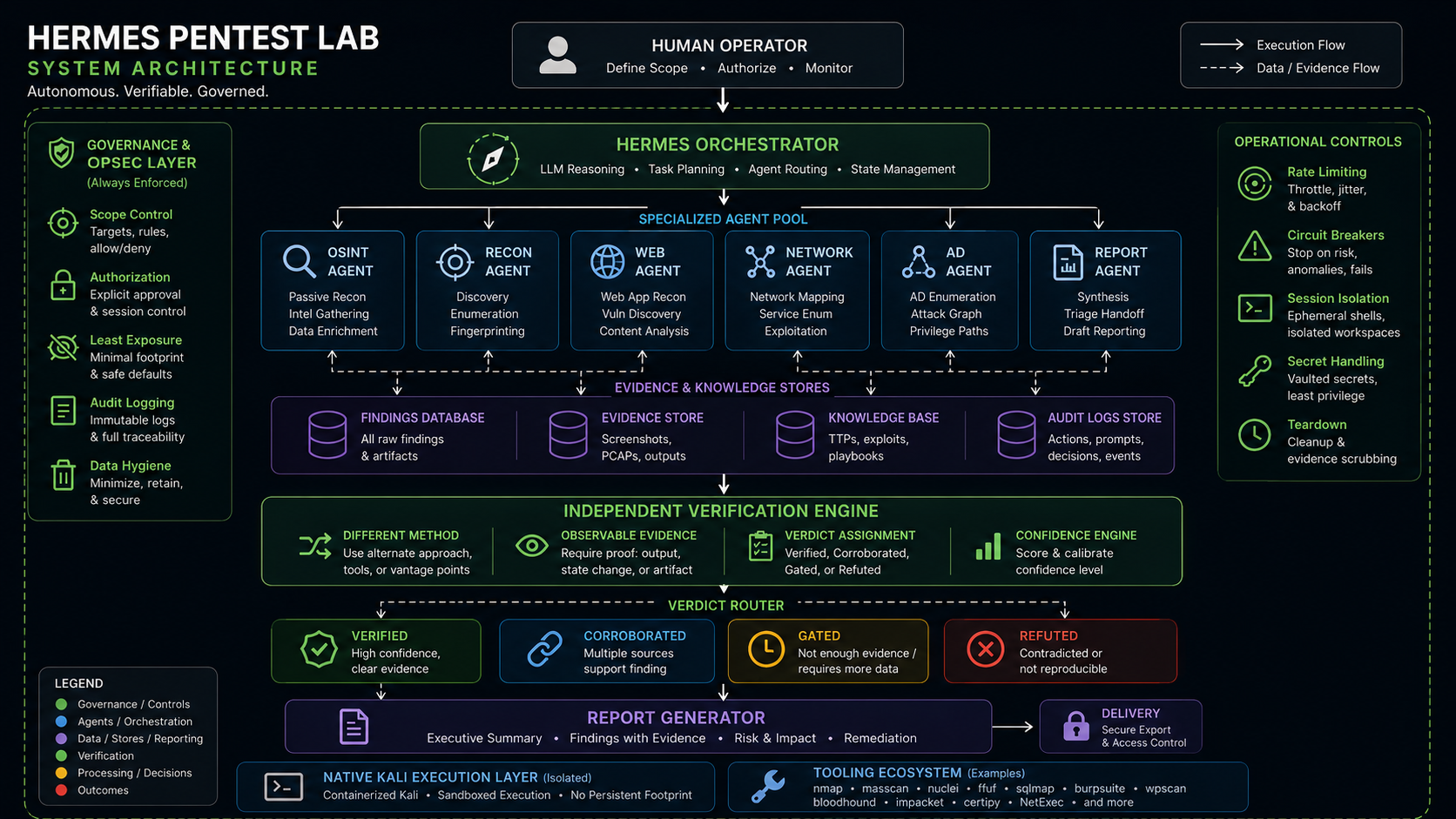
Verification Pipeline — verdict router, taxonomy, L1-L6
How It Works
- You tell Hermes what to test (e.g., "Scan 192.168.1.0/24")
- Hermes checks the scope, starts the VPN, and dispatches 7 subagents in parallel
- Each subagent runs tools natively on the Kali host
- Findings flow into a shared SQLite v5 database
- Verify agent independently reproduces every DRAFT finding — benign only
- Report agent generates a professional PDF with verdict badges and confidence tiers
- Audit trail logs every action
🆕 New Capabilities
Four additions layered on the safety-first core — each shipped independently with its own stdlib test suite:
🔌 MCP tool-server — guardrails enforced in code
The toolchain is exposed over the Model Context Protocol so any MCP client (Claude Code / Desktop, Cursor) can drive it. Unlike the skill docs — which ask an agent to check scope and keep rate limits on — every target-touching tool routes through scope-check.py before running and appends to the tamper-evident audit chain after. The scope, VPN, rate-limit, and audit guardrails are enforced in code and cannot be bypassed by the calling agent. Destructive tools (sqlmap/hydra/metasploit/responder) stay operator-run.
make mcp # stdio server — full detail in mcp_server/README.md
🎯 MITRE ATT&CK + OWASP Top 10 mapping
Findings carry optional attack_technique / owasp_category tags that render a Framework Mapping coverage section in the report, so defenders can align remediation with the frameworks they already track. Delivered as an additive, idempotent DB migration (migrate-add-attack-owasp.py, v4 → v5).
📚 Reusable findings library
15 pre-approved, generic finding templates (reports/findings-library.json) with {placeholder} text and pre-applied ATT&CK/OWASP tags + CVSS — render one instead of writing a finding from scratch:
python3 scripts/add-finding.py <engagement> sql-injection --set host=10.0.0.5 endpoint=/login parameter=id
🔁 Retest / delta tracking
Mark findings open / fixed / regressed across retest rounds (retest.py); the report renders a Remediation Progress section with the remediation rate and per-finding status. Status is asserted after re-testing — never guessed — and every mark is written to the audit chain.
📊 Sample Reports
Two reports from live assessments — one vulnerable target, one hardened production site.
Design: Dark gradient cover · 4-category scorecards · findings heatmap · inline evidence screenshots · business-first descriptions · observed controls with values · remediation checklist · A4 portrait print-native
Generated by build-report.py v4 — automated CVSS impact generation, per-finding screenshot embedding, findings heatmap, 6-phase methodology (incl. verification pass).
🚀 Quick Start
Three levels, depending on how much you want. Full detail in INSTALL.md.
Reference only — the skills, scope engine, and tests, nothing installed:
git clone https://github.com/jayelbotvibe-web/hermes-pentest-lab.git
cd hermes-pentest-lab
make test        # needs only Python 3.8+
Practice lab (~15 min) — bundled vulnerable targets, no VPN or vault. For learning against Juice Shop / DVWA on localhost:
./install.sh --minimal
docker compose -f docker/docker-compose.yml --profile lab up -d   # targets
make doctor
Full engagement setup (~30 min) — encrypted vault, VPN OPSEC gate, and the full toolchain (native on Kali, or the kali-* containers elsewhere):
./install.sh                                    # interactive
bash scripts/create-pentest-vault.sh --size 40G # encrypted client-data vault
On Kali, tools run natively — install them once:
sudo apt install -y nmap metasploit-framework ffuf gobuster wpscan sqlmap   hydra john enum4linux whatweb responder impacket-scripts evil-winrm seclists   wireguard-tools age cryptsetup
pipx install netexec bloodhound certipy-ad theHarvester holehe sherlock
On a non-Kali host, use the tool containers instead:
make images                          # build kali-web / kali-net / osint-tools
# then set PENTEST_USE_CONTAINERS=true in your config
Stuck at any point:
make doctor # what is missing, and the command that fixes it
Daily use
mount-pentest-vault                       # open the encrypted vault
bash scripts/init-engagement.sh acme-2026 # start an engagement
bash scripts/preflight.sh acme-2026       # authorization gate (VPN + signed scope)
# ... work ...
bash scripts/build-report.py acme-2026    # PDF report
unmount-pentest-vault                     # close when done
AI orchestrator
In a Hermes Agent session: /skill pentest-engage, then describe the engagement.
MCP tool-server (any MCP client)
Drive the same toolchain from Claude Code / Desktop or Cursor — with the scope, VPN, rate-limit, and audit guardrails enforced in code, not just documented:
make mcp # launches the stdio server (mcp_server/)
Point a client at scripts/pentest-mcp.sh (see
mcp_server/mcp.json.example). Every
target-touching tool refuses out-of-scope targets, injects the engagement's
rate tier, and appends to the tamper-evident audit chain before it runs.
Destructive tools stay operator-run. Details:
mcp_server/README.md.
🛠️ Tools Included
💻 = Native host 🐳 = Docker service
:port= web access
Web Application Testing
Network & Active Directory
OSINT & Passive Recon
Infrastructure
Native Tools
🤖 AI Subagents
7 specialized agents — each with deep domain knowledge, Pre-flight checks, and rate limiting.
📊 Report Pipeline
Findings DB (SQLite) → Verify Pass (independent reproduction)
           ↓                        ↓
    Jinja2 Templates  ←  Verdicts + Confidence
           ↓
      WeasyPrint → PDF
           ↓
      Pandoc → DOCX (editable reports)
What's in the report
🔐 OPSEC & Encryption
📁 Repo Structure
hermes-pentest-lab/
├── README.md
├── .gitignore
├── ruff.toml                                ← pinned lint rule set (version-stable CI)
├── mcp_server/                              ← 🆕 MCP tool-server (scope/rate/audit enforced in code)
│   ├── server.py                            ← FastMCP tools (scan, osint, findings, retest, report)
│   ├── enforce.py                           ← the gates: scope · VPN · rate · audit
│   ├── catalog.py                           ← rate-limit lookups from tool-catalog.yaml
│   ├── requirements.txt / mcp.json.example  ← venv deps + example client config
│   └── README.md
├── docs/
│   ├── index.html                           ← GitHub Pages landing page
│   ├── pentest-architecture-complete.html   ← interactive system diagram
│   ├── pentest-architecture.html
│   ├── pentest-ops-architecture.html
│   ├── verification-pass-architecture.html  ← 🆕 verification pass system diagram
│   ├── pentest-reference.html               ← 🆕 complete production reference
│   ├── TROUBLESHOOTING.md
│   ├── WORKFLOW.md
│   └── reports/samples/
│       ├── juice-shop-benchmark-report.{html,pdf}  ← 14 findings, 38/100
│       ├── zerodaybrief-report.{html,pdf}           ← 1 finding, 94/100
│       ├── report-preview.png
│       └── screenshots/                      ← evidence screenshots (F-XXX-*.png)
├── docker/
│   ├── docker-compose.yml                   ← 4 services, 3 profiles (lab, sandbox, neo4j)
│   ├── Dockerfile.kali-web                   ← (deprecated — tools now native)
│   ├── Dockerfile.kali-net                   ← (deprecated — tools now native)
│   └── Dockerfile.osint-tools               ← (deprecated — tools now native)
├── scripts/
│   ├── pentest-canary.sh                    ← validates all tools before session
│   ├── pentest-up.sh                        ← starts containers + LUKS mount
│   ├── pentest-down.sh                      ← graceful shutdown + cleanup
│   ├── pentest-verify.sh                    ← post-startup verification
│   ├── init-engagement.sh                   ← creates forensics-style engagement dir
│   ├── init-engagement-db.py                ← SQLite schema (6 tables, v5 + verdict/ATT&CK/OWASP/retest)
│   ├── build-report.py                      ← findings → Jinja2 → HTML + PDF (verdict + framework + retest aware)
│   ├── verify-findings.py                   ← 🆕 independent finding reproduction engine
│   ├── migrate-add-verification.py          ← 🆕 additive, idempotent DB migration (v3→v4)
│   ├── migrate-add-attack-owasp.py          ← 🆕 additive, idempotent DB migration (v4→v5)
│   ├── framework_map.py                     ← 🆕 ATT&CK + OWASP lookups + report coverage
│   ├── findings_library.py / add-finding.py ← 🆕 reusable finding templates (module + CLI)
│   ├── retest.py                            ← 🆕 open/fixed/regressed lifecycle + progress
│   ├── report_verification.py               ← 🆕 partition (body/ruled-out), verdict→confidence
│   ├── pentest-mcp.sh                        ← 🆕 launches the MCP tool-server (venv, stdio)
│   ├── audit-log.sh                         ← scope-validated audit entries
│   ├── preflight.sh                         ← VPN + LUKS + DNS + scope checks
│   ├── wipe-engagement.sh                   ← encrypted archive + destruction cert
│   ├── capture-evidence.sh                  ← headless Chromium screenshots
│   └── convert-docs.py                      ← MarkItDown: PDF/DOCX → markdown
├── reports/
│   ├── templates/report.html                ← unified Jinja2 template (v2)
│   └── findings-library.json                ← 🆕 15 pre-approved, pre-tagged finding templates
├── tools/
│   └── tool-catalog.yaml                    ← tools with version, fallback, rate limits
├── skills/
│   ├── pentest-context.md                   ← system map — loaded every session
│   ├── pentest-engage.md                    ← orchestrator — dispatches 7 subagents
│   ├── pentest-ops.md                       ← startup/shutdown/repair/troubleshooting
│   ├── pentest-verify.md                    ← 🆕 7th subagent — independent reproduction skill
│   ├── pentest-mcp.md                        ← 🆕 driving the toolchain over MCP
│   ├── pentest-findings/SKILL.md            ← finding encyclopedia — 14 interpretations + library
│   ├── subagent-{osint,recon,web,net,report,scope}.md
│   └── safety-guards.md                     ← 13-item refusal list + rate limits
└── scope/
    ├── _template.json                       ← scope template (copied into engagements)
    └── contract-template.md                 ← rules of engagement
Engagement Directory (created by init-engagement.sh)
engagements/<name>/
├── ENGAGEMENT.yaml       ← client, dates, status, assessor
├── scope.json            ← scope definition (IPs, domains, signed)
├── findings.db           ← SQLite v5 database (6 tables, verdict + ATT&CK/OWASP + retest columns)
├── findings.json         ← machine-readable findings export
├── metadata.json         ← controls, observations, methodology
├── audit/
│   └── actions.jsonl     ← every tool run, scope-validated (incl. verification actions)
├── evidence/             ← client documents (auto-converted via MarkItDown)
├── screenshots/          ← tool evidence (F-XXX-*.png auto-attach in report)
├── raw/scans/            ← nmap XML, nuclei JSON, tool output
└── reports/              ← generated HTML + PDF reports
🆚 How It Compares
Based on publicly available documentation as of June 2026. Features may have changed. Verify independently.
Hermes Pentest Lab is built for the practicing professional — it prioritizes safety, audit trails, and client deliverables over autonomous exploitation.
🆕 Verification Pass (Phase 5.5) — Just Added
Every DRAFT finding is independently reproduced before it reaches the report.
The verification pass sits between discovery (Phases 2-5) and reporting (Phase 6). It runs a benign, independent method against each finding — re-fetching headers with a plain stdlib client, observing TLS with a different tool, checking open ports with a socket probe. It never fires an exploit.
How it works
  DRAFT findings → verify-findings.py → 5 possible verdicts:
                                          ├─ VERIFIED       — manual confirmation
                                          ├─ CORROBORATED   — independent signal agrees
                                          ├─ GATED          — destructive class, abstained
                                          ├─ UNVERIFIED     — couldn't confirm (probe error ≠ refute)
                                          └─ REFUTED        — evidence contradicts finding → ruled-out appendix
Design rules (baked in)
Commands
python3 scripts/verify-findings.py <engagement>            # write verdicts
python3 scripts/verify-findings.py <engagement> --dry-run   # preview only
python3 scripts/migrate-add-verification.py --all           # migrate existing DBs
What the report shows
- Verdict badge on every finding card (
CORROBORATED,UNVERIFIED,GATED, etc.) - Confidence driven by verdict — CORROBORATED→MEDIUM, UNVERIFIED→LOW, GATED→TENTATIVE
- Independent Verification block on each finding — method used + observable evidence
- Ruled-Out Candidates appendix — REFUTED findings surfaced for transparency
→ Full verification architecture diagram
🎓 Learning Path
- PortSwigger Academy — free, all web security labs
- Juice Shop —
docker compose --profile lab up -d→ http://127.0.0.1:3000 - DVWA — http://127.0.0.1:8080 (admin/password, set security to "low")
- Portfolio reports — see sample reports above in
reports/samples/
⚠️ Legal
This toolkit is for authorized security testing only. Never use it on systems you don't own or have explicit written permission to test. Every engagement requires a signed scope document (scope/contract-template.md). Every tool run is logged to an audit trail. Every report includes a data destruction certificate.
📄 License
MIT — use it, modify it, share it. Built by @jayelbotvibe-web.