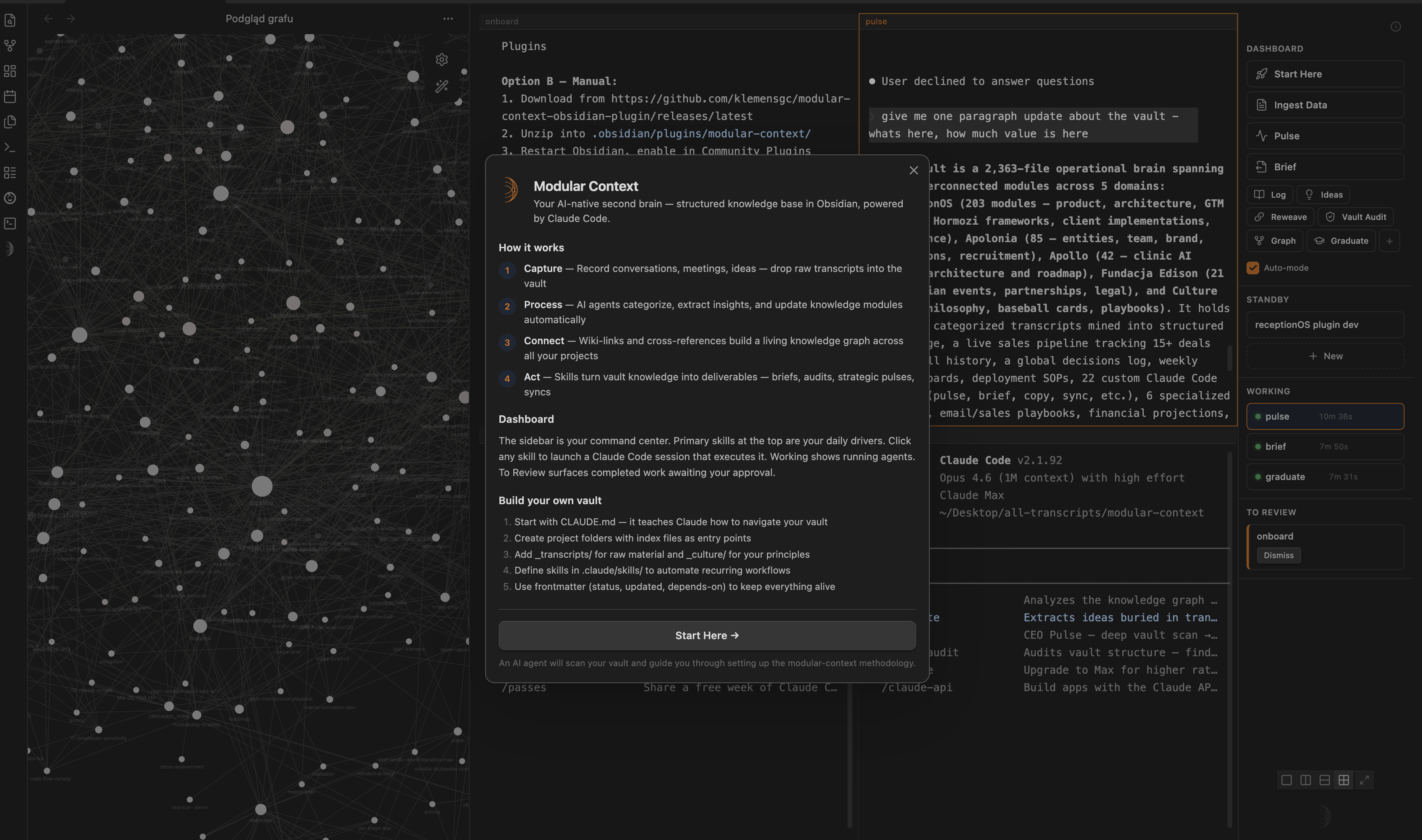
Modular Context | Obsidian LLM Knowledge Base for Strategy, Ops & Comms
Your Obsidian vault as LLM-native knowledge base + multi-account Google Workspace (Gmail, Calendar, Drive, Docs, Sheets, Slides) exposed as 25 MCP tools for Claude Code. Local-first, encrypted, no telemetry.
Modular Context | Karpathy LLM Knowledge Base + Gmail & G-Cal — multi-account MCP server for Claude Code, encrypted local-first
What is this?
Two things in one plugin:
LLM Knowledge Base — Your Obsidian vault structured as Sources → Wiki → Schema (Karpathy-aligned framing). Multi-terminal Claude Code + Codex with skills sidebar, agent tracking, session glyphs. Your second brain seen by LLMs as a first-class context.
G-Suite MCP Server — Multi-account Google Workspace (Gmail, Calendar, Drive, Docs, Sheets, Slides) exposed as 25 native tools for Claude Code (gmail_search, drive_list_files, docs_create_doc, sheets_append_row, slides_read_presentation, …). OAuth 2.0 + PKCE desktop flow, tokens encrypted via Electron safeStorage (OS keychain), no telemetry, no cloud.
One install, one onboarding, two productivity frontiers.
🏢 The AI Company Stack
The plugin isn't just a terminal + an MCP server — paired with the skills library it's a whole AI company stack running on one workflow: your vault is the brain, Claude Code is the operator, and each layer plugs into the next.
Layer
What it does
Skills
🎙️ Notetaker
Turn raw transcripts, calls and tweets into structured, tagged knowledge
process-transcripts, xdaily, graduate
🧠 Self-healing Knowledge Base
The vault keeps itself current — reweaves stale modules, fixes links, audits structure, syncs sibling vaults
reweave, vault-audit, graph, sync, pulse
📡 Communication layer
One read across mail, WhatsApp and Google Workspace — what's happening and what belongs to you
comms-review, whatsapp-digest, gsuite-analysis
📊 CRM / ops
Ready skills that connect to ClickUp — review your sales funnel and pull your weekly plan straight from the workspace
clickup-review, review-core, tasklist
Each layer is independently useful; together they run a one-person company on autopilot. Skills install from the in-app library (dependencies auto-resolve).
Architecture
   ┌──────────────────────────────────────────────────────────────────┐
   │  YOUR VAULT — your full context, structured so an LLM works on      │
   │  YOUR reality: projects · people · decisions · history              │
   │                                                                     │
   │  Sources  →  Wiki  →  Schema                                        │
   │  raw input   linked notes   structured & typed (LLM-navigable)      │
   └──────────────────────▲────────────────────────▲───────────────────┘
                    reads  │                        │  writes back
   ╔═══════════════════════╧════════════════════════╧═══════════════════╗
   ║              🦀  CLAUDE CODE  (the operator)  🦀                    ║
   ║                                                                     ║
   ║   ── works on your notes ──        ── works with the world ──       ║
   ║   🦀 Capture     🦀 Keep current    🦀 Communicate  🦀 Operate       ║
   ║   calls & files  fix outdated       read & send      review &       ║
   ║   → notes        notes + links      email·WhatsApp    act (CRM)      ║
   ╚══════════════════════════════════════════╦═════════════════╦═══════╝
                                              ▼                 ▼
   COMMUNICATIONS  (read + send)
   ├─ Gmail       ← search          → send / draft / labels
   └─ WhatsApp    ← read messages     (read-only · macOS)

   OPERATIONS  (read + write)
   └─ ClickUp     ← sales funnel · your tasks · weekly plan  → update · batch actions

   WORKSPACE  (Google · multi-account)
   ├─ Calendar  ← list           → create / update / delete
   ├─ Drive     ← list / search  → download / upload
   ├─ Docs      ← read           → create / update
   ├─ Sheets    ← read           → write / append
   └─ Slides    ← read           → create / add slide

   ── set up by ──▶  Modular Context Plugin  (installs skills · handles Google login)
Hot reload — server re-reads credentials per tool call, zero-downtime refresh
3 primary skills (post-onboarding)
Skill
Purpose
Uses
Synthesise Files
Turn raw files (transcripts, notes, backlog) into vault modules — categorize, tag, update, reweave neighbors
Your vault, optional _transcripts-backlog/
WhatsApp Digest
Analyze WhatsApp groups for action items, blindspots, staleness vs vault
macOS WhatsApp.app
Gmail + G-Suite
Inbox sweep, stale follow-ups, calendar gap analysis, meeting prep, doc extraction, sheet logging, deck prep
MCP tools below
All three write artifacts to _workspace/{YYYY-MM}/w{N}/. Secondary skills (Pulse, Brief, Log, Reweave, Graph, Graduate, Ideas, Vault-Audit) available in sidebar grid.
25 MCP tools
Gmail (4)
Tool
Purpose
gmail_search
Query with Gmail syntax (is:unread, from:X, after:2026-04-01). Optional body extraction.
gmail_draft
Create draft — not sent. User opens webUrl in Gmail UI to send.
gmail_send
Send immediately. Skip draft for trusted, scripted sends.
gmail_modify_labels
Add/remove labels — system presets (INBOX, UNREAD, STARRED, IMPORTANT, SPAM, TRASH) + custom labels by name.
Calendar (6)
Tool
Purpose
calendar_list_calendars
Enumerate all calendars user has access to.
calendar_list_events
Events in time range.
calendar_create_event
Create event (sendUpdates: "none" default — no auto-invite spam).
calendar_update_event
Patch existing (only provided fields changed).
calendar_delete_event
Delete.
calendar_freebusy
Query busy windows across multiple calendars — ideal for "find time to meet".
Drive (4)
Tool
Purpose
drive_list_files
List with Drive query syntax filter, pagination, ordering.
OAuth scopes required (10 total): gmail.modify, calendar, drive.file, drive.metadata.readonly, documents, spreadsheets, presentations, plus OIDC openid email profile.
Google Cloud setup: Enable 6 APIs in your OAuth project — Gmail, Calendar, Drive, Docs, Sheets, Slides. Missing API returns PERMISSION_DENIED with direct enable link.
Install
Plugin
Requires Obsidian ≥ 0.15 and macOS (Linux + Windows may work; untested).
Via BRAT (Beta Reviewer plugin, recommended for now):
Install BRAT from Community Plugins
Cmd+P → "BRAT: Add a beta plugin" → klemensgc/modular-context-obsidian-plugin
Enable in Settings → Community plugins
Manual:
Download main.js, manifest.json, styles.css, mcp-server.js from latest release
Copy to <vault>/.obsidian/plugins/modular-context/
Enable plugin in Settings → Community plugins → Modular Context
MCP server
Auto-installed on first Google Workspace: Connect. Plugin copies bundled binary to ~/.modular-context/mcp-google/dist/index.js (~100 MB one-time).
Repo structure
Monorepo with three packages:
modular-context-obsidian-plugin/
├── packages/
│   ├── plugin/        ← Obsidian plugin (main.ts, manifest, features + MCP client glue)
│   ├── mcp-google/    ← standalone MCP server (25 Google Workspace tools, Node)
│   ├── shared/        ← portable types + AgentTracker + PTY helper + UI primitives
│   └── app/           ← experimental standalone Electron app (WIP, not shipped)
├── README.md          ← you are here
├── banner.png
└── package.json       ← monorepo scripts (build:shared → build:mcp-google → build:plugin)
Quick Connect (no GCP setup) — use the shared OAuth client bundled with the pre-built release. Comment your email on #3 — Quick Connect: request test-user access to be added as a test user (usually within 24h). Then skip to step 5 below.
BYO (your own GCP project) — full control, no test-user limit. Follow all 6 steps below.
Add more accounts — "Google Workspace: Add another account" any time
The plugin writes .mcp.json to your vault root + per-account sidecars to ~/.modular-context/mcp-google/accounts/{filename}/. Restart Claude Code session to pick up the MCP server.
Plugin commands
Command
Purpose
Google Workspace: Connect (or add account)
Launch OAuth flow for new/additional account
Google Workspace: Add another account
Alias for above — clearer intent
Google Workspace: Reconnect (upgrade scopes)
Nuke tokens, re-auth all accounts with current scope set
Google Workspace: Disconnect all accounts
Remove all credentials + .mcp.json entry
Google Workspace: Status
List connected accounts, expiry times, scope status
Google Workspace: Show MCP server logs
Open ~/.modular-context/mcp-google/logs/server.log
Plus 5+ non-Google commands for terminal / skill management. See Command Palette.
Security
Tokens encrypted via Electron safeStorage (OS keychain). Never leave disk in plaintext.
Credentials sidecar for MCP server: plaintext JSON at 0600 perms in user-scope folder (comparable to ~/.aws/credentials, ~/.config/gcloud/). Plugin may re-encrypt in v2.1 (see ADR-003 addendum).
No telemetry. No crash reports. No metrics. Zero phone-home.
Logs scrub tokens, emails, subjects via regex on every line.
Multi-account isolation. Each account has separate credentials; MCP server honors account param strictly.