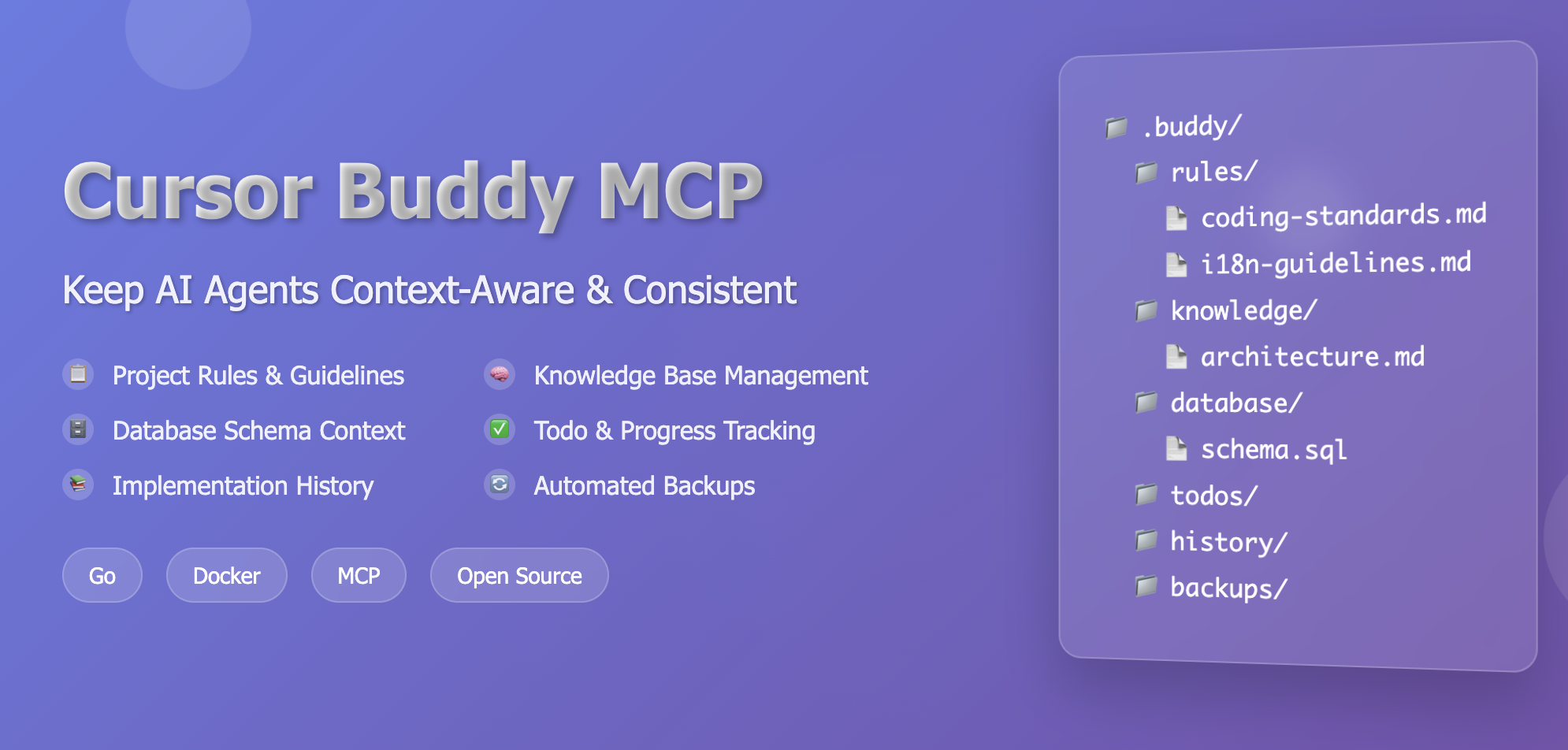
Cursor Buddy MCP
🤖 Keep AI Agents Context-Aware & Consistent
接入你的智能体
從發布者安裝。不是 PlugMCP 端點。
遠端 URL 還是本機指令? 兩種安裝方式的差異
Transform your AI assistant into a context-aware coding partner that understands your project's standards, conventions, and history.
Your AI assistant instantly knows your coding standards, architectural patterns, and project conventions
All project documentation and guidelines in one searchable location
Automatic todo management and implementation history tracking
File monitoring ensures your AI always has the latest information
Drop-in Docker container with immediate MCP integration
Fast, relevant results across all your project context
graph TB
    A[AI Assistant] --> B[MCP Client]
    B --> C[Cursor Buddy MCP Server]
    C --> D[.buddy Directory]
    D --> E[Rules]
    D --> F[Knowledge]
    D --> G[Todos]
    D --> H[Database]
    D --> I[History]
    D --> J[Backups]

    C --> K[Search Engine]
    C --> L[File Monitor]
    C --> M[Backup Manager]

    style A fill:#e1f5fe
    style C fill:#f3e5f5
    style K fill:#e8f5e8
Built on the Model Context Protocol (MCP) using the Go SDK from mark3labs/mcp-go. Communicates over stdin/stdout using JSON-RPC 2.0, making it compatible with MCP clients like Claude Desktop.
docker pull ghcr.io/omar-haris/cursor-buddy-mcp:latest
Add to .cursor/mcp.json:
⚠️ Important: Replace
/path/to/your/project/with your actual project directory path!
{
  "mcpServers": {
    "cursor-buddy-mcp": {
      "command": "docker",
      "args": [
        "run", "-i", "--rm",
        "-v", "/path/to/your/project/.buddy:/home/buddy/.buddy",
        "-e", "BUDDY_PATH=/home/buddy/.buddy",
        "ghcr.io/omar-haris/cursor-buddy-mcp:latest"
      ]
    }
  }
}
Examples:
"/home/user/myproject/.buddy:/home/buddy/.buddy""C:/Users/User/myproject/.buddy:/home/buddy/.buddy""${PWD}/.buddy:/home/buddy/.buddy"💡 How to find your project path:
# Navigate to your project directory and run:
pwd
# Copy the output and replace /path/to/your/project/ with: {output}/.buddy
Navigate to your project directory and run:
mkdir -p .buddy/{rules,knowledge,todos,database,history,backups}
📁 This will create:
your-project/
├── .buddy/
│   ├── rules/
│   ├── knowledge/
│   ├── todos/
│   ├── database/
│   ├── history/
│   └── backups/
Create files in .buddy/ folders following the documentation below.
Get coding standards and guidelines
Search project documentation
List/update tasks and track progress
Get schema info and validate queries
Track implementation changes and search history
Create and manage file backups
Ask your AI assistant questions like:
Location:
.buddy/rules/
Purpose: Define coding standards, architectural patterns, and guidelines
.md)category and priority# Coding Standards
- category: coding
- priority: critical
## Overview
Core coding standards and best practices for the project.
## Go-Specific Standards
- Follow Go naming conventions (camelCase, PascalCase)
- Use `gofmt` for code formatting
- Handle errors explicitly, don't ignore them
- Use interfaces for abstraction
## Error Handling
- Always check and handle errors
- Use structured error types
- Wrap errors with context using `fmt.Errorf`
- Return meaningful error messages
## Testing
- Write unit tests for all public functions
- Use table-driven tests for multiple test cases
- Achieve minimum 80% code coverage
# Architecture Patterns
- category: architecture
- priority: critical

## Design Principles
- **Single Responsibility**: Each component has one reason to change
- **Dependency Inversion**: Depend on abstractions, not concretions

## Recommended Patterns

### Repository Pattern
- Encapsulate data access logic
- Provide consistent interface for data operations
- Enable easy testing with mock implementations

### Layered Architecture
┌─────────────────────┐
│   Presentation      │  ← HTTP handlers, CLI
├─────────────────────┤
│   Business Logic    │  ← Domain models, use cases
├─────────────────────┤
│   Data Access       │  ← Repositories, databases
└─────────────────────┘
Location:
.buddy/knowledge/
Purpose: Store project documentation, API specs, and technical information
.md)category and optional tags# API Documentation
- category: architecture
- tags: api, rest, authentication
## Authentication Endpoints
### POST /auth/login
**Request:**
```json
{
"email": "[email protected]",
"password": "secure_password"
}
Response:
{
  "token": "jwt_token_here",
  "user": {
    "id": 123,
    "email": "[email protected]",
    "role": "user"
  }
}
Headers: Authorization: Bearer <token>
Response:
{
  "user": {
    "id": 123,
    "email": "[email protected]",
    "role": "user"
  }
}
All endpoints return errors in this format:
{
  "error": "error_code",
  "message": "Human readable message"
}
</details>

---

### ✅ Todo Files

> **Location:** `.buddy/todos/`
> **Purpose:** Track tasks, features, and project progress

#### 📝 Format Requirements
- ✅ Use markdown format (`.md`)
- ✅ Use checkbox syntax: `- [ ]` (incomplete) or `- [x]` (complete)
- ✅ Group related tasks under clear headings
- ✅ Include context and details for each task

#### 🔐 Example: Feature Development

<details>
<summary>Click to expand feature development example</summary>

```markdown
# Authentication Feature

## Backend Implementation
- [x] Set up JWT library
- [x] Create user model and database migration
- [x] Implement password hashing with bcrypt
- [ ] Create login endpoint
- [ ] Create registration endpoint
- [ ] Add middleware for protected routes
- [ ] Write unit tests for auth service
- [ ] Add integration tests for auth endpoints

## Frontend Implementation
- [ ] Create login form component
- [ ] Create registration form component
- [ ] Implement JWT token storage
- [ ] Add authentication context
- [ ] Create protected route wrapper
- [ ] Handle token refresh logic

## Security & Testing
- [ ] Add rate limiting to auth endpoints
- [ ] Implement account lockout after failed attempts
- [ ] Add password strength validation
- [ ] Security audit of auth implementation
- [ ] Load testing for auth endpoints
Location:
.buddy/database/
Purpose: Store SQL schema definitions, migrations, and query examples
-- Users table
CREATE TABLE users (
    id SERIAL PRIMARY KEY,
    email VARCHAR(255) UNIQUE NOT NULL,
    password_hash VARCHAR(255) NOT NULL,
    role VARCHAR(50) DEFAULT 'user',
    created_at TIMESTAMP DEFAULT CURRENT_TIMESTAMP,
    updated_at TIMESTAMP DEFAULT CURRENT_TIMESTAMP
);

-- Sessions table for JWT blacklisting
CREATE TABLE sessions (
    id SERIAL PRIMARY KEY,
    user_id INTEGER REFERENCES users(id) ON DELETE CASCADE,
    token_hash VARCHAR(255) UNIQUE NOT NULL,
    expires_at TIMESTAMP NOT NULL,
    created_at TIMESTAMP DEFAULT CURRENT_TIMESTAMP
);

-- Indexes for performance
CREATE INDEX idx_users_email ON users(email);
CREATE INDEX idx_sessions_token_hash ON sessions(token_hash);
CREATE INDEX idx_sessions_expires_at ON sessions(expires_at);
The server automatically monitors your .buddy directory for changes and reloads content in real-time.
Uses Bleve full-text search for fast, relevant results across all your project context.
Automatically creates backups of important files before modifications.
Built with Go for high performance and easy extension with new tools and features.
We welcome contributions! Here's how you can help:
Your AI assistant will now have deep context about your codebase and can provide consistent, informed responses.
Made with ❤️ by developers, for developers
🤖 MCP server that gives AI agents deep context about your project - coding standards, knowledge base, todos, database schema & history. Keep your AI assistant consistent and context-aware.
工具
尚無工具清單。遠端伺服器會在首次健康檢查後取得工具清單。
常見問題
在本頁複製適用於 Cursor、Claude Desktop、Claude Code 或 VS Code 的 stdio 設定。它使用發布者的安裝方式,而不是 PlugMCP 代理伺服器。
這筆記錄未列出必要的環境變數。
Cursor Buddy 透過 stdio 在本機執行。
上次檢查時間:2026-10-28。 🤖 MCP server that gives AI agents deep context about your project - coding standards, knowledge base, todos, database schema & history. Keep your AI assistant consistent and context-aware.
