Installation
Quick Start with npx (Recommended - Zero Install)
# Run directly without installation - works instantly!
npx -y kubectl-mcp-server

# Or install globally for faster startup
npm install -g kubectl-mcp-server
接入你的智能体
從發布者安裝。不是 PlugMCP 端點。
遠端 URL 還是本機指令? 兩種安裝方式的差異
來自發布者
# Run directly without installation - works instantly!
npx -y kubectl-mcp-server
# Or install globally for faster startup
npm install -g kubectl-mcp-server
Published in CNCF Landscape: A MCP server for Kubernetes.
# Standard installation
pip install kubectl-mcp-server

# With interactive UI dashboards (recommended)
pip install kubectl-mcp-server[ui]
Simply ask your AI assistant in natural language:
💬 "Why is my pod crashing?"
💬 "Deploy a Redis cluster with 3 replicas"
💬 "Show me which pods are wasting resources"
💬 "Which services can't reach the database?"
💬 "Audit security across all namespaces"
💬 "Show me the cluster dashboard"
253 powerful tools | 8 workflow prompts | 8 data resources | Works with all major AI assistants
From debugging crashed pods to optimizing cluster costs, kubectl-mcp-server is your AI-powered DevOps companion.
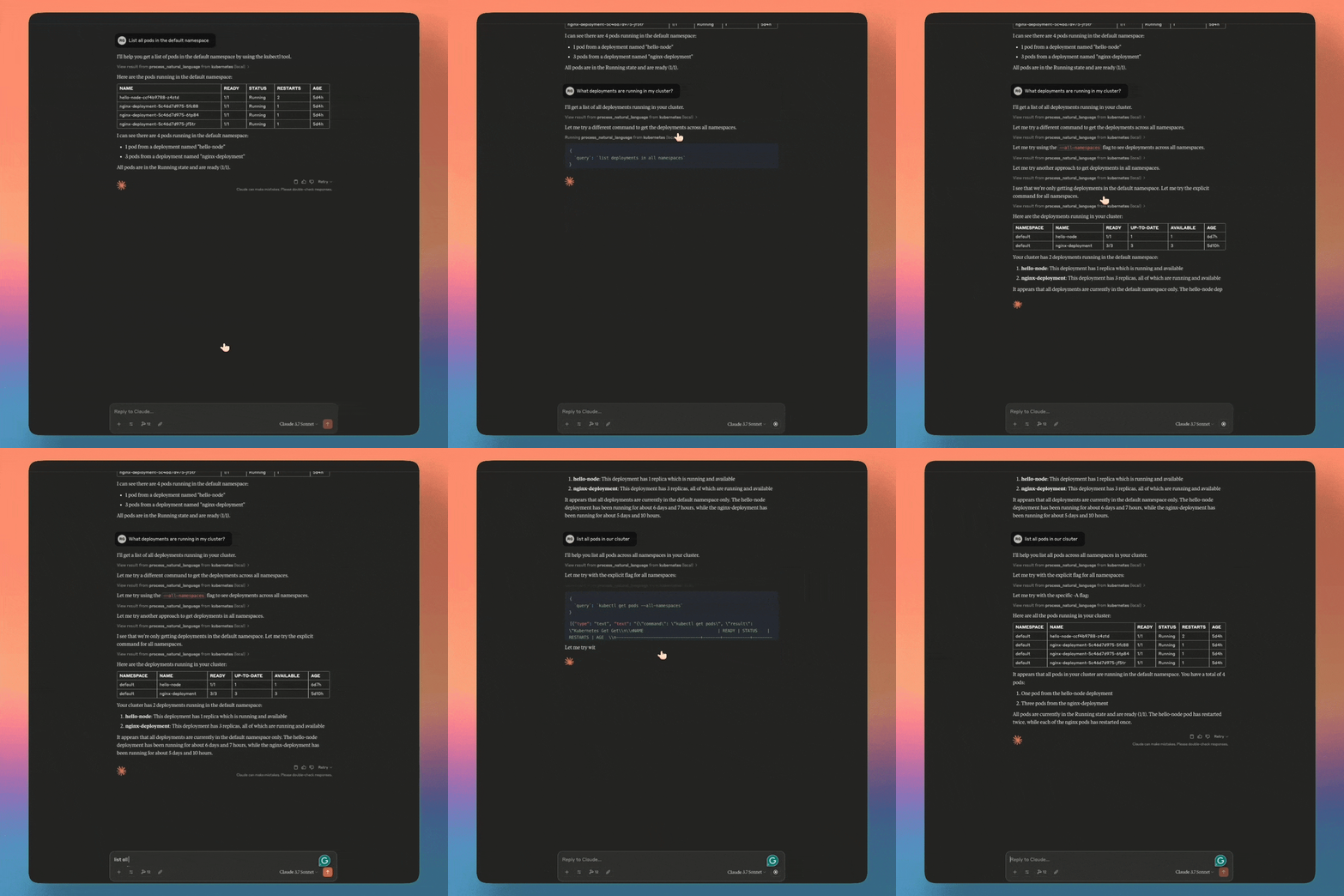
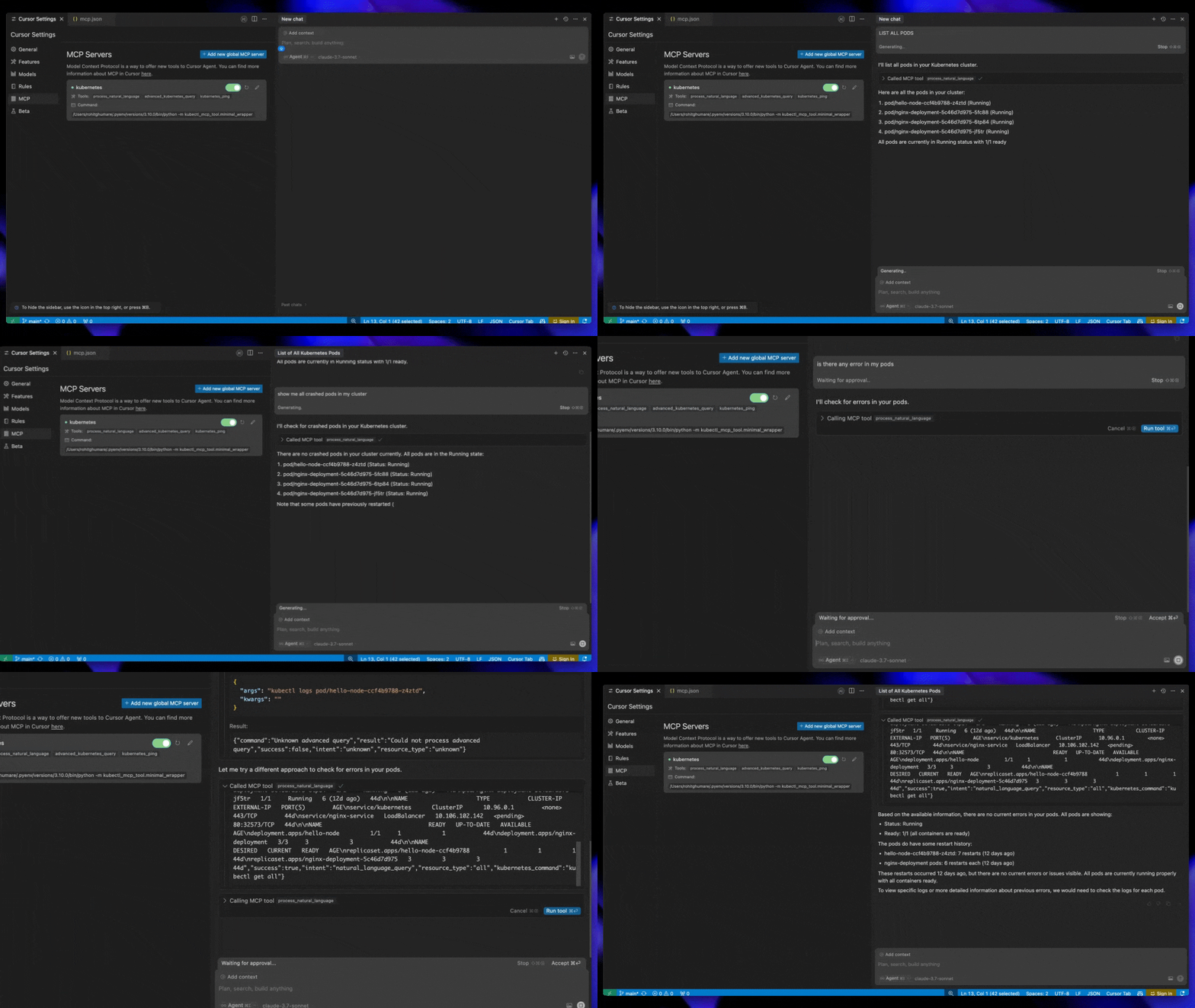
# Run directly without installation - works instantly!
npx -y kubectl-mcp-server

# Or install globally for faster startup
npm install -g kubectl-mcp-server
# Standard installation
pip install kubectl-mcp-server

# With interactive UI dashboards (recommended)
pip install kubectl-mcp-server[ui]
# Install specific version directly from GitHub release (replace {VERSION} with desired version)
pip install https://github.com/rohitg00/kubectl-mcp-server/releases/download/v{VERSION}/kubectl_mcp_server-{VERSION}-py3-none-any.whl

# Example: Install v1.19.0
pip install https://github.com/rohitg00/kubectl-mcp-server/releases/download/v1.19.0/kubectl_mcp_server-1.19.0-py3-none-any.whl

# Or install latest from git
pip install git+https://github.com/rohitg00/kubectl-mcp-server.git
# Pull from Docker Hub
docker pull rohitghumare64/kubectl-mcp-server:latest

# Or pull from GitHub Container Registry
docker pull ghcr.io/rohitg00/kubectl-mcp-server:latest

# Run with stdio transport
docker run -i -v $HOME/.kube:/root/.kube:ro rohitghumare64/kubectl-mcp-server:latest

# Run with HTTP transport
docker run -p 8000:8000 -v $HOME/.kube:/root/.kube:ro rohitghumare64/kubectl-mcp-server:latest --transport sse
Before integrating with your AI assistant, verify the installation:
# Check if kubectl is configured
kubectl cluster-info

# Test the MCP server directly
kubectl-mcp-server info

# List all available tools
kubectl-mcp-server tools

# Try calling a tool
kubectl-mcp-server call get_pods '{"namespace": "kube-system"}'
Choose your favorite AI assistant and add the configuration:
Add to ~/Library/Application Support/Claude/claude_desktop_config.json:
{
  "mcpServers": {
    "kubernetes": {
      "command": "npx",
      "args": ["-y", "kubectl-mcp-server"]
    }
  }
}
Add to ~/.cursor/mcp.json:
{
  "mcpServers": {
    "kubernetes": {
      "command": "npx",
      "args": ["-y", "kubectl-mcp-server"]
    }
  }
}
Add to ~/.config/windsurf/mcp.json:
{
  "mcpServers": {
    "kubernetes": {
      "command": "npx",
      "args": ["-y", "kubectl-mcp-server"]
    }
  }
}
{
  "mcpServers": {
    "kubernetes": {
      "command": "python",
      "args": ["-m", "kubectl_mcp_tool.mcp_server"],
      "env": {
        "KUBECONFIG": "/path/to/.kube/config"
      }
    }
  }
}
More integrations: GitHub Copilot, Goose, Gemini CLI, Roo Code, and 15+ other clients —> see full configuration guide below.
After adding the configuration, restart your AI assistant (GitHub Copilot, Claude Code,Claude Desktop, Cursor, etc.) to load the MCP server.
Start a conversation with your AI assistant and try these:
Troubleshooting:
"Show me all pods in the kube-system namespace"
"Why is the nginx-deployment pod crashing?"
"Diagnose network connectivity issues in the default namespace"
Deployments:
"Create a deployment for nginx with 3 replicas"
"Scale my frontend deployment to 5 replicas"
"Roll back the api-server deployment to the previous version"
Cost & Optimization:
"Which pods are using the most resources?"
"Show me idle resources that are wasting money"
"Analyze cost optimization opportunities in the production namespace"
Security:
"Audit RBAC permissions in all namespaces"
"Check for insecure secrets and configurations"
"Show me pods running with privileged access"
Helm:
"List all Helm releases in the cluster"
"Install Redis from the Bitnami chart repository"
"Show me the values for my nginx-ingress Helm release"
Multi-Cluster:
"List all available Kubernetes contexts"
"Switch to the production cluster context"
"Show me cluster information and version"
Works seamlessly with all MCP-compatible AI assistants:
Add to ~/.config/claude-code/mcp.json:
{
  "mcpServers": {
    "kubernetes": {
      "command": "npx",
      "args": ["-y", "kubectl-mcp-server"]
    }
  }
}
Add to VS Code settings.json:
{
  "mcp": {
    "servers": {
      "kubernetes": {
        "command": "npx",
        "args": ["-y", "kubectl-mcp-server"]
      }
    }
  }
}
Add to ~/.config/goose/config.yaml:
extensions:
  kubernetes:
    command: npx
    args:
      - -y
      - kubectl-mcp-server
Add to ~/.gemini/settings.json:
{
  "mcpServers": {
    "kubernetes": {
      "command": "npx",
      "args": ["-y", "kubectl-mcp-server"]
    }
  }
}
Add to ~/.config/roo-code/mcp.json or ~/.config/kilo-code/mcp.json:
{
  "mcpServers": {
    "kubernetes": {
      "command": "npx",
      "args": ["-y", "kubectl-mcp-server"]
    }
  }
}
Access Kubernetes data as browsable resources:
Pre-built workflow prompts for common Kubernetes operations:
The built-in CLI lets you explore and test tools without an AI assistant:
# List all tools with descriptions
kubectl-mcp-server tools -d

# Search for pod-related tools
kubectl-mcp-server grep "*pod*"

# Show specific tool schema
kubectl-mcp-server tools get_pods

# Call a tool directly
kubectl-mcp-server call get_pods '{"namespace": "kube-system"}'

# Pipe JSON from stdin
echo '{"namespace": "default"}' | kubectl-mcp-server call get_pods

# Check dependencies
kubectl-mcp-server doctor

# Show/switch Kubernetes context
kubectl-mcp-server context
kubectl-mcp-server context minikube

# List resources and prompts
kubectl-mcp-server resources
kubectl-mcp-server prompts

# Show server info
kubectl-mcp-server info
--json)NO_COLOR environment variableThe server supports multiple transport protocols:
# stdio (default) - Best for Claude Desktop, Cursor, Windsurf
kubectl-mcp-server
# or: python -m kubectl_mcp_tool.mcp_server

# SSE - Server-Sent Events for web clients
kubectl-mcp-server --transport sse --port 8000

# HTTP - Standard HTTP for REST clients
kubectl-mcp-server --transport http --port 8000

# streamable-http - For agentgateway integration
kubectl-mcp-server --transport streamable-http --port 8000
Transport Options:
--transport: Choose from stdio, sse, http, streamable-http (default: stdio)--host: Bind address (default: 0.0.0.0)--port: Port for network transports (default: 8000)--disable-destructive (or --non-destructive): Block destructive operations (allow create/update, block delete)--read-only: Block all write operationsCore Settings:
Authentication (Enterprise):
Browser Automation (Optional):
Get beautiful HTML dashboards for visual cluster management.
Installation:
# Install with UI support
pip install kubectl-mcp-server[ui]
6 Dashboard Tools:
show_pods_dashboard_ui - Real-time pod status tableshow_pod_logs_ui - Interactive log viewer with searchshow_cluster_overview_ui - Complete cluster dashboardshow_events_timeline_ui - Events timeline with filteringshow_resource_yaml_ui - YAML viewer with syntax highlightingrender_k8s_dashboard_screenshot - Export dashboards as PNGFeatures:
Works With: Goose, LibreChat, Nanobot (full HTML UI) | Claude Desktop, Cursor, others (JSON + screenshots)
Automate web-based Kubernetes operations with agent-browser integration.
Quick Setup:
# Install agent-browser
npm install -g agent-browser
agent-browser install

# Enable browser tools
export MCP_BROWSER_ENABLED=true
kubectl-mcp-server
What You Can Do:
26 Available Tools: browser_open, browser_screenshot, browser_click, browser_fill, browser_test_ingress, browser_screenshot_grafana, browser_health_check, and 19 more
Advanced Features:
A standalone npm package that provides beautiful, interactive UI dashboards for Kubernetes management using the MCP ext-apps SDK.
Installation:
# Via npm
npm install -g kubectl-mcp-app

# Or via npx (no install)
npx kubectl-mcp-app
Claude Desktop Configuration:
{
  "mcpServers": {
    "kubectl-app": {
      "command": "npx",
      "args": ["kubectl-mcp-app"]
    }
  }
}
8 Interactive UI Tools:
Features:
More Info: See kubectl-mcp-app/README.md for full documentation.
Secure your MCP server with OAuth 2.1 authentication (RFC 9728).
export MCP_AUTH_ENABLED=true
export MCP_AUTH_ISSUER=https://your-idp.example.com
export MCP_AUTH_AUDIENCE=kubectl-mcp-server
kubectl-mcp-server --transport http --port 8000
Supported Identity Providers: Okta, Auth0, Keycloak, Microsoft Entra ID, Google OAuth, and any OIDC-compliant provider.
Use Case: Multi-tenant environments, compliance requirements, audit logging.
Works with Docker MCP Toolkit:
docker mcp server add kubectl-mcp-server mcp/kubectl-mcp-server:latest
docker mcp server configure kubectl-mcp-server --volume "$HOME/.kube:/root/.kube:ro"
docker mcp server enable kubectl-mcp-server
docker mcp client connect claude
Install from the centralized agentregistry:
# Install arctl CLI
curl -fsSL https://raw.githubusercontent.com/agentregistry-dev/agentregistry/main/scripts/install.sh | bash

# Install kubectl-mcp-server
arctl mcp install io.github.rohitg00/kubectl-mcp-server
Available via: PyPI (uvx), npm (npx), OCI (docker.io/rohitghumare64/kubectl-mcp-server)
Route to multiple MCP servers through agentgateway:
# Start with streamable-http
kubectl-mcp-server --transport streamable-http --port 8000

# Configure gateway
cat > gateway.yaml <<EOF
binds:
- port: 3000
  listeners:
  - routes:
    - backends:
      - mcp:
          targets:
          - name: kubectl-mcp-server
            mcp:
              host: http://localhost:8000/mcp
EOF

# Start gateway
agentgateway --config gateway.yaml
Connect clients to http://localhost:3000/mcp for unified access to all 253 tools.
Deploy with kMCP - a control plane for MCP servers:
# Install kMCP
curl -fsSL https://raw.githubusercontent.com/kagent-dev/kmcp/refs/heads/main/scripts/get-kmcp.sh | bash
kmcp install

# Deploy kubectl-mcp-server (easiest)
kmcp deploy package --deployment-name kubectl-mcp-server \
   --manager npx --args kubectl-mcp-server

# Or with Docker image
kmcp deploy --file deploy/kmcp/kmcp.yaml --image rohitghumare64/kubectl-mcp-server:latest
See kMCP quickstart for details.
Deploy with kubectl/kustomize:
# Using kustomize (recommended)
kubectl apply -k deploy/kubernetes/

# Or individual manifests
kubectl apply -f deploy/kubernetes/namespace.yaml
kubectl apply -f deploy/kubernetes/rbac.yaml
kubectl apply -f deploy/kubernetes/deployment.yaml
kubectl apply -f deploy/kubernetes/service.yaml

# Access via port-forward
kubectl port-forward -n kubectl-mcp svc/kubectl-mcp-server 8000:8000
See deploy/ directory for all manifests and configuration options.
Integrate with kagent - a CNCF Kubernetes-native AI agent framework:
# Install kagent
brew install kagent
kagent install --profile demo

# Register as ToolServer
kubectl apply -f deploy/kagent/toolserver-stdio.yaml

# Open dashboard
kagent dashboard
Your AI agents now have access to all 253 Kubernetes tools. See kagent quickstart.
┌─────────────────┐     ┌──────────────────┐     ┌─────────────────┐
│   AI Assistant  │────▶│   MCP Server     │────▶│  Kubernetes API │
│ (Claude/Cursor) │◀────│ (kubectl-mcp)    │◀────│    (kubectl)    │
└─────────────────┘     └──────────────────┘     └─────────────────┘
The MCP server implements the Model Context Protocol, translating natural language requests into kubectl operations.
kubectl_mcp_tool/
├── mcp_server.py          # Main server (FastMCP, transports)
├── tools/                  # 253 MCP tools organized by category
│   ├── pods.py            # Pod management & diagnostics
│   ├── deployments.py     # Deployments, StatefulSets, DaemonSets
│   ├── core.py            # Namespaces, ConfigMaps, Secrets
│   ├── cluster.py         # Context/cluster management
│   ├── networking.py      # Services, Ingress, NetworkPolicies
│   ├── storage.py         # PVCs, StorageClasses, PVs
│   ├── security.py        # RBAC, ServiceAccounts, PodSecurity
│   ├── helm.py            # Complete Helm v3 operations
│   ├── operations.py      # kubectl apply/patch/describe/etc
│   ├── diagnostics.py     # Metrics, namespace comparison
│   ├── cost.py            # Resource optimization & cost analysis
│   ├── ui.py              # MCP-UI interactive dashboards
│   ├── gitops.py          # GitOps (Flux/ArgoCD)
│   ├── certs.py           # Cert-Manager
│   ├── policy.py          # Policy (Kyverno/Gatekeeper)
│   ├── backup.py          # Backup (Velero)
│   ├── keda.py            # KEDA autoscaling
│   ├── cilium.py          # Cilium/Hubble network observability
│   ├── rollouts.py        # Argo Rollouts/Flagger
│   ├── capi.py            # Cluster API
│   ├── kubevirt.py        # KubeVirt VMs
│   ├── kiali.py           # Istio/Kiali service mesh
│   └── vind.py            # vCluster (virtual clusters)
├── resources/              # 8 MCP Resources for data exposure
├── prompts/                # 8 MCP Prompts for workflows
└── cli/                    # CLI interface
Extend your AI coding agent with Kubernetes expertise using our Agent Skills library. Skills provide specialized knowledge and workflows that agents can load on demand.
# Copy all skills to Claude
cp -r kubernetes-skills/claude/* ~/.claude/skills/

# Or install specific skills
cp -r kubernetes-skills/claude/k8s-helm ~/.claude/skills/
Use SkillKit to convert skills to your preferred AI agent format:
npm install -g skillkit

# Convert to Cursor format
skillkit translate kubernetes-skills/claude --to cursor --output .cursor/rules/

# Convert to Codex format
skillkit translate kubernetes-skills/claude --to codex --output ./
Supported agents: Claude, Cursor, Codex, Gemini CLI, GitHub Copilot, Goose, Windsurf, Roo, Amp, and more.
See kubernetes-skills/README.md for full documentation.
Seamlessly manage multiple Kubernetes clusters through natural language. Every tool supports an optional context parameter to target any cluster without switching contexts.
Most kubectl-backed tools accept an optional context parameter to target specific clusters.
Note: vCluster (vind) and kind tools run via their local CLIs and do not accept the context parameter.
Talk to your AI assistant:
"List pods in the production cluster"
"Get deployments from staging context"
"Show logs from the api-pod in the dev cluster"
"Compare namespaces between production and staging clusters"
Direct tool calls with context:
# Target a specific cluster context
kubectl-mcp-server call get_pods '{"namespace": "default", "context": "production"}'

# Get deployments from staging
kubectl-mcp-server call get_deployments '{"namespace": "app", "context": "staging"}'

# Install Helm chart to production cluster
kubectl-mcp-server call install_helm_chart '{"name": "redis", "chart": "bitnami/redis", "namespace": "cache", "context": "production"}'

# Compare resources across clusters
kubectl-mcp-server call compare_namespaces '{"namespace1": "prod-ns", "namespace2": "staging-ns", "context": "production"}'
Talk to your AI assistant:
"List all available Kubernetes contexts"
"Switch to the production cluster"
"Show me details about the staging context"
"What's the current cluster I'm connected to?"
Or use the CLI directly:
kubectl-mcp-server context                    # Show current context
kubectl-mcp-server context production         # Switch context
kubectl-mcp-server call list_contexts_tool    # List all contexts via MCP
context is omitted, the tool uses your current kubectl contextcontext is specified, the tool targets that cluster directly"context": "production" or "context": "current" for clarityKUBECONFIG environment variable# Clone the repository
git clone https://github.com/rohitg00/kubectl-mcp-server.git
cd kubectl-mcp-server
# Create virtual environment
python -m venv venv
source venv/bin/activate # On Windows: venv\Scripts\activate
# Install development dependencies
pip install -r requirements-dev.txt
# Run all tests
pytest tests/ -v

# Run specific test file
pytest tests/test_tools.py -v

# Run with coverage
pytest tests/ --cov=kubectl_mcp_tool --cov-report=html

# Run only unit tests
pytest tests/ -v -m unit
tests/
├── __init__.py          # Test package
├── conftest.py          # Shared fixtures and mocks
├── test_tools.py        # Unit tests for 253 MCP tools
├── test_resources.py    # Tests for 8 MCP Resources
├── test_prompts.py      # Tests for 8 MCP Prompts
└── test_server.py       # Server initialization tests
234 tests covering: tool registration, resource exposure, prompt generation, server initialization, non-destructive mode, secret masking, error handling, transport methods, CLI commands, browser automation, and ecosystem tools.
# Format code
black kubectl_mcp_tool tests

# Sort imports
isort kubectl_mcp_tool tests

# Lint
flake8 kubectl_mcp_tool tests

# Type checking
mypy kubectl_mcp_tool
We ❤️ contributions! Whether it's bug reports, feature requests, documentation improvements, or code contributions.
Ways to contribute:
Development setup: See Development & Testing section above.
Before submitting a PR:
pytest tests/ -vblack kubectl_mcp_tool testsflake8 kubectl_mcp_tool testsMIT License - see LICENSE for details.
Package Repositories:
Project:
Ecosystem:
Made with ❤️ for the Kubernetes and AI community
If kubectl-mcp-server makes your DevOps life easier, give it a ⭐ on GitHub!
Published in CNCF Landscape: A MCP server for Kubernetes.
工具
尚無工具清單。遠端伺服器會在首次健康檢查後取得工具清單。
常見問題
在本頁複製適用於 Cursor、Claude Desktop、Claude Code 或 VS Code 的 stdio 設定。它使用發布者的安裝方式,而不是 PlugMCP 代理伺服器。
這筆記錄未列出必要的環境變數。
Kubectl 透過 stdio 在本機執行。
上次檢查時間:2026-10-26。 Published in CNCF Landscape: A MCP server for Kubernetes.