MCP Alchemy MCP 伺服器 | PlugMCP
跳到正文 MCP Alchemy
Status: Actively maintained and in daily use. Tested releases are published to PyPI with git tags, and issues and pull requests are triaged regularly.
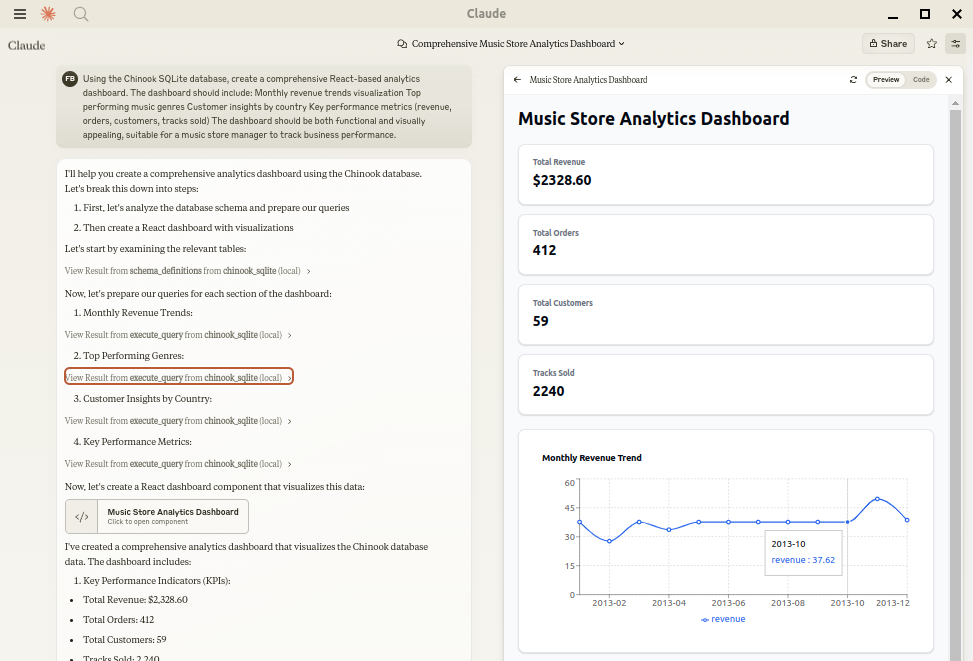
Let Claude be your database expert! MCP Alchemy connects Claude Desktop directly to your databases, allowing it to:
Help you explore and understand your database structure
A MCP (model context protocol) server that gives the LLM access to and knowledge about relational databases like SQLite, Postgresql, MySQL & MariaDB, Oracle, and MS-SQL.
把任意工具接入任意代理。面向非開發者的 MCP 伺服器目錄;閘道承載流量,n8n 承載應用。
產品
目錄
開發者
公司
Assist in writing and validating SQL queries
Displays relationships between tables
Analyze large datasets and create reports Claude Desktop Can analyse and create artifacts for very large datasets using claude-local-files . Works with PostgreSQL, MySQL, MariaDB, SQLite, Oracle, MS SQL Server, CrateDB, Vertica,
and a host of other SQLAlchemy-compatible databases.
Installation Ensure you have uv installed:
# Install uv if you haven't already
curl -LsSf https://astral.sh/uv/install.sh | sh
Usage with Claude Desktop Add to your claude_desktop_config.json. You need to add the appropriate database driver in the --with parameter.
Note: After a new version release there might be a period of up to 600 seconds while the cache clears locally
cached causing uv to raise a versioning error. Restarting the MCP client once again solves the error.
SQLite (built into Python) {
"mcpServers": {
"my_sqlite_db": {
"command": "uvx",
"args": ["--from", "mcp-alchemy==2026.10.15.202659",
"--refresh-package", "mcp-alchemy", "mcp-alchemy"],
"env": {
"DB_URL": "sqlite:////absolute/path/to/database.db"
}
}
}
}
PostgreSQL {
"mcpServers": {
"my_postgres_db": {
"command": "uvx",
"args": ["--from", "mcp-alchemy==2026.10.15.202659", "--with", "psycopg2-binary",
"--refresh-package", "mcp-alchemy", "mcp-alchemy"],
"env": {
"DB_URL": "postgresql://user:password@localhost/dbname"
}
}
}
}
MySQL/MariaDB {
"mcpServers": {
"my_mysql_db": {
"command": "uvx",
"args": ["--from", "mcp-alchemy==2026.10.15.202659", "--with", "pymysql",
"--refresh-package", "mcp-alchemy", "mcp-alchemy"],
"env": {
"DB_URL": "mysql+pymysql://user:password@localhost/dbname"
}
}
}
}
Microsoft SQL Server {
"mcpServers": {
"my_mssql_db": {
"command": "uvx",
"args": ["--from", "mcp-alchemy==2026.10.15.202659", "--with", "pymssql",
"--refresh-package", "mcp-alchemy", "mcp-alchemy"],
"env": {
"DB_URL": "mssql+pymssql://user:password@localhost/dbname"
}
}
}
}
Oracle {
"mcpServers": {
"my_oracle_db": {
"command": "uvx",
"args": ["--from", "mcp-alchemy==2026.10.15.202659", "--with", "oracledb",
"--refresh-package", "mcp-alchemy", "mcp-alchemy"],
"env": {
"DB_URL": "oracle+oracledb://user:password@localhost/dbname"
}
}
}
}
CrateDB {
"mcpServers": {
"my_cratedb": {
"command": "uvx",
"args": ["--from", "mcp-alchemy==2026.10.15.202659", "--with", "sqlalchemy-cratedb>=0.42.0.dev1",
"--refresh-package", "mcp-alchemy", "mcp-alchemy"],
"env": {
"DB_URL": "crate://user:password@localhost:4200/?schema=testdrive"
}
}
}
}
For connecting to CrateDB Cloud, use a URL like
crate://user:[email protected] :4200?ssl=true.
Vertica {
"mcpServers": {
"my_vertica_db": {
"command": "uvx",
"args": ["--from", "mcp-alchemy==2026.10.15.202659", "--with", "vertica-python",
"--refresh-package", "mcp-alchemy", "mcp-alchemy"],
"env": {
"DB_URL": "vertica+vertica_python://user:password@localhost:5433/dbname",
"DB_ENGINE_OPTIONS": "{\"connect_args\": {\"ssl\": false}}"
}
}
}
}
Docker A container image is published to GitHub Container Registry with common database drivers
(PostgreSQL, MySQL/MariaDB, MS SQL Server, Oracle) preinstalled:
{
"mcpServers": {
"my_db": {
"command": "docker",
"args": ["run", "-i", "--rm", "-e", "DB_URL",
"ghcr.io/runekaagaard/mcp-alchemy:latest"],
"env": {
"DB_URL": "postgresql://user:[email protected] /dbname"
}
}
}
}
Or build it yourself with docker build -t ghcr.io/runekaagaard/mcp-alchemy .
Transports By default the server speaks stdio. It can also serve over HTTP for clients that connect that way:
# Recommended HTTP transport (serves on http://HOST:PORT/mcp)
mcp-alchemy --transport streamable-http --host 127.0.0.1 --port 7000

# Legacy SSE transport, for older clients (serves on http://HOST:PORT/sse)
mcp-alchemy --transport sse --host 127.0.0.1 --port 7000
Environment Variables
DB_URL: SQLAlchemy database URL (required)CLAUDE_LOCAL_FILES_PATH: Directory for full result sets (optional)EXECUTE_QUERY_MAX_CHARS: Maximum output length (optional, default 4000)DB_ENGINE_OPTIONS: JSON string containing additional SQLAlchemy engine options (optional)
Connection Pooling MCP Alchemy uses connection pooling optimized for long-running MCP servers. The default settings are:
pool_pre_ping=True: Tests connections before use to handle database timeouts and network issuespool_size=1: Maintains 1 persistent connection (MCP servers typically handle one request at a time)max_overflow=2: Allows up to 2 additional connections for burst capacitypool_recycle=3600: Refreshes connections older than 1 hour (prevents timeout issues)isolation_level='AUTOCOMMIT': Ensures each query commits automatically These defaults work well for most databases, but you can override them via DB_ENGINE_OPTIONS:
{
  "DB_ENGINE_OPTIONS": "{\"pool_size\": 5, \"max_overflow\": 10, \"pool_recycle\": 1800}"
}
For databases with aggressive timeout settings (like MySQL's 8-hour default), the combination of pool_pre_ping and pool_recycle ensures reliable connections.
API
Tools
all_table_names
Return all table names in the database
No input required
Returns comma-separated list of tables
users, orders, products, categories
filter_table_names
Find tables matching a substring
Input: q (string)
Returns matching table names
Input: "user"
Returns: "users, user_roles, user_permissions"
schema_definitions
Get detailed schema for specified tables
Input: table_names (string[])
Returns table definitions including:
Column names and types
Primary keys
Foreign key relationships
Nullable flags
users:
    id: INTEGER, primary key, autoincrement
    email: VARCHAR(255), nullable
    created_at: DATETIME

    Relationships:
      id -> orders.user_id
execute_query
Execute SQL query with vertical output format
Inputs:
query (string): SQL queryparams (object, optional): Query parameters
Returns results in clean vertical format:
1. row
id: 123
name: John Doe
created_at: 2024-03-15T14:30:00
email: NULL

Result: 1 rows
Features:
Smart truncation of large results
Full result set access via claude-local-files integration
Clean NULL value display
ISO formatted dates
Clear row separation
Claude Local Files
Access complete result sets beyond Claude's context window
Generate detailed reports and visualizations
Perform deep analysis on large datasets
Export results for further processing
The integration automatically activates when CLAUDE_LOCAL_FILES_PATH is set.
Developing First clone the github repository, install the dependencies and your database driver(s) of choice:
git clone [email protected] :runekaagaard/mcp-alchemy.git
cd mcp-alchemy
uv sync
uv pip install psycopg2-binary
Then set this in claude_desktop_config.json:
...
"command": "uv",
"args": ["run", "--directory", "/path/to/mcp-alchemy", "-m", "mcp_alchemy.server", "main"],
...
My Other LLM Projects
MCP Directory Listings MCP Alchemy is listed in the following MCP directory sites and repositories:
Contributing Contributions are warmly welcomed! Whether it's bug reports, feature requests, documentation improvements, or code contributions - all input is valuable. Feel free to:
Open an issue to report bugs or suggest features
Submit pull requests with improvements
Enhance documentation or share your usage examples
Ask questions and share your experiences
The goal is to make database interaction with Claude even better, and your insights and contributions help achieve that.
License Mozilla Public License Version 2.0
Graphify Turn any codebase, with its docs, SQL schemas, configs, and PDFs, into a queryable knowledge graph. A /graphify skill for Claude Code, Cursor, Codex, and Gemini CLI: local deterministic AST parsing, e Private Gpt Complete API layer for private AI applications on local models: RAG, skills, tools, MCP, text-to-sql, and more. Works with any OpenAI-compatible inference server. Scientific Agent Skills Turn any AI agent into an AI Scientist. The #1 Agent Skills library for science, used by 250,000+ scientists worldwide. 177 ready-to-use validated skills plus 100+ scientific databases covering biolog Open Code Review Secure, fast, efficient, battle-tested at Alibaba's scale. Hybrid architecture code review tool: deterministic pipelines + LLM Agent, precise line-level comments, built-in multi-language ruleset (NPE, Codebase Memory Local code intelligence for developers and AI agents. Connect code, docs and infrastructure in a persistent graph, with CBM Lens, MCP tools, agent integrations and change-aware test selection. Orm The Prisma ORM: write your application in TypeScript with human-readable queries instead of SQL. Host your database on Prisma Postgres and your app on Prisma Compute. OpenViking Self-evolving Context Database for AI Agents. Unify Agent Memory, Knowledge RAG and Skills. Context Mode Free, local plugin that keeps tool output out of your coding agent's context window. Sandbox and SQLite FTS5 search, 99% fewer bytes in context. Works with Claude Code, Codex, Pi, OMP, OpenCode, Gemin Dbx 25 MB lightweight cross-platform database client for 100+ databases, including MySQL, PostgreSQL, SQLite, Redis, MongoDB, DuckDB, SQL Server, and Dameng. Built-in AI, MCP Server, CLI, desktop and Dock Xerj AI search engine and MCP server for bots and agents. One Rust binary indexes code, docs, logs, JSONL/CSV and PDFs for BM25 full-text, vector and hybrid search, code search without grep, agent memory a Wasp The batteries-included full-stack framework for the AI era. Develop JS/TS web apps (React, Node.js, and Prisma) using declarative code that abstracts away complex full-stack features like auth, backgr WrenAI GenBI (Generative BI) for AI agents, an open-source, governed text-to-SQL through an open context layer that turns natural-language questions into trusted dashboards, charts, and SQL across 20+ data s Databases MCP 伺服器 最佳 Databases MCP 伺服器
尚無工具清單。遠端伺服器會在首次健康檢查後取得工具清單。
如何安裝 MCP Alchemy? 在本頁複製適用於 Cursor、Claude Desktop、Claude Code 或 VS Code 的 stdio 設定。它使用發布者的安裝方式,而不是 PlugMCP 代理伺服器。
MCP Alchemy 需要 API 金鑰嗎? 這筆記錄未列出必要的環境變數。
MCP Alchemy 使用哪種傳輸方式? MCP Alchemy 透過 stdio 在本機執行。
MCP Alchemy 上次檢查是什麼時候? 上次檢查時間:2026-10-27。 A MCP (model context protocol) server that gives the LLM access to and knowledge about relational databases like SQLite, Postgresql, MySQL & MariaDB, Oracle, and MS-SQL.
工具
0 / 10