NEPSE API
An unofficial API service for Nepal Stock Exchange (NEPSE) that provides real-time market data through REST, WebSocket, and Model Context Protocol (MCP) endpoints.
接入你的智能体
從發布者安裝。不是 PlugMCP 端點。
遠端 URL 還是本機指令? 兩種安裝方式的差異
來自發布者
An unofficial API service for Nepal Stock Exchange (NEPSE) that provides real-time market data through REST, WebSocket, and Model Context Protocol (MCP) endpoints.
Unlock Nepal Stock Exchange (NEPSE) data with this powerful unofficial API. Features REST, WebSocket, and a first-of-its-kind Model Context Protocol (MCP) server, enabling AI models like Claude to perform live market analysis with over 20 specialized tools. Strictly for educational and non-commercial use.
This project is provided "AS IS" without any warranty of any kind, express or implied. By using this software or its hosted services, you are agreeing to accept all risks and responsibilities.
This project and its associated services are intended strictly for educational, research, and personal, non-commercial purposes only.
The data is sourced from unofficial channels. The author does not guarantee the accuracy, completeness, timeliness, or reliability of any data provided. Do not use this for making financial decisions. Any financial loss or other damages resulting from the use of this software are solely your responsibility.
The author is not liable for anything. This includes, but is not limited to:
A free, hosted version of this API is provided as a convenience for testing and educational use.
This is a personal project that earns no money. By choosing to use this software, you acknowledge that you understand these risks and agree to hold the author harmless from any and all claims, damages, or losses.
Cache-Control: public, max-age=30 header to reduce server load and improve client-side performance.This project is strictly intended for educational and research purposes only. Commercial use is NOT permitted without proper authorization from official NEPSE data providers.
This API depends on unofficial data sources and third-party libraries for accessing Nepal Stock Exchange data. The author:
For any legal concerns, issues, or questions:
A free hosted version is available with rate limiting as a generous effort to support researchers and students:
⚠️ Critical Service Disclaimers:
🚨 Important: This free service may be discontinued at any time without notice. Use at your own risk.
This project is released under the MIT License to encourage open-source collaboration while maintaining proper attribution.
The project consists of three main components:
REST API Server (server.py)
WebSocket Server (socketServer.py)
MCP Server (mcp_server.py) - NEW
# Create and activate virtual environment
python -m venv venv
source venv/bin/activate  # Linux/Mac
venv\Scripts\activate     # Windows

# Install dependencies
pip install -r requirements.txt
Cross-platform (Recommended):
python start_servers.py
Windows (Double-click):
# Double-click start_servers.bat
# OR run in PowerShell:
.\start_servers.bat
Alternative methods:
# Manual startup script for Windows
python start_servers.py

# Or start individual components
python server.py          # FastAPI server
python socketServer.py    # WebSocket server
python mcp_server.py      # MCP server
# Start REST API server
python server.py

# Start WebSocket server
python socketServer.py

# Start MCP server (for AI integration)
python mcp_server.py
The WebSocket server provides a persistent, real-time connection for receiving NEPSE data. It's ideal for applications that need live updates without constant polling.
Connecting to the Server:
Connect your WebSocket client to ws://localhost:5555 (or wss://nepseapiws.surajrimal.dev/ for the hosted version).
Communication Protocol: Communication is done via JSON messages.
route and optional params.Example 1: Get Market Summary
Send this message to the server:
{
  "route": "Summary",
  "params": {}
}
Receive a response like this:
{
  "Total Turnover Rs:": 4489236458.2,
  "Total Traded Shares": 12540423,
  "Total Transactions": 85879,
  "Total Scrips Traded": 242
}
Example 2: Get Company Details for NABIL Bank
Send this message:
{
  "route": "CompanyDetails",
  "params": {
    "symbol": "NABIL"
  }
}
Receive a response with the company's details.
Handling Errors: If you send an invalid route or parameters, the server will respond with an error message:
{
  "error": "Route not found"
}
Available Routes: The WebSocket server supports numerous routes, including:
SummaryNepseIndexLiveMarketTopGainersTopLosersCompanyDetails (requires symbol in params)FloorsheetOf (requires symbol in params)The MCP server enables AI models (like Claude) to directly access Nepal stock market data using the Model Context Protocol (MCP) via FastMCP.
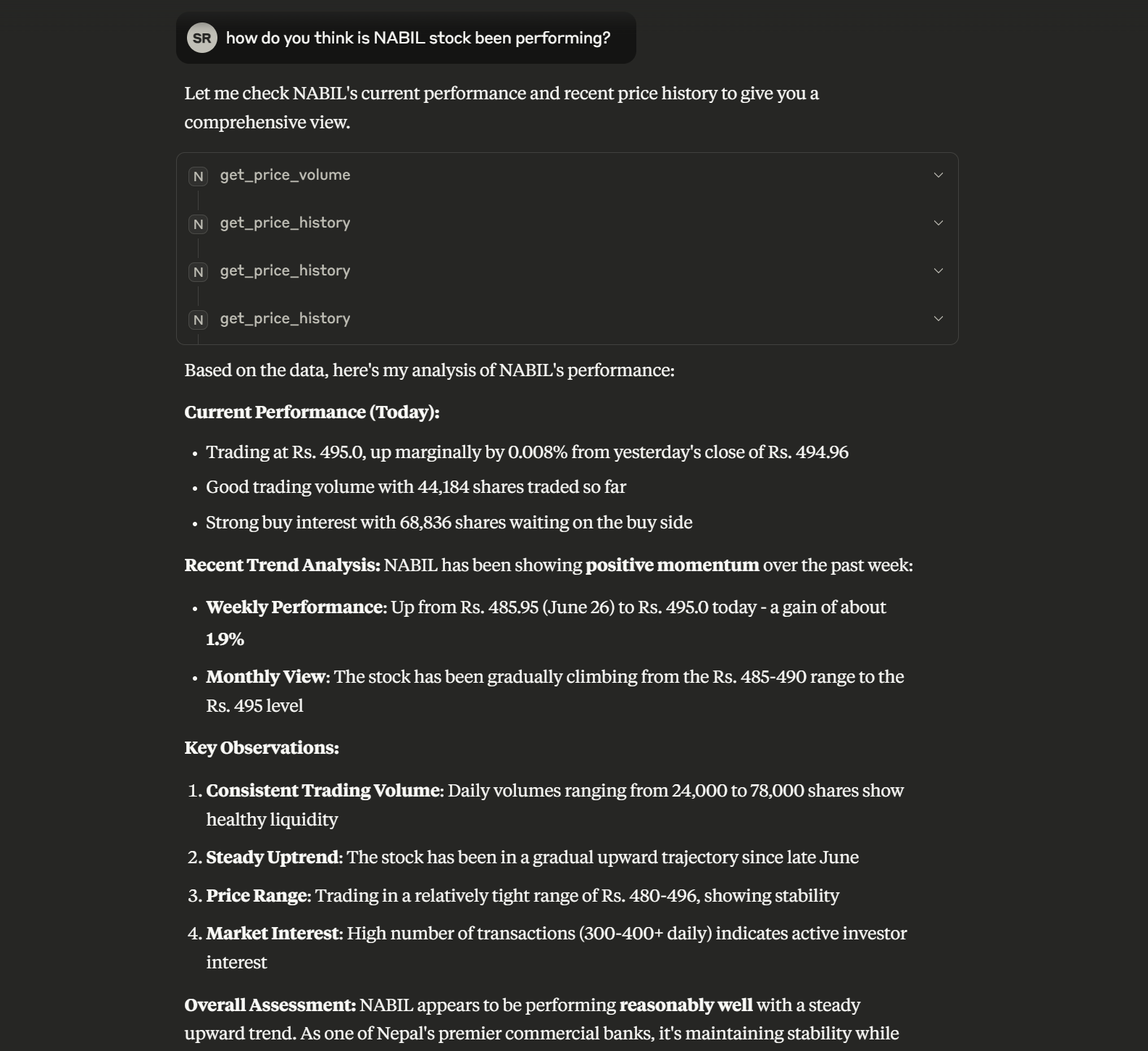
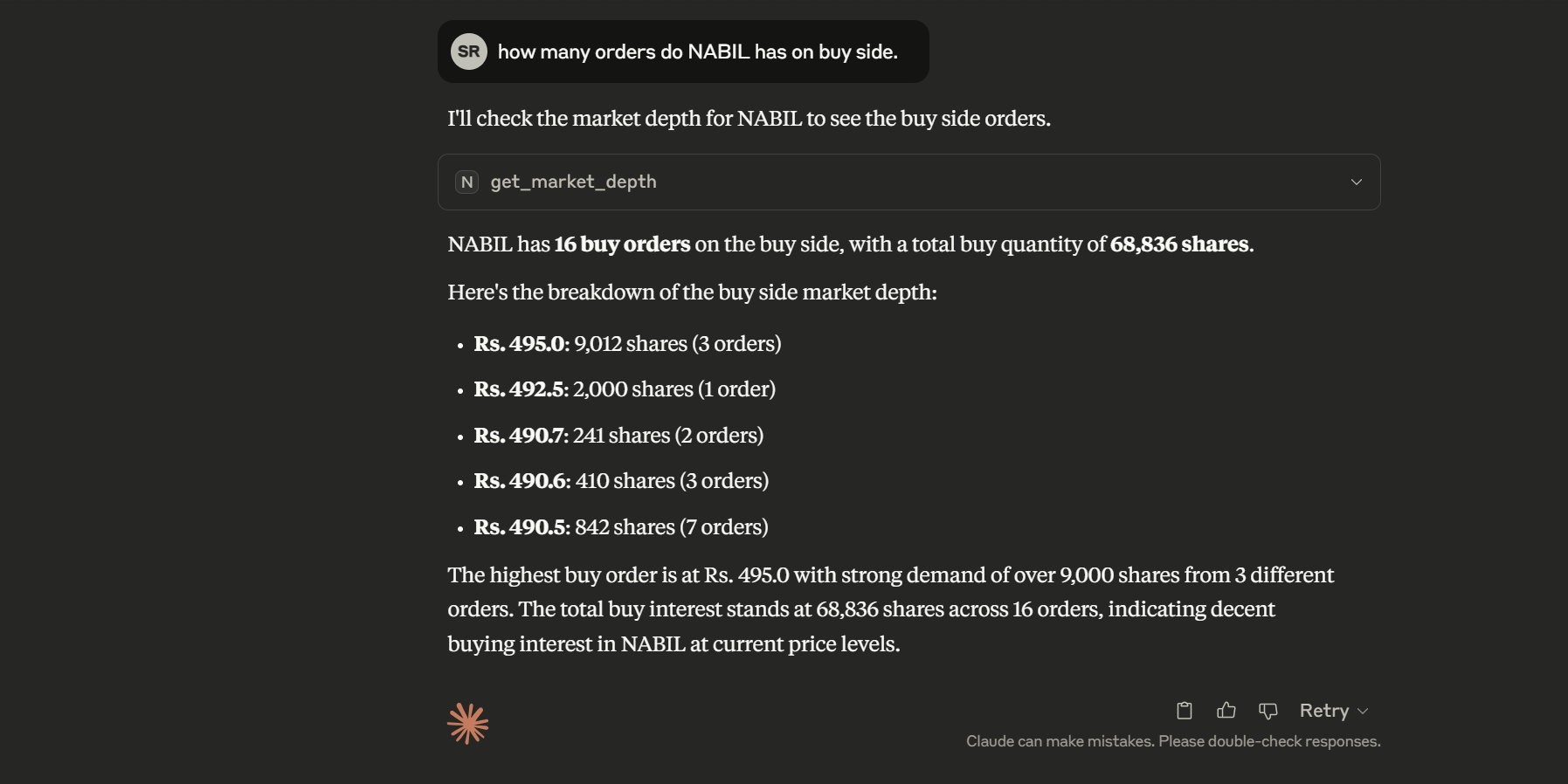
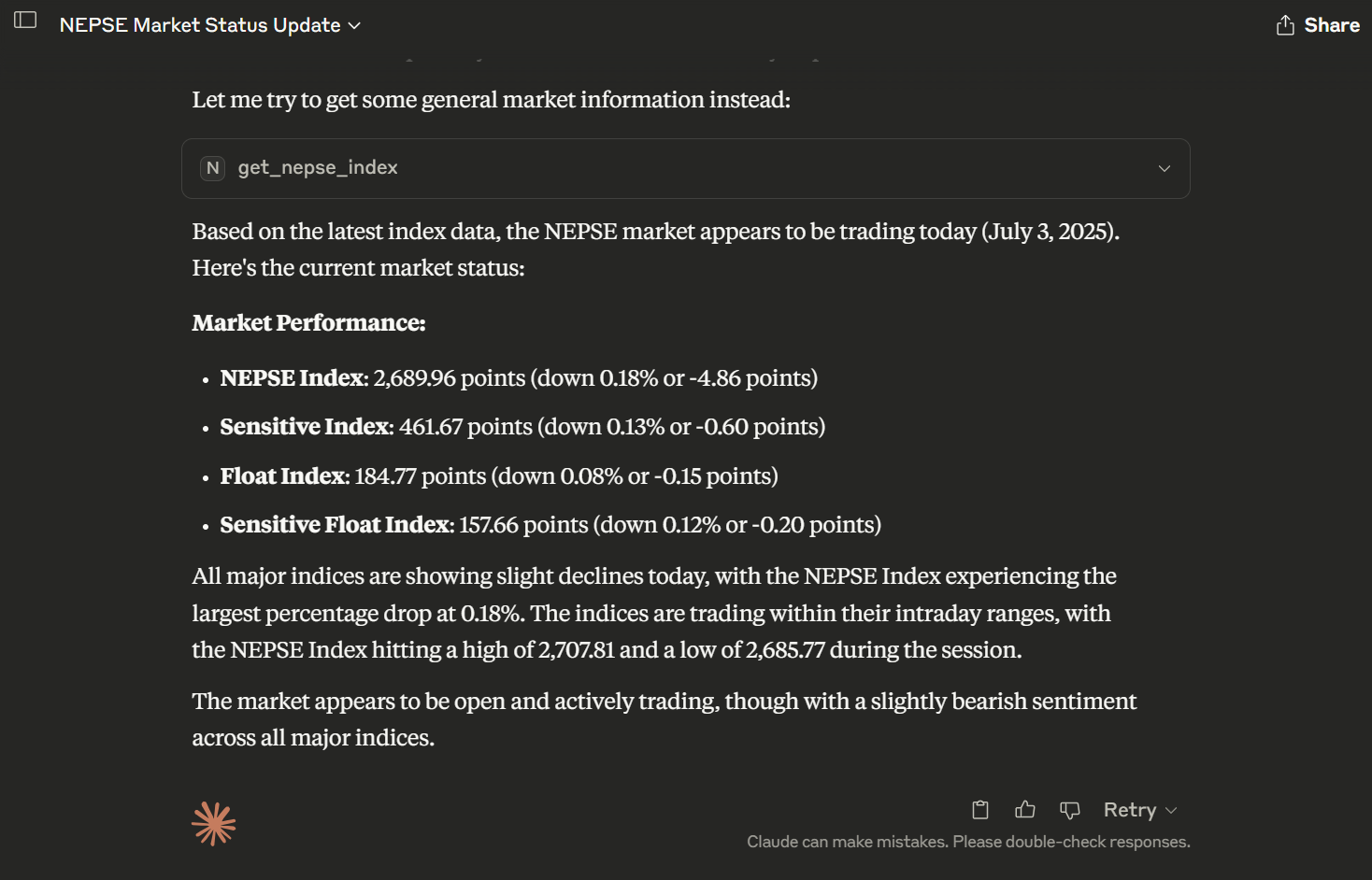
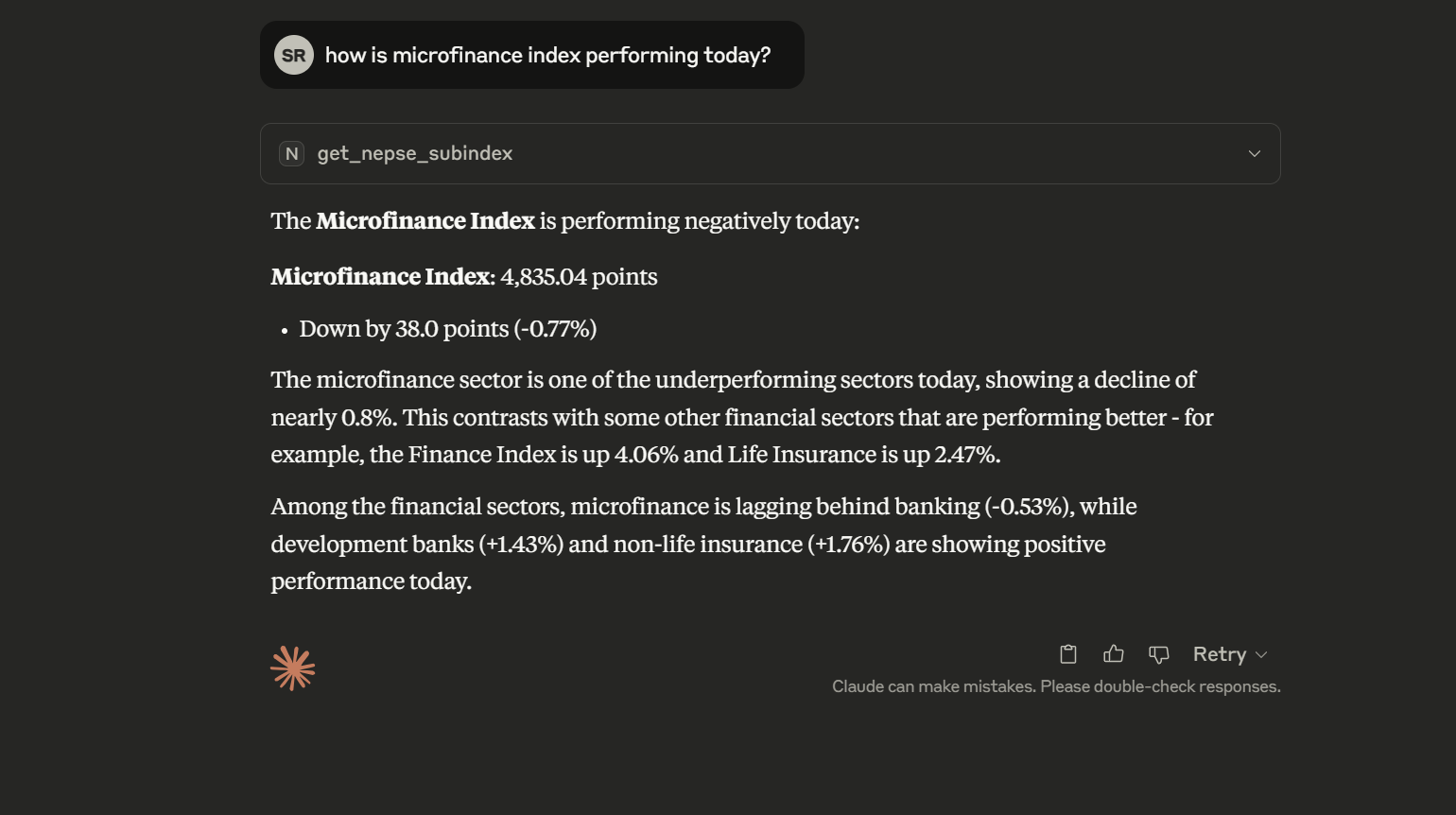
Here are some examples of the MCP server in action:
Stock Analysis
Market Depth
NEPSE Index
Sub-indices
Local (for Claude Desktop, stdio):
In your mcp_server.py, ensure you start the server with stdio transport for local integration:
if __name__ == "__main__":
    mcp.run(transport="stdio")
Remote (HTTP, for hosted or networked use):
To run the MCP server as a remote HTTP service (e.g., for network/hosted access):
if __name__ == "__main__":
    mcp.run(transport="http", host="0.0.0.0", port=PORT)
Install uv globally (required for Claude Desktop to find it):
curl -LsSf https://astral.sh/uv/install.sh | sh
powershell -ExecutionPolicy ByPass -c "irm https://astral.sh/uv/install.ps1 | iex"
Configure Claude Desktop
Add the following to your claude_desktop_config.json (adjust the path to your mcp_server.py):
{
  "mcpServers": {
    "nepseapi-mcp-server": {
      "command": "uv",
      "args": [
        "run",
        "--with", "fastmcp",
        "--with", "requests",
        "--with", "pydantic",
        "python",
        "C:/Users/Admin/Desktop/Work/NepseAPI/mcp_server.py"
      ]
    }
  }
}
Restart Claude Desktop
The AI can now use tools like:
get_market_summary - Get current market overviewTest MCP Server:
python test_mcp.py
Instead of setting up locally, you can use the free hosted service with rate limits:
REST API:
# Use hosted REST API
curl "https://nepseapi.surajrimal.dev/health"
curl "https://nepseapi.surajrimal.dev/Summary"
curl "https://nepseapi.surajrimal.dev/validate/stock/NABIL"
WebSocket Connection:
// Connect to hosted WebSocket
const ws = new WebSocket('wss://nepseapiws.surajrimal.dev/');
ws.onmessage = (event) => console.log(JSON.parse(event.data));
MCP Server for Claude Desktop:
{
  "mcpServers": {
    "nepseapi-mcp-server": {
      "command": "uv",
      "args": [
        "run",
        "--with", "fastmcp",
        "--with", "requests",
        "--with", "pydantic",
        "path\\to\\mcp_server.py"
      ]
    }
  }
}
⚠️ Rate Limits Apply: The hosted service has reasonable rate limits to ensure fair usage. Please do not abuse the free service.
🛑 Hosted Service Reliability Notice:
# Build the image
docker build -t nepseapi .

# Run the container
docker run -p 8000:8000 -p 5555:5555 -p 8080:8080 nepseapi
# Pull and run from Docker Hub
docker run -p 8000:8000 -p 5555:5555 -p 8080:8080 -p 9000:9000 surajrimal/nepseapi:latest
Use the provided docker-compose.yml for easy orchestration:
# Start all services
docker-compose up -d

# View logs
docker-compose logs -f

# Stop services
docker-compose down
The Docker Compose setup includes:
Base URL: http://localhost:8000
Note: All endpoints with stock symbols or index names include automatic validation with helpful error messages and suggestions. Rate limiting is applied to prevent abuse.
And many more endpoints available at the root URL (/).
The API includes built-in rate limiting to prevent abuse and ensure fair usage across all services.
HTTP responses include rate limiting information:
X-RateLimit-Limit: 60
X-RateLimit-Remaining: 45
X-RateLimit-Reset: 1703123456
X-RateLimit-Category: market_data
When rate limits are exceeded:
HTTP API (429 status):
{
  "error": "Rate limit exceeded",
  "message": "Too many requests. Try again in 30 seconds.",
  "limit": 60,
  "reset_time": 1703123456
}
WebSocket:
{
  "error": "Rate limit exceeded for messages",
  "limit": 100,
  "remaining": 0,
  "reset_time": 1703123456
}
MCP:
Rate limit exceeded for MCP tool 'get_market_summary'.
Limit: 80 requests per minute. Try again in 25 seconds.
# Check rate limit statistics
curl http://localhost:8000/rate-limit/stats

# Example response
{
  "total_tracked_ips": 5,
  "active_requests_in_window": 23,
  "window_size_seconds": 60,
  "limits": {
    "default": 60,
    "validation": 120,
    "market_data": 60,
    "websocket": 100,
    "mcp": 80,
    "health": 200
  }
}
The API includes comprehensive validation for all stock symbols and index names to ensure data accuracy and provide helpful feedback.
# Validate a stock symbol
curl "http://localhost:8000/validate/stock/NABIL"

# Get suggestions for invalid symbol
curl "http://localhost:8000/validate/suggestions/stock/NABIL123"

# Validate an index name
curl "http://localhost:8000/validate/index/Banking"
Valid Symbol:
{
  "symbol": "NABIL",
  "is_valid": true,
  "suggestions": []
}
Invalid Symbol with Suggestions:
{
  "symbol": "NABIL123",
  "is_valid": false,
  "suggestions": ["NABIL", "NABBC", "NICA"]
}
For detailed information about the validation system, see VALIDATION_SUMMARY.md.
The MCP server provides the following tools for AI integration, with endpoint-level caching (10-minute TTL) for faster repeat queries:
For more details on how to use these tools, please refer to MCP_USAGE.md.
License Compliance: All dependencies are used under their respective open-source licenses (MIT, Apache 2.0, etc.)
# Test local REST API endpoints
curl http://localhost:8000/health

# Test local validation endpoints
curl http://localhost:8000/validate/stock/NABIL

# Test hosted service
curl https://nepseapi.surajrimal.dev/health

# Test MCP server functionality (local)
python test_mcp.py

# Run with verbose output
python test_mcp.py --verbose

# Test stock map update functionality
python test_update.py

# Test rate limiting functionality
python test_rate_limiting.py
The project includes an automated system to keep the stock symbol database current as NEPSE adds new stocks.
stockmap.json.github/workflows/update-stock-map.ymlupdateStocksMap.py# Start the API server first
python server.py
# In another terminal, run the update script
python updateStocksMap.py
# With verbose logging
python updateStocksMap.py --verbose
/SecurityList and /SectorScrips endpointsThe update script ensures data consistency and provides detailed logging for troubleshooting.
This project is licensed under the MIT License - see the LICENSE file for details.
This project uses an unofficial API client for NEPSE and various open-source libraries. All dependencies must be used in accordance with their respective licenses and terms of service.
No Maintenance Guarantee: The author provides this project "as-is" with NO obligation for future maintenance, updates, or bug fixes.
Bug Reports & Issues:
Author's Commitment:
Recommended Approach:
The project supports multiple deployment configurations:
This software is provided "AS IS" without warranty of any kind. The author makes no representations or warranties regarding:
The author shall NOT be liable for:
By using this software, you acknowledge and agree that:
For official, licensed, and commercial-grade market data, please contact:
For any legal concerns, compliance questions, or takedown requests:
This project is not affiliated with, endorsed by, or connected to the Nepal Stock Exchange (NEPSE) or any official financial institutions.
This project depends upon and is heavily inspired by NepseUnofficialApi. Thanks to the author basic-bgnr for open sourcing the project.
Unlock Nepal Stock Exchange (NEPSE) data with this powerful unofficial API. Features REST, WebSocket, and a first-of-its-kind Model Context Protocol (MCP) server, enabling AI models like Claude to per
總覽
Unlock Nepal Stock Exchange (NEPSE) data with this powerful unofficial API. Features REST, WebSocket, and a first-of-its-kind Model Context Protocol (MCP) server, enabling AI models like Claude to perform live market analysis with over 20 specialized tools. Strictly for educational and non-commercial use.
工具
尚無工具清單。遠端伺服器會在首次健康檢查後取得工具清單。
常見問題
在本頁複製適用於 Cursor、Claude Desktop、Claude Code 或 VS Code 的 stdio 設定。它使用發布者的安裝方式,而不是 PlugMCP 代理伺服器。
這筆記錄未列出必要的環境變數。
NepseAPI Unofficial 透過 stdio 在本機執行。
上次檢查時間:2026-10-28。 Unlock Nepal Stock Exchange (NEPSE) data with this powerful unofficial API. Features REST, WebSocket, and a first-of-its-kind Model Context Protocol (MCP) server, enabling AI models like Claude to perform live market analysis with over 20 specialized tools. Strictly for educational and non-commercial use.