接入你的智能体
從發布者安裝。不是 PlugMCP 端點。
遠端 URL 還是本機指令? 兩種安裝方式的差異
An MCP-Server that reads the contents of Python packages. This Server allows Large Language Models (LLMs) and other AI Agents to inspect the contents of Python packages in a specified environment.
pypreader-mcp acts as a bridge between AI models and the local Python environment. By exposing a set of tools via MCP, it enables AI to programmatically browse installed packages, view their file structures, and read their source code. This is useful for tasks such as code analysis, dependency checking, and automated programming assistance.
When I use AI-integrated programming IDEs like Cursor or Trae, I always find that the currently used model is unaware of the third-party libraries I need.
But sometimes they pretend to know and seriously generate a bunch of indescribable stuff; other times they search the internet, but the results are mostly not good, making it hard to find any useful information.
So I created this MCP service. It can read documentation from the official website pypi.org or read source code from the site-packages environment corresponding to your Python, allowing for a more direct understanding of the contents of the third-party libraries you want to use.
This Server provides the following tools to MCP clients:
get_pypi_description(package_name: str): Retrieve the official description of a package from PyPI.get_package_directory(package_name: str): List the entire file and directory structure of a specified installed package.get_source_code_by_path(package_path: str): Retrieve the complete source code of a specific file within a package.get_source_code_by_symbol(package_path: str, symbol_name: str): Get the definition (code snippet) of a specified symbol (function, class, etc.).This tool is designed to act as an MCP Server for use in AI-based environments such as Cursor or Trae.
In the MCP Server configuration of your AI environment, add a new Server with the following settings. This allows the AI to run the service directly from its Git repository using uvx.
{
  "mcpServers": {
    "PypReader-MCP": {
      "command": "uvx",
      "args": [
        "--from",
        "git+https://github.com/zakahan/pypreader-mcp.git",
        "pypreader-mcp"
      ],
      "env": {
        "CURRENT_PYTHON_PATH": "<your-python-path>",
        "CURRENT_LOGGING_LEVEL": "INFO"
      }
    }
  }
}
When configuring the MCP Server in your AI environment, you can specify the following env parameters:
CURRENT_PYTHON_PATH: Specifies the path to the Python executable of the target package installation environment. If not provided, it defaults to the Python executable running the Server. You can find the correct path by activating your project's Python environment and running which python in the terminal.CURRENT_LOGGING_LEVEL: Sets the logging level of the Server. Options are DEBUG, INFO, WARNING, ERROR, CRITICAL. The default value is INFO.If you use a Python virtual environment to configure your Python project, you typically need to modify python_path as needed to switch to your specified Python environment.
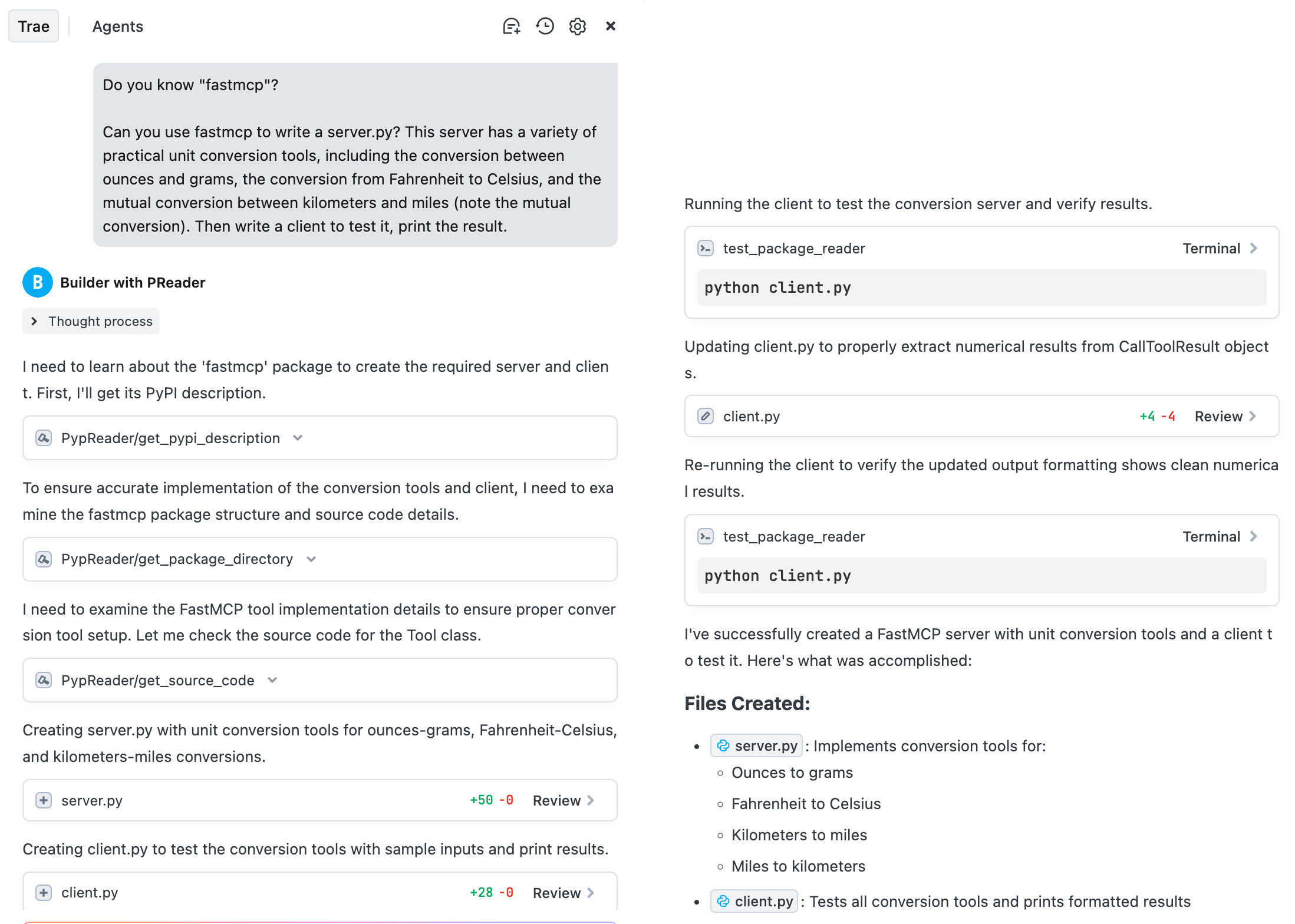
Take Trae as an example. As of now (2025-07-02), the doubao-seed-1.6 model is unaware of the fastmcp package (in fact, most models don't recognize it either). Under normal circumstances, it would either pretend to know and output a bunch of messy, indescribable incorrect content (even thinking I'm talking about FastAPI), or perform a clumsy search and find all sorts of disorganized information.
This time, I created a Trae agent equipped with this project's mcp-server. The result is as follows: Trae can understand my project and then write a fastmcp service to complete my task.
This is the entire process of Trae completing my requested task
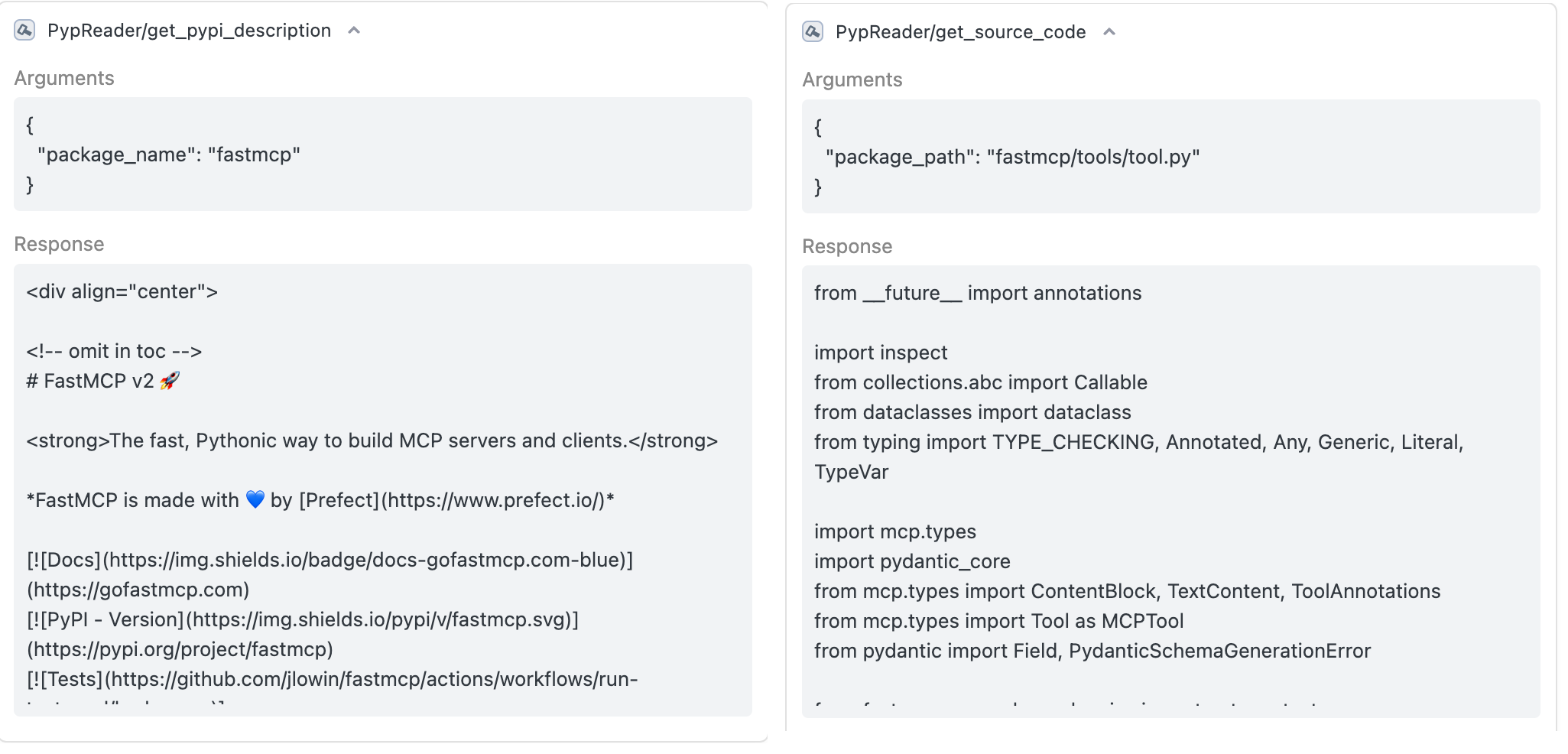
These are the specific details of the tool calls
This project is licensed under the MIT License. For details, please refer to the LICENSE file.
get_source_code_by_symbol to use reading and writing temporary files instead of stdio to support the Windows platform.get_source_code_by_symbol tool to fix the issue where it couldn't read classes or functions belonging to sub-packages.python-package-name is inconsistent with the actual path, e.g., the package name google-adk has an actual path of google/adk and is actually imported as google.adkThis is an MCP service that assists in AI programming. It can read the source code of third - party libraries and their basic description documents, etc. It is very suitable for use with AI IDEs. 这是个辅
總覽
This is an MCP service that assists in AI programming. It can read the source code of third - party libraries and their basic description documents, etc. It is very suitable for use with AI IDEs. 这是个辅助AI编程的MCP服务,能够读取第三方库的源代码,读取第三方库的基本描述文档之类的,非常适合搭配AI IDE使用。
工具
尚無工具清單。遠端伺服器會在首次健康檢查後取得工具清單。
常見問題
在本頁複製適用於 Cursor、Claude Desktop、Claude Code 或 VS Code 的 stdio 設定。它使用發布者的安裝方式,而不是 PlugMCP 代理伺服器。
這筆記錄未列出必要的環境變數。
Pypreader 透過 stdio 在本機執行。
上次檢查時間:2026-10-28。 This is an MCP service that assists in AI programming. It can read the source code of third - party libraries and their basic description documents, etc. It is very suitable for use with AI IDEs. 这是个辅助AI编程的MCP服务,能够读取第三方库的源代码,读取第三方库的基本描述文档之类的,非常适合搭配AI IDE使用。
