AceDataCloud Agent Skills
Agent Skills for AceDataCloud AI services — music, image, video generation, LLM chat, web search, and more.
接入你的智能体
发布者自己的命令。不是 PlugMCP 端点。
用我们的密钥与日志托管一份副本。
npx -y @acedatacloud/[email protected]Claude Code 没有针对本地命令的安装链接。复制下方命令并在终端中运行。
claude mcp add acedatacloud-skills -- npx -y @acedatacloud/skills@2026.1116.325001在终端中运行。
{ "mcpServers": { "acedatacloud-skills": { "command": "npx", "args": [ "-y", "@acedatacloud/[email protected]" ] } }}claude_desktop_config.json
远程 URL 还是本机命令? 两种安装方式的区别
来自发布者
Agent Skills for AceDataCloud AI services — music, image, video generation, LLM chat, web search, and more.
Agent Skills for AceDataCloud AI services — music, image, video generation, LLM chat, web search. Compatible with Claude Code, GitHub Copilot, Gemini CLI, OpenAI Codex, and 30+ AI coding agents.
Compatible with 30+ AI coding agents via the agentskills.io open standard: Claude Code, GitHub Copilot, Gemini CLI, OpenAI Codex, Cursor, Roo Code, Goose, and more.
Choose the service you want, then install that Skill only. Each integration is maintained by Ace Data Cloud and uses your Ace API key; it is not published by the model or service vendor.
For example, install Suno into your Codex project:
npx --yes [email protected] add acedatacloud/skills --skill suno-music -a codex --yes
npx --yes [email protected] list
Replace codex with your supported agent, such as claude-code or cursor. For Codex the files are copied to .agents/skills/suno-music/; start a fresh assistant session. No ClawHub account, OpenClaw installation or paired MCP server is required for this path. Installation itself does not generate media.
Follow the selected service's guide: Ace registration/sign-in → Applications / General application → check service access, balance and current price → copy or create a dedicated API key → make it available to the assistant process → submit once and query the same task ID. The guides include real redacted Ace key-management images and service-specific request examples. A Skill cannot configure an environment variable or load .env automatically; follow your assistant's environment/secret settings. Never paste a key into a prompt.
The optional acedatacloud account Skill can read public catalog/pricing without a key. Account-resource reads such as balance use the separate ACEDATACLOUD_PLATFORM_TOKEN; service generation uses ACEDATACLOUD_API_TOKEN. Neither the account Skill nor a model-provider configuration is a prerequisite for the five service Skills.
This example uses Suno. The same API-key steps apply to the other AceDataCloud image, video, music, chat, search, and face Skills. A ClawHub account installs Skills; an AceDataCloud API key authorizes API calls. They are separate credentials.
Open Suno on ClawHub and check that the publisher is @acedatacloud. Install the ClawHub CLI if needed, then run:
npm install -g clawhub
clawhub install @acedatacloud/suno
clawhub list
Start a new OpenClaw session so it loads the installed Skill. The ClawHub names are shorter than the folders in this repository: for example, @acedatacloud/suno corresponds to skills/suno-music, and @acedatacloud/nano-banana to skills/nano-banana-image. For other agents, use Quick Install below.
New account? Register and sign in first. If the Applications page has no General application yet, choose Initialize General Application, then continue with the key steps below.
/suno/audios and /suno/tasks.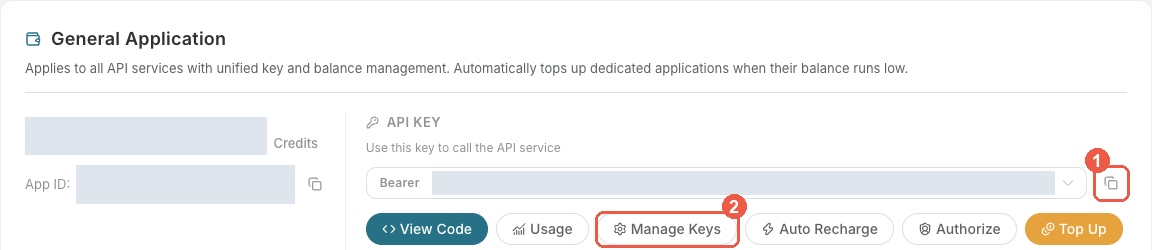
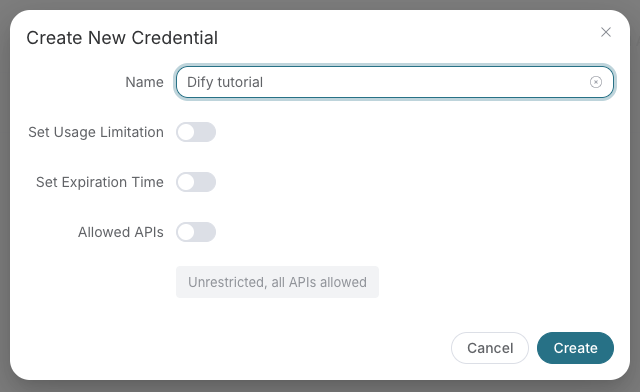
Copy the key value only. Do not include Bearer or quotation marks when pasting into a credential field. A platform-management token beginning with platform- is for the account-management Skill, not for generation/search requests to api.acedata.cloud.
Put this line in ~/.openclaw/.env on the machine running the OpenClaw Gateway, replacing the placeholder with your key:
ACEDATACLOUD_API_TOKEN=your_api_key_here
OpenClaw loads this global .env file even when its Gateway runs as a service. Restart the Gateway and start a fresh session after changing it. Keep the file private (chmod 600 ~/.openclaw/.env) and never commit it or paste the key into a chat. For a direct terminal-only test, use export ACEDATACLOUD_API_TOKEN="your_api_key_here" in that terminal instead.
Ask your agent: “Use the Suno Skill to make an instrumental piano melody for a sunrise.” Or run this example after checking the current Suno price; generation is billable:
curl -X POST https://api.acedata.cloud/suno/audios \
  -H "Authorization: Bearer $ACEDATACLOUD_API_TOKEN" \
  -H "Content-Type: application/json" \
  -d '{"model":"chirp-v6","prompt":"A gentle instrumental piano melody for a sunrise, no vocals.","instrumental":true,"async":true}'
If the response gives a task ID, copy it and query that same task until it succeeds or fails:
curl -X POST https://api.acedata.cloud/suno/tasks \
  -H "Authorization: Bearer $ACEDATACLOUD_API_TOKEN" \
  -H "Content-Type: application/json" \
  -d '{"id":"YOUR_TASK_ID"}'
Use the audio URL from the completed result. Do not submit the generation request again just because a task is pending; that creates another billable task. Other Skills have their own request examples and task endpoints in their SKILL.md files.
For more detail, see the authentication guide and task-polling guide. Support: [email protected].
The general ClawHub API guide is the entry point for agents that have not selected a service yet.
These skills drive third-party connectors users wire up at studio.acedata.cloud/console/connectors. Each declares the OAuth / BYOC connection it needs in connections: frontmatter; the aichat2 runtime injects the matching access token into the sandbox before the skill's Bash calls run.
The content-fanout playbook prepares channel-specific drafts from a canonical source and uses only explicitly selected, connected publishing skills. It requires human review and does not provide unattended bulk posting.
AceDataCloud API Skills need an API key from Applications. Follow the first-run steps for the exact UI path, key restrictions, OpenClaw environment setup, and a complete example. Local-only Skills such as onepage-pdf and apple-notes do not use an AceDataCloud API key; the acedatacloud account-management Skill uses a separate platform token.
One command to install skills into your project — works with all agents:
# Install all skills (for any agentskills.io-compatible agent)
npx skills add acedatacloud/skills --skill '*' --yes

# Install specific skills only
npx skills add acedatacloud/skills --skill suno-music --skill flux-image --yes
The skills CLI auto-detects your agent and installs to the correct path.
Option A: skills CLI (recommended)
# Install all skills for Claude Code
npx skills add acedatacloud/skills --skill '*' -a claude-code --yes

# Install specific skills
npx skills add acedatacloud/skills --skill suno-music -a claude-code --yes
Skills are symlinked into .claude/skills/ and auto-discovered by Claude Code.
Option B: Plugin Marketplace
/plugin marketplace add acedatacloud/skills
/plugin install acedatacloud-ai-media@acedatacloud-skills
/plugin install acedatacloud-ai-tools@acedatacloud-skills
Option C: npm package
npx @acedatacloud/skills install --target .claude/skills
Option D: Manual copy
git clone https://github.com/AceDataCloud/Skills.git
cp -r Skills/skills/* .claude/skills/
npx skills add acedatacloud/skills --skill '*' -a github-copilot --yes
npx skills add acedatacloud/skills --skill '*' -a gemini-cli --yes
npx skills add acedatacloud/skills --skill '*' -a codex --yes
Follow the English setup guide or 中文指南 for the current stable version: import a secret-free Suno MCP example, add your Ace key privately, sync tools, build a minimal Agent conversation, and query the same task ID to its final audio URL. The guide maps 17 named services to their reusable Skills.
npx skills add acedatacloud/skills --skill '*' -a cursor --yes
npx skills add acedatacloud/skills --skill '*' -a roo --yes
npx skills add acedatacloud/skills --skill '*' -a goose --yes
npx skills add acedatacloud/skills --skill '*' -a windsurf --yes
npx skills add acedatacloud/skills --skill '*' -a cline --yes
The skills CLI supports 40+ agents. Use npx skills add --help to see all options, or install to the universal .agents/skills/ path:
npx skills add acedatacloud/skills --skill '*' --yes
Skills provide knowledge (when to use, parameters, gotchas). MCP servers provide tools (executable functions the agent can call). Together they give the best experience.
Using hosted MCP endpoints in Claude Code (no local install needed):
Merge into the project's .mcp.json, preserve existing services, and start Claude Code from a terminal with ACEDATACLOUD_API_TOKEN set. Review the service approval prompt, then run /mcp to verify connection and loaded tools. See shared MCP setup for Amp's configuration and approval checks.
{
  "mcpServers": {
    "suno": {
      "type": "http",
      "url": "https://suno.mcp.acedata.cloud/mcp",
      "headers": {
        "Authorization": "Bearer ${ACEDATACLOUD_API_TOKEN}"
      }
    }
  }
}
Ask your AI agent:
"Generate a lo-fi hip hop track with rain sounds using Suno"
The agent will:
suno-music skill to understand the APIWe welcome contributions! To add a new skill:
skills/ matching the skill nameSKILL.md following the Agent Skills specification../_shared/authentication.md, ../_shared/async-tasks.md, ../_shared/mcp-servers.md) instead of duplicating common sectionsNote: .agents/skills/ and .github/skills/ are symlinks to skills/ — do not modify files via those paths.
The existing ClawHub-only @acedatacloud/api-guide listing is maintained in clawhub/api-guide/SKILL.md. Its general onboarding instructions are kept separate from the service Skills in skills/.
For a reviewed update to an existing listing, follow the ClawHub maintenance guide. The publishing helper previews one explicit listing by default and pins its source commit.
PlatformBackend ecosystem.py is the only scheduled coordinator.
One daily Kubernetes Job reviews Backend docs and API changes with Claude Code,
updates existing files, and creates or updates one reviewable PR per repository.
It never merges PRs or duplicates the Backend guide tree. Normal CI and review
remain required; publication and sub-repository mirroring run after merge.
Agent Skills for AceDataCloud AI services — music, image, video generation, LLM chat, web search. Compatible with Claude Code, GitHub Copilot, Gemini CLI, OpenAI Codex, and 30+ AI coding agents.
{ "mcpServers": { "acedatacloud-skills": { "command": "npx", "args": [ "-y", "@acedatacloud/[email protected]" ] } }}工具
暂无工具列表。远程服务器在首次健康检查后会获得工具列表。
常见问题
在本页复制适用于 Cursor、Claude Desktop、Claude Code 或 VS Code 的 stdio 配置。它使用发布者的安装方式,而不是 PlugMCP 代理。
此记录未列出必需的环境变量。
@acedatacloud/skills 通过 stdio 在本地运行。
上次检查时间:2026-11-17。 Agent Skills for AceDataCloud AI services — music, image, video generation, LLM chat, web search. Compatible with Claude Code, GitHub Copilot, Gemini CLI, OpenAI Codex, and 30+ AI coding agents.
