AdMob MCP Server
English | 한국어
接入你的智能体
发布者自己的命令。不是 PlugMCP 端点。
用我们的密钥与日志托管一份副本。
npx -y [email protected]Claude Code 没有针对本地命令的安装链接。复制下方命令并在终端中运行。
claude mcp add admob-mcp-server -- npx -y admob-mcp-server@0.2.0在终端中运行。
{ "mcpServers": { "admob-mcp-server": { "command": "npx", "args": [ "-y", "[email protected]" ] } }}claude_desktop_config.json
远程 URL 还是本机命令? 两种安装方式的区别
来自发布者
English | 한국어
MCP server for the Google AdMob API — apps, ad units, mediation, and revenue reports
Ask your AI assistant about your AdMob apps and earnings — in plain language:
- "How much did my apps earn in the last 7 days, broken down by country?"
- "Which mediation ad source had the best eCPM this month?"
- "Compare the RPM of my banner vs. rewarded ad units."
- "List my apps and their ad units."
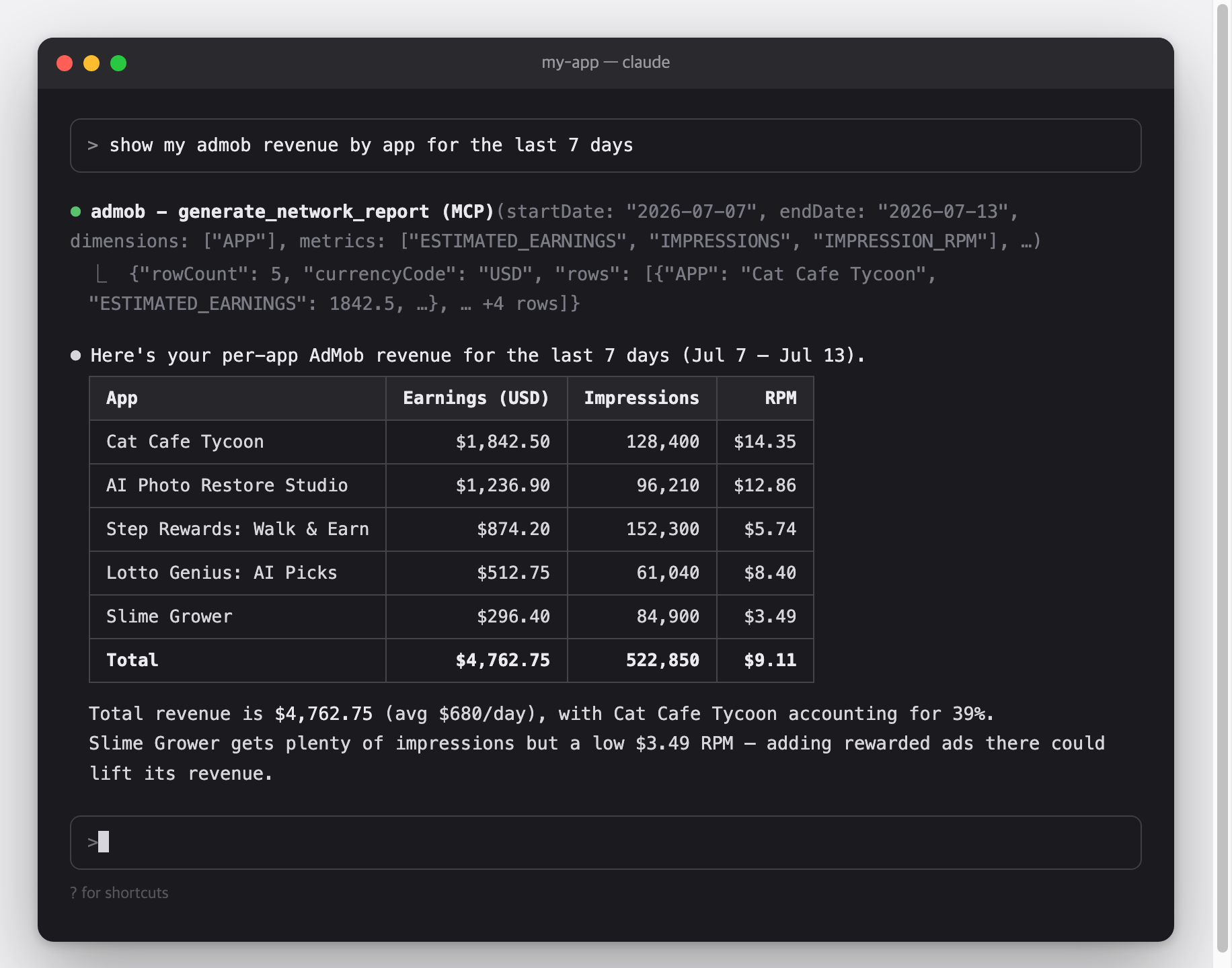
This is a Model Context Protocol (MCP) server for the Google AdMob API.
It works with Claude Code, Claude Desktop, Cursor, Gemini CLI, and any other MCP-capable AI client.
flowchart LR
    C["MCP client<br/>Claude Code · Claude Desktop · Cursor · Gemini CLI"]

    subgraph S["admob-mcp-server — runs on your machine"]
        direction TB
        T["9 read-only tools in 5 toolsets<br/>accounts · apps · adunits · reports · mediation<br/>(filtered by --toolsets)"]
        A["Credential resolver<br/>env vars → token.json → gcloud ADC"]
        R["Report flattener<br/>chunk stream → rows · micros → currency"]
    end

    G["Google AdMob API<br/>v1beta"]

    C <-->|"MCP over stdio"| T
    T --> A
    A <-->|"OAuth 2.0 / HTTPS"| G
    G -.->|"report chunks"| R
    R -.-> T
Credentials and revenue data travel only between your machine and Google — there is no third-party server in between.
--toolsets reports,accountsnpx admob-mcp-server auth), environment-variable refresh token, or gcloud Application Default CredentialsOne-time setup, roughly 10 minutes:
node --version; if missing, install from nodejs.orgWhy is this needed?
The AdMob API has no simple API keys — Google requires every program that accesses your data to be registered as an "OAuth app".
Here you register a personal one that only you will use.
It's free and needs no billing setup.
admob-mcp), and your email as the support/contact email[!WARNING] While the consent screen is in Testing mode, Google expires sign-ins after 7 days, so you'll need to re-run the sign-in weekly.
To stop that, publish the app (Audience → Publish app).
Publishing for your own use doesn't require Google's verification — you'll just see an "unverified app" warning during sign-in, which is expected.
Move the JSON file you downloaded to where the server looks for it, then run the sign-in command:
mkdir -p ~/.admob-mcp
mv ~/Downloads/client_secret_*.json ~/.admob-mcp/oauth_client.json

npx admob-mcp-server auth
(On Windows, move the file to C:\Users\<you>\.admob-mcp\oauth_client.json in Explorer, then run the npx command.)
Your browser opens.
Pick the Google account that owns your AdMob account and allow access.
If you see a "Google hasn't verified this app" warning, that's your own app from Part 1 — click "Continue".
When the terminal prints Setup complete, your sign-in is saved to ~/.admob-mcp/token.json and reused from then on.
The sign-in requests the admob.readonly and admob.report scopes — read access only.
What the auth command does:
sequenceDiagram
    autonumber
    participant T as Terminal
    participant S as admob-mcp-server
    participant B as Browser
    participant G as Google

    T->>S: npx admob-mcp-server auth
    S->>S: read ~/.admob-mcp/oauth_client.json
    S->>B: open consent URL (loopback redirect, random port)
    B->>G: sign in & allow scopes
    G-->>S: authorization code → refresh token
    S->>S: save ~/.admob-mcp/token.json (reused for every later call)
If you already have a refresh token, no files are needed:
export GOOGLE_CLIENT_ID="....apps.googleusercontent.com"
export GOOGLE_CLIENT_SECRET="..."
export GOOGLE_REFRESH_TOKEN="..."
The same pattern Google's official Analytics/Ads MCP servers use:
gcloud auth application-default login \
  --scopes=https://www.googleapis.com/auth/admob.readonly,https://www.googleapis.com/auth/admob.report,https://www.googleapis.com/auth/cloud-platform \
  --client-id-file=path/to/oauth_client.json
Credential resolution order: environment variables → token.json (from auth) → ADC.
Pick your client below.
MCP servers are loaded when the client starts, so restart the client after adding the config.
Claude Code
claude mcp add admob -- npx -y admob-mcp-server
Verify with claude mcp list — you should see admob: ... - ✔ Connected.
Claude Desktop — open Settings → Developer → Edit Config, which opens claude_desktop_config.json (macOS: ~/Library/Application Support/Claude/, Windows: %APPDATA%\Claude\), and add:
{
  "mcpServers": {
    "admob": {
      "command": "npx",
      "args": ["-y", "admob-mcp-server"]
    }
  }
}
Restart the app; the admob tools appear in the tools menu of the chat input.
Cursor — add the same mcpServers block to ~/.cursor/mcp.json, then check Settings → MCP shows admob as enabled.
Gemini CLI — add the same mcpServers block to ~/.gemini/settings.json, then check with /mcp inside the CLI.
[!TIP] If you used the environment-variable sign-in, pass the variables through your client's
envblock (Claude Code: repeat--env KEY=valuebefore--; JSON configs: add an"env": { ... }object next to"args").
You don't call tools yourself — just ask in plain language and the assistant picks the right tools.
Some starters:
Most clients ask for your permission before each tool call, so nothing runs without your approval.
All configuration is optional — the defaults work for a single AdMob account.
CLI flags take precedence over environment variables.
Flags go after the command in your client config, e.g. npx -y admob-mcp-server --toolsets reports.
A "tool" is a function the AI assistant can call on your behalf.
Tools are grouped into five toolsets; all are enabled by default:
All tools are read-only and require the admob.readonly / admob.report scopes.
The AdMob API does expose write methods (adUnits.create, apps.create, the whole mediationGroups resource), but Google marks each of them limited access:
This method has limited access. If you see a 403 permission denied error, please reach out to your account manager for access.
A normal publisher account gets PERMISSION_DENIED from all of them even with a valid admob.monetization token — and the same wall blocks mediationGroups.list and adUnitMappings.list, which are reads. Since these tools cannot work without an allowlisted account, they are not shipped: an assistant that sees them will try them and fail. Create ad units and mediation groups in the AdMob console instead.
All report tools take startDate / endDate (YYYY-MM-DD), metrics, and optional dimensions, dimensionFilters, sortConditions, maxReportRows (default 1000), currencyCode.
Responses are flat tables; monetary metrics are converted from micros to currency units.
Valid dimensions/metrics per report are exposed as MCP resources (reference documents the assistant can read): admob://reference/network-report-spec, mediation-report-spec, campaign-report-spec.
Mediation groups and ad unit mappings are not covered — see Why there are no write tools.
Prompts are ready-made analysis requests.
Your client surfaces them as slash commands or a prompt picker (e.g. /top_performing_apps in Claude Code).
All take an optional days argument:
~/.admob-mcp/oauth_client.json (your OAuth app) and ~/.admob-mcp/token.json (your sign-in).~/.admob-mcp/token.json, and optionally revoke the app's access at myaccount.google.com/permissions.command not found: npx / spawn npx ENOENTclaude mcp list, Gemini CLI: /mcp), and make sure npx -y admob-mcp-server runs in a terminal without errors.invalid_grant / "token has been expired or revoked"npx admob-mcp-server auth.access_denied during browser sign-innpx admob-mcp-server auth and pick the account that owns your AdMob account in the account chooser.PERMISSION_DENIEDadmob.readonly and admob.report — re-run npx admob-mcp-server auth to refresh itRESOURCE_EXHAUSTEDADMOB_ACCOUNT=pub-... (find IDs with list_accounts).git clone https://github.com/ParkSangGwon/admob-mcp-server.git
cd admob-mcp-server
npm install
npm test
npm run build
# debug with the MCP Inspector
npm run inspect
To run a local build in a client, point it at the built entry instead of npx: node /path/to/admob-mcp-server/dist/index.js.
Releases: pushing a v* tag runs CI and publishes to npm with provenance (see .github/workflows/release.yml).
Issues and pull requests are welcome.
For larger changes, please open an issue first to discuss the direction.
Make sure npm run lint, npm run format:check, and npm test pass.
MCP server for the Google AdMob API — apps, ad units, mediation, and revenue reports
{ "mcpServers": { "admob-mcp-server": { "command": "npx", "args": [ "-y", "[email protected]" ] } }}工具
暂无工具列表。远程服务器在首次健康检查后会获得工具列表。
常见问题
在本页复制适用于 Cursor、Claude Desktop、Claude Code 或 VS Code 的 stdio 配置。它使用发布者的安装方式,而不是 PlugMCP 代理。
此记录未列出必需的环境变量。
Admob 通过 stdio 在本地运行。
上次检查时间:2026-11-14。 MCP server for the Google AdMob API — apps, ad units, mediation, and revenue reports
