Matrix Hub
Welcome to Matrix Hub, your all‑in‑one AI agent marketplace and installer!
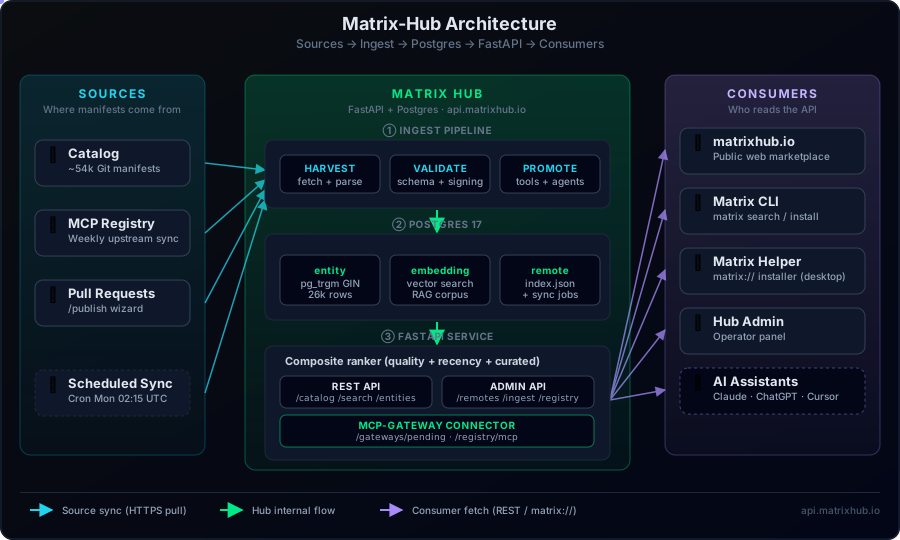
Matrix Hub is your production‑ready catalog & installer for AI agents, custom tools, and MCP servers. It ingests well‑structured manifests from remote catalogs (e.g., GitHub), offers lightning‑fast search (lexical + semantic hybrid), safely computes and executes install plans (pip/uv, Docker, Git, ZIP), and can automatically register everything with your MCP Gateway.
What is Matrix Hub?
Imagine PyPI for intelligent agents and custom tools—Matrix Hub ingests curated manifests from GitHub (or any remote catalog), lets you find the perfect agent in seconds using hybrid text + semantic search, and then safely installs everything into your project (pip, Docker, Git, or ZIP) with a single command. It even auto‑registers new services with your MCP Gateway, writes scaffolding adapters, and produces a lockfile so your builds are rock‑solid.
flowchart TD
    A[Agent Authors<br>manifests] --> B[GitHub Catalog]
    B --> C[Matrix Hub<br>catalog & install]
    C --> D[CLI & SDK<br>agent‑creator]
    C --> E[Agent Generator<br>planning_agent]
    D & E --> F[Install Agents/Tools]
    F --> G[MCP Gateway<br>runtime registry]
    G --> H[Your App<br>invokes agents]
Ready to discover, install, and manage enterprise‑grade AI skills? Explore the full documentation to get started!
Official Search API
Matrix Hub exposes a stable, public endpoint that returns the Top‑5 best matches for a query across agents, tools, and MCP servers. This contract is additive and safe for production.
Endpoint
GET /catalog/search
Common parameters
q(string, required) – user intent, e.g.summarize pdfstype(enum: agent|tool|mcp_server|any, default any) – filter by type;anysearches all.limit(int, default 5) – maximum items returned. Public API caps to 5.with_snippets(bool, default false) – include a short snippet (first ~200 chars of summary/description) when available.
Advanced parameters (optional): mode (keyword|semantic|hybrid), with_rag (bool), rerank (none|llm), and CSV filters capabilities, frameworks, providers.
Response
Each item includes ranking scores and convenience links for import/install:
{
  "items": [
    {
      "id": "tool:[email protected]",
      "type": "tool",
      "name": "hello",
      "version": "0.1.0",
      "summary": "Return greeting",
      "capabilities": ["hello"],
      "frameworks": ["example"],
      "providers": ["self"],
      "score_lexical": 0.81,
      "score_semantic": 0.74,
      "score_quality": 0.90,
      "score_recency": 0.88,
      "score_final": 0.82,
      "fit_reason": null,
      "manifest_url": "https://…/hello.manifest.json",
      "install_url": "https://api.example.com/catalog/install?id=tool:[email protected]",
      "snippet": "Short summary snippet if with_snippets=true"
    }
  ],
  "total": 1
}
Quick start (curl)
curl -s 'https://api.example.com/catalog/search?q=extract%20pdf%20tables&type=any&limit=5&with_snippets=true' | jq
To install a selected item:
curl -s -X POST 'https://api.example.com/catalog/install' \
  -H 'Content-Type: application/json' \
  -d '{
    "id": "tool:[email protected]",
    "target": "./"
  }'
See the full API doc: Top‑5 Search API.
Deployment notes
- Set
PUBLIC_BASE_URLin your environment (e.g.,https://api.example.com). - The optional helper route
GET /catalog/manifest/{id}can redirect to external manifests whensource_urlis set. - No database migrations required.
Quick start (docker compose)
Requirements: Docker 24+, docker compose plugin.
# 1) Clone and enter the repo
git clone https://github.com/agent-matrix/matrix-hub.git
cd matrix-hub

# 2) Create .env from template and adjust if needed
cp .env.example .env
# (Optionally) set MATRIX_REMOTES to your catalog index.json URLs in .env

# 3) Build & run
docker compose up -d --build

# 4) Health check
curl -s http://localhost:443/health | jq
You should see:
{ "status": "ok" }
The app container waits for Postgres to be healthy, then starts the API. Ingest is scheduled (see INGEST_INTERVAL_MIN in .env).
Environment
All configuration is via environment variables; see .env.example for a documented template.
Key settings (common):
Security: If you set API_TOKEN, pass Authorization: Bearer <token> on protected endpoints (e.g., manual ingest). Without it, admin endpoints are disabled or open depending on route configuration.
API walk‑through
Base URL defaults to http://localhost:443.
GET /health
Liveness/readiness. Optional DB probe:
curl -s 'http://localhost:443/health?check_db=true' | jq
Returns:
{ "status": "ok", "db": "ok" }
GET /catalog/search
Hybrid search over the catalog with optional filters.
Query params
q(required) — free text querytype—agent|tool|mcp_servercapabilities— CSV, e.g.pdf,summarizeframeworks— CSV, e.g.langgraph,watsonx_orchestrateproviders— CSV, e.g.openai,watsonxmode—keyword|semantic|hybrid(default from settings)limit— default20with_rag—trueto enrich results with a short “fit_reason”rerank—none|llm(default from settings)
Example
curl -s 'http://localhost:443/catalog/search?q=summarize%20pdfs&type=agent&capabilities=pdf,summarize&limit=5&with_rag=true' | jq
Response (truncated)
{
  "items": [
    {
      "id": "agent:[email protected]",
      "type": "agent",
      "name": "PDF Summarizer",
      "version": "1.4.2",
      "summary": "Summarizes long PDF documents into concise points.",
      "capabilities": ["pdf", "summarize"],
      "frameworks": ["langgraph"],
      "providers": ["watsonx"],
      "score_lexical": 0.82,
      "score_semantic": 0.76,
      "score_quality": 0.9,
      "score_recency": 0.88,
      "score_final": 0.83,
      "fit_reason": "Matches 'summarize pdfs'; strong README snippet about legal contracts."
    }
  ],
  "total": 1
}
GET /catalog/entities/{id}
Fetch full entity details for a specific catalog ID.
Example
curl -s 'http://localhost:443/catalog/entities/agent:[email protected]' | jq
POST /catalog/install
Compute and execute an install plan (pip/uv, docker, git, zip), write adapters into your project, and (optionally) register tools/servers with MCP‑Gateway. Emits matrix.lock.json.
Body
{
  "id": "agent:[email protected]",
  "target": "./apps/pdf-bot"
}
Example
curl -s -X POST 'http://localhost:443/catalog/install' \
  -H 'Content-Type: application/json' \
  -d '{"id":"agent:[email protected]","target":"./apps/pdf-bot"}' | jq
Response (truncated)
{
  "plan": {
    "artifacts": [
      {"kind": "pypi", "command": "uv pip install --system --no-cache-dir pdf-summarizer-agent==1.4.2"}
    ],
    "adapters": [{"framework":"langgraph","template_key":"langgraph-node"}],
    "mcp_registration": {
      "tool": { "name": "pdf_summarize", "integration_type": "REST", "request_type": "POST", "url": "http://..." }
    }
  },
  "results": [
    {"step":"pypi","ok":true,"returncode":0,"elapsed_secs":5.91},
    {"step":"adapters.write","ok":true,"extra":{"count":1}},
    {"step":"gateway.register","ok":true,"extra":{"tool":{"id":"...","name":"pdf_summarize"}}},
    {"step":"lockfile.write","ok":true,"extra":{"path":"apps/pdf-bot/matrix.lock.json"}}
  ],
  "files_written": ["apps/pdf-bot/src/flows/pdf_summarizer_node.py","apps/pdf-bot/matrix.lock.json"],
  "lockfile": { "version":1, "entities":[{ "id":"agent:[email protected]", "...": "..." }] }
}
Manifests & Schemas
Catalog authors publish manifests in a separate content repo (e.g., agent-matrix/catalog) and generate an index.json.
Matrix Hub ingests those manifests on a schedule or via an admin trigger. Supported schemas (JSON Schema Draft 2020‑12):
- Agent:
schemas/agent.manifest.schema.json - Tool:
schemas/tool.manifest.schema.json - MCP Server:
schemas/mcp-server.manifest.schema.json
Minimal index.json formats accepted:
{ "manifests": ["https://.../agents/pdf/1.4.2/agent.manifest.yaml"] }
or
{ "items": [ {"manifest_url": "https://.../tool.manifest.yaml"} ] }
or
{ "entries": [ {"base_url": "https://raw.githubusercontent.com/ORG/REPO/main/", "path": "agents/pdf/1.4.2/agent.manifest.yaml"} ] }
Example agent manifest (excerpt):
schema_version: 1
type: agent
id: pdf-summarizer
name: PDF Summarizer
version: 1.4.2
description: Summarizes long PDF documents into concise points.
capabilities: [pdf, summarize]
compatibility:
  frameworks: [langgraph]
  providers: [watsonx]
artifacts:
  - kind: pypi
    spec: { package: pdf-summarizer-agent, version: "==1.4.2" }
adapters:
  - framework: langgraph
    template_key: langgraph-node
mcp_registration:
  tool:
    name: pdf_summarize
    integration_type: REST
    request_type: POST
    url: https://example.com/invoke
    input_schema: { type: object, properties: { input: { type: string } }, required: [input] }
Local development
# 1) Create a virtualenv (optional)
python3 -m venv .venv && source .venv/bin/activate

# 2) Install in editable mode
pip install -U pip
pip install -e .

# 3) Run with auto-reload
make dev
# or
uvicorn src.app:app --reload --port 443
Quality & tests
make fmt        # ruff fix + format
make lint       # ruff check
make test       # pytest -q
Where things live
src/
  app.py                # FastAPI app, routers, scheduler
  routes/               # /health, /catalog/*
  services/             # ingest, search, install, adapters, gateway client...
  models.py             # SQLAlchemy models
  schemas.py            # Pydantic DTOs
  utils/                # logging, security, etag
schemas/                # JSON Schemas for manifests
tests/                  # starter tests and smoke checks
Migrations
This project includes Alembic scaffolding. To create and apply migrations:
# Generate a new revision (edit message)
make migrate m="add quality indexes"

# Apply to head
make upgrade
In production, run migrations as part of your deploy step (e.g., init container or CI job) before starting new app instances.
Production notes
Container image: See Dockerfile (multi‑stage). Run with:
docker build -t ghcr.io/agent-matrix/matrix-hub:latest .
docker run -p 443:443 --env-file .env ghcr.io/agent-matrix/matrix-hub:latest
Database: Use PostgreSQL in production. SQLite is supported for quick local trials only.
Scaling: The API is stateless; scale horizontally behind a reverse proxy/load balancer. Ensure a single writer for migrations.
Observability: Logs are JSON‑formatted with correlation IDs (see src/utils/logging.py). Forward stdout/stderr to your log stack (e.g., Loki/ELK). Add metrics/tracing as needed.
Security:
- Set
API_TOKENto protect admin routes. - Place the service behind TLS (e.g., NGINX/Envoy) and enforce client auth if needed.
- Configure outbound access policies for
pip,docker, andgitif your environment restricts egress. MCP Gateway: ExposeMCP_GATEWAY_URLandMCP_GATEWAY_TOKEN. The installer will register tools/servers after artifacts are installed.
Troubleshooting
API returns 500 on /catalog/search
- Check DB connectivity (
/health?check_db=true). - Ensure the entity table is populated (ingest logs).
- If running SQLite, semantic/vector search is disabled by default.
No results after ingest
- Verify
MATRIX_REMOTESpoints to a validindex.json. - Review container logs for validation errors (schema mismatches).
Install fails on pip/docker/git
- See the
resultsarray in the install response for command stdout/stderr. - Check that the container has network access and the artifact references are valid.
Gateway registration errors
- Confirm
MCP_GATEWAY_URLis reachable and token is correct. - Some gateways perform discovery automatically; our client handles transport normalization.
License
Apache‑2.0. See LICENSE.
Docker Hub
The official Docker image is available on Docker Hub:
# Pull the latest image
docker pull ruslanmv/matrix-hub:latest

# Run with default settings (SQLite, port 8000)
docker run -d -p 8000:8000 --name matrix-hub ruslanmv/matrix-hub:latest

# Run with PostgreSQL and custom config
docker run -d -p 8000:8000 \
  -e DATABASE_URL=postgresql+psycopg://matrix:matrix@db:5432/matrixhub \
  -e API_TOKEN=your-secret-token \
  -e CATALOG_REMOTES='["https://raw.githubusercontent.com/agent-matrix/catalog/main/index.json"]' \
  --name matrix-hub \
  ruslanmv/matrix-hub:latest

# Build locally
make container-build
make container-run
Frontend Integration
The official web frontend is MatrixHub, deployed at matrixhub.io.
The frontend communicates with this backend via server-side proxy routes:
To connect the frontend to your backend, set MATRIX_HUB_BASE in the frontend's .env.local:
MATRIX_HUB_BASE=https://api.matrixhub.io
DNS Configuration (Production)
See also
- matrixhub — Web frontend (Next.js)
- agent-generator — AI agent scaffolding tool
- catalog — Curated manifest repository
Schemas:
- Agent —
schemas/agent.manifest.schema.json - Tool —
schemas/tool.manifest.schema.json - MCP Server —
schemas/mcp-server.manifest.schema.json
Tests: tests/ — smoke tests and examples; run with make test.
