faultline
A Halley project
接入你的智能体
发布者自己的命令。不是 PlugMCP 端点。
用我们的密钥与日志托管一份副本。
npx -y @anzalabidi/[email protected]Claude Code 没有针对本地命令的安装链接。复制下方命令并在终端中运行。
claude mcp add anzalabidi-faultline -- npx -y @anzalabidi/faultline@0.5.1在终端中运行。
{ "mcpServers": { "anzalabidi-faultline": { "command": "npx", "args": [ "-y", "@anzalabidi/[email protected]" ] } }}claude_desktop_config.json
远程 URL 还是本机命令? 两种安装方式的区别
来自发布者
A Halley project
A living architecture map for any codebase, any language, any coding agent. See what every change does to the structure, and stop it crossing the lines you drew.
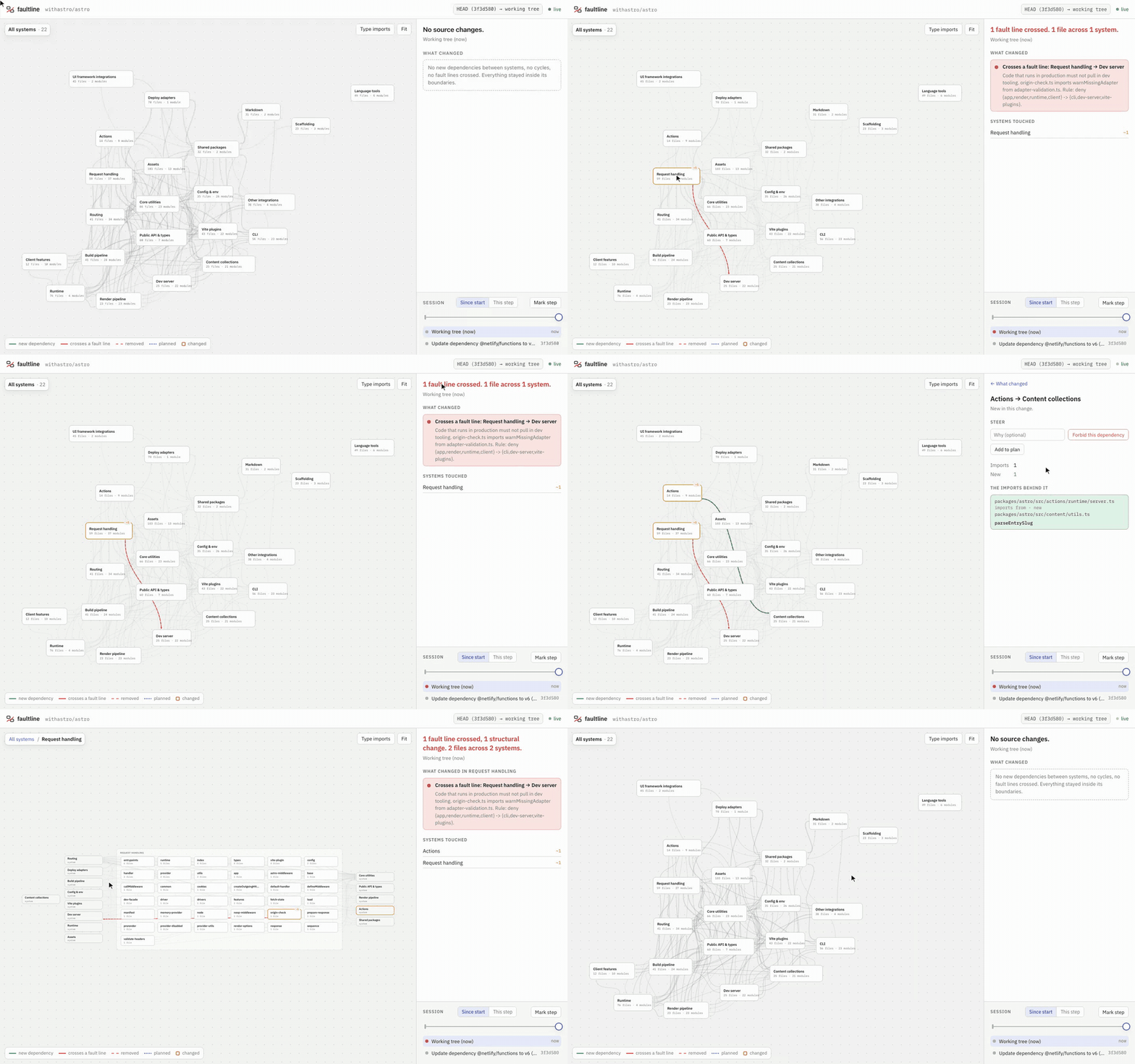
Recorded live on withastro/astro while real files changed. One edit crosses a fault line (production request handling importing the dev server), one adds an allowed dependency, and both are undone at the end. The systems and rules are an example map, not the Astro team's (examples/astro). Also: what Astro's production entry loads at startup.
faultline.anzalabidi.dev · A living architecture map for any codebase. You declare the systems once. Every change after that, yours or any coding agent's, shows up as light on a map that never moves, as a sentence in the PR, and as a short answer the agent can read before it writes the wrong import.
fault init        # propose systems from the repo, write faultline.yml
fault map         # open the live map; it redraws as files change
fault setup       # connect your agents: MCP, hooks, AGENTS.md, pre-commit
fault diff main   # what this branch did to the structure, in plain English
fault footprint   # what an entry point loads at startup, and where to cut it
fault check main  # exit 1 if it crosses a fault line or loosens a rule (CI)
fault sync        # place new folders, suggest rules learned from history
npm install -g @anzalabidi/faultline # or run any command with npx -y @anzalabidi/faultline
Node 20 or newer. The command is fault.
It answers one question at a glance: what did this change do to the shape of the system? Not which lines moved. Which boxes started talking to each other, which boundaries got crossed, and the exact imports behind each of those.
✗ Crosses a fault line: Request handling → Dev server:
  packages/astro/src/core/app/origin-check.ts imports warnMissingAdapter from adapter-validation.ts.
  Allowed route: app → core-shared → dev-server
(~50 tokens)
JavaScript and TypeScript are parsed with oxc. Every other language goes through a small adapter: a comment- and string-aware lexer that reads the imports, plus a resolver that follows that language's own rules.
Adding a language is one extractor and one resolver function; see src/lang/.
Some languages name files in their imports. Others (C#, Swift, same-package Java, Ruby constants) only name types. faultline tags every edge:
Rules only fire on exact edges. A wrong edge that blocks a commit is worse than a missing one, so an inferred reference can show on the map but never fails your build. Names that shadow platform types (String, File, View, Task, and so on) are skipped rather than guessed.
Checked against each language's own toolchain on public repos (bench/accuracy/, reproducible):
Go, the JVM languages, C# and the rest were checked by hand on hugo, okhttp, spring-petclinic, eShop, redis, jekyll, laravel, swift-composable-architecture, cats, phoenix, telescope.nvim and zls. A native-toolchain comparison for them is the next benchmark to add.
fault setup              # agents it detects in the repo
fault setup --agent all  # or: claude,cursor,codex,copilot,gemini,kiro,zed,opencode
fault setup also installs a git pre-commit hook (fault check --staged) that refuses a commit crossing a fault line, whoever wrote it. It is idempotent: run it twice and nothing changes.
The MCP server has four tools, each with a description under 40 words, because every connected agent pays for the tool list in every session.
The same answers are on the CLI (fault overview, fault place, fault diff --format agent, fault plan) for agents without MCP. Every answer ends with its own cost, (~N tokens).
On Astro (967 source files, 22 systems), from node bench/tokens.mjs:
A pilot on the Astro monorepo: 36 headless Claude Code runs on tasks built to tempt one forbidden import. Where a rule covered the tempting import, agents crossed it 3 of 6 times with no guidance, 5 of 6 times with the rule written in AGENTS.md, and 0 of 6 times with faultline, at 46 to 62% higher average cost per run (the correct fix is a refactor). One repo, one model, tasks written by the builder: read it as a pilot. Method, every diff and the caveats are in bench/agent-ab.
fault map serves a local page that watches the repo and redraws as files change:
main.go or main.rs) and the map shows what it loads at startup: how much of each system, which npm packages, and the shortest import chain behind any file or package. Cut points are the files whose removal from the startup path drops the most with them. Open one directly with ?entry=<export or path>.faultline.yml. Click a system and Plan a new dependency. Agents read both through faultline on their next call.The map is private to your machine: it binds to 127.0.0.1 and refuses writes from any other origin.
fault export and fault replay write the same UI to one HTML file you can share: a single change, or a stretch of history played back commit by commit.
version: 1
systems:
  - id: web
    name: Web UI
    description: Pages and components.
    paths: [apps/web/src/**]
  - id: api
    name: API
    paths: [services/api/**]
  - id: db
    name: Database
    paths: [packages/db/**]
rules:
  - deny: web -> db
    reason: The UI talks to the API, never the database
  - deny: "{web,api} -> {scripts,tools}"
src/core/** out of a broader src/**.types: true.fault init writes a first draft from the directory tree. fault init --outline prints the tree and the draft for whichever agent you use to name properly; fault init --ai asks Claude directly when ANTHROPIC_API_KEY is set.fault plan "api -> billing: invoices need customer data"
Planned dependencies live in .faultline/plan.yml, next to the code. The map draws them dotted until the imports exist. The PR comment lists each one as built or not yet, and flags any new dependency between systems that nobody planned.
A map nobody updates starts lying, and a lying map gets ignored. faultline splits the upkeep in two, on purpose.
Where code lives is a fact, so it keeps itself current. A new folder outside every system shows up on the map with a suggestion: join the system its imports go to, or become a new one. fault sync --apply (or Place on the map) writes it. Agents are told to run it; placing code never loosens a rule.
$ fault sync
1 folder outside every system
  billing-lab/**  (2 files) → Core utilities  2 of its 3 imports to and from other systems involve Core utilities

Suggested rules (a person decides these; add one with fault sync --rule "a -> b")
  deny core-shared -> cli  CLI depends on Core utilities (38 imports) and Core utilities has not imported CLI in the last 200 commits. Keeps it one-way.
What may depend on what is a decision, so only people make it. Rules are suggested from history: if A imports B and B has never imported A in the last 200 commits, faultline offers deny B -> A to keep it one-way. You add it with one click or fault sync --rule. Nothing adds a rule on its own.
Loosening needs a human. An agent that hits a red line could simply delete it. So:
faultline.yml invalid. Other agents are told right after the edit.fault check judges a change against the stricter of the two faultline.yml versions, and fails when the file gets looser. Approve it with --allow-loosening or FAULTLINE_ALLOW_LOOSENING=1.allow-loosening is set, for example from a label: - uses: halleylabs/faultline@v0
with:
allow-loosening: ${{ contains(github.event.pull_request.labels.*.name, 'faultline-approved') }}
# .github/workflows/faultline.yml
on: pull_request
permissions:
  contents: read
  pull-requests: write
jobs:
  faultline:
    runs-on: ubuntu-latest
    steps:
      - uses: actions/checkout@v4
        with: { fetch-depth: 0 }
      - uses: halleylabs/faultline@v0
The action runs from its own source, so it needs no package registry. Every pull request gets one sticky comment: the headline, each structural change as a sentence, a Mermaid map of only the part that changed (GitHub renders it inline), plan versus actual, and the imports behind each change. The check fails when the PR crosses a fault line or loosens faultline.yml without approval. On GitLab, Bitbucket or anything else, run fault diff "$BASE" "$HEAD" --format markdown and post the output.
Every repo named above builds its full graph in under a second on a laptop, cold, with no cache. Replaying the last 260 commits of the Astro monorepo takes about 30 seconds.
$ fault footprint astro/app/entrypoint/prod --why zod
astro/app/entrypoint/prod  packages/astro/src/core/app/entrypoints/virtual/prod.ts
Loads 159 files at startup across 11 systems.
  Runtime                      37 of 76
  Routing                      35 of 41
  Request handling             30 of 59
  ...
npm at startup: @oslojs/encoding, clsx, cookie, devalue, html-escaper, piccolore, unstorage, zod

Cut points: stop importing the file and this many files stop loading at startup
    11  astro/src/core/routing/handler.ts
     ...
     4  astro/src/core/session/provider.ts  drops unstorage

Why zod loads at startup
  ... > core/fetch/fetch-state.ts {FetchState} > core/encryption.ts {generateCspDigest} > core/csp/config.ts {ALGORITHMS, CspHash}
Startup means static, non-type imports reachable from the entry; files reached only through import() count as on demand. Cut points come from the dominator tree of that graph: every startup path to a file passes through its dominators, so no longer importing one drops its whole subtree. It counts files and packages, not bytes or milliseconds, and a bundler may still tree-shake some of what it lists.
import(\./locale/${lang}`)`) are not followed.npm install
npm run build
npm test
node dist/cli.js -C path/to/repo map
MIT licensed.
A living architecture map for any codebase, any language, any coding agent. See what every change does to the structure, and stop it crossing the lines you drew.
{ "mcpServers": { "anzalabidi-faultline": { "command": "npx", "args": [ "-y", "@anzalabidi/[email protected]" ] } }}工具
暂无工具列表。远程服务器在首次健康检查后会获得工具列表。
常见问题
在本页复制适用于 Cursor、Claude Desktop、Claude Code 或 VS Code 的 stdio 配置。它使用发布者的安装方式,而不是 PlugMCP 代理。
此记录未列出必需的环境变量。
@anzalabidi/faultline 通过 stdio 在本地运行。
上次检查时间:2026-10-28。 A living architecture map for any codebase, any language, any coding agent. See what every change does to the structure, and stop it crossing the lines you drew.
