ECS MCP Server Sample
The following sample demonstrates how to deploy an Agentic AI architecture using AWS Fargate for Amazon ECS. It uses AWS CDK to deploy the architecture components.
接入你的智能体
从发布者处安装。不是 PlugMCP 端点。
远程 URL 还是本机命令? 两种安装方式的区别
来自发布者
The following sample demonstrates how to deploy an Agentic AI architecture using AWS Fargate for Amazon ECS. It uses AWS CDK to deploy the architecture components.
This sample demonstrates how to deploy an Agentic AI architecture using AWS Fargate for Amazon ECS with AWS CDK. The sample features an AI Service that connects to multiple Model Context Protocol (MCP) servers to perform various actions
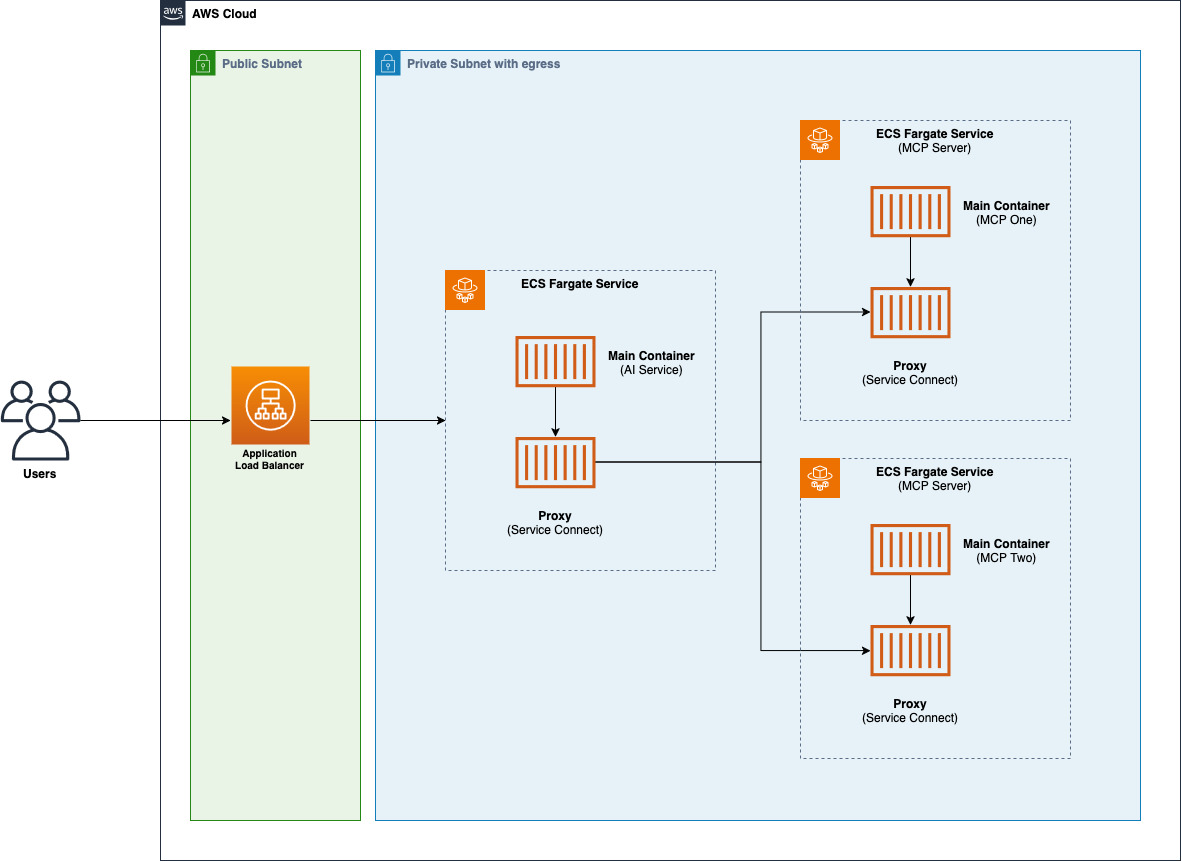
The architecture consists of the following components:
Service-to-service communication between AWS Fargate services is done using Service Connect. The AI Service leverages custom DNS names to connect to the MCP Servers available in this sample.
The sample also generates an AWS Secret to be used as the x-api-key header when calling the Application Load Balancer URLs.
To deploy this sample in your account follow the instructions below:
# install dependencies
$ npm install
# login to the public ECR registry to allow download base images
$ aws ecr-public get-login-password --region us-east-1 | docker login --username AWS --password-stdin public.ecr.aws
# bootstrap your AWS environment (in case you haven't done it yet)
$ npm run cdk bootstrap
# deploy the CDK Stack into your account
$ npm run cdk deploy
Once the deployment is finalized in your account, you will have the following output from AWS CDK:
 ✅  EcsMcpServerSampleStack

✨  Deployment time: 362.32s

Outputs:
EcsMcpServerSampleStack.ALBLoadBalancerDNS6ED38D87 = [application-load-balancer-url]
EcsMcpServerSampleStack.AiServiceSecretARN2FB050DB = [secret-arn]
Before invoking the Application Load Balancer URL, you'll need to retrieve the secret value with the following command:
$ aws secretsmanager get-secret-value --secret-id [secret-arn]
# or use the following to directly get the value
$ aws secretsmanager get-secret-value --secret-id [secret-arn] --output json | jq -r '.SecretString'
Now that you have all the information, you can call the Application Load Balancer URL to test the agent:
curl --location 'http://[ALB-URL]/chat' \
--header 'x-api-key: [secret-value]' \
--header 'Content-Type: application/json' \
--data '{
    "prompt": "what'\''s the command to list AWS Buckets"
}'
{
  "answer": "The command to list AWS S3 buckets is:\n\n```bash\naws s3 ls\n```\n\nThis command will display all S3 buckets in your AWS account, showing:\n- Creation date and time\n- Bucket name\n\nAs you can see from the output, it lists all the buckets with their creation timestamps and names. The command works across all regions and shows buckets from your entire AWS account.\n"
}
or execute the AWS CLI command:
curl --location 'http://[ALB-URL]/chat' \
--header 'x-api-key: [secret-value]' \
--header 'Content-Type: application/json' \
--data '{
    "prompt": "list all my AWS Buckets"
}'
{
  "answer": "Here are all your S3 buckets: [omissis]"
}
or compute some math using the custom MCP Server:
curl --location 'http://[ALB-URL]/chat' \
--header 'x-api-key: [secret-value]' \
--header 'Content-Type: application/json' \
--data '{
    "prompt": "what'\''s 2+2"
}'
{
  "answer": "2 + 2 = **4**\n"
}
See CONTRIBUTING for more information.
This library is licensed under the MIT-0 License. See the LICENSE file.
This sample demonstrates how to deploy an Agentic AI architecture using AWS Fargate for Amazon ECS with AWS CDK. The sample features an AI Service that connects to multiple Model Context Protocol (MCP
概览
This sample demonstrates how to deploy an Agentic AI architecture using AWS Fargate for Amazon ECS with AWS CDK. The sample features an AI Service that connects to multiple Model Context Protocol (MCP) servers to perform various actions
工具
暂无工具列表。远程服务器在首次健康检查后会获得工具列表。
常见问题
在本页复制适用于 Cursor、Claude Desktop、Claude Code 或 VS Code 的 stdio 配置。它使用发布者的安装方式,而不是 PlugMCP 代理。
此记录未列出必需的环境变量。
Sample Ecs 通过 stdio 在本地运行。
上次检查时间:2026-10-28。 This sample demonstrates how to deploy an Agentic AI architecture using AWS Fargate for Amazon ECS with AWS CDK. The sample features an AI Service that connects to multiple Model Context Protocol (MCP) servers to perform various actions
