MCP Azure APIM Workshop
接入你的智能体
从发布者处安装。不是 PlugMCP 端点。
远程 URL 还是本机命令? 两种安装方式的区别
来自发布者
This project demonstrates how to use Azure API Management (APIM) to expose an existing REST API as a Model-Context-Protocol (MCP) Server or to proxy an existing MCP Server The MCP Server can then be consumed as a tool by various clients, including AI agents built with Azure AI services.
This workshop demonstrates how to use Azure API Management (APIM) to expose an existing REST API as a Model-Context-Protocol (MCP) Server. The MCP Server can then be consumed as a tool by various clients, including AI agents built with Azure AI services.
What you will learn in this workshop:
azd)The workshop leverages the public Setlist.fm API as an example. It provisions the necessary Azure infrastructure using Bicep and the Azure Developer CLI (azd).
Setlist.fm is a collaborative online platform dedicated to documenting setlists—the lists of songs performed by artists or bands during concerts. Unlike official setlists, Setlist.fm focuses on what was actually played at live events.
This project is using azd to configure the Azure Resources
azd auth login
azd up
You will be prompted for where to deploy the infrastructure:
New environment 'dev' created and set as default
? Select an Azure Subscription to use: 25. xxxxx-qqqqqqq-xxxxx (111111111-1111-1111-1111-11111111)
? Pick a resource group to use: 1. Create a new resource group
? Select a location to create the resource group in: 50. (US) East US 2 (eastus2)
? Enter a name for the new resource group: rm-mcp-dev
This repository is configured using Azure Bicep, which defines the following resources:
Note the API Center is not configured by default, to enable it edit infra/main.parameters.json and set configureAPICenter with the value True
Go the Azure Portal https://portal.azure.com, select the APIM instance and MCP Servers (preview) Create a MCP Server, expose API as an MCP Server
SetList FMSearch for Artists, Search for SetlistsSetlistFM MCPsetlistfm-mcp
Note: this value must match the value in .vscode/mcp.json and src/python/.env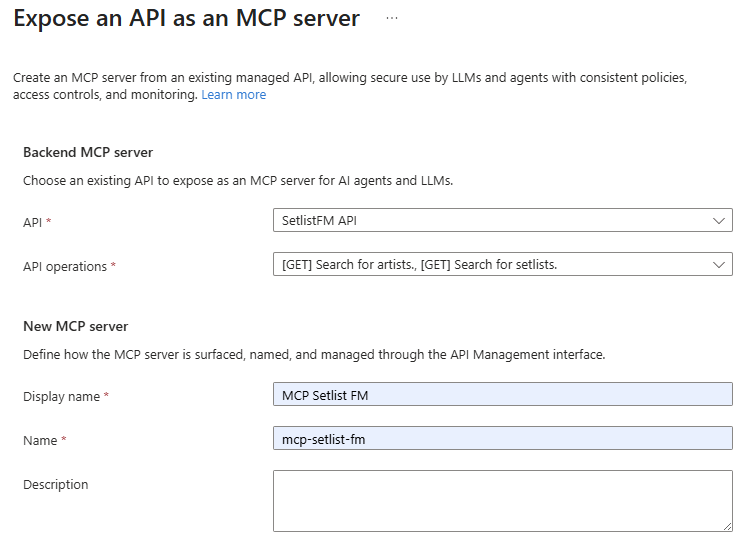
Test SetList FM API:
# the script displays the latest setlist performed by The Weeknd
./src/shell/test_api.sh
The MCP Server is ready!
Note to enable this configuration managed by the bicep file, edit infra/main.parameters.json and set configureSetListfmMCP with the value True
cd src/python
uv venv --clear
source .venv/bin/activate
uv sync
mcp_client.py uses a library acting as MCP Client. It lists the exposed tools, and call them: searchForArtists(coldplay) and searchForSetlists(Blondshell)
uv run mcp_client.py
Sample Output
🔗 Testing connection to https://mcp-azure-apim-api-management-dev.azure-api.net/setlistfm-mcp/mcp...
✅ Successfully authenticated!
🔧 Available tools (2):
[...]
🔗 Search for artists with 'Coldplay' in the name
🔗 Get a list of setlists for Blondshell
🎤 23-09-2025 · History (Toronto)
Tour: The Clearing
Link: https://www.setlist.fm/setlist/wolf-alice/2025/history-toronto-on-canada-2b47f072.html
[...]
👋 Closing client...
Github Copilot in the Agent Mode can include external tools defined in the mcp.json file.
In this workshop, this file was automatically generated by the azd up command. You can review the content of the file in mcp.json.
Note: The generation can be manually triggered with the following command azd hooks run preprovision
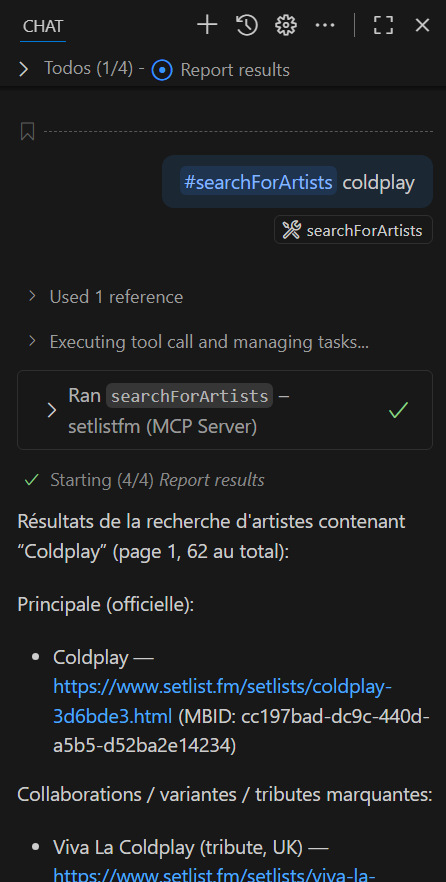
To call the MCP tool from copilot, type the following text in the copilot chat:
#searchForArtists coldplay
Copilot should request you to validate the usage of the MCP tool:
MCP is designed to provides tools to any agent. This is a sample where azure_ai_agent_mcp.py uses the Azure Agent Service library to create an Agent in Azure AI Foundry configured to use the SetlistFM MCP Server as tool.
uv run azure_ai_agent_mcp.py
Sample Output:
Setting up AI Project Client
PROJECT_ENDPOINT: https://foundry-7ephb7ltz2uu2.services.ai.azure.com/api/projects/mcp-dev
Setting up Setlist FM plugin https://apim-7ephb7ltz2uu2.azure-api.net/setlistfm-mcp/mcp
Created agent: SetlistFM-MCP-Agent
Agent ID: SetlistFM-MCP-Agent:1
Agent created (id: SetlistFM-MCP-Agent:1, name: SetlistFM-MCP-Agent, version: 1)
Sending request to agent...
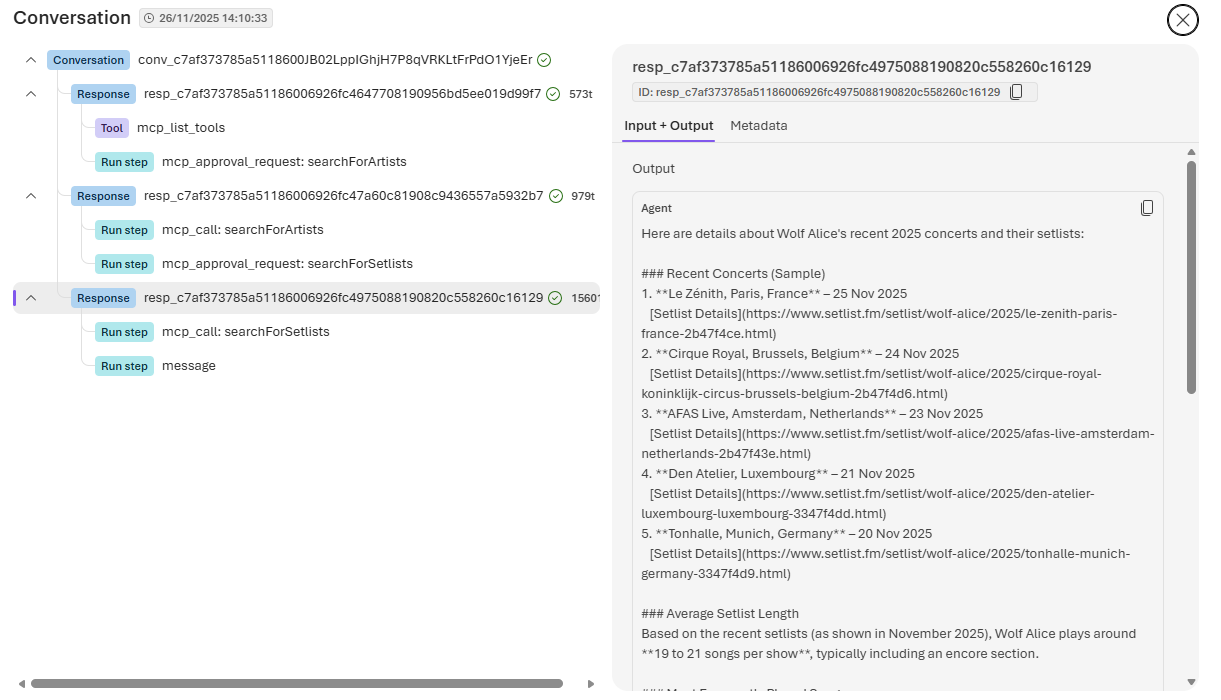
TASK: Can you provide details about recent concerts and setlists in 2025 performed by the band Wolf Alice? Provide the average setlist length and the most frequently played songs.
Response Item Type: mcp_list_tools
Response Item Type: mcp_approval_request
Approving MCP request for server: existing-mcp-tool, request ID: mcpr_0827a8c84ce4fb44006924615f281081949e5f81c37fd308cc
Approving the call of 'searchForSetlists' with the following arguments: {"year":"2025","artistName":"Wolf Alice","p":"1"}
Processed 1 MCP approval requests.
Response Item Type: mcp_call
Response Item Type: message
No MCP approval requests to process.
STOP:  [McpCall(id='mcp_0827a8c84ce4fb44006924615ff9488194a6b2146b967fbab1', arguments='{"year":"2025","artistName":"Wolf Alice","p":"1"}', name='searchForSetlists', ......
Response Item Type: mcp_call
Response Item Content: {
   "type" : "setlists",
Once the conversation is finished, it is possible to view the executed thread in the AI Foundry Portal:
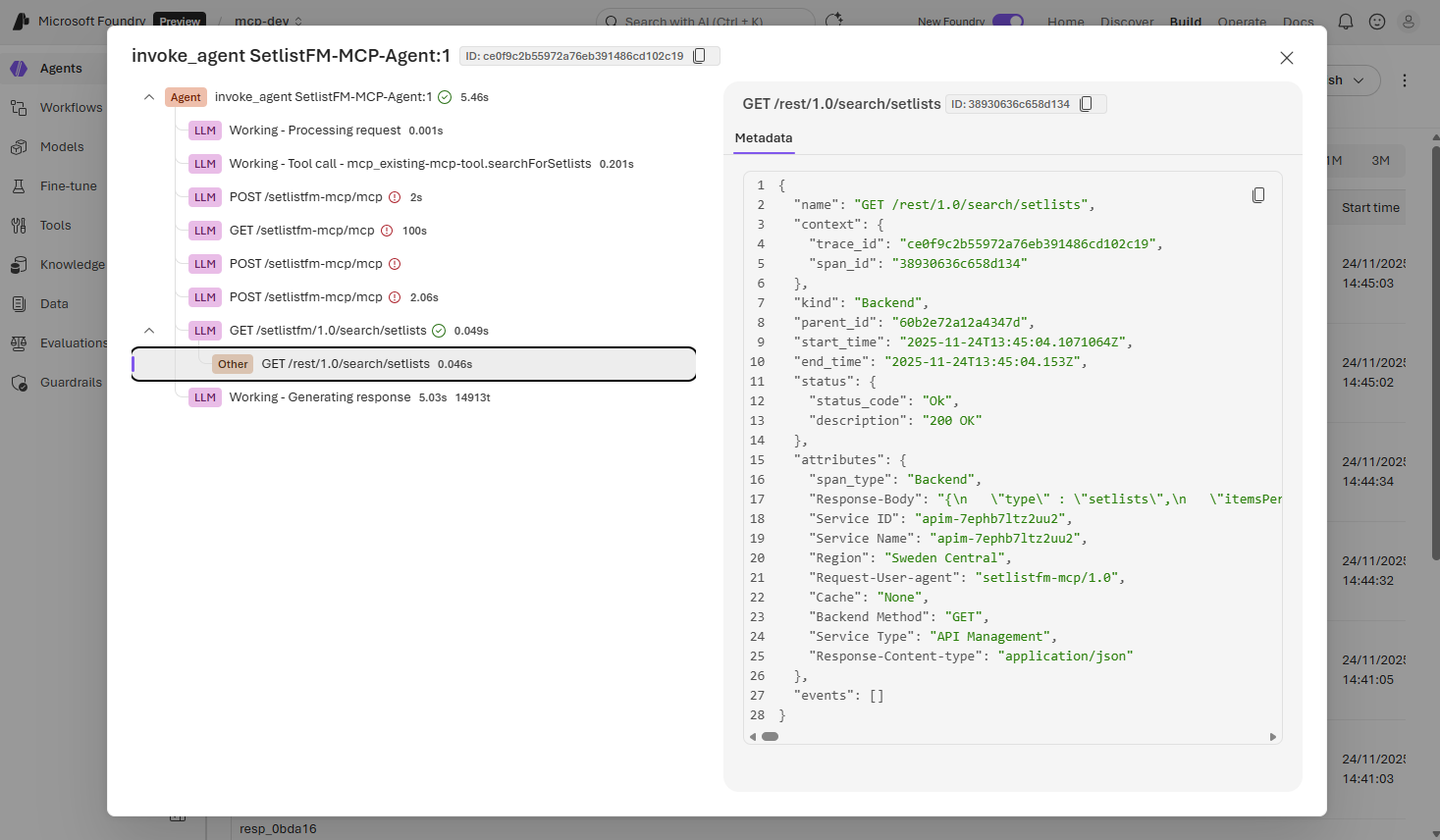
As the MCP server has it own policy layer, there are several scenario that can be implemented.
The steps to define the MCP policy are:
MCP Servers and open the mcp-setlist-fm serverIn this sample, an EntraID application has been defined to represent the the MCP Server. The client will perform an EntraId authentication process and the policy validates the provided token and then and header will be added to inject the Ocp-Apim-Subscription-Key value.
It is implementing this APIM Pattern: API Authentication with API Management (APIM) using APIM Policies with Entra ID and App Roles
azd up command, you can run the generation again using the azd hooks run postprovision command) .....
<inbound>
<validate-jwt header-name="Authorization" failed-validation-httpcode="401" failed-validation-error-message="Unauthorized due Benoit APIM Policy" require-expiration-time="true" require-scheme="Bearer" require-signed-tokens="true">
<openid-config url="https://login.microsoftonline.com/OAUTH_TENANT_ID/v2.0/.well-known/openid-configuration" />
<audiences>
<audience>api://OAUTH_APP_ID</audience>
</audiences>
<issuers>
<issuer>https://sts.windows.net/OAUTH_TENANT_ID/</issuer>
</issuers>
</validate-jwt>
<set-header name="Ocp-Apim-Subscription-Key" exists-action="override">
<value>SETLISTAPI_SUBSCRIPTION_KEY</value>
</set-header>
<base />
</inbound>
.....
If you run the previous python code, you'll get an 401 error:
uv run mcp_client.py
🔗 Testing connection to https://mcp-azure-apim-api-management-dev.azure-api.net/setlistfm-mcp/mcp...
❌ failure : Client error '401 Unauthorized' for url 'https://mcp-azure-apim-api-management-dev.azure-api.net/setlistfm-mcp/mcp'
For more information check: https://developer.mozilla.org/en-US/docs/Web/HTTP/Status/401
👋 Closing client...
Run the following test:
uv run mcp_client_entra_id.py default_credential|client_secret|msal
what ever the option, the output should be the same when using simple basic authentication using Header. The options are:
default_credential uses use the magic DefaultAzureCredential that support several Azure Authentication features. It re-use the az login or the azd auth loginclient_secret uses the client_id, the client_secret and the tenant_id propertiesclient_secret uses the client_id, the client_secret and the tenant_id properties and MSAL (Microsoft Authentication Library) library. It’s a client SDK family (for Python, .NET, Java, JavaScript, etc.) that hides the wire details of standard identity protocols. Under the hood, MSAL talks to Microsoft Entra ID (formerly Azure AD) using OAuth 2.0 and OpenID Connect endpoints.The Microsoft Learn MCP Server enables clients like GitHub Copilot and other AI agents to bring trusted and up-to-date information directly from Microsoft's official documentation. It is a remote MCP server that uses streamable http. It allows to search through documentation, fetch a complete article, and search through code samples. The aim of this sample is to proxy the MCP Server and to secure its access.
This configuration has been tested using GitHub Copilot. The execution of azd provision command configures Azure APIM & Azure EntraID and update the mcp.json file.
On the EntraID side, an Entra ID (Azure AD) application registration provides the OAuth2/OIDC authentication for the Microsoft Learn MCP proxy. On the APIM side, Deployment of an MCP (Model Context Protocol) proxy API in Azure API Management that serves as a gateway to the Microsoft Learn documentation and code sample APIs.
Two Bicep Modules manages this configuration: the module mslearn mcp-proxy.bicep
the module mcpMSLearnApp app-reg.bicep
Authentication Flow: This app registration enables:
Based on the traces, here's a Mermaid sequence diagram showing the MCP server initialization flow with OAuth2 discovery:
This diagram illustrates:
sequenceDiagram
    participant VSCode as VS Code Editor
    participant MCP as MCP Server<br/>(secured-mslearn)
    participant APIM as Azure APIM Gateway<br/>(mslearn-mcp)
    participant EntraID as Microsoft Entra ID<br/>(login.microsoftonline.com)

    VSCode->>MCP: Start server
    activate MCP
    Note over MCP: Connection State: Starting
    Note over MCP: Connection State: Running
    MCP-->>VSCode: Server ready

    Note over VSCode,EntraID: MCP Initialization & OAuth Discovery (RFC 9728)

    VSCode->>MCP: initialize (protocolVersion: 2025-11-25)
    Note over MCP: Detecting authentication requirements...

    MCP->>APIM: HTTP Request (attempt connection)
    APIM-->>MCP: 401 Unauthorized<br/>WWW-Authenticate: resource_metadata=<URL>
    Note over MCP: Found resource_metadata challenge

    MCP->>APIM: GET /.well-known/oauth-protected-resource<br/>(server-specific endpoint)
    APIM-->>MCP: 401 Unauthorized
    Note over MCP: Warning: Failed to fetch from server-specific endpoint

    MCP->>APIM: GET /.well-known/oauth-protected-resource/mslearn-mcp<br/>(global discovery endpoint)
    APIM-->>MCP: 200 OK + Resource Metadata<br/>(auth_server: tenant URL)
    Note over MCP: Discovered resource metadata<br/>Auth server: .../be38c437.../v2.0

    MCP->>EntraID: GET /.well-known/oauth-authorization-server/<tenant>/v2.0
    EntraID-->>MCP: 404 Not Found
    Note over MCP: Warning: OAuth authorization server endpoint failed

    MCP->>EntraID: GET /.well-known/openid-configuration/<tenant>/v2.0
    EntraID-->>MCP: 404 Not Found
    Note over MCP: Warning: Direct OpenID config path failed

    MCP->>EntraID: GET /<tenant>/v2.0/.well-known/openid-configuration
    EntraID-->>MCP: 200 OK + OpenID Configuration<br/>(token_endpoint, authorization_endpoint, etc.)
    Note over MCP: Discovered authorization server metadata

    Note over VSCode,MCP: MCP Protocol Exchange

    VSCode->>VSCode: Waiting for initialize response (5s)...

    MCP-->>VSCode: initialize result<br/>(capabilities, serverInfo, instructions)
    Note over VSCode: Server: Microsoft Learn MCP Server v1.0.0<br/>3 tools available

    VSCode->>MCP: logging/setLevel (level: debug)
    VSCode->>MCP: notifications/initialized
    VSCode->>MCP: prompts/list
    VSCode->>MCP: tools/list

    MCP-->>VSCode: prompts/list result (empty)
    MCP-->>VSCode: logging/setLevel result (success)
    MCP-->>VSCode: tools/list result<br/>(microsoft_docs_search,<br/>microsoft_code_sample_search,<br/>microsoft_docs_fetch)

    Note over VSCode: Discovered 3 tools<br/>Server ready for use
    deactivate MCP
Reference: Locking Down MCP: Create a Private Registry on Azure API Center and Enforce It in GitHub Copilot And VS Code and https://docs.github.com/en/copilot/how-tos/administer-copilot/manage-mcp-usage/configure-mcp-registry#option-2-using-azure-api-center-as-an-mcp-registry
API_CENTER_RUNTIME_ENDPOINT=$(azd env get-value API_CENTER_RUNTIME_ENDPOINT)
echo "MCP Registry: ${API_CENTER_RUNTIME_ENDPOINT}/workspaces/default/v0.1/servers"
curl  ${API_CENTER_RUNTIME_ENDPOINT}/workspaces/default/v0.1/servers | jq
MCP Registry: https://mcp-demo-iq6gqqdm2wnp6.data.swedencentral.azure-apicenter.ms/workspaces/default/v0.1/servers
{
  "servers": [
    {
      "server": {
        "$schema": "https://static.modelcontextprotocol.io/schemas/2025-09-29/server.schema.json",
        "name": "2049090721144127476",
        "description": "Setlist.fm MCP for concert details",
        "version": "Original",
        "remotes": [
          {
            "type": "sse",
            "url": "apim-iq6gqqdm2wnp6.azure-api.net/setlistfm-mcp"
          }
        ]
      },
      "_meta": {
        "io.modelcontextprotocol.registry/official": {
          "status": "active",
          "createdAt": "2025-12-05T10:48:11.8074044+00:00",
          "updatedAt": "2025-12-05T10:48:15.2662824+00:00",
          "isLatest": true
        },
        "x-ms-id": "c33a8142-4905-40c7-bbdc-fc6632ab3f3d"
      }
    },
    {
      "server": {
        "$schema": "https://static.modelcontextprotocol.io/schemas/2025-09-29/server.schema.json",
        "name": "13043750526061366627",
        "description": "Proxy to Microsoft Learn API",
        "version": "Original",
        "remotes": [....
azd down --force --purge
This project demonstrates how to use Azure API Management (APIM) to expose an existing REST API as a Model-Context-Protocol (MCP) Server or to proxy an existing MCP Server The MCP Server can then be c
概览
This project demonstrates how to use Azure API Management (APIM) to expose an existing REST API as a Model-Context-Protocol (MCP) Server or to proxy an existing MCP Server The MCP Server can then be consumed as a tool by various clients, including AI agents built with Azure AI services.
工具
暂无工具列表。远程服务器在首次健康检查后会获得工具列表。
常见问题
在本页复制适用于 Cursor、Claude Desktop、Claude Code 或 VS Code 的 stdio 配置。它使用发布者的安装方式,而不是 PlugMCP 代理。
此记录未列出必需的环境变量。
MCP Azure Apim 通过 stdio 在本地运行。
上次检查时间:2026-10-28。 This project demonstrates how to use Azure API Management (APIM) to expose an existing REST API as a Model-Context-Protocol (MCP) Server or to proxy an existing MCP Server The MCP Server can then be consumed as a tool by various clients, including AI agents built with Azure AI services.
