🖨️ MCP Klipper Documentation Server
AI-Powered Klipper Documentation at Your Fingertips
A Model Context Protocol (MCP) server that transforms how you interact with Klipper 3D printer firmware documentation.
接入你的智能体
从发布者处安装。不是 PlugMCP 端点。
远程 URL 还是本机命令? 两种安装方式的区别
Experience seamless Klipper documentation access directly within Claude Desktop. Search configurations, browse documentation, and get instant answers to your 3D printing questions.
Klipper's documentation is comprehensive but scattered across dozens of markdown files. Finding the right configuration option or troubleshooting guide means multiple clicks and searches. This changes everything.
# Install globally
npm install -g mcp-klipper-docs

# Or install locally in your project
npm install mcp-klipper-docs
Open your Claude Desktop config file:
%APPDATA%\Claude\claude_desktop_config.json~/Library/Application Support/Claude/claude_desktop_config.jsonAdd the MCP server:
{
  "mcpServers": {
    "klipper-docs": {
      "command": "node",
      "args": ["C:\\Users\\bpuhnk\\AppData\\Roaming\\npm\\node_modules\\mcp-klipper-docs\\dist\\server.js"]
    }
  }
}
{
  "mcpServers": {
    "klipper-docs": {
      "command": "npx",
      "args": ["-y", "[email protected]"]
    }
  }
}
{
  "mcpServers": {
    "klipper-docs": {
      "command": "node",
      "args": ["C:\\Users\\bpuhnk\\source\\repos\\MCP_Klipper\\dist\\server.js"]
    }
  }
}
That's it! 🎉 Claude now has instant access to all Klipper documentation.
After installation, verify everything works:
# Check package installation
npm list -g mcp-klipper-docs

# Test server startup
node C:\Users\bpuhnk\AppData\Roaming\npm\node_modules\mcp-klipper-docs\dist\server.js

# Or using npx
npx -y [email protected]
"Search for BLTouch configuration"
"Find information about pressure advance"
"Look up extruder tuning guides"
"Get configuration for [extruder]"
"Show me stepper_x settings"
"What are the bed_mesh parameters?"
"Browse calibration documentation"
"Show me hardware configuration sections"
"What's in the troubleshooting section?"
"How many documents are available?"
"What sections exist in the documentation?"
"Show me index statistics"
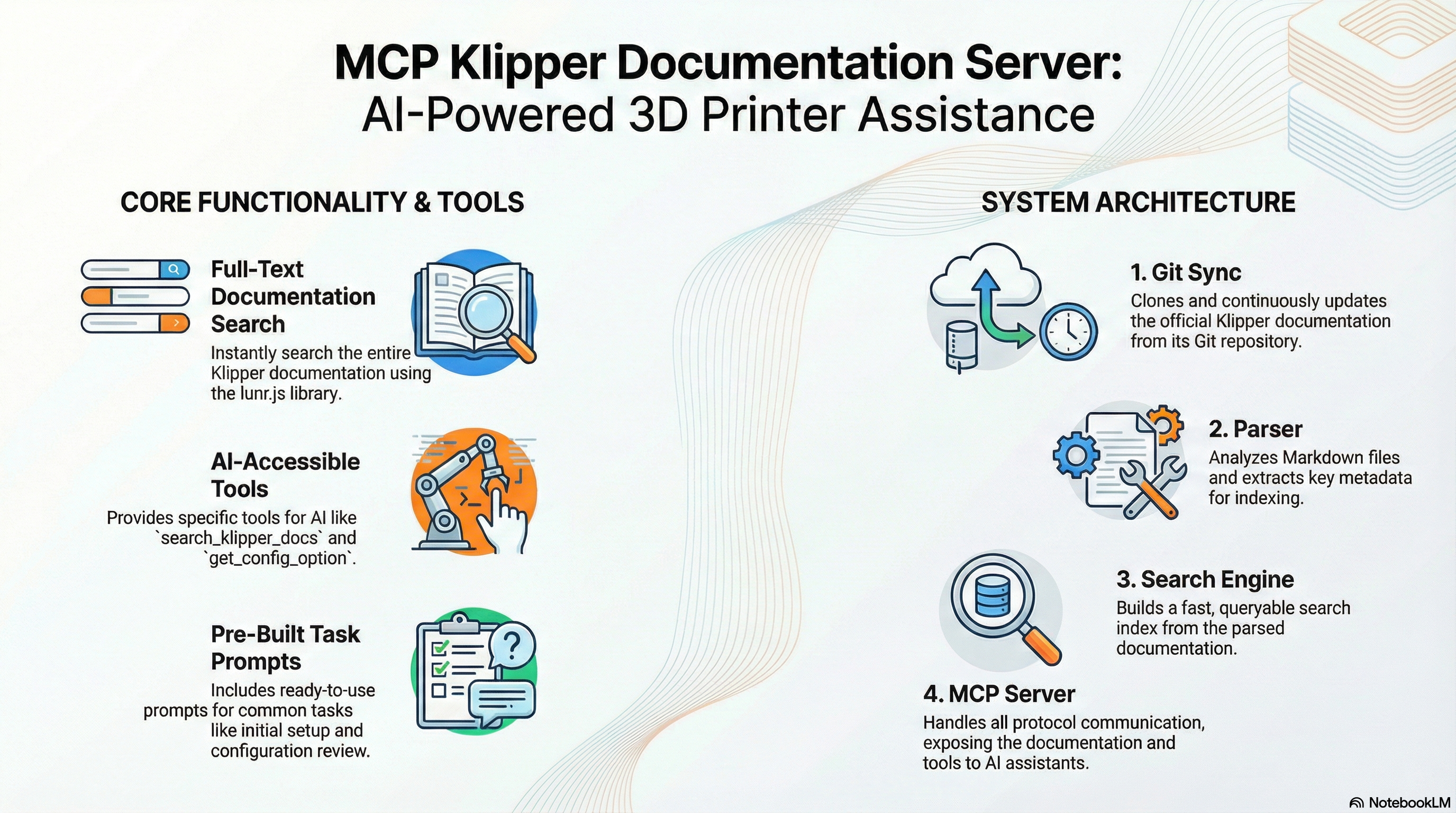
graph TD
    A[Claude Desktop] --> B[MCP Protocol]
    B --> C[MCP Server]
    C --> D[Search Engine]
    C --> E[Document Parser]
    C --> F[Git Sync]
    D --> G[Lunr.js Index]
    E --> H[Markdown Files]
    F --> I[Klipper Repository]
search_klipper_docsSearch across all Klipper documentation with relevance scoring.
Parameters:
query (string): Search termslimit (number, optional): Max results (default: 10)section (string, optional): Filter by sectionExample:
{
  "query": "BLTouch configuration",
  "limit": 5,
  "section": "hardware"
}
get_config_optionRetrieve specific configuration sections from Config_Reference.
Parameters:
option (string): Configuration option nameinclude_examples (boolean, optional): Include code examplesExample:
{
  "option": "extruder",
  "include_examples": true
}
browse_documentationBrowse documentation by section or get overview information.
Parameters:
section (string, optional): Section to browseinclude_stats (boolean, optional): Include statisticsExample:
{
  "section": "calibration",
  "include_stats": true
}
get_index_statsGet documentation index statistics and metadata.
No parameters required.
All documentation files are available as MCP resources:
klipper://docs/{document-id}Example Resources:
klipper://docs/Config_Referenceklipper://docs/BLTouchklipper://docs/Installationklipper://docs/Troubleshooting# Build the image
docker build -t mcp-klipper-docs .
# Run the container
docker run -d \
--name mcp-klipper-docs \
-v $(pwd)/data:/app/data \
mcp-klipper-docs
version: '3.8'
services:
  mcp-klipper-docs:
    build: .
    container_name: mcp-klipper-docs
    volumes:
      - ./data:/app/data
    environment:
      - LOG_LEVEL=info
      - UPDATE_INTERVAL=3600
    restart: unless-stopped
# Clone the repository
git clone https://github.com/yourusername/mcp-klipper-docs.git
cd mcp-klipper-docs

# Install dependencies
npm install

# Run in development mode
npm run dev

# Run tests
npm test

# Build for production
npm run build
mcp-klipper-docs/
├── src/
│   ├── server.ts          # Main MCP server
│   ├── config.ts          # Configuration management
│   ├── logger.ts          # Logging utilities
│   ├── git-sync.ts        # Git repository operations
│   ├── parser.ts          # Markdown document parsing
│   ├── search.ts          # Search engine implementation
│   ├── types.ts           # TypeScript type definitions
│   └── errors.ts          # Error handling
├── tests/                 # Test suite
├── docs/                  # Additional documentation
├── img/                   # Images and assets
├── data/                  # Local Klipper repository
└── dist/                  # Built JavaScript files
# Run all tests
npm test

# Run tests in watch mode
npm run test:watch

# Run with coverage
npm run test -- --coverage

# Lint code
npm run lint

# Fix linting issues
npm run lint:fix
We welcome contributions from the Klipper community! Here's how you can help:
git checkout -b feature/amazing-featurenpm testThis project is licensed under the MIT License - see the LICENSE file for details.
/docs foldernpm install -g mcp-klipper-docs⭐ If this project helps you, consider giving it a star!
Made with ❤️ by the 3D printing community, for the 3D printing community.
MCP server for Klipper 3D printer firmware documentation
工具
暂无工具列表。远程服务器在首次健康检查后会获得工具列表。
常见问题
在本页复制适用于 Cursor、Claude Desktop、Claude Code 或 VS Code 的 stdio 配置。它使用发布者的安装方式,而不是 PlugMCP 代理。
此记录未列出必需的环境变量。
MCP Klipper Docs 通过 stdio 在本地运行。
上次检查时间:2026-10-28。 MCP server for Klipper 3D printer firmware documentation
