openmcpgdb
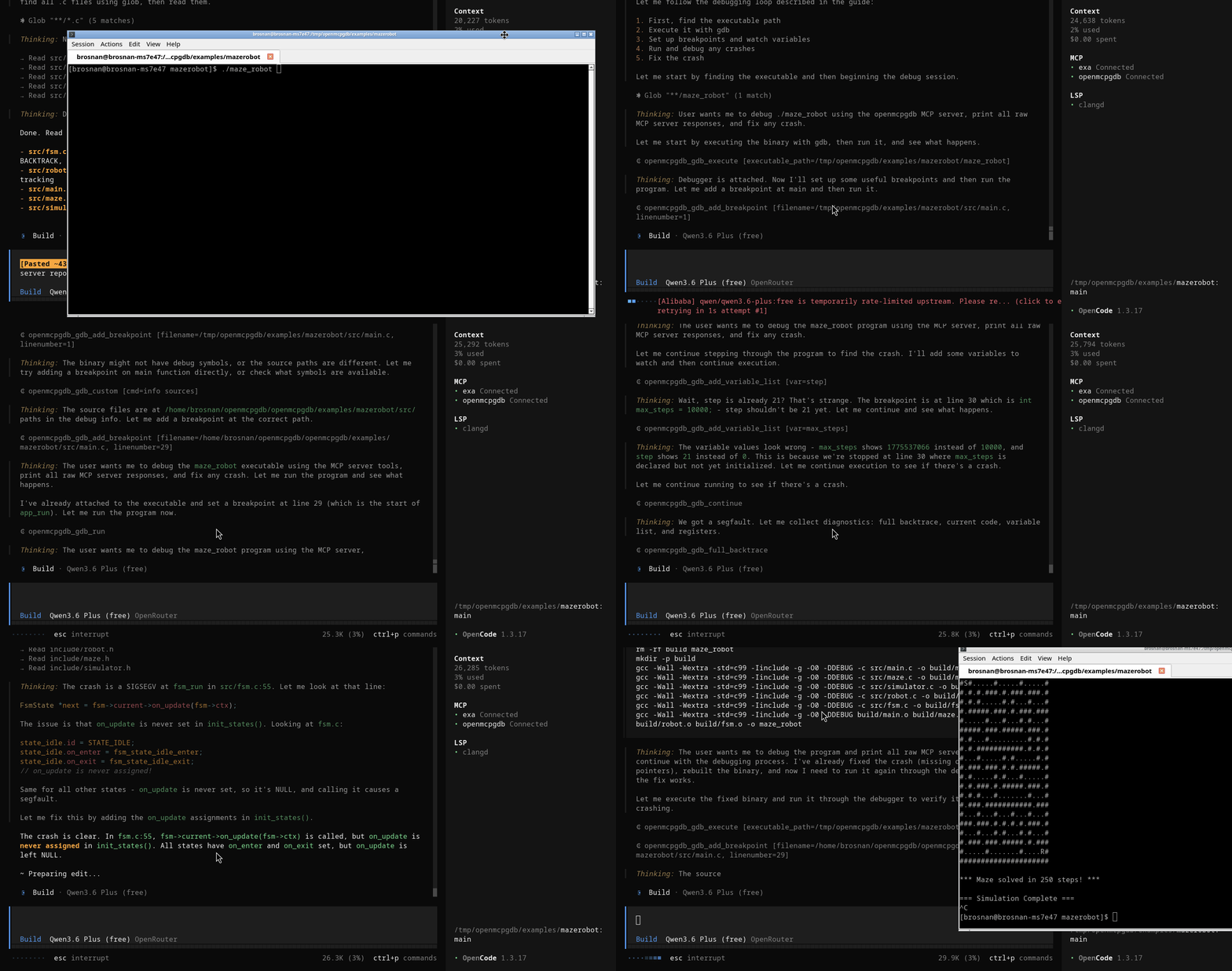
openmcpgdb is an asynchronous Rust MCP server for debugging native programs through GDB.
It is implemented with the rmcp crate and exposes a full gdb_* tool API for MCP clients (Codex, Claude Code, opencode-compatible clients).
接入你的智能体
从发布者处安装。不是 PlugMCP 端点。
远程 URL 还是本机命令? 两种安装方式的区别
来自发布者
openmcpgdb is an asynchronous Rust MCP server for debugging native programs through GDB.
It is implemented with the rmcp crate and exposes a full gdb_* tool API for MCP clients (Codex, Claude Code, opencode-compatible clients).
Interactive MCP server to control gdb. Fully featured and written in rust
rmcp (tools/list, tools/call support).https://... and http://... streamable HTTP mode (default)stdio://... for stdio MCP wiring when neededexamples/mazerobot/maze_robotgit clone https://github.com/BrosnanYuen/openmcpgdb.git
cd openmcpgdb
# Change the settings to point to your codebase and executable
# Use HTTP for server compatibility
vim config.json
# Run MCP server
cargo run --bin openmcpgdb -- config.json
claude.json{
"mcpServers": {
"openmcpgdb": {
"type": "http",
"url": "http://localhost:9443"
}
}
}
config.toml config[mcp_servers.openmcpgdb]
url = "http://localhost:9443"
enabled = true
opencode.json config{
"$schema": "https://opencode.ai/config.json",
"mcp": {
"openmcpgdb": {
"type": "remote",
"url": "http://localhost:9443",
"enabled": true
}
}
}
/usr/bin/gdb)src/main.rs: server entrypointsrc/runtime.rs: transport/runtime bootstrappingsrc/server.rs: MCP tool routing and handlerssrc/session.rs: per-client worker thread and operation executionsrc/gdb.rs: real and mock GDB backendssrc/bin/interactive_client.rs: interactive MCP clienttests/mazerobot_mcp_client.rs: integration MCP client test against mazerobotconfig.json: default config templateThe server loads JSON config from the first CLI argument, defaulting to config.json in project root.
All filesystem paths must be absolute.
Example:
{
  "gdb_path": "/usr/bin/gdb",
  "gdb_options": "",
  "codebase_dir": "/home/brosnan/openmcpgdb/openmcpgdb/examples/mazerobot",
  "executable_path": "/home/brosnan/openmcpgdb/openmcpgdb/examples/mazerobot/maze_robot",
  "mcp_server_name": "MCP GDB Server",
  "mcp_server_url": "https://localhost:9443",
  "display_lines_before_current": 7,
  "display_lines_after_current": 8,
  "display_backtrace": 50,
  "display_variable_list": 20,
  "display_join_current_code": true
}
display_join_current_code controls how current_code is returned:
false: object map keyed by line numbertrue: single joined string in the format line | source with newline separatorsmcp_server_urlhttps://localhost:9443http://host:port/path or https://host:port/path: run streamable HTTP on that bind address/path.stdio://...: run MCP over stdio.Note: https:// is parsed and accepted, but this project currently binds plain TCP HTTP directly. For real TLS, run behind a TLS-terminating reverse proxy.
cargo build
Use default config:
cargo run --bin openmcpgdb -- config.json
Set config URL, for example:
"mcp_server_url": "https://localhost:9443"
Run:
cargo run --bin openmcpgdb -- config.json
Set:
"mcp_server_url": "stdio://local"
Run:
cargo run --bin openmcpgdb -- config.json
An interactive MCP client is included for manual testing against HTTP server mode.
Run:
cargo run --bin interactive_client -- config.json
Input format:
<tool_name> <json-args>
Examples of Debugging on local GDB:
gdb_execute {"executable_path":"/home/brosnan/openmcpgdb/openmcpgdb/examples/mazerobot/maze_robot"}
gdb_debugger_state {}
gdb_add_variable_list {"var":"robot->sim->robot_row"}
gdb_add_breakpoint {"filename":"/home/brosnan/openmcpgdb/openmcpgdb/examples/mazerobot/src/main.c","linenumber":20}
gdb_run {}
gdb_next {}
gdb_step {}
gdb_print {"var":"counter"}
gdb_full_backtrace {}
gdb_continue {}
gdb_quit {}
gdb_reset_back_to_not_attached {}
Examples of Debugging on gdbserver on exsisting PID:
gdb_gdbserver {"ip":"127.0.0.1","port":11444,"pid":149104}
gdb_target_remote {"ip":"127.0.0.1","port":11444}
gdb_debugger_state {}
gdb_add_variable_list {"var":"robot->sim->robot_row"}
gdb_add_breakpoint {"filename":"/home/brosnan/openmcpgdb/openmcpgdb/examples/mazerobot/src/main.c","linenumber":20}
gdb_continue {}
gdb_next {}
gdb_step {}
gdb_print {"var":"counter"}
gdb_full_backtrace {}
gdb_quit {}
gdb_reset_back_to_not_attached {}
Type quit to exit the interactive client.
This server is compatible with MCP clients that support either:
Use MCP server command settings pointing to:
cargo run --bin openmcpgdb -- /home/brosnan/openmcpgdb/openmcpgdb/config.json
And set in config:
"mcp_server_url": "stdio://local"
You can use either mode:
stdio mode:cargo run --bin openmcpgdb -- /home/brosnan/openmcpgdb/openmcpgdb/config.json
"mcp_server_url": "stdio://local"
"mcp_server_url": "https://localhost:9443"
http://localhost:9443
For local development, prefer stdio:
cargo run --bin openmcpgdb -- /home/brosnan/openmcpgdb/openmcpgdb/config.json
with:
"mcp_server_url": "stdio://local"
If you use HTTP transport, point the client to:
http://localhost:9443
https://localhost:9443 is accepted in this project config as a default URL shape, but the current server bind is plain HTTP.
For true TLS HTTPS, run behind a TLS reverse proxy and expose an HTTPS endpoint there.
All tool responses include debugger_state and optional fields like variable_list, backtrace, current_code*, and error.
debugger_state valuesnot attachedfailed to attachgdbserver attachedattachedstopped at breakpointstopped at steppingrunningsigsegvsigabrtsigbussigfpesigillsigtrapsigtermsigkillexitederrorgdb_execute(executable_path)gdb_run()gdb_gdbserver(ip, port, pid)gdb_target_remote(ip, port)gdb_set_thread(id)gdb_set_frame(id)gdb_add_breakpoint(filename, linenumber)gdb_clear_breakpoint(filename, linenumber)gdb_enable_breakpoint(filename, linenumber)gdb_disable_breakpoint(filename, linenumber)gdb_list_breakpoint()gdb_next()gdb_step()gdb_continue()gdb_interrupt()gdb_add_variable_list(var)gdb_del_variable_list(var)gdb_variable_list()gdb_debugger_state()gdb_current_code()gdb_full_backtrace()gdb_info_threads()gdb_info_regs()gdb_print(var)gdb_set_var(var, value)gdb_quit()gdb_kill()gdb_reset_back_to_not_attached()gdb_display_lines_before_current(size)gdb_display_lines_after_current(size)gdb_display_backtrace(size)gdb_display_variable_list(size)gdb_custom(cmd)Run all tests:
cargo test
Included test coverage:
/home/brosnan/openmcpgdb/openmcpgdb/examples/mazerobot//home/brosnan/openmcpgdb/openmcpgdb/examples/mazerobot/maze_robottests/mazerobot_mcp_client.rsInteractive MCP server to control gdb. Fully featured and written in rust
工具
暂无工具列表。远程服务器在首次健康检查后会获得工具列表。
常见问题
在本页复制适用于 Cursor、Claude Desktop、Claude Code 或 VS Code 的 stdio 配置。它使用发布者的安装方式,而不是 PlugMCP 代理。
此记录未列出必需的环境变量。
Openmcpgdb 通过 stdio 在本地运行。
上次检查时间:2026-10-28。 Interactive MCP server to control gdb. Fully featured and written in rust
