npm-search MCP Server
A Model Context Protocol server that allows you to search for npm packages by calling the npm search command.
Features:
- Search npm packages using the
npm searchcommand
接入你的智能体
从发布者处安装。不是 PlugMCP 端点。
远程 URL 还是本机命令? 两种安装方式的区别
PORT environment variable is set/health)search_npm_packages - Search for npm packages.
query (string): The search query.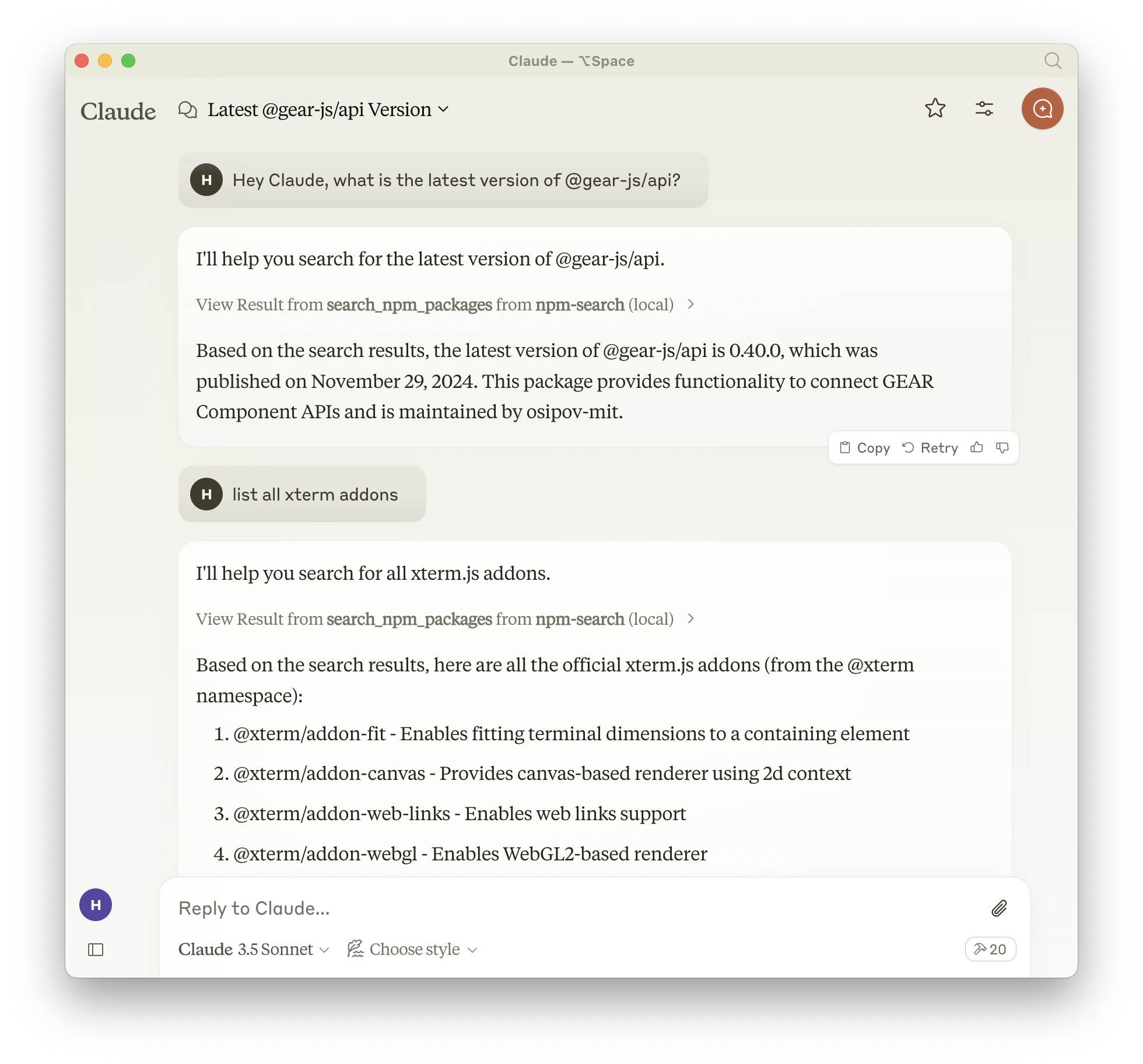
To install npm-search for Claude Desktop automatically via Smithery:
npx -y @smithery/cli install npm-search-mcp-server --client claude
Alternatively you can install npm-search-mcp-server via npm:
npm install -g npm-search-mcp-server
After installation, you can run it as a command using:
npm-search-mcp-server
When using uv no specific installation is needed. We will
use uvx to directly run npm-search-mcp-server.
Add to your Claude settings:
"mcpServers": {
  "npm-search": {
    "command": "npx",
    "args": ["-y", "npm-search-mcp-server"]
  }
}
"mcpServers": {
  "npm-search": {
    "command": "uvx",
    "args": ["npm-search-mcp-server"]
  }
}
Add to your Zed settings.json:
"context_servers": {
  "npm-search-mcp-server": {
    "command": "npx",
    "args": ["-y", "npm-search-mcp-server"]
  }
},
"context_servers": [
  "npm-search-mcp-server": {
    "command": "uvx",
    "args": ["npm-search-mcp-server"]
  }
],
{
  "name": "search_npm_packages",
  "arguments": {
    "query": "express"
  }
}
Response:
{
  "results": [
    {
      "name": "express",
      "description": "Fast, unopinionated, minimalist web framework",
      "version": "4.17.1",
      "author": "TJ Holowaychuk",
      "license": "MIT"
    },
    ...
  ]
}
You can use the MCP inspector to debug the server. For uvx installations:
npx @modelcontextprotocol/inspector npx -y npm-search-mcp-server
Or if you've installed the package in a specific directory or are developing on it:
cd path/to/servers/src/npm-search
npx @modelcontextprotocol/inspector uv run npm-search-mcp-server
The server can be run in a Docker container with HTTP transport support:
# Build the image
docker build -t mcp/npm-search .

# Run the container (default port 3009)
docker run -p 3009:3009 mcp/npm-search

# Run with custom port via environment variable
docker run -p 3009:3009 -e PORT=3009 mcp/npm-search
The Docker image uses HTTP transport when the PORT environment variable is set. The server exposes:
POST /mcp - Main MCP endpoint for tool calls and session initializationGET /mcp - SSE stream endpoint for streaming responses (requires session ID)DELETE /mcp - Session termination endpointGET /health - Health check endpoint with service status and active session countFor Docker Compose integration:
services:
  npm-search-mcp:
    build: .
    ports:
      - "3009:3009"
    environment:
      PORT: 3009
We encourage contributions to help expand and improve npm-search-mcp-server. Whether you want to add new npm-related tools, enhance existing functionality, or improve documentation, your input is valuable.
For examples of other MCP servers and implementation patterns, see: https://github.com/modelcontextprotocol/servers
Pull requests are welcome! Feel free to contribute new ideas, bug fixes, or enhancements to make npm-search-mcp-server even more powerful and useful.
npm-search-mcp-server is licensed under the MIT License. This means you are free to use, modify, and distribute the software, subject to the terms and conditions of the MIT License. For more details, please see the LICENSE file in the project repository.
MCP server for searching npm packages
工具
暂无工具列表。远程服务器在首次健康检查后会获得工具列表。
常见问题
在本页复制适用于 Cursor、Claude Desktop、Claude Code 或 VS Code 的 stdio 配置。它使用发布者的安装方式,而不是 PlugMCP 代理。
此记录未列出必需的环境变量。
Npm Search 通过 stdio 在本地运行。
上次检查时间:2026-11-05。 MCP server for searching npm packages
