swagger-mcp
Overview
swagger-mcp is a tool that reads a Swagger 2.0 or OpenAPI 3.0 specification and dynamically generates MCP tools at runtime — one tool per API endpoint. These tools can be used by any MCP client for LLM-driven API interaction.
接入你的智能体
从发布者处安装。不是 PlugMCP 端点。
远程 URL 还是本机命令? 两种安装方式的区别
来自发布者
swagger-mcp is a tool that reads a Swagger 2.0 or OpenAPI 3.0 specification and dynamically generates MCP tools at runtime — one tool per API endpoint. These tools can be used by any MCP client for LLM-driven API interaction.
mcp server which will dynamically define tools based on swagger
Supported spec formats:
swagger: "2.0") — path/query/header parameters and in: body request bodiesopenapi: "3.0.x") — path/query/header parameters and requestBody with inline or $ref schemasRequired and optional fields are read from the schema's required array and honoured in the generated tool definitions.
If you find this project valuable, please support me on LinkedIn by:
Your support on LinkedIn will help me reach more people and improve the project!
To use swagger-mcp, ensure you have the following dependencies:
go install github.com/danishjsheikh/swagger-mcp@latest
swagger-mcp --specUrl=https://your_swagger_api_docs.json
swagger-mcp --specUrl=https://your_swagger_api_docs.json --sse --sseAddr=:8080
swagger-mcp --specUrl=https://your_swagger_api_docs.json --http --httpAddr=:8080
Xquik publishes a remote OpenAPI document for its X/Twitter automation API.
Because it uses an API key header, pass the key with --security=apiKey and
--apiKeyAuth:
export XQUIK_API_KEY="your-xquik-api-key"

swagger-mcp \
  --specUrl=https://xquik.com/openapi.json \
  --baseUrl=https://xquik.com \
  --security=apiKey \
  --apiKeyAuth=header:x-api-key=$XQUIK_API_KEY
The same arguments can be used in an MCP client config:
{
  "mcpServers": {
    "xquik": {
      "command": "swagger-mcp",
      "args": [
        "--specUrl=https://xquik.com/openapi.json",
        "--baseUrl=https://xquik.com",
        "--security=apiKey",
        "--apiKeyAuth=header:x-api-key=<XQUIK_API_KEY>"
      ]
    }
  }
}
To integrate with mcphost, include the following configuration in .mcp.json:
{
    "mcpServers": {
        "swagger_loader": {
            "command": "swagger-mcp",
            "args": ["--specUrl=<swagger/doc.json_url>"]
        }
    }
}
With bearer auth and path filtering:
{
    "mcpServers": {
        "swagger_loader": {
            "command": "swagger-mcp",
            "args": [
                "--specUrl=https://api.example.com/openapi.json",
                "--security=bearer",
                "--bearerAuth=your-token-here",
                "--includeMethods=GET,POST"
            ]
        }
    }
}
Both Swagger 2.0 and OpenAPI 3.0 request bodies are supported:
parameters with in: body and a $ref or inline schema under definitionsrequestBody.content.<media-type>.schema — resolved from components/schemas if a $ref, or used inline if an object schemaFields listed in the schema's required array are marked as required in the MCP tool. All other fields are optional and are omitted from the request if not provided.
Some Backend:
go install github.com/danishjsheikh/go-backend-demo@latest
go-backend-demo
Ollama
ollama run llama3.2
MCP Client
go install github.com/mark3labs/mcphost@latest
mcphost -m ollama:llama3.2 --config <.mcp.json_file_path>
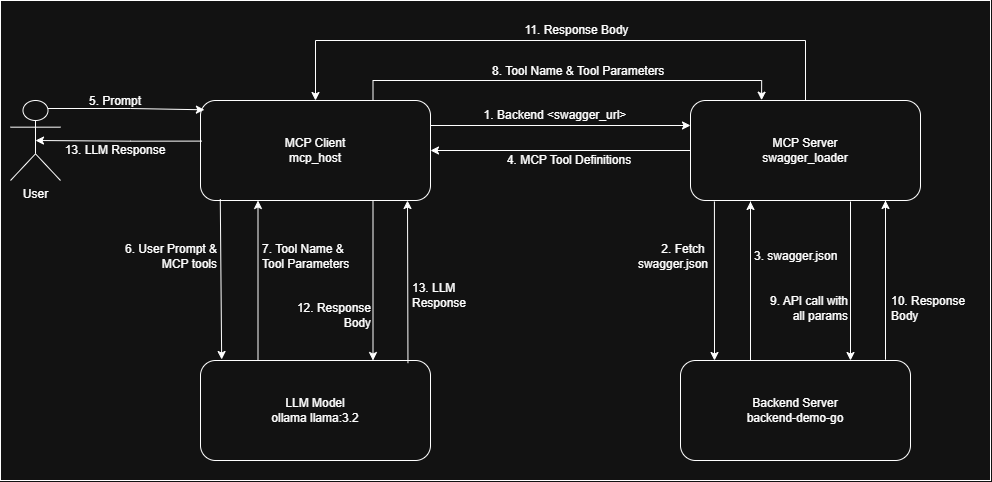
I am working on improving tool definitions to enhance:
✅ Better error handling for more accurate responses
✅ LLM behavior control to ensure it relies only on API responses and does not use its own memory
✅ Preventing hallucinations and random data generation by enforcing strict data retrieval from APIs
If you have insights or suggestions on improving these aspects, please contribute by:
Your input will be invaluable in making this tool more reliable and effective! 🚀
mcp server which will dynamically define tools based on swagger
工具
暂无工具列表。远程服务器在首次健康检查后会获得工具列表。
常见问题
在本页复制适用于 Cursor、Claude Desktop、Claude Code 或 VS Code 的 stdio 配置。它使用发布者的安装方式,而不是 PlugMCP 代理。
此记录未列出必需的环境变量。
Swagger 通过 stdio 在本地运行。
上次检查时间:2026-11-05。 mcp server which will dynamically define tools based on swagger
