Fitch MCP Adapter
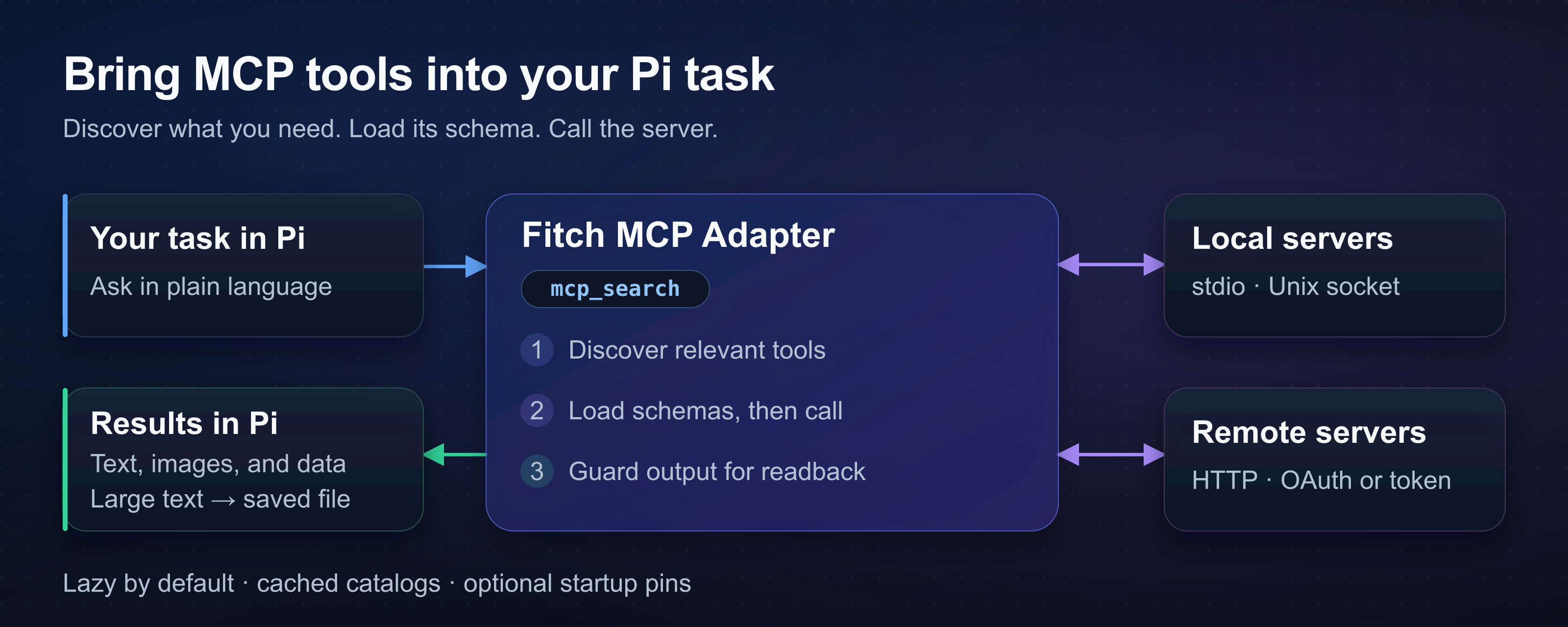
Connect Pi to MCP servers for browsers, databases, and APIs. The adapter loads selected tool schemas when needed to keep large catalogs out of the conversation context.
接入你的智能体
发布者自己的命令。不是 PlugMCP 端点。
用我们的密钥与日志托管一份副本。
npx -y @fitchmultz/[email protected]Claude Code 没有针对本地命令的安装链接。复制下方命令并在终端中运行。
claude mcp add fitchmultz-pi-mcp-adapter -- npx -y @fitchmultz/pi-mcp-adapter@8.0.43在终端中运行。
{ "mcpServers": { "fitchmultz-pi-mcp-adapter": { "command": "npx", "args": [ "-y", "@fitchmultz/[email protected]" ] } }}claude_desktop_config.json
远程 URL 还是本机命令? 两种安装方式的区别
来自发布者
Connect Pi to MCP servers for browsers, databases, and APIs. The adapter loads selected tool schemas when needed to keep large catalogs out of the conversation context.
Token-efficient MCP adapter for the Pi coding agent
Use Pi 1.0.0 or later and Node.js 24 or later.
pi install npm:@fitchmultz/pi-mcp-adapter
pi
Restart Pi if it was open during installation. Load only one adapter per Pi host. For pre-v5 state, read the upgrade guide before you restart Pi.
For a Git install, run pi install git:github.com/fitchmultz/pi-mcp-adapter.
Enter /mcp setup to add a server or import configs from other hosts. Preview the changes before you save them. The adapter leaves external host files unchanged.
The adapter reads .mcp.json and ~/.config/mcp/mcp.json automatically. Pi loads project configs only after project trust. See config paths and precedence.
For Chrome DevTools, create .mcp.json in your project:
{
  "mcpServers": {
    "chrome-devtools": {
      "command": "npx",
      "args": ["-y", "chrome-devtools-mcp"]
    }
  }
}
Run /reload after config changes. Ask Pi:
Use Chrome DevTools to take a screenshot of the current page.
By default, servers connect when Pi discovers an uncached catalog or calls a tool. Cached catalogs remain searchable without a connection.
Use directTools to pin tools at startup. Other tools remain available for discovery. Global search covers known catalogs; select a server to discover an unknown catalog.
Use approveTools to require confirmation before sensitive calls. Matching calls fail in headless sessions without approval.
The adapter supports resources and prompt templates. Prompt commands use /mcp__<server>__<prompt> names.
MCP Apps open interactive UIs in a browser or through Glimpse on macOS. Apps can send messages to Pi. Try the interactive visualizer.
Use mcp_script for loops and dependent tool calls. See gateway examples for exact call shapes.
MCP servers can execute programs or access accounts. Check server commands and account access before you trust a project config.
OAuth requires an available OS credential store. Unlock a Secret Service-compatible keyring on headless Linux. The adapter has no plaintext fallback. See the OAuth guide for remote sign-in.
Android and Termux do not support persistent OAuth by default. Unauthenticated, header-token, and stdio servers work. Git/source builds require an Android-native tsgo compiler. Use the precompiled npm package if you have no compiler. See Android build details.
The adapter saves text above the default 50 KiB or 2,000-line limit to local files. Saved results and App histories can contain sensitive data. Remove files when you no longer need them. See output handling and readback.
If App history cannot be saved, reload or exit discards unsaved messages. Retrieve pending messages before either action. See App history and recovery.
Mitch Fultz maintains Fitch MCP Adapter under the MIT license. Mario Zechner discusses tool schema costs in his article about MCP.
{ "mcpServers": { "fitchmultz-pi-mcp-adapter": { "command": "npx", "args": [ "-y", "@fitchmultz/[email protected]" ] } }}工具
暂无工具列表。远程服务器在首次健康检查后会获得工具列表。
常见问题
在本页复制适用于 Cursor、Claude Desktop、Claude Code 或 VS Code 的 stdio 配置。它使用发布者的安装方式,而不是 PlugMCP 代理。
此记录未列出必需的环境变量。
@fitchmultz/pi MCP Adapter 通过 stdio 在本地运行。
上次检查时间:2026-11-16。 Token-efficient MCP adapter for the Pi coding agent
