接入你的智能体
发布者自己的命令。不是 PlugMCP 端点。
用我们的密钥与日志托管一份副本。
uvx apple-mail-mcp==0.5.0Claude Code 没有针对本地命令的安装链接。复制下方命令并在终端中运行。
claude mcp add imdinu-apple-mail-mcp -- uvx apple-mail-mcp==0.5.0在终端中运行。
{ "mcpServers": { "imdinu-apple-mail-mcp": { "command": "uvx", "args": [ "apple-mail-mcp==0.5.0" ] } }}claude_desktop_config.json
远程 URL 还是本机命令? 两种安装方式的区别
The only Apple Mail MCP server with full-coverage body search — reliable on large mailboxes where AppleScript-based servers timeout. 8 tools for reading, searching, and extracting email content.
Read the docs for the full guide.
claude plugin marketplace add imdinu/apple-mail-mcp
claude plugin install apple-mail@imdinu
Download apple-mail-mcp-<version>.mcpb from the
latest release
and double-click it.
Both the plugin and the bundle run the released PyPI package via a thin
launcher (uvx → pipx → private venv, whichever is available) — no
vendored code, identical behavior to a manual install. They start the
server with --watch; grant Full Disk Access to the launching app
(Claude Code / Claude Desktop) so the index stays fresh.
pipx install apple-mail-mcp
Add to your MCP client:
{
  "mcpServers": {
    "mail": {
      "command": "apple-mail-mcp"
    }
  }
}
# Requires Full Disk Access for Terminal
# System Settings → Privacy & Security → Full Disk Access → Add Terminal

apple-mail-mcp index --verbose
apple-mail-mcp init # writes ~/.apple-mail-mcp/config.toml
Writes a commented config file you can edit to set defaults like your
primary account or mailbox. Every key has a matching APPLE_MAIL_* env
var if you prefer environment-based config. See
Configuration
for the full schema and precedence rules.
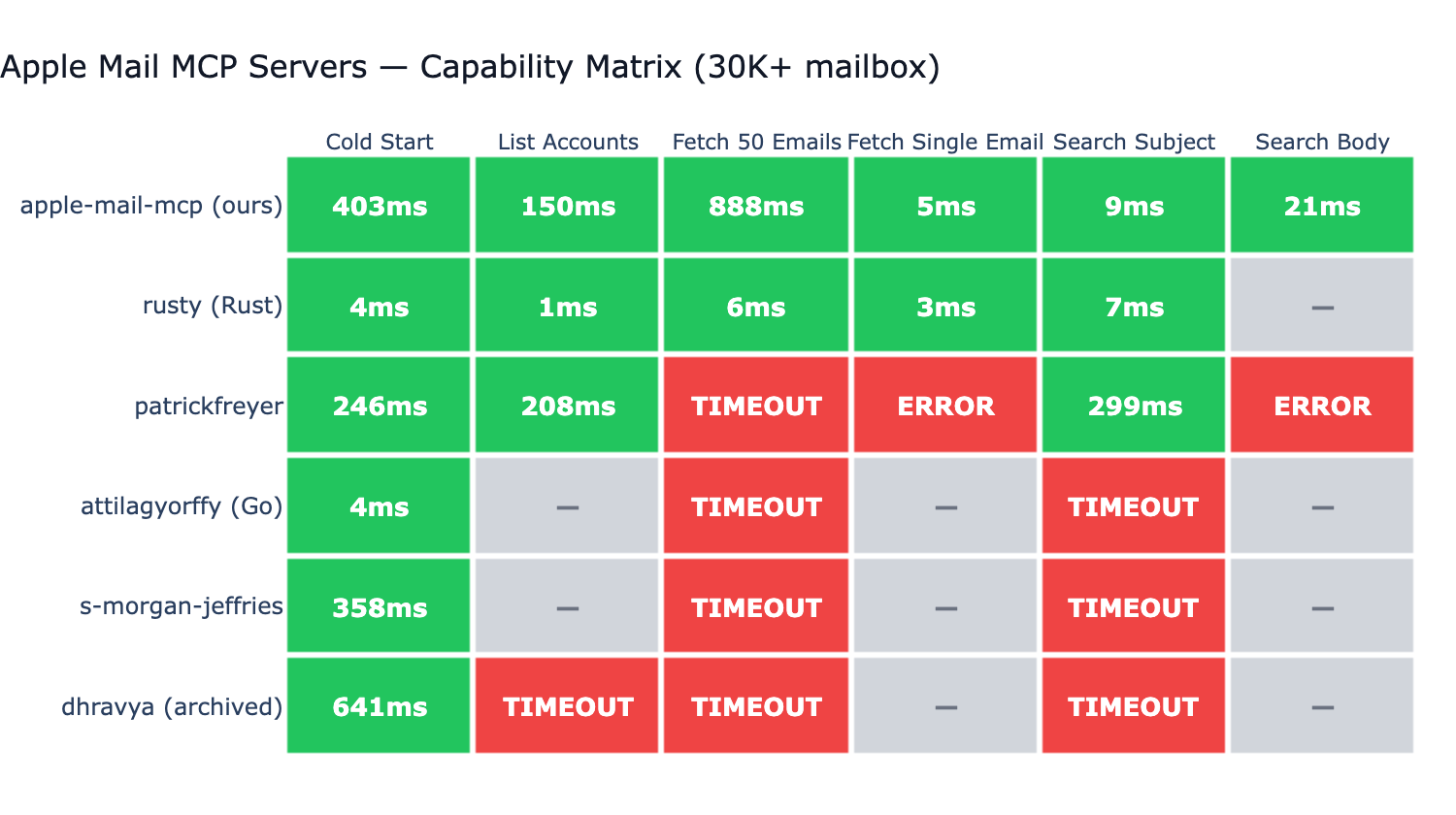
Tested against 6 other Apple Mail MCP servers on a real ~73K-message mailbox:
.emlx reading (no JXA round-trip).list_accounts and ~5ms 50-email listing via direct Envelope-Index SQLite reads (0.4+) — same path BastianZim/rusty/pl-lyfx use, with JXA as the correctness fallback.
Apple Mail MCP works out of the box. To customize defaults, run
apple-mail-mcp init to generate a config.toml template — or use
the matching APPLE_MAIL_* environment variables. See the
Configuration docs
for the full schema and the CLI > env > file > default precedence.
Per-client env overrides via the MCP client's launch config also work:
{
  "mcpServers": {
    "mail": {
      "command": "apple-mail-mcp",
      "args": ["--watch"],
      "env": {
        "APPLE_MAIL_DEFAULT_ACCOUNT": "Work"
      }
    }
  }
}
All tools are also available as standalone CLI commands (no MCP server needed):
apple-mail-mcp search "quarterly report" --scope subject
apple-mail-mcp search "invoice" --after 2026-01-01 --limit 10
apple-mail-mcp read 12345
apple-mail-mcp emails --filter unread --limit 10
apple-mail-mcp accounts
apple-mail-mcp mailboxes --account Work
apple-mail-mcp extract 12345 invoice.pdf
All commands output JSON. Generate a Claude Code skill for CLI-based access:
apple-mail-mcp integrate claude > ~/.claude/skills/apple-mail.md
git clone https://github.com/imdinu/apple-mail-mcp
cd apple-mail-mcp
uv sync
uv run ruff check src/
uv run pytest
GPL-3.0-or-later
Apple Mail MCP server with full-coverage FTS5 body search. Reliable on large mailboxes where AppleScript-based servers timeout.
{ "mcpServers": { "imdinu-apple-mail-mcp": { "command": "uvx", "args": [ "apple-mail-mcp==0.5.0" ] } }}工具
暂无工具列表。远程服务器在首次健康检查后会获得工具列表。
常见问题
在本页复制适用于 Cursor、Claude Desktop、Claude Code 或 VS Code 的 stdio 配置。它使用发布者的安装方式,而不是 PlugMCP 代理。
此记录未列出必需的环境变量。
Apple Mail 通过 stdio 在本地运行。
上次检查时间:2026-11-17。 Apple Mail MCP server with full-coverage FTS5 body search. Reliable on large mailboxes where AppleScript-based servers timeout.
