Hail
Give your agent a real phone number and an email inbox — in minutes, not days.
接入你的智能体
发布者自己的 URL。不是 PlugMCP 端点。
用我们的密钥与日志托管一份副本。
https://mcp.hail.so上方的 Claude 按钮会打开 Claude,并填好名称和 URL。你仍需在那里确认。
claude mcp add --transport http io.github.hail-hq-hail-mcp https://mcp.hail.soRun in a terminal.
{ "mcpServers": { "io.github.hail-hq-hail-mcp": { "command": "npx", "args": [ "-y", "mcp-remote", "https://mcp.hail.so" ] } }}claude_desktop_config.json
远程 URL 还是本机命令? 两种安装方式的区别

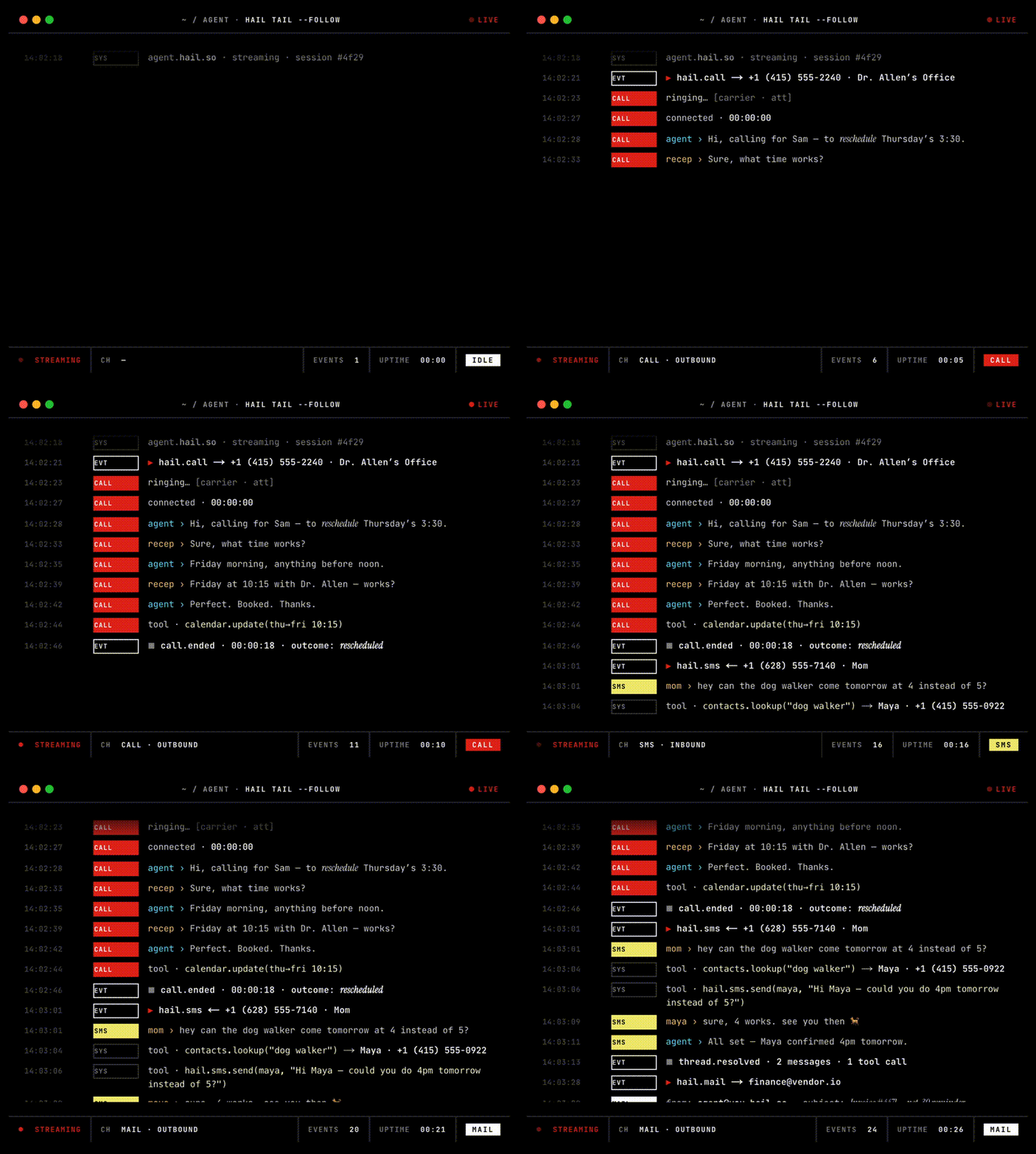
Your agent needs to call a person to move an appointment. Hail connects to the telephone carrier and runs the voice pipeline — STT, TTS, turn detection. Your agent is the brain: point Hail at any OpenAI-compatible endpoint (bring your own LLM), or let Hail's fallback chain (Anthropic → OpenAI → Gemini) do the talking. SMS and email work the same way — one MCP endpoint, one API key, one invoice.
Self-hostable with Docker Compose; LiveKit Cloud and the communication providers remain external. Open source under AGPLv3.
Prerequisites: Git, Docker Engine, and Docker Compose v2. For a public production deployment you also need a domain, HTTPS, and a managed Postgres; start with the VM deployment guide.
The commands below run a local evaluation stack with bundled Postgres. Voice calls additionally require LiveKit Cloud, a carrier (Twilio, Telnyx or DIDWW), Deepgram, Cartesia, and at least one LLM provider. Email is optional and requires AWS SES.
git clone https://github.com/hail-hq/hail
cd hail
cp .env.example .env

# Generate a shared self-host key, then put it in .env as HAIL_API_KEY.
printf 'hk_%s\n' "$(openssl rand -base64 32 | tr -d '/+=' | head -c 40)"

# Edit .env and add the providers required for the channels you will use.
docker compose -f docker-compose.yml -f docker-compose.local.yml \
  run --rm api alembic upgrade head
docker compose -f docker-compose.yml -f docker-compose.local.yml up -d
docker compose -f docker-compose.yml -f docker-compose.local.yml ps
curl --fail http://localhost:8080/healthz
Self-host authentication uses the HAIL_API_KEY value from .env; it does not
need an API-key row in Postgres. Export the same key and API URL in the shell
where you use the CLI or SDK (Compose does not export .env into your shell):
export HAIL_API_URL=http://localhost:8080
export HAIL_API_KEY='<same value as .env>'
Next, follow LiveKit Cloud and Twilio (optionally Telnyx and DIDWW), then bind a phone number to the self-host organization using the first-run setup. To enable email, follow AWS SES.
Authentication differs by deployment:
hail login. The device flow writes a key to ~/.hail/credentials.json.hail login; set HAIL_API_URL and HAIL_API_KEY as shown above, or pass --api-url and --api-key.Full setup guides: self-hosting · Webhooks · MCP · operations
Give your AI assistant a phone number and an email inbox.
Let your assistant handle calls, texts, and email. Building an app? Add AI calls, email and SMS with one API.
Make and take calls, send and receive messages, and check conversation history from Cursor. Get phone numbers in 120+ countries, with help for local rules and required documents, including US A2P 10DLC registration. Choose a built-in voice or bring your own. Build with the API, CLI, or Python SDK. Open-source or cloud priced on usage.
From a checkout that includes the plugin, copy its files into Cursor's local plugin directory:
mkdir -p ~/.cursor/plugins/local/hail
git archive HEAD .cursor-plugin mcp.json README.md LICENSE \
  docs/assets/hail-messenger.svg | tar -x -C ~/.cursor/plugins/local/hail
Reload Cursor and open Customize to find the Hail MCP server.
Enterprise administrators must allow local plugin imports first.
The plugin connects to https://mcp.hail.so
using OAuth. Sign in to Hail when Cursor asks. No API key or local MCP
runtime is needed. Start with a read-only request:
Find call-capable Hail numbers in the UK, France, and Canada. Compare
monthly fees, setup fees, and registration requirements.
On macOS or Linux with Homebrew:
brew install hail-hq/tap/hail
hail version
Homebrew adds the hail-hq/tap tap automatically. To update later:
brew upgrade hail-hq/tap/hail
Alternatively, download the archive for your operating system and architecture from GitHub Releases. Release binaries are available for macOS and Linux on Intel and ARM64. See the CLI reference for authentication and commands.
CLI:
hail login                        # Hail Cloud only (device flow)
hail auth logout                  # remove local credentials
hail auth token                   # print bare API key for scripting

hail call +14155550100 --prompt "be brief" --recipient-consent
hail call list
hail call status <id>             # one call's state
hail call tail <id>               # follow events for one call

hail sms +15551234567 --body "Hello!" --recipient-consent
hail sms list
hail sms status <id>
hail sms suppressions list        # opt-out list
hail sms sender-id get            # custom sender ID

hail numbers acquire              # dedicated phone number (voice + SMS), cheapest live offer
hail numbers list
hail contacts list                # org contact directory

hail email send --to [email protected] --subject hi --body "hello" --recipient-consent
hail email list
hail email get <id>
hail email tail <id>              # follow events for one email
hail email raw <id>               # RFC 5322 source
hail email attachment <id> <att-id> --output file.pdf
hail email domain register --kind hail_mail
hail email domain register --kind custom --domain acme.com  # send + receive on your own domain
hail email domain list

printf '%s' "$YOUR_API_KEY" | hail providers set llm \
  --provider openai-compatible \
  --base-url https://api.your-agent.dev/v1 \
  --model your-model \
  --key -                         # standing BYO brain (also: tts, stt)

hail tail                         # cross-channel event stream
hail tail call:<id>               # narrow by resource type

hail mcp endpoint                 # Streamable HTTP URL for the MCP server
hail completion zsh               # source <(hail completion zsh)
hail version
Python (pip install hail-sdk):
import asyncio
from hail import Client

async def main():
    async with Client() as client:  # reads $HAIL_API_KEY
        call = await client.calls.create(
            to="+15551234567",
            recipient_consent=True,
            system_prompt="You are calling to confirm a reschedule.",
        )
        async for event in client.events.tail(id=f"call:{call.id}"):
            print(event.kind, event.payload)

asyncio.run(main())
HTTP (OpenAPI spec, API reference):
curl -X POST http://localhost:8080/v1/calls \
  -H "Authorization: Bearer $HAIL_API_KEY" \
  -H "Content-Type: application/json" \
  -d '{"to":"+15551234567","recipient_consent":true,"system_prompt":"..."}'
MCP (Claude.ai, Claude Code, ChatGPT, Cursor, …): local clients can use
http://localhost:8081. Web-based clients require a publicly reachable HTTPS
endpoint. See the MCP setup guide.
Hail always runs the telephony and the voice pipeline. The brain is pluggable, at two levels:
llm block to POST /calls; different brains for different calls.hail providers set llm …); every call your org places uses it.Any OpenAI chat-completions-compatible endpoint works. A complete runnable example lives in docs/public/byo-llm.md. TTS and STT are pluggable the same way (hail providers set tts|stt …).
A checked box is a released feature. Per-artifact changelogs (GitHub Releases for the CLI, PyPI notes for the SDK) record which version shipped it.
hail binary via GitHub Releaseshail-sdk on PyPI, imports as hailThe path of an outbound call:
AI agent ──► Hail API ──dispatch──► Voicebot ──► LiveKit Cloud ──SIP──► carrier (Twilio · Telnyx · DIDWW) ──► 📞
Full diagram and service breakdown: docs/public/architecture.md. All docs are published at hail.so/docs and live as plain markdown in docs/public/.
See docs/public/contributing.md. Short version: fork, branch, conventional commits, pull request. Provider adapters go in core/hailhq/core/providers/; new env vars update .env.example in the same commit.
Code: AGPL-3.0-or-later — run a modified Hail as a service, release your source.
Pricing dataset (costs/): CC-BY-4.0 — use the JSON with attribution.
Phone, SMS and email for AI agents. One remote MCP endpoint, OAuth login, zero install.
{ "mcpServers": { "io.github.hail-hq-hail-mcp": { "url": "https://mcp.hail.so", "headers": {} } }}工具
暂无工具列表。远程服务器在首次健康检查后会获得工具列表。
常见问题
在本页复制适用于 Cursor、Claude Desktop、Claude Code 或 VS Code 的 http 配置。它使用发布者的安装方式,而不是 PlugMCP 代理。
此记录未列出必需的环境变量。
Hail 通过 HTTP 访问。
上次检查时间:2026-11-09。 Phone, SMS and email for AI agents. One remote MCP endpoint, OAuth login, zero install.