Memento
Give your AI tools a persistent memory — so every session starts where the last one left off.
接入你的智能体
发布者自己的命令。不是 PlugMCP 端点。
用我们的密钥与日志托管一份副本。
docker run -i --rm ghcr.io/scrypster/memento:0.1.0Claude Code 没有针对本地命令的安装链接。复制下方命令并在终端中运行。
claude mcp add io.github.scrypster-memento -- docker run -i --rm ghcr.io/scrypster/memento:0.1.0在终端中运行。
{ "mcpServers": { "io.github.scrypster-memento": { "command": "docker", "args": [ "run", "-i", "--rm", "ghcr.io/scrypster/memento:0.1.0" ] } }}claude_desktop_config.json
远程 URL 还是本机命令? 两种安装方式的区别
Your AI starts fresh every session. Memento fixes that.
It runs on your machine, connects to any MCP-compatible AI tool, and builds a persistent knowledge graph from your conversations — entities, relationships, decisions, and context that survive every session restart.
No cloud. No API keys required. No subscriptions. Your data stays on your machine.
Prerequisites: Docker — or — Go 1.23+ + Node.js 18+ + Ollama
git clone https://github.com/scrypster/memento.git
cd memento
./launch.sh
The script detects your environment, runs preflight checks, builds everything, and prints the exact command to connect your AI tool at the end. First run downloads Ollama models (~5 GB). After that, starts in seconds.
Once connected, try this in Claude:
"We're using PostgreSQL — chose it for pgvector support."
Close the tab. Open a new session. Ask:
"What database are we using?"
Your AI already knows. No re-explaining. No context window tricks.
Close the tab. Open a new session.
You: "What database are we using?"

→ Your AI already knows: "PostgreSQL — you chose it for pgvector support."
  No re-explaining. No context window tricks. It just remembers.
Behind the scenes, Memento built this automatically:
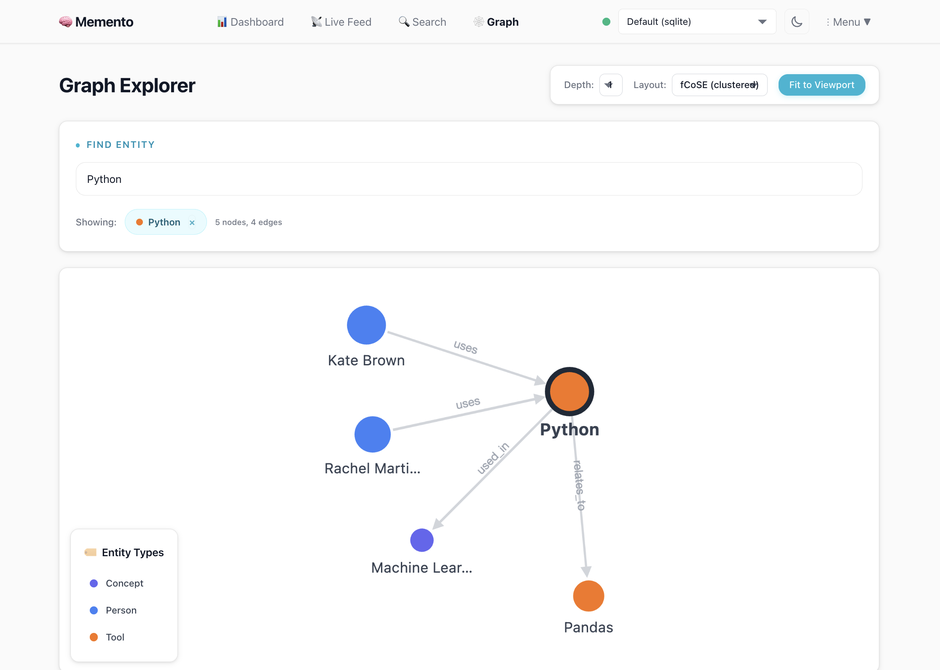
Every entity gets wired into a knowledge graph — people, tools, projects, decisions — with confidence scores and timestamps.
Open http://localhost:6363/integrations — the web UI generates configs, download buttons, and connection testing for every client:
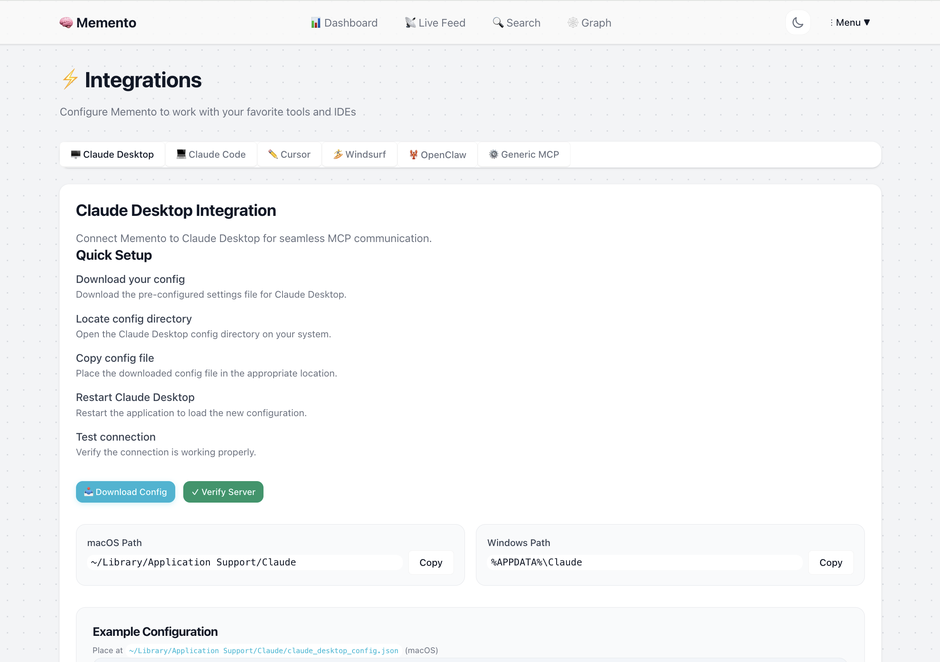
The integrations page generates ready-to-paste configs with your actual binary paths and data directories. It also has connection testing, troubleshooting, and per-project workspace scoping.
The MCP connection makes tools available, but Claude won't use them automatically. Add this to ~/.claude/CLAUDE.md to make Claude store decisions and recall context without being asked:
## Memento MCP — Persistent Memory

The `memento` MCP server provides persistent cross-session memory. Use these tools proactively — don't wait to be asked.

**Store** (`store_memory`) when the user:
- States a preference or working style ("I prefer X", "always use Y format")
- Makes an architectural or technical decision
- Establishes project context that should survive session restarts
- Explicitly says "remember this" or similar

**Recall** (`recall_memory` or `find_related`) when:
- Starting a session for a known project — query for relevant context before diving in
- About to make a recommendation — check for existing preferences first
- The user asks about past decisions, choices, or "what did we decide about X"
- Something seems like it may have been discussed in a prior session

**Don't store:** transient debug output, in-progress exploration, or anything session-specific that won't matter next time.

Memories are searchable immediately after storing. Enrichment (entity/relationship extraction) runs asynchronously via local Ollama.
The web UI at Integrations → Claude Code → Make it proactive generates a version with your specific paths and connection settings, plus a download button.
See the full integration guides: Claude Code | Claude Desktop | Cursor & Windsurf | OpenClaw
Point everyone's AI tools at the same Memento instance and your team's decisions, conventions, and context become shared knowledge — queryable by anyone, attributable to anyone.
Every memory is tagged with who stored it. Memento auto-detects this from your git config, or you can set it explicitly:
export MEMENTO_USER=alice # or set in your shell profile
Or in your MCP config:
"env": { "MEMENTO_USER": "alice" }
Once set, you can ask:
What did Bob decide about the auth service this week?
recall_memory(created_by="bob", created_after="2024-01-14T00:00:00Z")
Setup: Each teammate runs Memento pointing at the same PostgreSQL database. Personal context stays personal (use a separate personal connection). Shared architectural decisions, conventions, and project context go into the shared connection.
See the team setup guide for full PostgreSQL configuration.
Once connected, your AI has 20 tools it can call — no prompting required:
Store returns in <10ms. Enrichment — entity extraction, relationship mapping, embedding generation — runs asynchronously. Your AI is never blocked.
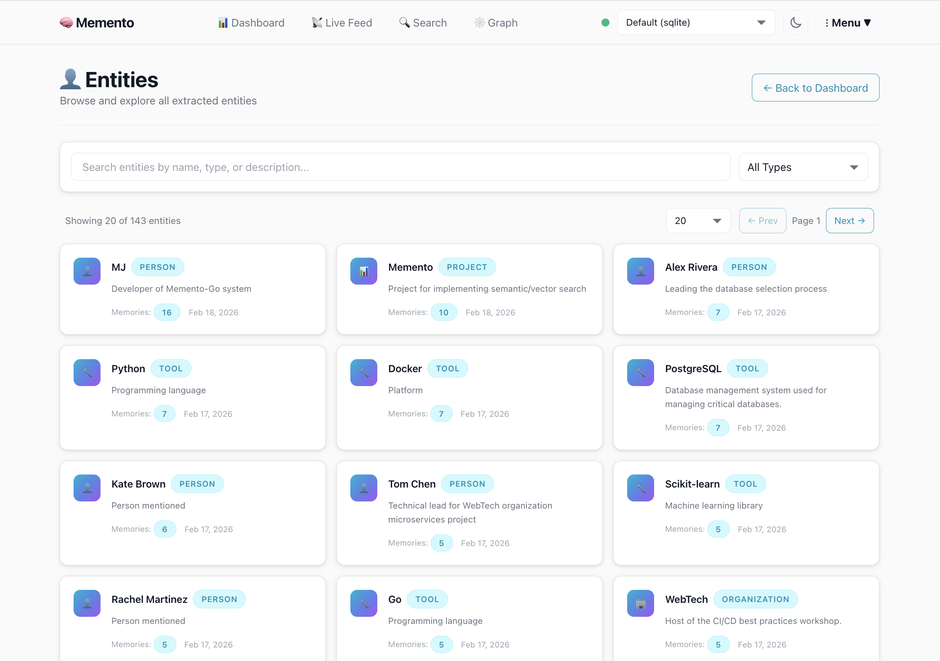
People, projects, tools, organizations, languages, APIs — extracted automatically from your AI conversations. No tagging required.
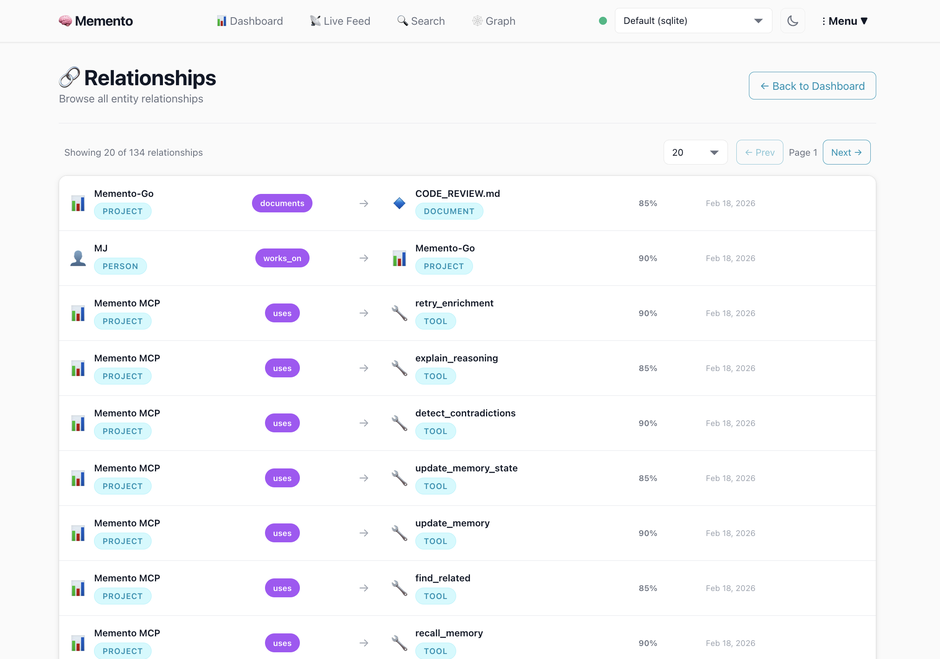
Your AI knows who works_on what, which tools depend_on which services, and what the current state of each decision is — with confidence scores and timestamps.
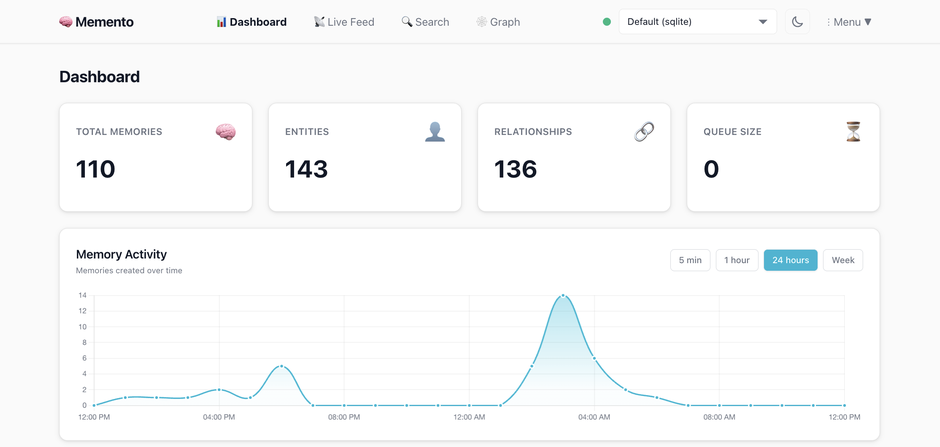
Live enrichment queue, entity browser, relationship explorer, and graph visualizer — all in the web UI.
Mem0 requires cloud API keys and a paid plan for production use. Memento runs entirely on your machine with Ollama — no API keys, no cloud, no per-memory pricing. Memento also ships a full web UI with graph visualization, entity browser, and one-click integration setup. Mem0 has no web interface.
Zep requires Neo4j or FalkorDB for its knowledge graph. Memento uses SQLite (zero deps) or PostgreSQL — no graph database to manage. Zep's open-source version is limited; the full feature set requires Zep Cloud.
Built-in memory is a flat list of facts with no relationships, no search, no graph, and no way to export or control your data. Memento gives you a structured knowledge graph you own, with hybrid search and full lifecycle management.
Memento captures context automatically as you work — no manual effort. It builds relationships between concepts instead of isolated pages, and it's designed to be queried by LLMs, not just humans.
┌─────────────────────────────────────────────────────┐
│  Your AI tool (Cursor / Claude Code / Windsurf / …) │
└─────────────────────────┬───────────────────────────┘
                          │  MCP (JSON-RPC 2.0 over stdio)
┌─────────────────────────▼───────────────────────────┐
│                   MCP Server                        │
│   store · recall · find_related · contradictions…   │
└─────────────────────────┬───────────────────────────┘
                          │
┌─────────────────────────▼───────────────────────────┐
│                Memory Engine                        │
│  ┌──────────────────────────────────────────────┐  │
│  │           Enrichment Pipeline                │  │
│  │  entity extraction → relationship mapping    │  │
│  │  → semantic embeddings → contradiction check │  │
│  └──────────────────────────────────────────────┘  │
└──────────────────┬──────────────────────────────────┘
                   │
       ┌───────────┴───────────┐
       │                       │
┌──────▼──────┐       ┌────────▼────────┐
│   SQLite    │       │  PostgreSQL     │
│  FTS5 index │       │  + pgvector     │
│  (default)  │       │  (scale-out)    │
└─────────────┘       └─────────────────┘
Runs entirely offline
~/.memento/memento.dbHybrid search
Knowledge graph
Memory lifecycle
planning → active → paused | blocked | completed | cancelled → archivedProduction-ready backends
Multi-connection isolation
Web UI
Switch providers per connection — different projects can use different LLMs.
docker compose --profile postgres up -d
MEMENTO_STORAGE_ENGINE=postgres
MEMENTO_DATABASE_URL=postgres://memento:memento_dev_password@localhost:5433/memento
memento/
├── cmd/
│   ├── memento-mcp/        # MCP server binary — connect this to your AI client
│   ├── memento-web/        # Web dashboard — entity browser, graph explorer, settings
│   └── memento-setup/      # Interactive setup wizard
├── internal/
│   ├── api/mcp/            # MCP JSON-RPC server — 20 tool handlers
│   ├── engine/             # Memory engine, enrichment pipeline, async workers
│   ├── llm/                # Ollama, OpenAI, Anthropic + circuit breaker
│   └── storage/
│       ├── sqlite/         # SQLite with FTS5 and hybrid vector search
│       └── postgres/       # PostgreSQL with pgvector and ivfflat index
├── web/
│   ├── handlers/           # HTMX handlers
│   ├── templates/          # Dashboard, graph, entities, settings, integrations
│   └── static/templates/   # MCP config snippets generated per client
├── docs/
│   └── integrations/       # Per-client integration guides
├── migrations/             # SQL schema migrations
└── docker-compose.yml
Issues and PRs welcome. Open an issue before starting significant work.
go test ./...

go build -o memento-mcp ./cmd/memento-mcp/
go build -o memento-web ./cmd/memento-web/
go build -o memento-setup ./cmd/memento-setup/
MIT — see LICENSE.
MJ Bonanno — software architect and founder of Scrypster.
Remember everything. Forget nothing. Unlike Leonard Shelby, your context is here to stay — searchable, versioned, and backed by a knowledge graph that never fades.
Persistent memory for AI tools. Local-first knowledge graph with hybrid search.
{ "mcpServers": { "io.github.scrypster-memento": { "command": "docker", "args": [ "run", "-i", "--rm", "ghcr.io/scrypster/memento:0.1.0" ] } }}工具
暂无工具列表。远程服务器在首次健康检查后会获得工具列表。
常见问题
在本页复制适用于 Cursor、Claude Desktop、Claude Code 或 VS Code 的 stdio 配置。它使用发布者的安装方式,而不是 PlugMCP 代理。
此记录未列出必需的环境变量。
Memento 通过 stdio 在本地运行。
上次检查时间:2026-11-10。 Persistent memory for AI tools. Local-first knowledge graph with hybrid search.
