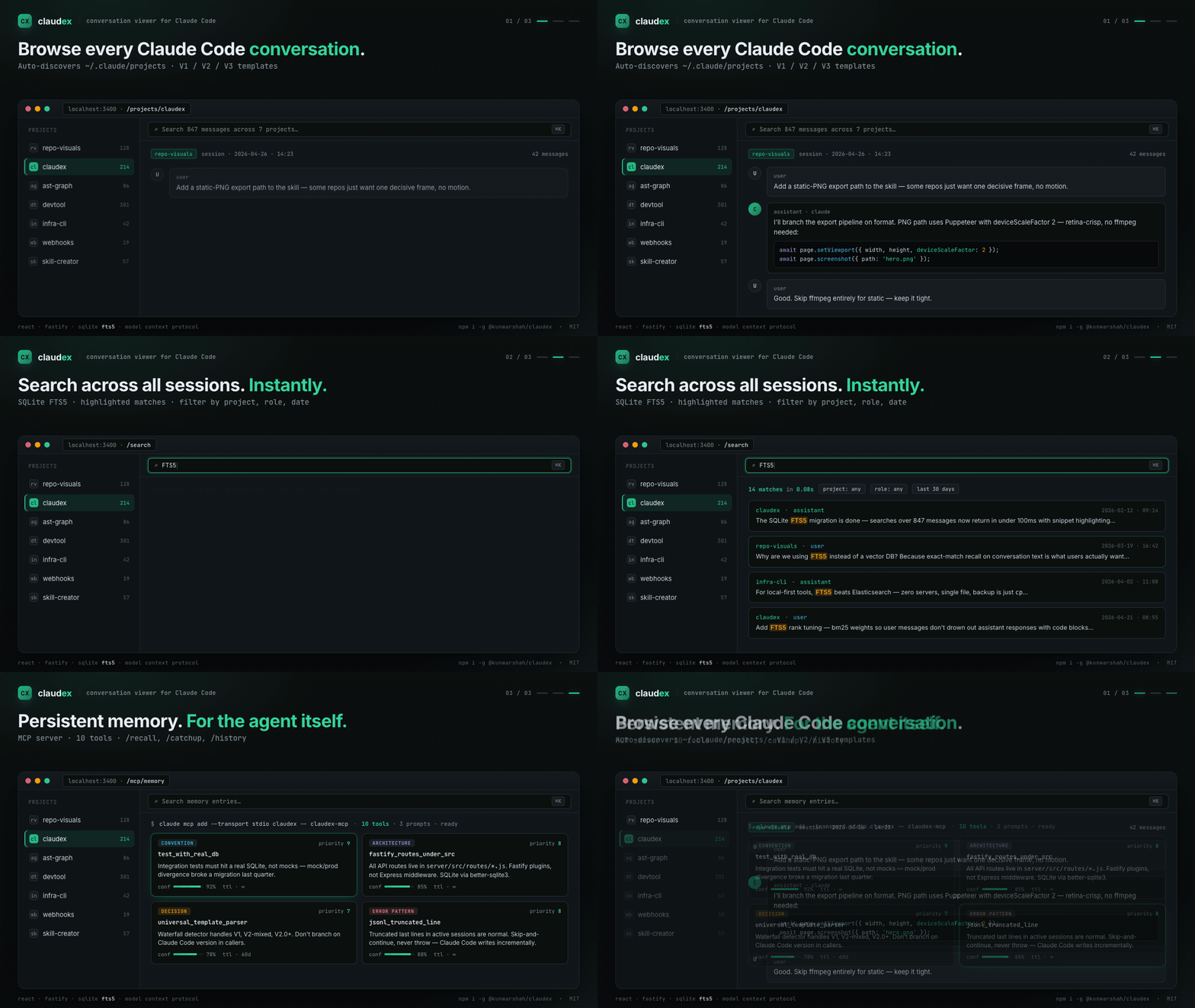
Professional conversation viewer and analysis tool for Claude Code
Category: Development Tools · Conversation Analysis · Usage Monitoring
Claudex is a full-stack web application designed for developers, QA engineers, and researchers who need to inspect, search, and analyze Claude Code conversation histories. Built with React and Fastify, it provides enterprise-grade full-text search using SQLite FTS5, universal template support for all Claude Code versions, and comprehensive analytics dashboards.
MCP server with persistent memory + FTS5 search for Claude Code conversation history. Index your ~/.claude/projects/, expose 10 MCP tools, browse via web UI. MIT-licensed.
MCP Server: Give Claude Code persistent memory — conventions, architecture, decisions, and error patterns survive across sessions
Structured Memory: Store and recall coding knowledge with priority (1-10), confidence, and TTL-based expiration
Auto Project Discovery: Automatically scans ~/.claude/projects directory to discover all conversations across multiple projects
Full-Text Search: Enterprise-grade SQLite FTS5 search engine with advanced filtering by project, session, role, date range, and content highlighting
Universal Template Support: Intelligent template detection and parsing for all Claude Code versions (V1.x, V2-mixed, V2.0+) with automatic format detection
Session Analytics: Comprehensive analytics dashboard with message distribution charts, file operation tracking, and conversation statistics using Tremor React
Export Options: Export conversations to JSON (structured data), HTML (readable format), or plain TXT for archival and sharing
Modern UI: Responsive React interface with 10 themes, 29 fonts, session favorites, and optimized for developer workflows
💖 Support This Project
Claudex is free and open source. If it saves you time and improves your workflow, please consider:
Every contribution helps keep this project alive and growing! 🚀
🚀 Quick Start
Prerequisites
Node.js 18+ and npm
Claude Code installed with conversation history in ~/.claude/projects
Installation
Option 1: npm (Recommended)
# Global installation
npm install -g @kunwarshah/claudex [https://www.npmjs.com/package/@kunwarshah/claudex]

# Then run anywhere:
claudex

# Custom port (if 3400 is in use):
claudex --port 3500

# Custom project directory:
claudex --project-root ~/my-claude-projects

# Or use without installing (npx):
npx @kunwarshah/claudex
Add MCP Server (gives Claude Code persistent memory):
claude mcp add --transport stdio claudex -- claudex-mcp
The viewer automatically detects and parses all Claude Code conversation formats:
V3 Template (Universal - Recommended)
Claude Code v2.0+: New format with role field directly
Claude Code v1.x: Original format with type field
Edge cases: Mixed formats and migration states
New message types: file-history-snapshot support
Role mapping: All system messages → assistant (binary user/assistant classification)
Legacy Templates (Auto-detected)
V2-Mixed: Transition format between V1 and V2
V1: Original Claude Code format
The template detector uses a waterfall detection strategy, automatically selecting the best parser for your conversation files.
🔍 Search System
Building the Search Index
The search index needs to be built before searching:
# Option 1: Via API
curl -X POST http://localhost:3400/api/search/index/build

# Option 2: Via test script
./test-search.sh

# Option 3: Via UI (Search page → "Rebuild Index" button)
When to Rebuild Index
Rebuild the search index when:
First time setup
After template changes
When new conversations are added
If search results seem outdated
Search API Examples
# Basic search
curl -X POST http://localhost:3400/api/search \
  -H "Content-Type: application/json" \
  -d '{"q": "migration", "limit": 10}'

# Search with filters
curl -X POST http://localhost:3400/api/search \
  -H "Content-Type: application/json" \
  -d '{
    "q": "database",
    "projectId": "my-project",
    "role": "user",
    "limit": 20,
    "offset": 0
  }'

# Check index status
curl http://localhost:3400/api/search/index/status
# Run both frontend + backend with hot reload
npm run dev

# Or run separately:
# Terminal 1 - Backend (auto-restarts on changes)
cd server && npm run dev

# Terminal 2 - Frontend (hot module replacement)
cd client && npm run dev
This will check all common problems and provide actionable suggestions.
Common Issues
"No messages found" Despite Messages Existing
Fixed in v1.1.1 - If you see intermittent empty sessions or duplicate key warnings:
# Update to latest version
cd claude-viewer
git pull origin main
npm install && cd server && npm install && cd ../client && npm install && cd ..
npm run dev
# Check what the system sees
npm run check

# Verify path
cat server/.env | grep PROJECT_ROOT
Verify PROJECT_ROOT in .env points to ~/.claude/projects
Check that Claude Code has created conversation files
Run npm run check:fix to auto-create missing directories
Search Not Working
# Quick fix via UI
# Visit http://localhost:3000/search → Click "Rebuild Index"

# Or via command line
curl -X POST http://localhost:3400/api/search/index/build
Port Conflicts
# System checker will detect port conflicts
npm run check

# Auto-detected ports in use show PID
# Kill process: kill <PID>
# Or change PORT in server/.env
# Build image manually
docker build -t claudex:latest .

# Run container manually
docker run -d \
  -p 3400:3400 \
  -v ~/.claude/projects:/root/.claude/projects:ro \
  -v claudex-data:/app/data \
  --name claudex-web \
  claudex:latest

# Check health
docker ps  # Check STATUS column for "healthy"

# View logs
docker logs claudex-web -f

# Stop and remove
docker stop claudex-web && docker rm claudex-web
Docker Features
Multi-stage build: Optimized image size (~200MB)
Non-root user: Runs as nodejs user for security
Health checks: Automatic health monitoring
Persistent volumes: Stores search index and logs
Read-only mounts: Claude projects mounted read-only for safety
Log rotation: JSON logs with 10MB max size, 3 file rotation
Docker Environment Variables
# Override in docker-compose.yml or docker run
-e PORT=3400                           # Server port
-e HOST=0.0.0.0                        # Bind address
-e NODE_ENV=production                 # Environment
-e PROJECT_ROOT=/root/.claude/projects # Claude projects path
Manual Production Build
For non-Docker deployments:
# 1. Install dependencies
npm run install-deps

# 2. Build client
npm run build

# 3. Start server (serves built client)
cd server && NODE_ENV=production npm start
Use the search page to find conversations across all projects
Export conversations to share with team members
Rebuild search index after adding new conversations
Check /api/health endpoint to verify system status
Use npm run dev for the best development experience with hot reload
C
Claudex
kunwar-shah·97 个星标·
MCP server with persistent memory + FTS5 search for Claude Code conversation history. Index your ~/.claude/projects/, expose 10 MCP tools, browse via web UI. MIT-licensed.
上次检查时间:2026-10-28。 MCP server with persistent memory + FTS5 search for Claude Code conversation history. Index your ~/.claude/projects/, expose 10 MCP tools, browse via web UI. MIT-licensed.