jPOS MCP Server
mcp-name: io.github.mohisyed/jpos-mcp-server
The first open-source MCP server for jPOS and ISO 8583.
接入你的智能体
发布者自己的命令。不是 PlugMCP 端点。
用我们的密钥与日志托管一份副本。
uvx jpos-mcp-server==0.1.1Claude Code 没有针对本地命令的安装链接。复制下方命令并在终端中运行。
claude mcp add mohisyed-jpos-mcp -- uvx jpos-mcp-server==0.1.1在终端中运行。
{ "mcpServers": { "mohisyed-jpos-mcp": { "command": "uvx", "args": [ "jpos-mcp-server==0.1.1" ] } }}claude_desktop_config.json
远程 URL 还是本机命令? 两种安装方式的区别
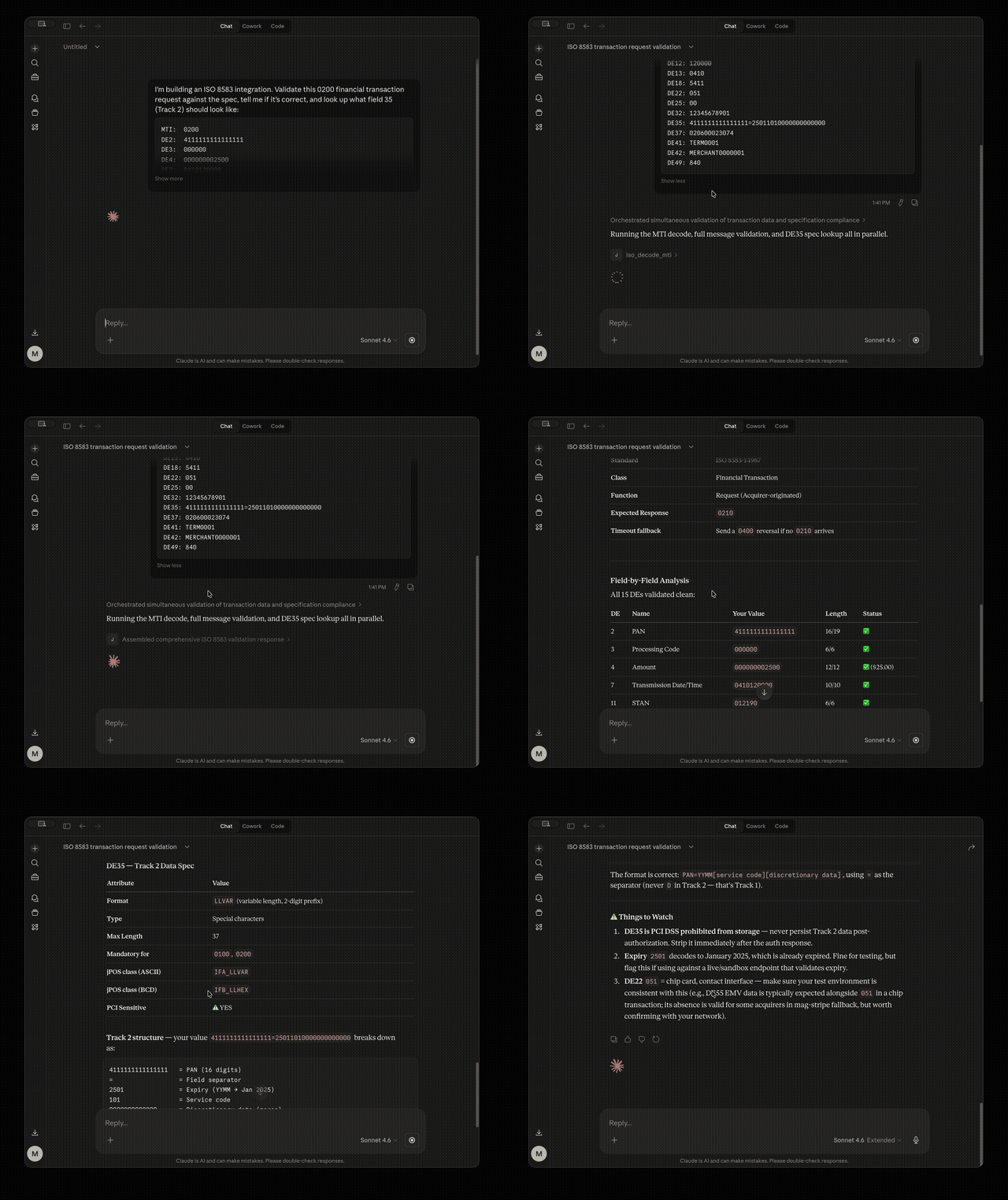
Claude validating a real ISO 8583 financial transaction request using deterministic tools. No guessing — every answer comes from verified data.
An MCP server that gives AI agents (Claude, Cursor, VS Code Copilot) deterministic, verified access to ISO 8583 field specs, MTI decoding, jPOS packager XML generation, deploy descriptor validation, message building, and jPOS documentation search.
No more guessing packager class names. No more scrolling a 300-page PDF. Call a tool, get the right answer.
Prerequisites: Python 3.11+ and uv package manager.
# 1. Clone and install
git clone https://github.com/mohisyed/JPOS-MCP.git
cd JPOS-MCP
uv sync

# 2. (Optional) Set up the knowledge base for semantic search
mkdir -p knowledge/sources
curl -o knowledge/sources/proguide.pdf https://jpos.org/doc/proguide-draft.pdf
uv run python knowledge/ingest.py

# 3. Add to Claude Desktop (see Claude Desktop Setup below)
All 6 tools work immediately after step 1. Step 2 enables the search_jpos RAG tool with real documentation.
LLMs can guess that field 35 uses IFA_LLVAR, but they sometimes hallucinate class names like IFA_LLTRACK2 (doesn't exist). Our tools read from data/iso_fields.json — a verified lookup table — so the answer is always correct. The AI decides which tool to call; our code provides the facts.
┌─────────────────────────────────────────────────────────────────┐
│                      AI AGENT CLIENTS                           │
│  Claude Desktop  ·  Claude API  ·  Cursor  ·  VS Code Copilot  │
└──────────────────────────┬──────────────────────────────────────┘
                           │  MCP Protocol (JSON-RPC 2.0)
              stdio (local) / Streamable HTTP (Docker)
                           │
┌──────────────────────────▼──────────────────────────────────────┐
│           jpos-mcp-server  (Python / FastMCP v3.1.1)            │
│                                                                  │
│  main.py                                                         │
│  ├── iso_server    [iso]   lookup_field, decode_mti              │
│  ├── jpos_server   [jpos]  generate_packager, validate_descriptor│
│  ├── msg_server    [msg]   build_message                         │
│  └── rag_server    [docs]  search_jpos                           │
│                                                                  │
│  ┌──────────────┐   ┌─────────────────────────────────────────┐  │
│  │  DATA LAYER   │   │  KNOWLEDGE LAYER                        │  │
│  │  iso_fields   │   │  ChromaDB + sentence-transformers       │  │
│  │  mti_table    │   │  Chunked jPOS Programmer's Guide        │  │
│  │  mandatory    │   │  + project docs (ISO 8583 deep dive)    │  │
│  └──────────────┘   └─────────────────────────────────────────┘  │
│  core/ — timeout guardrails, PAN detection, safe logging         │
└──────────────────────────────────────────────────────────────────┘
The server is split into 4 domain-specific sub-servers mounted via FastMCP.mount(). Each sub-server is independently testable — a bug in the RAG pipeline doesn't prevent ISO field lookups from working. Adding a new domain is one file + one mount() call in main.py.
Every tool is wrapped with @with_timeout() using asyncio.wait_for(). If a tool hangs (e.g., ChromaDB cold start), it returns a structured error dict instead of blocking the entire MCP server. Timeout tiers:
Payment systems have zero tolerance for wrong answers. A bad packager class name (IFA_LLVAR vs IFB_LLHEX) causes cryptic byte-level parsing errors that take hours to debug. Our tests verify that every tool returns correct, deterministic results across all input types.
# Install dev dependencies (pytest, ruff, black, coverage)
uv sync --dev

# Run all 114 tests (unit + MCP integration + E2E workflows)
uv run pytest tests/ -v

# Run a single test file
uv run pytest tests/test_iso.py -v

# Run a single test function
uv run pytest tests/test_iso.py::test_decode_mti_request -v

# Run with coverage report (target: 80%+, current: 91%)
uv run pytest tests/ --cov=servers --cov=core --cov-report=term-missing

# Lint (must pass with zero errors)
uv run ruff check .

# Format
uv run black .
When adding a tool, cover three categories:
All tools are async def, so use @pytest.mark.asyncio:
@pytest.mark.asyncio
async def test_my_new_tool():
    result = await my_tool("valid input")
    assert result["expected_key"] == "expected_value"
The search_jpos tool uses two-stage hybrid retrieval over jPOS documentation: a bi-encoder (mpnet) for fast candidate retrieval, followed by a cross-encoder reranker for high-precision ordering.
all-mpnet-base-v2 and stored in ChromaDB.ms-marco-MiniLM-L-6-v2) scores each (query, chunk) pair by attending across both inputs. This is significantly more accurate than cosine alone.The cross-encoder loads lazily on first call (~1s). Falls back to keyword-overlap reranking if the model can't load (offline environments).
# Download the jPOS Programmer's Guide (5.3MB PDF)
mkdir -p knowledge/sources
curl -o knowledge/sources/proguide.pdf https://jpos.org/doc/proguide-draft.pdf

# Run ingestion (first run downloads ~80MB mpnet + ~80MB cross-encoder)
uv run python knowledge/ingest.py
The ingest script processes:
knowledge/sources/*.pdf — page-by-page chunking with cleanupdocs/*.md — section-aware chunking (splits on ## headings)knowledge/sources/*.md — for any additional docs you addIngestion is idempotent — running it again skips existing chunks and only adds new ones.
Default knowledge base after a full ingest: ~786 chunks across the jPOS Programmer's Guide, ISO 8583-1:2003 spec, Wikipedia reference, jPOS tutorial pages, and project docs.
Drop any .pdf or .md files into knowledge/sources/ and re-run:
uv run python knowledge/ingest.py
Good candidates:
Scores are calibrated for the cross-encoder + mpnet pipeline:
Benchmark across 25 representative queries: 0.886 average score, 100% strong results.
# Build and start (HTTP transport)
docker compose -f docker/docker-compose.yml up -d --build

# View logs
docker compose -f docker/docker-compose.yml logs -f

# Re-ingest docs after adding new sources
docker compose -f docker/docker-compose.yml exec jpos-mcp uv run python knowledge/ingest.py

# Check health
docker compose -f docker/docker-compose.yml exec jpos-mcp curl -sf http://localhost:8000/health
python:3.11-slimappuser:1001) for security/health{
"mcpServers": {
"jpos-expert": {
"url": "http://localhost:8000/mcp"
}
}
}
Edit ~/Library/Application Support/Claude/claude_desktop_config.json:
{
  "mcpServers": {
    "jpos-expert": {
      "command": "uv",
      "args": ["run", "python", "main.py"],
      "cwd": "/ABSOLUTE/PATH/TO/JPOS-MCP"
    }
  }
}
Edit %APPDATA%\Claude\claude_desktop_config.json:
{
  "mcpServers": {
    "jpos-expert": {
      "command": "uv",
      "args": ["run", "python", "main.py"],
      "cwd": "C:\\ABSOLUTE\\PATH\\TO\\JPOS-MCP"
    }
  }
}
After saving, restart Claude Desktop. All tools appear in the hammer (tools) menu.
Ask Claude: "What's the jPOS packager class for field 35?"
Claude should call lookup_field(35) and return the exact spec — IFA_LLVAR for ASCII, IFB_LLHEX for BCD — not a guess.
The MCP Inspector is a browser-based UI for testing tools interactively:
uv run fastmcp dev inspector main.py:mcp
This opens a browser at http://localhost:6274 where you can:
This server is designed with PCI DSS awareness:
4111111111111111, 5500005555555559, etc.) are accepted. This runs before any other processing.PaymentSafeFormatter strips fields 2 (PAN), 35 (Track 2), 45 (Track 1), 52 (PIN), 55 (EMV), and 64 (MAC) from all log output.print() would corrupt the protocol.appuser:1001.fastmcp==3.1.1 exact pin prevents supply chain surprises.ModuleNotFoundError: No module named 'fastmcp'Dependencies aren't installed. Run:
uv sync
search_jpos returns "Knowledge base not initialized"ChromaDB hasn't been populated. Run:
mkdir -p knowledge/sources
curl -o knowledge/sources/proguide.pdf https://jpos.org/doc/proguide-draft.pdf
uv run python knowledge/ingest.py
cwd in claude_desktop_config.json is an absolute pathuv is in your PATH (try running uv --version in terminal)Make sure you installed dev dependencies:
uv sync --dev
print() broke the stdio transportAny stdout output corrupts JSON-RPC. Find and remove print() statements. Use logging.getLogger(__name__).info() instead — it writes to stderr.
search_jposFirst call after startup can take 5-10s (ChromaDB + embedding model cold start). The 15s timeout accommodates this. If it persists, check that knowledge/chroma_db/ exists and has data.
See docs/roadmap-and-architecture.md for full details.
See CONTRIBUTING.md for setup instructions and guidelines.
The first open-source MCP server for jPOS and ISO 8583. Give AI agents deterministic access to payment protocol expertise.
{ "mcpServers": { "mohisyed-jpos-mcp": { "command": "uvx", "args": [ "jpos-mcp-server==0.1.1" ] } }}工具
暂无工具列表。远程服务器在首次健康检查后会获得工具列表。
常见问题
在本页复制适用于 Cursor、Claude Desktop、Claude Code 或 VS Code 的 stdio 配置。它使用发布者的安装方式,而不是 PlugMCP 代理。
此记录未列出必需的环境变量。
JPOS 通过 stdio 在本地运行。
上次检查时间:2026-10-28。 The first open-source MCP server for jPOS and ISO 8583. Give AI agents deterministic access to payment protocol expertise.
