protect-mcp
Local policy enforcement and signed decision receipts for AI agent tool calls.
接入你的智能体
发布者自己的命令。不是 PlugMCP 端点。
用我们的密钥与日志托管一份副本。
npx -y [email protected]Claude Code 没有针对本地命令的安装链接。复制下方命令并在终端中运行。
claude mcp add protect-mcp -- npx -y protect-mcp@0.32.4在终端中运行。
{ "mcpServers": { "protect-mcp": { "command": "npx", "args": [ "-y", "[email protected]" ] } }}claude_desktop_config.json
远程 URL 还是本机命令? 两种安装方式的区别
Developer page · Quickstart · Agent setup · Policy packs · Sample record · Integrations · Documentation · Contribute
Put the gateway between an MCP client and its tool server, or use its hooks in a coding agent. Review a Cedar policy, enable enforcement, and keep a signed record of the decisions. Local evaluation and verification need no ScopeBlind account and send no decision telemetry.
--enforce when ready to block.A gateway covers calls routed through it. It is not an OS sandbox, and a signed receipt does not establish that an action executed or that no action was omitted. The security policy describes the boundary and reporting process.
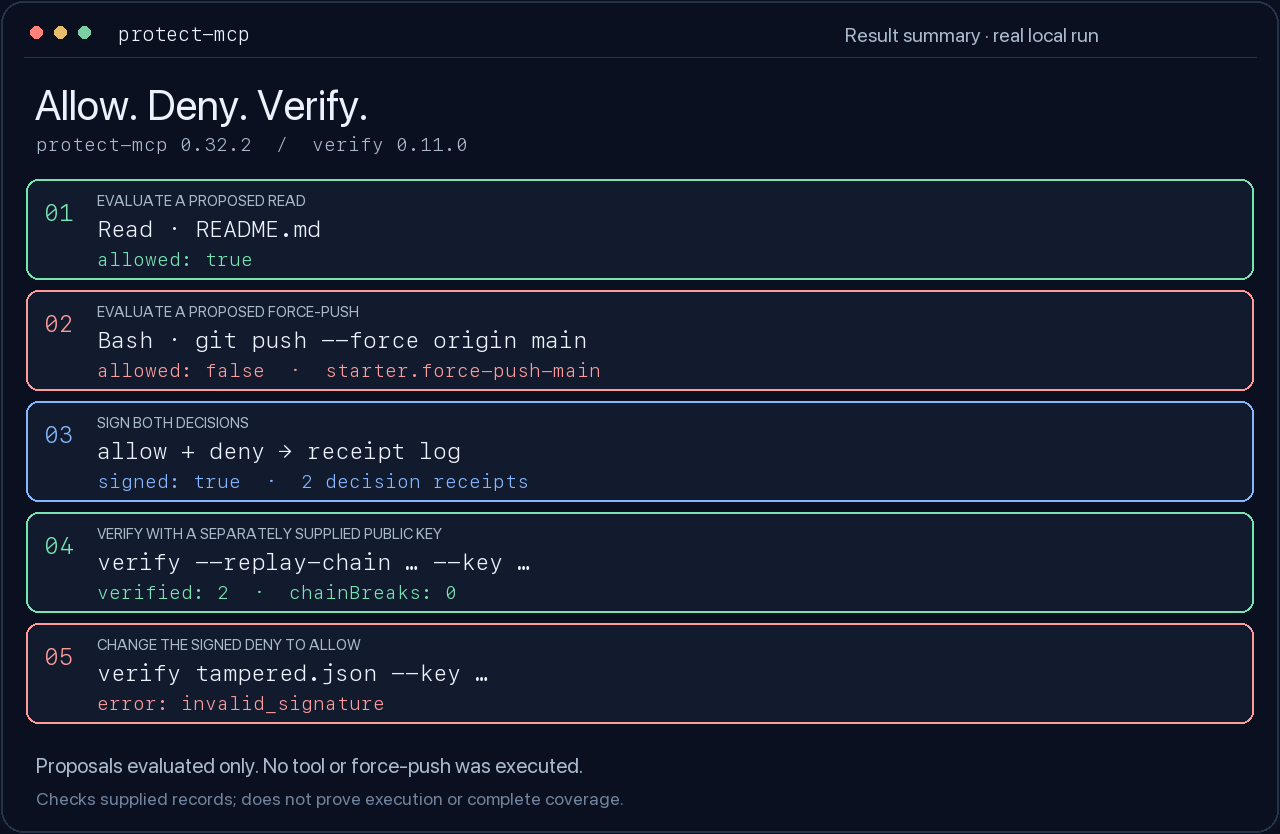
A real local run: evaluate two proposed calls, sign the decisions, verify the receipts, then change a signed decision and check it again.
Use Node.js 22 and npm in a new directory. Install the pinned gateway and verifier:
mkdir protect-mcp-demo
cd protect-mcp-demo
npm init -y
npm install --save-exact [email protected] @veritasacta/[email protected]
This example evaluates two proposed calls and signs their decisions. It does not
execute either tool or run git push. Everything after installation is local.
# Create a starter policy and a private signing key.
npx --no-install protect-mcp init --starter

# A normal read is allowed; a force-push to main is denied (exit 2).
npx --no-install protect-mcp evaluate --policy ./protect.cedar --tool Read --input '{"path":"README.md"}'
npx --no-install protect-mcp evaluate --policy ./protect.cedar --tool Bash --input '{"command":"git push --force origin main"}' || test "$?" -eq 2

# Evaluate again at signing time and record both decisions, in order.
npx --no-install protect-mcp sign --cedar builtin:starter --tool Read --input '{"path":"README.md"}' --key ./protect-mcp.key --receipts ./receipts
npx --no-install protect-mcp sign --cedar builtin:starter --tool Bash --input '{"command":"git push --force origin main"}' --key ./protect-mcp.key --receipts ./receipts

# Take only the public key from the key you generated, not from the receipt.
PROTECT_MCP_PUBLIC_KEY=$(node -p 'JSON.parse(require("fs").readFileSync("protect-mcp.key", "utf8")).publicKey')
npx --no-install verify --replay-chain ./receipts/receipts.jsonl --key "$PROTECT_MCP_PUBLIC_KEY" --json

# Change the signed deny to allow. The original receipt log stays intact.
node -e 'const fs=require("fs");const r=JSON.parse(fs.readFileSync("receipts/receipts.jsonl","utf8").trim().split("\n")[1]);r.payload.decision="allow";fs.writeFileSync("tampered.json",JSON.stringify(r))'
npx --no-install verify tampered.json --key "$PROTECT_MCP_PUBLIC_KEY" --json || test "$?" -eq 1
Expected: allow, then deny; both original receipt signatures and their link
verify; the modified receipt reports invalid_signature. Keep protect-mcp.key
private. To verify someone else's record, obtain their expected public key
through an independent trusted channel.
Verifier exit codes are 0: valid, 1: invalid, 2: not checked/error. An invalid result is not necessarily tampering: the wrong expected key can also fail verification. Chain replay checks the supplied links; it does not establish that you received the entire history.
CI runs this exact example against the packed candidate and the pinned published verifier. See validation and releases.
Choose the integration that matches your host and the coverage you need.
Installing guidance skills does not enable enforcement. doctor checks local
configuration; confirm the selected route with a real allowed and blocked call.
For the Claude Code plugin, first prepare and start the local gate, then install it in your project (Claude Code 2.1.295 or later):
claude plugin install protect-mcp --marketplace ScopeBlind/scopeblind-gateway --scope project
The plugin blocks routed tool calls while its gate is unavailable. Choose the plugin or standalone project hooks, so the same call is not recorded twice.
Host compatibility and release status separates adapter tests from real-host validation. The Cursor and assistant packages are previews, not public directory listings. The standalone hook-format fixes ship in 0.32.4; its changelog lists what changed for each format. A format flag alone does not establish a working Codex, Gemini or Hermes integration.
For an existing MCP server, initialize its configuration in a separate directory from the example above, then run the wrapper with your server command:
npx --yes [email protected] init
npx --yes [email protected] --policy ./protect-mcp.json -- node your-mcp-server.js
This starts in shadow mode. Review the observed calls and policy before
adding --enforce. wrap prints client configuration and exits; it is not the
launch command. Full setup instructions.
Starter shell rules inspect command text. They are useful guardrails, but can miss alternate command spellings and can match harmless quoted text. Review the starter policy's coverage and limits before relying on it.
0.32.0 closes several ways around the gate. Some of them change how you start it:
--http listens on 127.0.0.1, and every request except GET /health needs
Authorization: Bearer <token>. Set the same PROTECT_MCP_HTTP_TOKEN (at
least 32 characters) for the gateway and for the client or ingress that calls
it. Use --host only when you mean to expose the port beyond this machine.--enforce refuses to start when signing is configured but its key is
missing or unreadable, and refuses an allowed call whose receipt cannot be
signed.--cedar with --policy applies both: a call needs a Cedar permit and must
also pass that file's block, require_approval, rate limits and min_tier.
Signing and credentials come from that file.chmod 600 keys/gateway.json; the gateway warns until you do.POST /approve names the exact action: the Request ID the
gateway prints, tool:payload_hash. The approval nonce is on the gateway's
stderr only.See the changelog for every change.
Start with a bounded help-wanted task: one real host capture, another clean-package runtime, or one tested policy recipe.
Bug reports, minimal reproductions, documentation fixes and compatibility tests are welcome. See CONTRIBUTING.md for setup and checks, and GOVERNANCE.md for maintainership. Report vulnerabilities privately through SECURITY.md, not a public issue.
The shared conformance corpus records compatibility results across receipt producers. A passing corpus is bounded interoperability evidence, not a security certification.
MIT licensed; see LICENSE and the existing patent notice. Maintained by Tom Farley at ScopeBlind. Receipt format: Acta individual Internet-Draft.
Local Cedar policy enforcement and signed decision receipts for AI agent tool calls.
{ "mcpServers": { "protect-mcp": { "command": "npx", "args": [ "-y", "[email protected]" ] } }}工具
暂无工具列表。远程服务器在首次健康检查后会获得工具列表。
常见问题
在本页复制适用于 Cursor、Claude Desktop、Claude Code 或 VS Code 的 stdio 配置。它使用发布者的安装方式,而不是 PlugMCP 代理。
此记录未列出必需的环境变量。
Protect 通过 stdio 在本地运行。
上次检查时间:2026-11-14。 Local Cedar policy enforcement and signed decision receipts for AI agent tool calls.