Regle
Regle \ʁɛɡl\ (French word for 'rule' ) is a headless model-based form validation library for Vue 3.
It's heavily inspired by Vuelidate and aims to replace it in modern apps.
📚 Documentation

接入你的智能体
发布者自己的命令。不是 PlugMCP 端点。
用我们的密钥与日志托管一份副本。
npx -y @regle/[email protected]Claude Code 没有针对本地命令的安装链接。复制下方命令并在终端中运行。
claude mcp add regle-mcp-server -- npx -y @regle/mcp-server@1.29.5在终端中运行。
{ "mcpServers": { "regle-mcp-server": { "command": "npx", "args": [ "-y", "@regle/[email protected]" ] } }}claude_desktop_config.json
远程 URL 还是本机命令? 两种安装方式的区别
来自发布者
Regle \ʁɛɡl\ (French word for 'rule' ) is a headless model-based form validation library for Vue 3.
It's heavily inspired by Vuelidate and aims to replace it in modern apps.
MCP Server for Regle
| Playground | Simple demo | Advanced Demo |
|---|---|---|
 | |
Or add it manually to your .cursor/mcp.json or .mcp.json
{
  "mcpServers": {
    "regle": {
      "command": "npx",
      "args": ["@regle/mcp-server"]
    }
  }
}
Install Agent Skills to give your AI coding agent Regle expertise:
npx skills add victorgarciaesgi/regle
Regle comes with a built-in Vue devtools extension for easy debugging and testing.
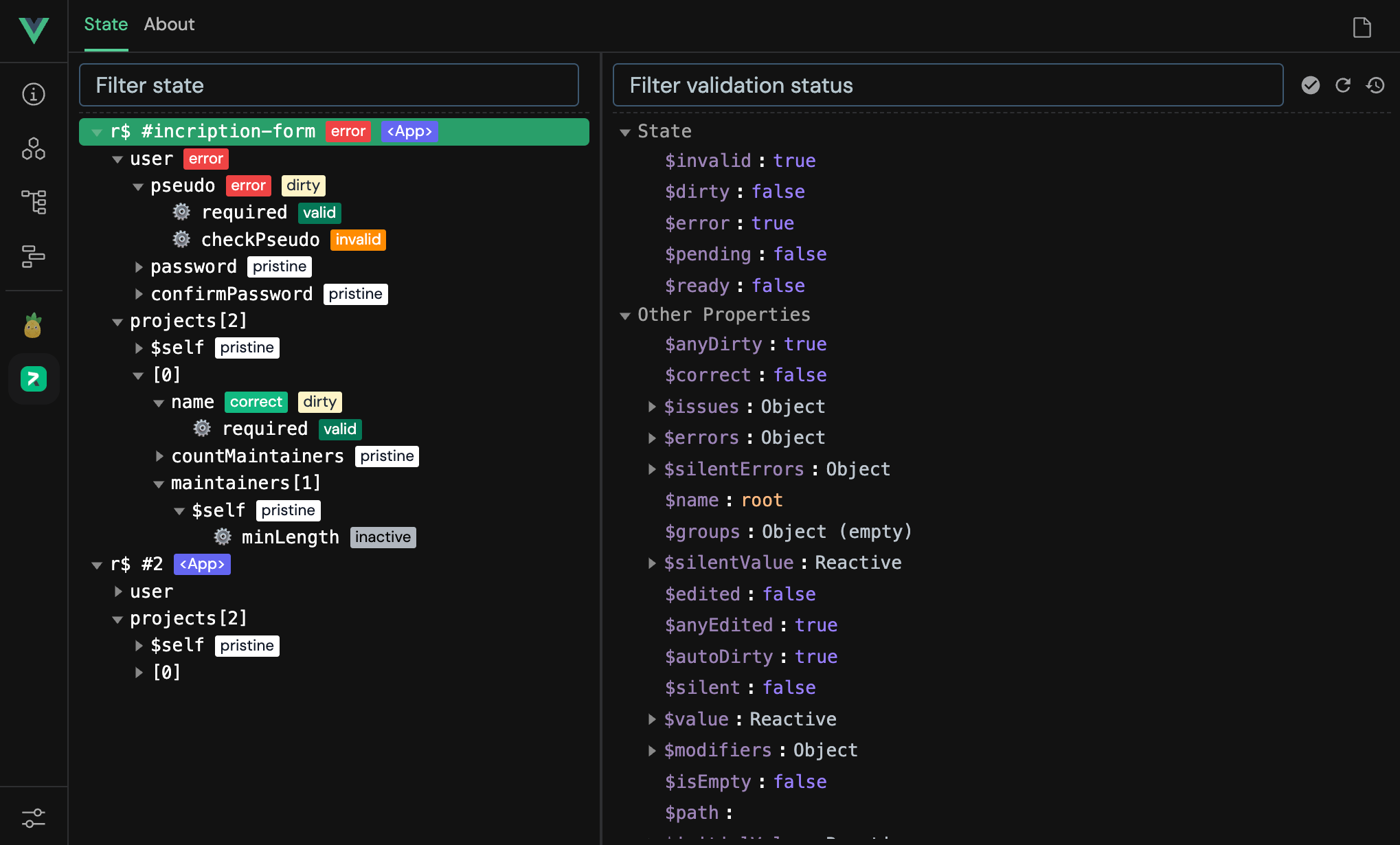
📝 For more details, see the Devtools documentation.
<template>
  <input v-model="r$.$value.email" :class="{ error: r$.email.$error }" placeholder="Type your email" />

  <ul>
    <li v-for="error of r$.email.$errors" :key="error">
      {{ error }}
    </li>
  </ul>
</template>

<script setup lang="ts">
  import { useRegle } from '@regle/core';
  import { required, minLength, email } from '@regle/rules';

  const { r$ } = useRegle(
    { email: '' },
    {
      email: { required, minLength: minLength(4), email },
    }
  );
</script>
pnpm install @regle/core @regle/rules
# or
yarn add @regle/core @regle/rules
# or
npm install @regle/core @regle/rules
{ "mcpServers": { "regle-mcp-server": { "command": "npx", "args": [ "-y", "@regle/[email protected]" ] } }}工具
暂无工具列表。远程服务器在首次健康检查后会获得工具列表。
常见问题
在本页复制适用于 Cursor、Claude Desktop、Claude Code 或 VS Code 的 stdio 配置。它使用发布者的安装方式,而不是 PlugMCP 代理。
此记录未列出必需的环境变量。
@regle/ 通过 stdio 在本地运行。
上次检查时间:2026-10-28。 MCP Server for Regle