接入你的智能体
从发布者处安装。不是 PlugMCP 端点。
远程 URL 还是本机命令? 两种安装方式的区别
Any brain, any agent. Package an AI agent's whole brain once — persona, MCP stack, skills,
memory, config — into one open, signed .uniqent file, and install it into whatever framework you
run (Claude Code, Hermes, OpenClaw) in one command.
Think n8n, but for whole agents: a visual builder to assemble the thing, and a portable artifact you can install anywhere. Uniqent is the builder + packager + translator + installer — it sits above the frameworks so one brain travels between all of them.
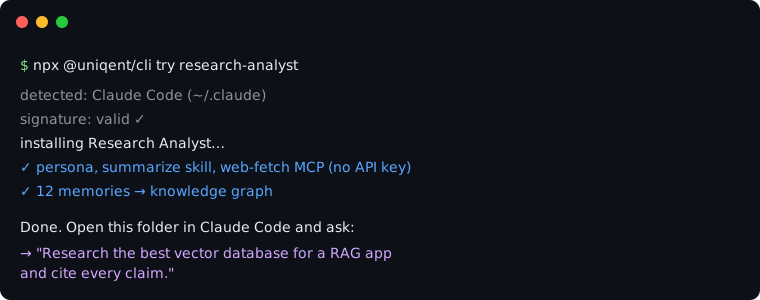
No clone, no config, no API key — install a complete research-analyst brain into your agent:
npx @uniqent/cli try research-analyst
It auto-detects your framework, installs the persona + skill + web-fetch MCP + a linked memory
graph, then tells you exactly what to ask. Run npx @uniqent/cli try --list to see the featured
brains.
Today an agent's "brain" is locked inside whatever framework you built it in — there's no portable
unit for "a whole agent." Uniqent makes that unit and the workflow around it: build → package →
share → install. You compose a brain in Uniqent Studio (a local-first visual builder) — or
capture one you already have — and export a single signed .uniqent bundle that carries no
secrets. Anyone installs it into the framework they run; a per-framework adapter translates
the brain into that framework's native layout and asks only for the recipient's own credentials.
🚀 Try a brain instantly — npx @uniqent/cli try <name> installs a featured, signed,
creds-free brain into your agent in one command.
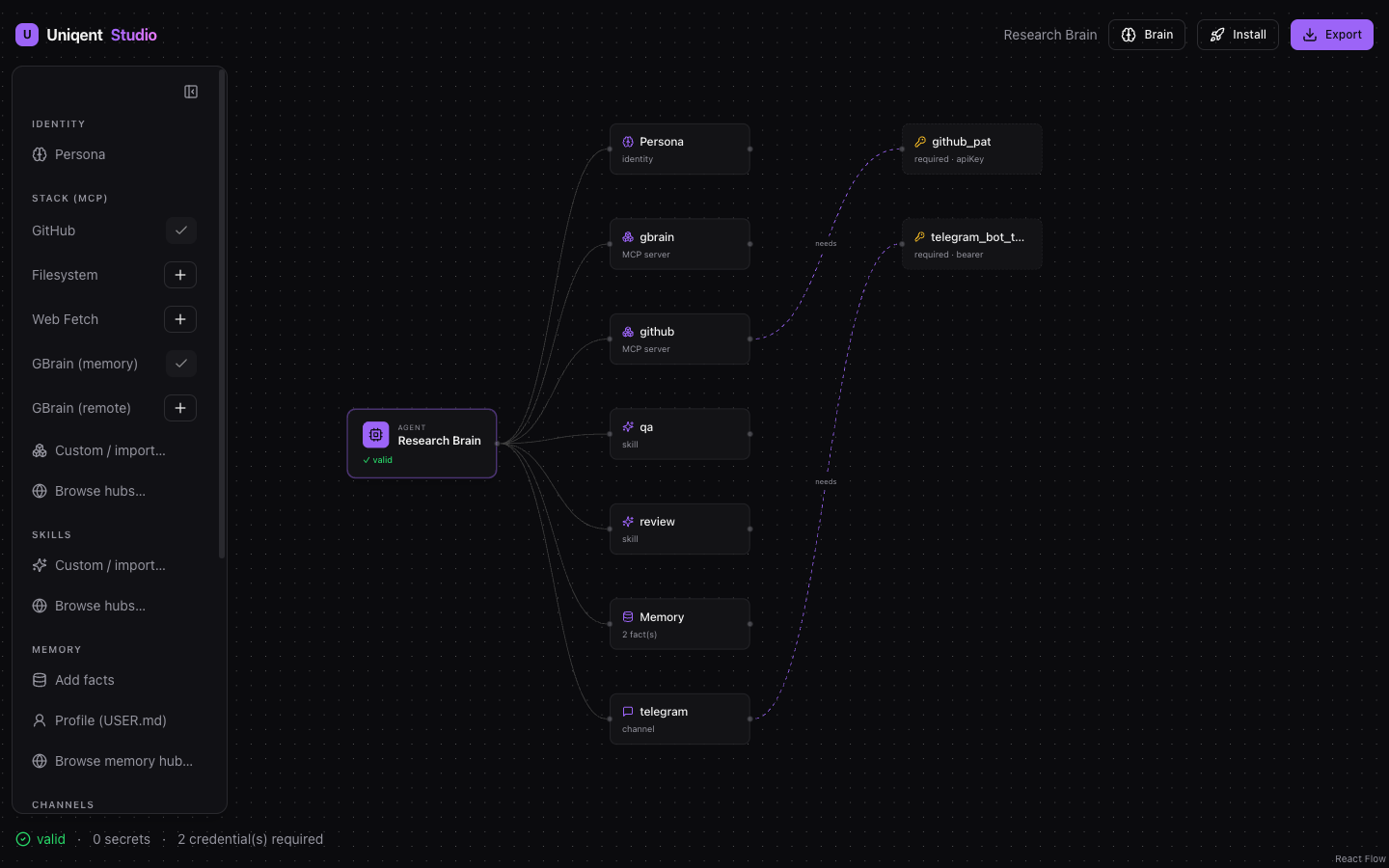
🧩 Build one visually — compose persona, MCP stack, skills, memory, channels, and flows on an
n8n-style canvas in Studio, with credentials wired as "needs" edges, then export one
.uniqent.
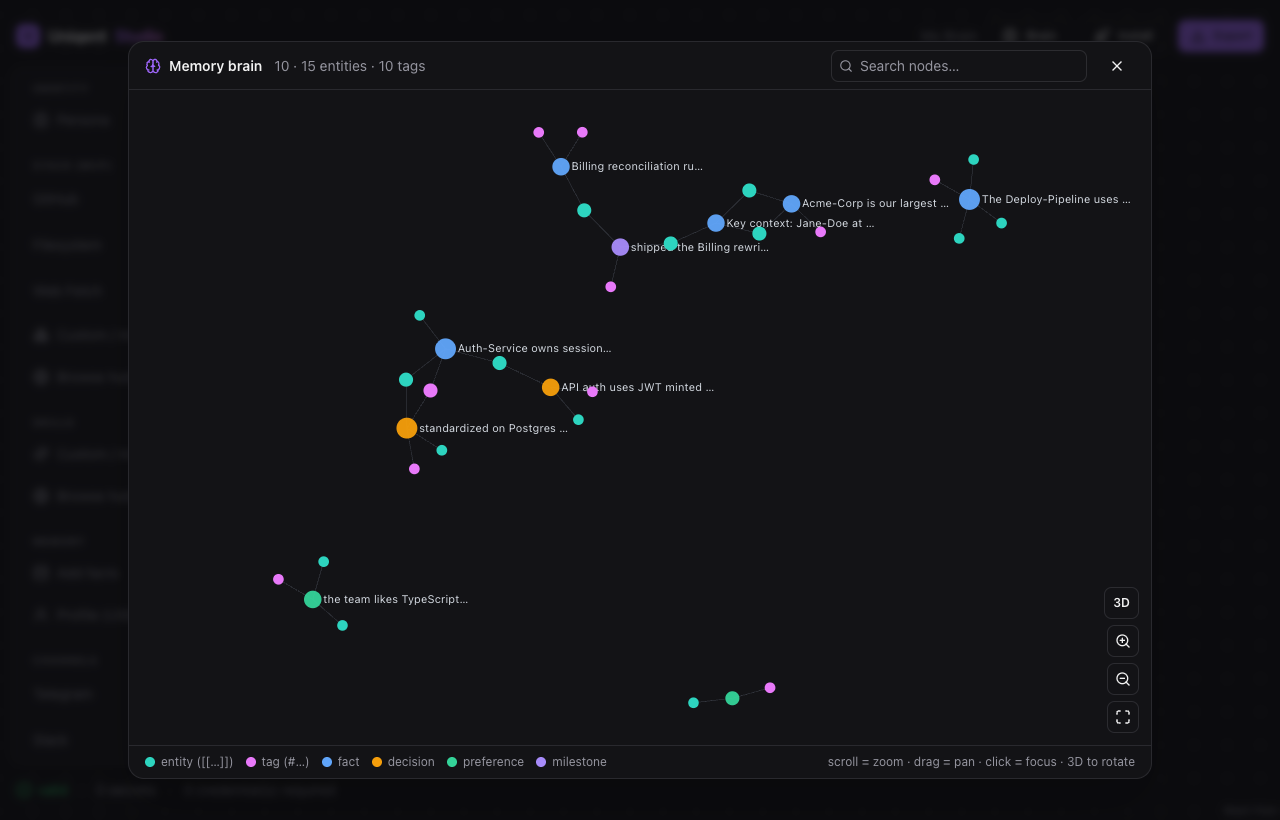
Memory isn't a flat list: write facts with Obsidian-style [[entities]] and #tags and Studio
parses them into an interactive memory brain — a force-directed graph (zoom / pan / drag, plus
a 3D mode) of how facts, people, and topics connect.
📥 Bring what you have — uniqent export captures a running agent; uniqent import-vault
turns an Obsidian / "second-brain" vault into a brain (SOUL.md → persona, USER.md → profile,
MEMORY.md + notes → memory, [[wikilinks]]/#tags preserved).
🔁 Install anywhere — the same bundle installs into Claude Code, Hermes, or OpenClaw; the adapter translates it and resolves your credentials locally.
Build → Pack → Share → Install — one open bundle, any framework:
.uniqent (Ed25519 signature over a content digest) — a fail-closed
secret-scan guarantees no API keys travel in the bundle.What makes it defensible — four things .dotagents-style sharing lacks:
npm i -g @uniqent/cli # or use npx @uniqent/cli <command>
A few real flows:
# Install a brain into your framework, resolving your own credentials locally:
uniqent install my-brain.uniqent --target claude-code --root .

# Install straight from a raw URL (no registry needed):
uniqent install https://example.com/dev-powerpack.uniqent --target openclaw --root ~/.openclaw

# Or by slug from any hosted index.json:
export UNIQENT_REGISTRY=https://raw.githubusercontent.com/RiggdAI/uniqent/main/registry/index.json
uniqent search coding && uniqent install dev-powerpack --target hermes --root ~/.hermes --cred github_pat=…
Studio runs as a native desktop app (Tauri). It needs a clone — see Build from source below.
pnpm --filter @uniqent/studio native:dev # native app with hot reload
Prerequisites
corepack enable provisions the exact pnpm pinned in
package.json.xcode-select --install). macOS is the supported desktop target
today.Build and test
git clone https://github.com/RiggdAI/uniqent.git && cd uniqent
corepack enable
pnpm install
pnpm build                       # all packages + Studio

pnpm test                        # every package's tests
pnpm typecheck && pnpm lint && pnpm format:check
(cd apps/studio/src-tauri && cargo test)   # native app's Rust tests
Run the CLI from source
node packages/cli/dist/bin.js --help
node packages/cli/dist/bin.js try research-analyst --target claude-code --root /tmp/demo --yes
Run Studio
pnpm --filter @uniqent/studio native:dev   # native app, dev mode (Vite hot reload + Rust backend)
pnpm --filter @uniqent/studio native:build # release build → Studio.app + .dmg
The release build lands in apps/studio/src-tauri/target/release/bundle/ (macos/Uniqent Studio.app
and dmg/*.dmg). Builds are unsigned for now: the first time, right-click the app → Open.
Regenerate generated files (only after changing their sources)
pnpm --filter @uniqent/spec gen             # JSON Schema + docs/SPEC.md, after editing packages/spec
pnpm --filter @uniqent/studio fixtures:ports # cross-language parity fixtures, after changing ported TS logic
.uniqent. ✅uniqent import-vault + uniqent export. ✅.uniqent installs into all three. ✅@uniqent/cli on npm; example brains in examples/; a file-based registry;
memory-pack publishing. ✅uniqent:// web "Install" handoff;
Codex/Cursor/Gemini adapters.LICENSE)LICENSE-SPEC) — any framework can implement an
adapter without asking permission.Contributions welcome — see docs/CONTRIBUTING.md and
docs/GOVERNANCE.md. Report security issues via
docs/SECURITY.md.
Any brain, any agent. Package an AI agent's brain — persona, MCP stack, skills, memory, config — into one open, signed bundle and install it into any framework (OpenClaw, Hermes, Claude Code) in one c
概览
Any brain, any agent. Package an AI agent's brain — persona, MCP stack, skills, memory, config — into one open, signed bundle and install it into any framework (OpenClaw, Hermes, Claude Code) in one click.
工具
暂无工具列表。远程服务器在首次健康检查后会获得工具列表。
常见问题
在本页复制适用于 Cursor、Claude Desktop、Claude Code 或 VS Code 的 stdio 配置。它使用发布者的安装方式,而不是 PlugMCP 代理。
此记录未列出必需的环境变量。
Uniqent 通过 stdio 在本地运行。
上次检查时间:2026-10-28。 Any brain, any agent. Package an AI agent's brain — persona, MCP stack, skills, memory, config — into one open, signed bundle and install it into any framework (OpenClaw, Hermes, Claude Code) in one click.