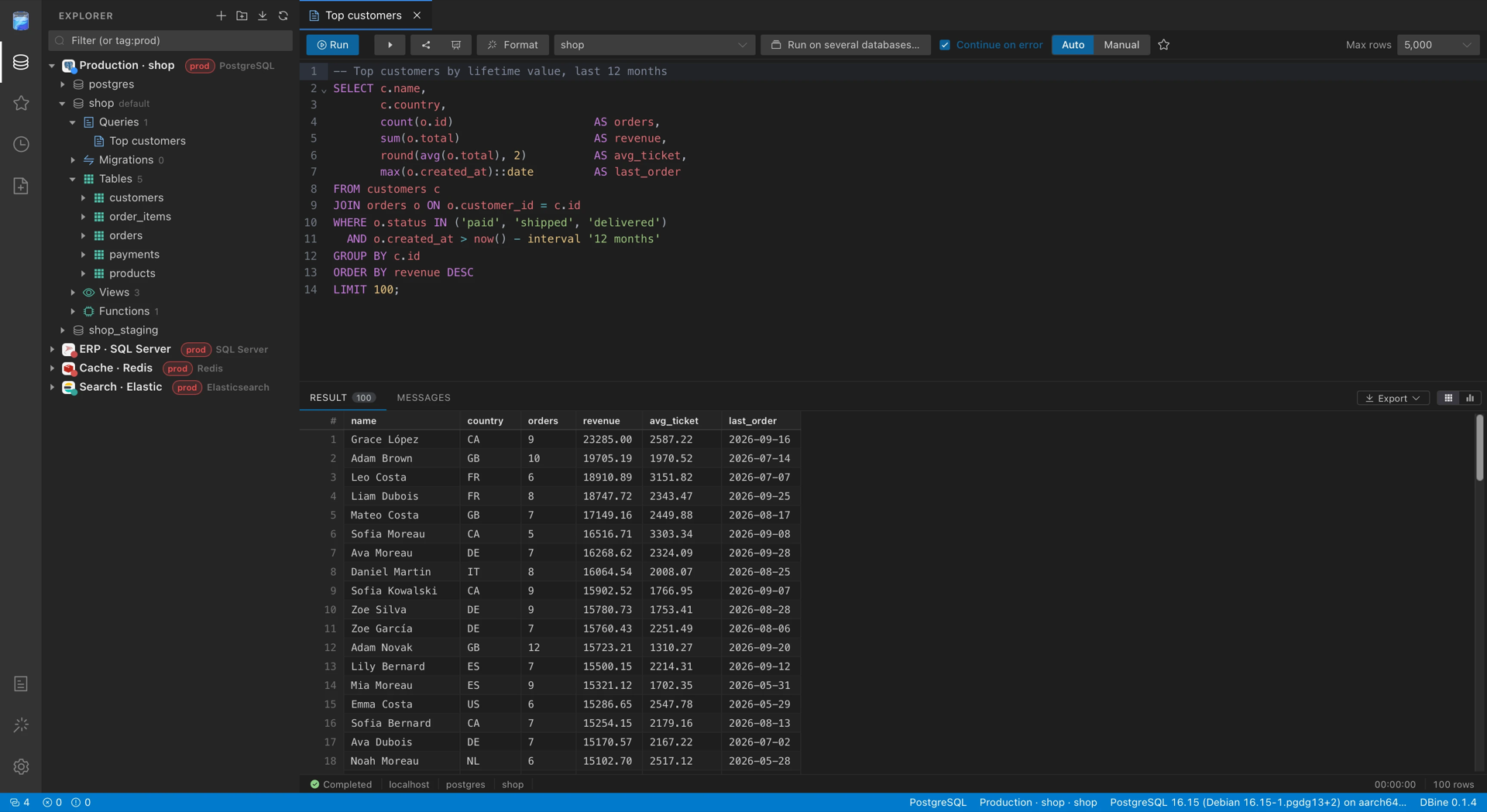
DBine database manager: a free desktop app for 130+ SQL and NoSQL databases and cloud services, with notebooks, schema & data compare, cross-engine migration, a local AI assistant, an MCP server and encrypted cloud sync. Rust + Tauri.
Sterne
39
Tools
—
Uptime
—
DBine is a desktop multi-engine database manager from AddLayer. One app
works with 130+ databases and cloud services: relational, analytical,
document, key-value, graph, time-series and search databases. It runs on
Windows, macOS and Linux.
It is built with Tauri 2, a Rust core and a Vue 3 + Element Plus
UI. The interface is a VS Code-style workbench. Each engine is its own crate
and queries are organized inside each database.
What it does
Explorer and connections
Tree per connection and per database. The first node of each database is
Queries, with that database's saved queries. This way loose tabs don't
pile up. Below come the engine's own objects: tables, views, routines,
collections, indexes, keys, nodes…
Explorer cache. When a connection opens, databases, objects and columns
appear instantly with what was there last time, and the server updates them
(the server always wins). It only stores names and structure.
Details: docs/explorer-cache.md.
Folders and groups, for example per client or per environment. They can
be nested and colored, and servers are moved between them by dragging.
Import connections from DBeaver, DbGate, DataGrip / JetBrains, Azure Data
Studio and SSMS, or by pasting connection URLs. DBine reads those tools'
files, shows what it found and saves the ones you pick. Passwords go
straight to the system keychain, without passing through the interface.
From DBeaver and DbGate the SSH tunnel comes along.
SSH tunnels: any connection to a network engine can go through an SSH
server, even through a chain of bastions, with a password, a private key or
the SSH agent. Each server's fingerprint is verified against known_hosts
or confirmed the first time. The password and the key passphrase never go
into the state file or the logs. Everything opened on a connection shares a
single tunnel, which reopens by itself if it drops. Details:
docs/ssh-tunnels.md.
Cloud sign-in for managed PostgreSQL and MySQL: AWS IAM (RDS, Aurora),
Google Cloud IAM (Cloud SQL, AlloyDB) and Microsoft Entra ID (Azure
Database). DBine makes a new token before every connection from the
computer's own credentials (AWS profiles and SSO, gcloud, az), so short-lived
tokens are never pasted; they stay in memory only. Details:
docs/cloud-authentication.md.
Passwords from a command or a secret manager: any secret field of any
engine, and the SSH tunnel's, can come from a command, 1Password, HashiCorp
Vault (or OpenBao), AWS Secrets Manager, AWS Parameter Store, Azure Key
Vault, Google Secret Manager, a KeePass database, Zoho Vault, Bitwarden,
Bitwarden Secrets Manager, CyberArk (Conjur and the Central Credential
Provider) or Delinea Secret Server, resolved at each connection and kept in
memory only; also database credentials HashiCorp Vault makes for the
connection (revoked when it closes). A definition that came
from elsewhere (an import, a restored backup) runs only after it's
confirmed on the computer. Details:
docs/secret-sources.md.
Copy connection string: a saved connection as the string an
application uses, in the formats of its engine (URI, ADO.NET, JDBC,
SQLAlchemy, ODBC, libpq, Node.js, Go), with its TLS and sign-in settings,
for any database. The password goes in only when asked for, resolved at
copy time; otherwise a placeholder. Details:
docs/connection-strings.md.
Database context menu:
new query, new table with a designer (and modify an existing one), new objects from templates;
ER diagram, generate script, export or import the database, run a script
file;
compare schemas, migrate, clone or sync, and Profiler;
create or delete the database, copy its name or the server's;
create a database with each engine's advanced options (collation,
files, replicas, retention…), with the script in view. Details:
docs/create-databases.md.
Create and drop schemas, with their owner and permissions in the same
script, which is reviewed before running it. Details:
docs/schemas.md.
Read-only connections: DBine blocks everything that isn't a read.
Monitor and Profiler
Server monitor, by right-clicking the connection: CPU, memory, sessions
and activity, on the engines that expose them.
Processes, in the Monitor: the live list of sessions and running
queries, with filters, highlighted locks, and the option to cancel a query
or terminate a session. Details: docs/processes.md.
Profiler, by right-clicking a database: a tab with all the queries any
client runs on that database, live, like SQL Server's Profiler. For each one
it shows the time, the duration, the text, the database, the user, the
client, the rows and the error, with filters and the option to open it in a
query.
If the engine records every query (Extended Events in SQL Server,
system.profile in MongoDB, query histories or logs), DBine reads what's
new every second. If it only shows what is currently running, it samples
every 100 ms, and the tab warns that shorter queries may not appear.
If the engine needs something enabled to capture, DBine enables it on
start, shows it in yellow and restores it on stop or on close. On
read-only connections it changes nothing on the server.
CPU, reads and writes of each query, on the engines that report those
figures and in their own unit (pages, blocks, rows, bytes, documents or
keys). When identical queries are grouped, the average, minimum, p95 and
maximum are shown, and they can also be used to filter.
Saved queries. They save themselves as you type. Each tab has its own
session, so SETs, temporary tables and transactions persist between
runs.
Preview tabs, as in VS Code. Double-clicking a tab shows its query or
object in the tree, and "Go to database" opens that database's menu.
Several windows in the same instance, from the Dock, the taskbar or the
menu. They share connections, queries and settings. Details:
docs/windows.md.
CodeMirror 6 editor, with each engine's dialect and table and column
autocompletion. It runs the selection or the statement under the cursor, and
it can be cancelled with each engine's native mechanism.
Script execution on every engine: the script is split statement by
statement respecting each engine's terminators, server messages arrive live
and in order, errors come with their code and line, there are manual
transactions per tab where the engine has them, and cancelling keeps the
session. Details: docs/script-execution.md.
Cell editing: when a cell is modified, the update code is generated in
the engine's language. DBine doesn't run it: it appends it to the query and
you decide.
Add rows and documents: new rows are added to the pending changes
together with edits and deletions, and the insert code comes out in each
engine's language (SQL, Redis commands, insertMany, Cypher…). Document
engines add one or several documents from a JSON editor, also in empty
collections.
Virtualized grid with several results per run, messages and a cell
viewer (with formatted JSON).
Column filters on a table's data (values, ranges, nulls, text). They are
applied on the server, with each engine's own filter.
Copy results in 10 formats: with or without headers, CSV, JSON, JSON
Lines, YAML, INSERT, UPDATE, Mongo inserts… The default format for ⌘C is
configurable.
Export results to CSV (with ,, with ; or for Excel), TSV, JSON,
JSONL, SQL, XLSX and XML. The export reruns the full query in streaming, so
it isn't limited to the rows on screen.
Charts of results with Apache ECharts.
JSON tree view of results, designed for document databases and available
on every engine: it unfolds nested fields and JSON columns, with search in
keys and values, types per field and large arrays grouped.
Graphical execution plans, in the style of Management Studio: estimated,
actual or both, with zoom and panning.
Search the database: a text in object names, column names and the code
of views, routines and triggers, with results as it progresses. Details:
docs/search.md.
Run on several databases: the editor's code on several databases of a
connection at once, with the results together in one grid with a base
column. Details:
docs/multi-database-queries.md.
Code quality: the editor flags slow queries, results that are probably
not the expected ones and changes that affect more rows than intended, with
the rules of each engine family, without querying the database. Details:
docs/code-quality.md.
Query builder: builds a SELECT (or its CQL equivalent) on a canvas with
tables, joins, aggregates, ordering and filters, with the engine's SQL.
Details: docs/query-builder.md.
Optimize query: equivalent rewrites by rules and by AI, indexes suggested
from the plan and a read-only comparison of times and results. Details:
docs/query-optimizer.md.
Design and structure
Table designer adapted to each engine. In Mongo it designs collections,
with validation; in each engine it uses its own types, identities, indexes
and keys.
ER diagram of the database:
with relationships, search and filtering by one or several schemas;
with a "keys only" mode, minimap and export to SVG or PNG;
with automatic layout that handles hundreds of tables.
Script generator for the database, choosing what to include: DROP,
CREATE, indexes, foreign keys, views and routines, data and triggers. It
comes out in the right order for restoring, with each engine's adjustments
(for example, IDENTITY_INSERT in SQL Server or resynchronizing sequences
in PostgreSQL).
Migrate, clone and sync databases: "Migrate…" in a database's menu moves
its tables and data to another database, even of another engine. Only the
modes that work for that pair of engines are enabled:
Migrate (convert), between any pair of engines: converts types,
default values, keys, indexes and names, shows a report of every change and
copies the data.
Clone, between databases of the same engine: leaves the target
identical to the source, with schemas, types, partitions, indexes,
constraints, sequences, views, routines and triggers. On SQL Server and
Azure SQL, and on PostgreSQL, TimescaleDB, KingbaseES, AlloyDB, Cloud SQL,
Aurora, EDB and Fujitsu.
Sync, on tables that already exist in the target: compares by key and
inserts, updates and deletes only the rows that differ, in one transaction
per table. On SQL Server and Azure SQL, and on PostgreSQL, TimescaleDB,
YugabyteDB, KingbaseES, AlloyDB, Cloud SQL, Aurora, EDB and Fujitsu, with
PostgreSQL 11 or later.
The copy uses each engine's native bulk load (INSERT BULK, binary COPY,
LOAD DATA, DuckDB's Appender…) or batched INSERT where there is none. It
moves several tables at once with bounded memory and shows the progress and
rows per second of each. The source is opened read-only and the data
arrives without loss.
If the app closes midway, the run is resumed later without copying the
already finished tables again.
Saved migrations: each database has a "Migrations" node with the ones
started from it. The configuration saves itself and travels with cloud
sync, and each run is kept in its history so it can be reopened, resumed
or repeated.
Compare schemas: "Compare schemas…" in a database's menu shows two
databases side by side, in the style of WinMerge. They can be on different
connections, and even on different engines.
It compares tables, views, procedures, functions and triggers. It
highlights what differs in columns, indexes, foreign keys and the primary
key, and the lines of code that differ.
With the → and ← arrows, changes are passed from one side to the
other, per object or per column, with undo.
An object can also be deleted from one side without passing it from the
other, and before running you see what depends on it.
"Sync" generates the script of that side's engine (CREATE, ALTER,
DROP) in the right order, and warns if something may lose data or fail.
It opens as a query or runs with confirmation.
Compare data: compares the rows of two tables or collections, on the same
connection, on different connections or on different engines. It pairs them
by the primary key, or by the columns you choose, and compares values by what
they are worth and not by how each engine returns them.
It shows the rows that differ, with each value marked, and the ones that
are on one side only. For each row you choose which way it goes: update,
insert or delete. Deletions are never chosen automatically.
It generates one script per side that changes, in its engine's language,
which can be copied, opened in a query or run. Then it compares again.
It warns if the two tables aren't the same, if there are duplicate keys or
if one exceeds 200,000 rows. Read-only connections reject the script.
It compares on every engine. Applying the changes depends on what the
target allows writing: Drill, for example, has no INSERT, UPDATE or DELETE.
Clone table: from the explorer, a table, collection or index is cloned
next to the original, with a name carrying the date and time that can be
changed.
It copies columns, primary key, constraints, indexes and foreign keys, and
the data with the transfer engine, preserving identities. It can also clone
the structure only.
The clone comes out exact or it isn't created: if something can't be
copied identically, or if you stop it, what was created is deleted. The
original table is never touched.
It is available on every engine with tables or collections that have rows
of their own. Not on graph or key-value engines, ksqlDB, CouchDB or
InfluxDB 2 and 3. Details:
docs/engine-support.md.
Import CSV, TSV, JSON, JSONL, XLSX and XML into a new or existing table,
with column mapping.
Run a large script file in parts, for example to restore a dump.
Test data: fills a table with made-up but plausible rows, respecting
keys, lengths and foreign keys. Details:
docs/test-data.md.
Document the database: a data dictionary in HTML or Markdown, with
tables, keys, indexes, routine code, dependencies and an entity-relationship
diagram. Details: docs/database-docs.md.
Data subset: copies some rows of a table to another database, with the
parent rows they need, and masks personal data. Details:
docs/data-subset.md.
Administration
Users and permissions: a tab with the server's users and roles (or the
database's, where they are per database). For each one it shows its roles and
its permissions, direct or inherited from a role, including denied ones.
Users and roles are created, passwords are changed, login is enabled or
disabled, and permissions on the database, a schema or an object are
granted or revoked.
Each change becomes an engine script that is reviewed before running it.
The password doesn't appear in the preview and these scripts are not kept
in the history.
It is available on the vast majority of engines. The ones without their
own users don't have it, such as SQLite, DuckDB or DynamoDB. Details:
docs/users-and-permissions.md.
Actions according to the user's permissions: before offering backups,
restores, the Profiler, terminating sessions, creating or deleting databases
or managing users, DBine asks the server whether the connected user can do
it. If they can't, the action appears disabled and says which permission is
missing. If the engine doesn't allow knowing it for certain, it stays
enabled.
Backups, in one tab per database:
DBine copies on every engine: a local script with the structure and, if you
want, the data, with its history on this machine, which is restored into
the same database or another one;
server backups where the engine has them (SQL Server, Oracle, SAP HANA,
ClickHouse, Snowflake, BigQuery, Elasticsearch, Redis, among others), with
their history and the script to make, restore or delete a backup, which is
reviewed before running it.
Scheduled tasks: scripts, exports, schema comparisons, backups, database
documentation and emails that run by themselves with DBine closed, with a
system notification, history and prior approval of anything that changes
data. Details: docs/scheduled-tasks.md.
Health check: reviews a database and lists what deserves attention by
severity, with each engine's own checks and fix scripts that are reviewed
before running them. Details: docs/health-check.md.
Database properties: shows what the engine reports about a database and
changes what it allows, with the script and the warnings in view. Details:
docs/database-properties.md.
Script library
A DBA's reusable scripts ("Reindex a table", "Blocking sessions"…) are kept in
their own view, with the ⭐:
Per engine, not per database: each script belongs to one or more
engines, so a MongoDB script doesn't get mixed with a SQL Server one.
On opening, it is copied into a query of the active database and asks for
its {{parameters}}, with suggestions from that database's tables.
Organization: folders and search.
Import and export: brings in the folder of .sql files you already have
in one go, and exports it the same way.
A backup of connections, folders, queries, preferences and passwords. It is
stored end-to-end encrypted with a passphrase chosen by the user
(XChaCha20-Poly1305 + Argon2id) and stays in their own account:
Google Drive, in the app's private folder;
OneDrive, in the app's folder;
or any folder, such as iCloud or Dropbox.
It syncs by itself, resolves conflicts without losing data and allows
recovering everything on another machine. AddLayer has no servers for this and
never sees the data. Details: docs/sync.md.
AI assistant
A chat in the right sidebar (⌘I). It writes queries, explains or fixes the
editor's one and answers about the database's structure.
It never runs anything. Its code is appended to the open query, or
replaces it when fixing it, and the user decides whether to run it.
It uses what is on the machine:
the built-in model (llama.cpp with Qwen2.5-Coder 3B or 7B), which runs
locally and is downloaded only once, the first time it is used;
Ollama or LM Studio;
Claude Code or Codex with the user's account, without tools.
It never sends data rows. As context it receives the engine, the
structure and the editor.
DBine can work as a local MCP server, so assistants such as Claude Code,
Codex, Cursor, Claude Desktop, VS Code or Windsurf work with your connections
while DBine is open. It ships turned off.
Four levels per connection: Disabled (the assistant doesn't see it),
Schema (structure only, no data), Read (also sample rows, read-only queries
and estimated plans) and Write. The default level is Schema, and connections
tagged prod or read-only never go beyond Read.
Every write is approved: DBine comes to the front and shows the client,
the connection, the database and the exact code to approve or reject it. If
you don't answer within 2 minutes, it is rejected and nothing runs.
One token per client, revocable separately. DBine listens only on this
machine and rejects requests that come from browser pages.
Local activity log with the last 10,000 calls, filterable by client or by
connection. It doesn't store passwords or secrets.
Passwords and other secrets are stored encrypted (XChaCha20-Poly1305) in
a separate file, with a random key that lives in the system keychain
(Keychain, Credential Manager, Secret Service). It is a single keychain item
for the whole app: the system asks for permission once, not once per
connection. They never go into the state file or the logs.
The local state is a SQLite file in the app's configuration folder.
Updates
It updates itself on macOS, Windows and with the Linux AppImage: it
downloads the new version, verifies its signature and restarts to finish,
without cutting background runs without asking. With the .deb and .rpm
packages, it notifies and offers the release page.
Each engine is a crate in crates/drivers/. Every new feature has to work on
all of them. The exceptions, with their reason, are in
docs/engine-support.md.
No driver needs vendor libraries for the app to start:
Oracle uses a pure-Rust client.
ODBC loads the driver manager only when it is used.
The ODBC presets do need the vendor's driver installed in order to connect.
DuckDB is not bundled in the app. The first time you connect, DBine
downloads the official library, with the version pinned and verified by
sha256, and the explorer shows the progress ("Downloading DuckDB…"). The
same happens with the AI assistant's engine. This way the executable weighs
much less.
Support the project
DBine is free and will stay that way. If it's useful to you, you can support it
with whatever you like, once or every month, from
Buy Me a Coffee. It is support, not
a license: the app works the same.
Feedback and contributing
Bugs and ideas: open an issue
(bug, enhancement, driver request or question).
Contributing: pull requests are welcome; how, and what a change needs, is
in CONTRIBUTING.md.
Security: report vulnerabilities privately, as SECURITY.md
explains; the current security status is public, and
docs/security-model.md says what DBine protects.
Roadmap: what's planned for the next 12 months is in ROADMAP.md.
The macOS app is signed with an Apple Developer ID and notarized by Apple, and
the Windows installer and app are signed with a code-signing certificate.
Build
Requirements
Rust stable and Node.js 20 or later.
A C compiler (Xcode Command Line Tools on macOS, Visual Studio Build Tools
on Windows, build-essential on Linux). llama.cpp and DuckDB are no longer
compiled: they are downloaded the first time they are used.
Linux only:sudo apt install libwebkit2gtk-4.1-dev libappindicator3-dev librsvg2-dev patchelf libssl-dev libxdo-dev.
npm install --prefix web
cargo install tauri-cli --version "^2"
Development
cargo tauri dev          # the app with hot reload
cargo test --workspace   # unit tests
macOS: keeping the keychain from asking for permission on every
rebuild. Development builds are signed "ad hoc" and change identity on every
build, so macOS asks again for each saved password. With a code-signing
certificate named DBine Dev in the login keychain (self-signed is enough),
cargo run / cargo tauri dev sign the app with a fixed identity
(scripts/dev-sign-run.sh, configured in .cargo/config.toml). After the
first "Always Allow", it doesn't ask again. To create the certificate, once per
machine:
The script runs
cargo tauri build --runner cargo-xwin --target x86_64-pc-windows-msvc --no-bundle
with two adjustments to compile the dependencies' C code from the Mac:
it uses LLVM's clang-cl;
it points cargo-xwin's lld-link at rustup's rust-lld.
It accepts the Windows SDK license (XWIN_ACCEPT_LICENSE=1). The .msi and
.exe installers are built on Windows or in CI.
Cloud accounts
For the Google Drive and OneDrive login to work, the registered app's IDs are
compiled in:
.github/workflows/release.yml builds the four variants on GitHub Actions:
Windows x64, macOS Apple Silicon, macOS Intel and Linux x64. Then it publishes
the installers in a release.
git tag v0.2.0
git push origin v0.2.0
The app version is taken from the tag.
If the secrets DBINE_GOOGLE_CLIENT_ID, DBINE_GOOGLE_CLIENT_SECRET and
DBINE_MICROSOFT_CLIENT_ID exist, the build includes them.
Dry run without publishing: Actions › release › Run workflow builds
everything and leaves the installers as artifacts.
The installer ships only the SQLite driver. The others are built separately,
uploaded to the same release, and the app downloads them the first time they
are used: docs/on-demand-drivers.md.
Repository structure
Path
What is there
crates/dbine-driver
The driver contract (Driver and Session traits) and the helpers
crates/drivers/<engine>
One crate per engine or protocol family
crates/dbine-drivers
The driver registry, with one feature per crate
crates/dbine-plugin, crates/dbine-plugin-host
The drivers as separate processes, downloaded on use
crates/dbine-core
The local state (SQLite), the keychain, export and import
crates/dbine-schema
Schema conversion between engines and schema comparison
crates/dbine-sync
Encrypted sync (Google Drive, OneDrive, folder)
crates/dbine-ai
The AI assistant (built-in model, Ollama, Claude Code, Codex, LM Studio)
The integration tests are in crates/drivers/*/tests/, marked #[ignore].
They read DBINE_TEST_<ENGINE>_URL and run against Docker containers.
Author
DBine is built and maintained by Marcos Panichella at
AddLayer.
License
DBine is licensed under the Apache License 2.0. Anyone who
redistributes it, modified or not, must keep the NOTICE file. The
license doesn't grant rights to the names "DBine" and "AddLayer" or their
logos, so a fork has to use its own name. Versions up to and including 1.0.0
were released under the MIT license.
D
Dbine
addlayer-io·39 Sterne·
DBine database manager: a free desktop app for 130+ SQL and NoSQL databases and cloud services, with notebooks, schema & data compare, cross-engine migration, a local AI assistant, an MCP server and e
DBine database manager: a free desktop app for 130+ SQL and NoSQL databases and cloud services, with notebooks, schema & data compare, cross-engine migration, a local AI assistant, an MCP server and encrypted cloud sync. Rust + Tauri.
Tools
Tools
Noch keine Tool-Liste. Remote-Server erhalten eine nach dem ersten Health-Check.
FAQ
Fragen
Wie installiere ich Dbine?
Kopieren Sie auf dieser Seite die stdio-Konfiguration für Cursor, Claude Desktop, Claude Code oder VS Code. Sie nutzt die Installation des Herausgebers, keinen PlugMCP-Proxy.
In diesem Eintrag ist keine erforderliche Umgebungsvariable aufgeführt.
Welchen Transport verwendet Dbine?
Dbine läuft lokal über stdio.
Wann wurde Dbine zuletzt geprüft?
Zuletzt geprüft: 2026-11-15. DBine database manager: a free desktop app for 130+ SQL and NoSQL databases and cloud services, with notebooks, schema & data compare, cross-engine migration, a local AI assistant, an MCP server and encrypted cloud sync. Rust + Tauri.