
msgmcp
A local MCP server, written in Rust, for message history on a Mac. It reads iMessage
and SMS from chat.db, WhatsApp Desktop from its ChatStorage.sqlite, Signal Desktop
from its encrypted db.sqlite and Telegram for macOS from its encrypted Postbox cache, all
read-only, looks people up in Contacts, WhatsApp's address book, Signal conversations and
Telegram's contacts, and sends iMessage text through the Messages app.
The problem
Agents increasingly run in cloud sandboxes (Claude, Codex, Grok and others), but your iMessages, texts, WhatsApp, Signal and Telegram chats and contacts live on your Mac. msgmcp reads their local data; macOS protects some of it with Full Disk Access. An agent that could answer "what did Sarah say about Saturday?" or draft a reply has no way to see them.
The obvious ways to bridge that gap are unsafe:
- Uploading the databases hands over every conversation you've ever had, to keep somewhere you don't control.
- Opening the Mac to the agent, through SSH or an exposed port, gives it far more than your messages, and anything that hijacks the agent gets the same.
- Letting it send freely means a stranger's message, read by the agent, can steer it into texting anyone.
msgmcp gives a cloud agent a narrow door instead. One signed app on the Mac holds the permissions and offers a few tools: search, list and read conversations, look up contacts, and send an iMessage. Agents reach it only over your private Tailscale network, where they're tagged and limited to that one port, and every request needs a token. The databases are opened read-only, results carry names from your Contacts, sending is off for remote agents unless you enable it and then reaches only people saved in Contacts, and every call lands in an audit log on the Mac. Security lists what this keeps out and what it doesn't.
Architecture
flowchart LR
  subgraph cloud["Cloud sandbox"]
    agent["Agent<br/>agent/msgmcp.sh, curl"]
  end
  subgraph mac["Mac"]
    serve["tailscale serve<br/>https://my-mac.tail4f2e1c.ts.net"]
    local["Local MCP clients<br/>msgmcp stdio adapter, schema, call"]
    subgraph app["msgmcp.app (LaunchAgent)"]
      gateway["msgmcp gateway<br/>127.0.0.1:8765/mcp, bearer token"]
      socket["or msgmcp socket<br/>Unix socket, this user only"]
    end
    stores[("chat.db, ChatStorage.sqlite,<br/>Signal db.sqlite, Telegram Postbox,<br/>Contacts")]
    keychain[("Keychain<br/>Signal Safe Storage")]
    messages["Messages app"]
    audit[/"Audit log<br/>~/Library/Logs/msgmcp"/]
    dashboard["Dashboard<br/>127.0.0.1:8766, this Mac only"]
  end
  agent -- "tailnet, tag:agent:<br/>HTTPS to the Mac only" --> serve
  serve --> gateway
  local --> app
  app -- "read-only;<br/>Full Disk Access where needed" --> stores
  app -- "Signal's database key,<br/>after Always Allow" --> keychain
  app -- "Automation: send,<br/>Contacts recipients only" --> messages
  app --> audit
  audit --> dashboard
- One privileged process. Only
~/Applications/msgmcp.app, run by a LaunchAgent, holds the macOS permissions and opens the databases. Everything else, local or remote, is a client of it, and no client can do more than the tools allow. - Two services, same tools. The LaunchAgent runs one of them:
msgmcp gateway(the default): MCP over HTTP athttp://127.0.0.1:8765/mcp, with a bearer token, for clients that can't reach a local socket.msgmcp socket: MCP on a Unix socket that only processes running as your user can open.
- Local clients run the same binary with no arguments as a stdio adapter; scripts use
msgmcp schemaandmsgmcp call. They use the socket if it exists, otherwise the gateway. - Remote access is two locks. The tailnet policy lets devices tagged
tag:agentreach only port 443 on the Mac, wheretailscale serveforwards to the gateway; the gateway then requires its bearer token. Remote agents can send only to people saved in Contacts, after you approve a draft, and every call lands in an audit log. - Agents set themselves up. A sandbox agent follows agent/README.md, which joins the tailnet without root and checks the whole path, including that it really is restricted, before it reads anything.
Install
SETUP.md is the step-by-step runbook, from a fresh checkout to a cloud agent connected, with a check for each step. An agent on the Mac can work through it with you.
In short, python3 scripts/reinstall.py --sign "<certificate>" --source imessage builds
the release binary, installs ~/Applications/msgmcp.app and its LaunchAgent, and checks
that the service can read the selected stores. The sources are imessage (iMessage and
SMS), whatsapp, signal and telegram. Repeat --source for each store you choose;
the service reads only those message stores and Contacts. List only the apps you want
agents to see
(without --source, a first install lists the stores it found and stops). The first time,
grant msgmcp Full Disk Access (to read chat.db and WhatsApp's and Telegram's group
containers; Signal doesn't need it) and run it again. When it serves Signal, the script also runs
msgmcp --check-signal, and macOS asks once whether msgmcp may use "Signal Safe
Storage" from the Keychain: choose Always Allow. Signal encrypts its database with a key
that only that Keychain item unlocks, and the service never shows that dialog itself, so
until it's allowed Signal is reported as unavailable. Automation → Messages (to send) is
requested on the first send.
To reinstall after changes, run python3 scripts/reinstall.py with no arguments. It reuses
the installed app's certificate, stores and service options, so macOS keeps its grants.
--source NAME (repeatable) replaces the installed stores. Options: --service socket,
--allow-host my-mac.tail4f2e1c.ts.net, --allow-send (needs iMessage); passing any of them
replaces the installed set. Restart MCP clients afterwards to pick up tool changes. An
install from before --source keeps serving iMessage and WhatsApp until you choose.
macOS ties privacy grants to the app's signature, so the script refuses an ad hoc signature,
which changes with every build. After switching certificates, macOS drops Full Disk Access
and it has to be granted again.
python3 scripts/install_service.py --uninstall removes the app and LaunchAgent.
Connect a client
Apps on this Mac
The adapter command is always /Users/<you>/Applications/msgmcp.app/Contents/MacOS/msgmcp.
- Claude Desktop: add the entry below to
~/Library/Application Support/Claude/claude_desktop_config.json, then quit the app with ⌘Q and reopen it. Its tools then appear asmsgmcp__*; in cloud sessions linked to the Mac they appear asmcp__remote-devices__msgmcp__*."mcpServers": { "msgmcp": { "command": "/Users/<you>/Applications/msgmcp.app/Contents/MacOS/msgmcp" } } - Codex:
codex mcp add msgmcp -- "$HOME/Applications/msgmcp.app/Contents/MacOS/msgmcp" - Claude Code:
claude mcp add msgmcp -- "$HOME/Applications/msgmcp.app/Contents/MacOS/msgmcp"
The service describes its own tools, so they aren't documented by hand. To see them, or to call one from a script:
msgmcp schema
msgmcp call list_conversations '{"query": "sarah"}'
A cloud agent
Follow parts 2 and 3 of SETUP.md. The agent gets four environment variables (.env.example) and a short instruction to fetch the public repository and follow agent/README.md each session. It then joins the tailnet, checks that it is restricted, and reads the tool list itself; nothing about the tools needs to be pasted in.
Remote access
The gateway listens on 127.0.0.1 only. To reach it from elsewhere, publish it on a private
network with tailscale serve, and reinstall with --allow-host so the gateway accepts the
proxied Host header (SETUP.md, steps 5–7). Requests from web pages (an
Origin header) are refused.
The tailnet policy gives tag:agent only tcp:443 on the Mac, and sandboxes join with a
reusable, ephemeral auth key tagged tag:agent (SETUP.md, steps 8–9). A device
that joins untagged counts as one of your own devices and gets your access.
Every request needs Authorization: Bearer <token>. The gateway creates a random token in
~/Library/Application Support/MSGMCP/gateway.token (mode 0600) on first start; delete the
file and restart the service to rotate it. The gateway is stateless, so an agent without MCP
can POST one JSON-RPC message:
curl -s https://my-mac.tail4f2e1c.ts.net/mcp -H "Authorization: Bearer $MSGMCP_TOKEN" \
  -H 'Content-Type: application/json' -H 'Accept: application/json, text/event-stream' \
  -d '{"jsonrpc":"2.0","id":1,"method":"tools/call","params":{"name":"list_conversations","arguments":{"limit":5}}}'
Sending. Message text is written by whoever sent it, so treat it as untrusted input to
an agent. send_message stays off on the gateway unless it runs with --allow-send, and on
every service it sends only to phone numbers and email addresses saved in Contacts. That
stops an agent steered by a stranger's message from texting the stranger. A number saved
without a country code counts as North American (+1), as Messages dials it. A success
means submitted, not delivered; never retry a send automatically.
Audit log. Both services append one JSON line per tool call to
~/Library/Logs/msgmcp/audit.log (Console.app shows it under Log Reports): the time,
service, caller, tool, arguments, outcome and any error. The gateway also logs requests it
refuses, with "probe": true when the caller sent X-Msgmcp-Probe to say it was checking
that a request without the token is refused, as msgmcp_test does; the dashboard shows
those as a green "self-test" but still counts them as rejections, since any caller can
send the header. Sent message text is logged as an argument; what tools return is never
logged. The log rotates at 10 MB and keeps five old files.
The caller is the tailnet device behind the gateway (its address, name, and tags or owner,
from tailscale whois, cached for ten minutes), 127.0.0.1 for apps on this Mac using the
gateway directly, or for socket clients the process and the program that started it.
tail -f ~/Library/Logs/msgmcp/audit.log
The audit dashboard shows the same log as a summary you can filter.
Audit dashboard
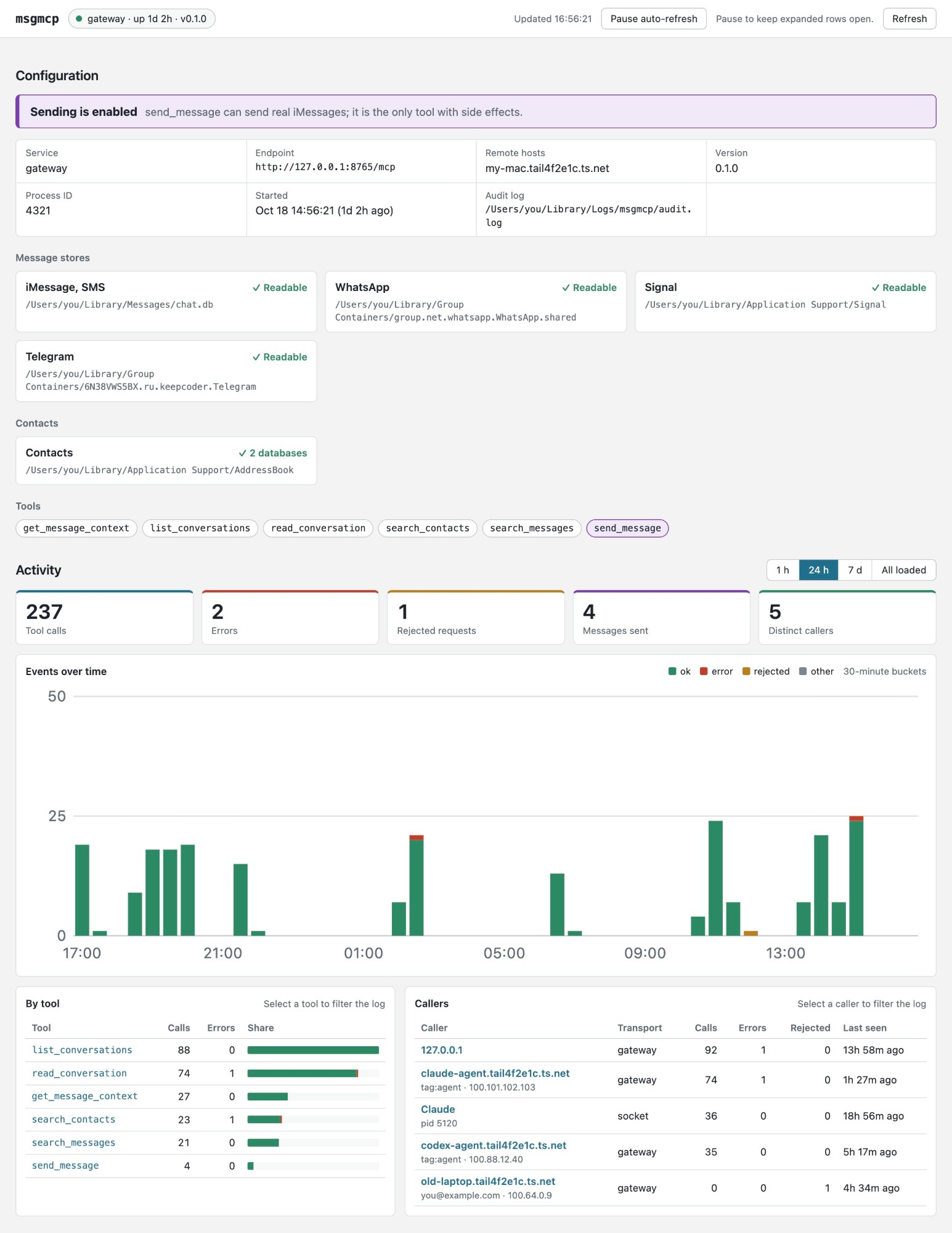
The dashboard showing made-up data from ?demo=1.
The service also serves a web page at http://127.0.0.1:8766/ for reviewing who has been using it and what they did. There's nothing to start: it is up whenever the service is.
- Configuration: the endpoint, the remote host names, whether sending is on, the tools offered, and whether each message store and Contacts can be read right now.
- Activity: for the last hour, day or week, or everything loaded: tool calls, errors, rejected requests, messages sent and distinct callers; a chart over time; and tables by tool and by caller. Select a tool or caller to filter the event log.
- Event log: every event in the audit log, filterable by text, outcome, caller and tool. Select a row to see the whole event.
The page is plain HTML that the service builds on each request, with no scripts, and it
reloads itself every 30 seconds; pause that to keep rows open. /api/status and /api/log
return the same data as JSON. ?demo=1 shows the page with made-up data instead of yours,
for screenshots like the one above.
The dashboard listens on loopback only and refuses any Host but its own, so neither the
tailnet (tailscale serve forwards only the gateway's port) nor web pages (through DNS
rebinding) can read it. It needs no key, so anything else that reaches this Mac's loopback
can (Security). --dashboard ADDRESS moves it to another loopback address; if
its port is taken, the service logs that and keeps serving MCP without it.
Security
Kept out: the internet. The gateway listens on 127.0.0.1, tailscale serve exposes it
to your tailnet only (never use Funnel), agent devices may reach only port 443, and every
request needs the token. Databases are read-only; sending reaches Apple Contacts only, and
every call is in the audit log.
Not kept out:
- What people text you. It can steer an agent into leaking what it reads, or, with
--allow-send, texting your contacts. Approving drafts is the agent's rule, not the server's. - WhatsApp, Signal and Telegram names. Senders choose their profile names, so a stranger
can show up as "Mom". Telegram chats from strangers you never wrote to are marked
filtered, but the mark is a heuristic. - Signal's encryption at rest. Once allowed, msgmcp can read Signal's database key, so
anything that controls msgmcp can read your Signal history, as with
chat.db. - Telegram's encryption at rest. Without a local passcode, Telegram for macOS encrypts its database with a key anyone who can read its group container can unlock, msgmcp included. With Passcode Lock on, msgmcp reports Telegram as unavailable.
- Your address book.
search_contactsneeds a query but returns anyone who matches, so an agent can read most of your contacts with a few short queries. - Your accounts. The agent platform, GitHub and Tailscale can each let someone in.
- Programs running as you. They can read the token and use the socket.
- Anything that reaches this Mac's loopback. The dashboard has no key, so other
accounts on the Mac, sandboxed apps, containers and VMs that can reach
127.0.0.1can read the audit log through it: who asked what, and the text of every message sent.
Limits
This is a proof of concept for the current Messages, WhatsApp Desktop, Signal Desktop and Telegram for macOS data formats, which can change without notice. Signal Desktop updates often; msgmcp reads only columns and JSON fields that Signal's own queries use. Signal can only be read, not sent to.
Telegram support reads the native Telegram for macOS app (App Store or direct download),
not Telegram Desktop, which keeps no history on disk. Its database is a cache of what the
app has loaded: older history the app never fetched is missing, and it is only as current
as the app's last sync. msgmcp decodes Telegram's undocumented Postbox format, following
Telegram's open-source client; a Telegram update that changes it shows up as
decode_failed messages or an unavailable store.
License
MIT. iMessage attributed-body text is decoded by a focused Rust reader.
Its test archives are generated from synthetic strings by Apple's NSArchiver, using
scripts/fixtures/attributed_body.swift; no message database is needed.