Agenten stärken
Installation vom Herausgeber. Kein PlugMCP-Endpunkt.
Host a copy with our keys and logs.
Noch kein paketiertes Release in der Registry. Folgen Sie der README des Repositorys.
Remote-URL oder ein Befehl auf Ihrem Rechner? Worin sich die beiden Installationen unterscheiden
Auf PlugMCP ausführen
A new server you create. It is not this listing's official endpoint. Use the publisher install when you want their URL and their credentials.
StartenA Model Context Protocol (MCP) server that provides access to OpenReview data for research and analysis. This server allows you to search for users, fetch papers, and export research data from major ML conferences (ICML, ICLR, NeurIPS).
git clone https://github.com/yourusername/openreview-mcp-server.git
cd openreview-mcp-server
python3 -m venv venv
source venv/bin/activate  # On Windows: venv\Scripts\activate
pip install -e .
You'll need your OpenReview account email and password.
Either run cmd+shift+P to open the Command Palette and find MCP settings that will lead you to the mcp.json, or look for:
Cursor: ~/.cursor/mcp.json
Open the MCP configuration file and add the openreview server to the mcpServers section:
{
  "mcpServers": {
    "openreview": {
      "command": "/ABSOLUTE/PATH/TO/openreview-mcp-server/venv/bin/python",
      "args": ["-m", "openreview_mcp_server"],
      "cwd": "/ABSOLUTE/PATH/TO/openreview-mcp-server",
      "env": {
        "OPENREVIEW_USERNAME": "[email protected]",
        "OPENREVIEW_PASSWORD": "your_password",
        "OPENREVIEW_BASE_URL": "https://api2.openreview.net",
        "OPENREVIEW_DEFAULT_EXPORT_DIR": "./openreview_exports"
      }
    }
  }
}
Important:
/ABSOLUTE/PATH/TO/openreview-mcp-server with the actual path (e.g., /Users/yourname/workspace/openreview-mcp-server)[email protected] and your_password with your OpenReview credentials/venv/bin/python)Example configuration:
{
  "mcpServers": {
    "openreview": {
      "command": "/Users/john/workspace/openreview-mcp-server/venv/bin/python",
      "args": ["-m", "openreview_mcp_server"],
      "cwd": "/Users/john/workspace/openreview-mcp-server",
      "env": {
        "OPENREVIEW_USERNAME": "[email protected]",
        "OPENREVIEW_PASSWORD": "mySecurePassword123",
        "OPENREVIEW_BASE_URL": "https://api2.openreview.net",
        "OPENREVIEW_DEFAULT_EXPORT_DIR": "./openreview_exports"
      }
    }
  }
}
Completely quit and reopen Cursor for the MCP server to load.
Once configured and Cursor is restarted, you can use natural language to interact with the OpenReview MCP server:
Search for papers:
Search OpenReview for papers about "multimodal tokenization" from ICML 2025, ICLR 2025 and NeurIPS 2025
Get your own papers:
Get my papers from OpenReview using email [email protected]
Export papers with PDFs:
Export papers about "multimodal tokenization" from ICLR 2024, download PDFs and extract text
Get conference papers:
Show me all papers from NeurIPS 2024
The server will automatically:
Exported files are saved to ./openreview_exports/ by default (or your custom directory).
Find a user profile by email address.
search_user(email="[email protected]", include_publications=true)
Fetch all papers published by a specific user.
Input schema:
get_user_papers(email="[email protected]", format="detailed")
Get papers from a specific conference and year.
Input schema:
get_conference_papers(venue="ICLR.cc", year="2024", limit=50)
Search for papers by keywords across multiple conferences.
Search modes:
Input schema:
search_papers(
  query="time series token merging",
  match_mode="all",
  search_fields=["title", "abstract"],
  venues=[
    {"venue": "ICLR.cc", "year": "2024"},
    {"venue": "NeurIPS.cc", "year": "2024"}
  ],
  limit=20
)
Export search results to JSON files for analysis.
Input schema:
export_papers(
  query="neural networks",
  venues=[
    {"venue": "ICLR.cc", "year": "2024"},
    {"venue": "ICML.cc", "year": "2024"}
  ],
  max_papers=1,
  download_pdfs=true,
  include_abstracts=true,
  export_dir="./research_exports"
)
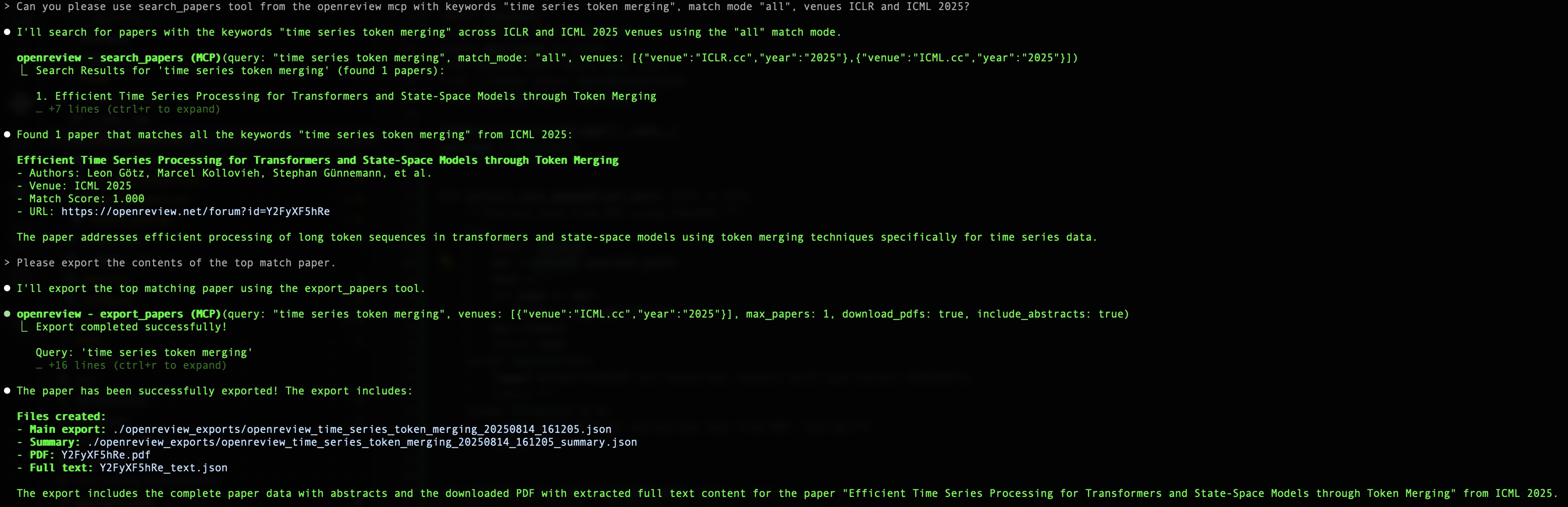
search_papers(query="time series forecasting", match_mode="all", venues=[{"venue": "ICLR.cc", "year": "2024"}])
export_papers(query="time series token merging", venues=[{"venue":"ICML.cc","year":"2025"}], max_papers=1, download_pdfs=true, include_abstracts=true)
MIT License
An MCP server for OpenReview to fetch user papers, specific conference papers (e.g. ICML / ICLR / NeurIPS), parse .pdf files and save them into .json. Can be added to Claude Code to sample ideas from
Übersicht
An MCP server for OpenReview to fetch user papers, specific conference papers (e.g. ICML / ICLR / NeurIPS), parse .pdf files and save them into .json. Can be added to Claude Code to sample ideas from the recent AI/ML/SWE conferences.
Tools
Noch keine Tool-Liste. Remote-Server erhalten eine nach dem ersten Health-Check.
FAQ
Kopieren Sie auf dieser Seite die stdio-Konfiguration für Cursor, Claude Desktop, Claude Code oder VS Code. Sie nutzt die Installation des Herausgebers, keinen PlugMCP-Proxy.
In diesem Eintrag ist keine erforderliche Umgebungsvariable aufgeführt.
Openreview läuft lokal über stdio.
Zuletzt geprüft: 2026-11-05. An MCP server for OpenReview to fetch user papers, specific conference papers (e.g. ICML / ICLR / NeurIPS), parse .pdf files and save them into .json. Can be added to Claude Code to sample ideas from the recent AI/ML/SWE conferences.

