MCP *arr Server
Agenten stärken
Der eigene Befehl des Herausgebers. Kein PlugMCP-Endpunkt.
Host a copy with our keys and logs.
npx -y [email protected]Claude Code hat keinen Installationslink für einen lokalen Befehl. Kopieren Sie den Befehl unten und führen Sie ihn in einem Terminal aus.
SONARR_URL=<value> SONARR_API_KEY=<secret> RADARR_URL=<value> RADARR_API_KEY=<secret> LIDARR_URL=<value> LIDARR_API_KEY=<secret> PROWLARR_URL=<value> PROWLARR_API_KEY=<secret> ARR_READ_ONLY=<value> claude mcp add aplaceforallmystuff-mcp-arr -- npx -y mcp-arr-server@1.9.0In einem Terminal ausführen.
{ "mcpServers": { "aplaceforallmystuff-mcp-arr": { "command": "npx", "args": [ "-y", "[email protected]" ], "env": { "SONARR_URL": "<value>", "SONARR_API_KEY": "<secret>", "RADARR_URL": "<value>", "RADARR_API_KEY": "<secret>", "LIDARR_URL": "<value>", "LIDARR_API_KEY": "<secret>", "PROWLARR_URL": "<value>", "PROWLARR_API_KEY": "<secret>", "ARR_READ_ONLY": "<value>" } } }}claude_desktop_config.json
Remote-URL oder ein Befehl auf Ihrem Rechner? Worin sich die beiden Installationen unterscheiden
Auf PlugMCP ausführen
A new server you create. It is not this listing's official endpoint. Use the publisher install when you want their URL and their credentials.
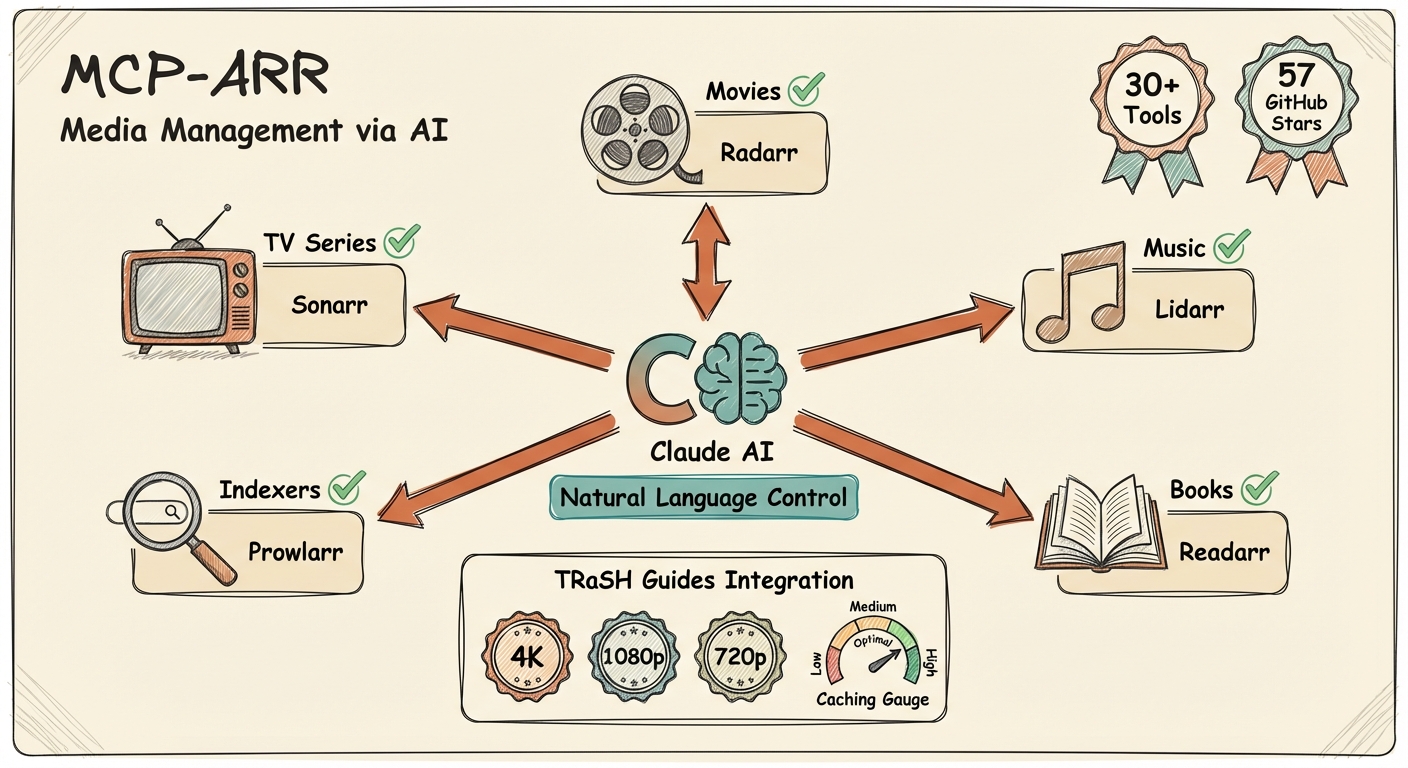
StartenMCP server for the *arr media management suite - Sonarr, Radarr, Lidarr, and Prowlarr.
Supports both local stdio mode for Claude/Codex-style clients and remote HTTP mode for hosted MCP clients such as ChatGPT connectors.
npx mcp-arr-server
MCP_TRANSPORT=http PORT=3000 npx mcp-arr-server
By default the remote server listens on 127.0.0.1:3000 and serves MCP on /mcp.
Environment variables for remote mode:
MCP_TRANSPORT=http to enable remote Streamable HTTP transportHOST to override the bind host (default 127.0.0.1)PORT to override the port (default 3000)MCP_PATH to override the MCP endpoint path (default /mcp)Prebuilt images are published to GitHub Container Registry on every release. You do not need to build anything:
docker pull ghcr.io/aplaceforallmystuff/mcp-arr:latest
Tags follow the release version — latest, 1, 1.7, and each exact version such as 1.7.3.
Pin to a major or minor tag if you want updates without surprises.
Run in local stdio mode:
docker run --rm -i \
  -e SONARR_URL=http://host.docker.internal:8989 \
  -e SONARR_API_KEY=your-sonarr-api-key \
  ghcr.io/aplaceforallmystuff/mcp-arr:latest
Run in remote HTTP mode:
docker run --rm -p 3000:3000 \
  -e MCP_TRANSPORT=http \
  -e HOST=0.0.0.0 \
  -e PORT=3000 \
  -e SONARR_URL=http://host.docker.internal:8989 \
  -e SONARR_API_KEY=your-sonarr-api-key \
  ghcr.io/aplaceforallmystuff/mcp-arr:latest
Minimal docker-compose.yml:
services:
  mcp-arr:
    image: ghcr.io/aplaceforallmystuff/mcp-arr:latest
    ports:
      - "3000:3000"
    environment:
      MCP_TRANSPORT: http
      HOST: 0.0.0.0
      PORT: 3000
      SONARR_URL: http://host.docker.internal:8989
      SONARR_API_KEY: your-sonarr-api-key
      RADARR_URL: http://host.docker.internal:7878
      RADARR_API_KEY: your-radarr-api-key
Only needed if you are developing against a change that is not released yet:
docker build -t mcp-arr .
git clone https://github.com/aplaceforallmystuff/mcp-arr.git
cd mcp-arr
npm install
npm run build
Each *arr application has an API key in Settings > General > Security:
Add to your Claude Desktop config file:
macOS: ~/Library/Application Support/Claude/claude_desktop_config.json
Windows: %APPDATA%\Claude\claude_desktop_config.json
{
  "mcpServers": {
    "arr": {
      "command": "npx",
      "args": ["-y", "mcp-arr-server"],
      "env": {
        "SONARR_URL": "http://localhost:8989",
        "SONARR_API_KEY": "your-sonarr-api-key",
        "RADARR_URL": "http://localhost:7878",
        "RADARR_API_KEY": "your-radarr-api-key",
        "LIDARR_URL": "http://localhost:8686",
        "LIDARR_API_KEY": "your-lidarr-api-key",
        "PROWLARR_URL": "http://localhost:9696",
        "PROWLARR_API_KEY": "your-prowlarr-api-key"
      }
    }
  }
}
Add to ~/.claude.json:
{
  "mcpServers": {
    "arr": {
      "command": "npx",
      "args": ["-y", "mcp-arr-server"],
      "env": {
        "SONARR_URL": "http://localhost:8989",
        "SONARR_API_KEY": "your-sonarr-api-key",
        "RADARR_URL": "http://localhost:7878",
        "RADARR_API_KEY": "your-radarr-api-key"
      }
    }
  }
}
Note: Only configure the services you have running. The server automatically detects which services are available based on the environment variables you provide.
TRaSH-only mode: if you don’t configure any *arr services, the server still starts and exposes the TRaSH Guides reference tools plus generic search and fetch.
To use mcp-arr with ChatGPT, run the server in remote HTTP mode on a reachable host and connect ChatGPT to the /mcp endpoint.
The server now exposes the generic search and fetch tools expected by ChatGPT-style remote MCP integrations:
search discovers matching *arr media and TRaSH profilesfetch returns structured detail for a selected search resultThe existing service-specific tools remain available for richer local or power-user workflows.
These tools are available for Sonarr, Radarr, and Lidarr. Replace {service} with the service name (e.g., sonarr_get_quality_profiles).
The {service}_review_setup tool returns all configuration in a single call, enabling natural language conversations about optimizing your setup. Claude can analyze your quality profiles, suggest improvements, explain why certain content isn't being grabbed, and help configure complex settings like custom formats.
⚠️ Disclaimer: The configuration review tools provide read-only access to your *arr settings. Any changes to your configuration must be made directly in the *arr application interfaces. The AI's suggestions are recommendations only - always back up your configuration before making significant changes. The maintainers are not responsible for any configuration changes, data loss, or other issues that may arise from following AI-generated recommendations.
Access community-curated quality profiles, custom formats, and naming conventions from TRaSH Guides directly through Claude or ChatGPT. These tools work without any *arr configuration - they fetch reference data from the TRaSH Guides GitHub repository.
Example usage:
Data is cached for 1 hour to minimize GitHub API calls.
# Watch mode for development
npm run watch

# Build TypeScript
npm run build

# Run locally
SONARR_URL="http://localhost:8989" SONARR_API_KEY="your-key" node dist/index.js
Ensure you have set at least one pair of URL and API_KEY environment variables:
SONARR_URL="http://localhost:8989"
SONARR_API_KEY="your-api-key"
The API key is incorrect. Verify it in your *arr application under Settings > General > Security.
The *arr application is not running or the URL is incorrect. Verify:
You tried to use a tool for a service that isn't configured. Add the corresponding URL and API_KEY environment variables.
I build and maintain MCP servers like this one, and I review AI and agent setups for security. If your team needs a custom server, an integration, or a security review of one you already run, see jimchristian.net/work or book a discovery session.
MIT - see LICENSE for details.
MCP server for *arr media management suite
{ "mcpServers": { "aplaceforallmystuff-mcp-arr": { "command": "npx", "args": [ "-y", "[email protected]" ], "env": { "SONARR_URL": "<value>", "SONARR_API_KEY": "<secret>", "RADARR_URL": "<value>", "RADARR_API_KEY": "<secret>", "LIDARR_URL": "<value>", "LIDARR_API_KEY": "<secret>", "PROWLARR_URL": "<value>", "PROWLARR_API_KEY": "<secret>", "ARR_READ_ONLY": "<value>" } } }}Tools
Noch keine Tool-Liste. Remote-Server erhalten eine nach dem ersten Health-Check.
FAQ
Kopieren Sie auf dieser Seite die stdio-Konfiguration für Cursor, Claude Desktop, Claude Code oder VS Code. Sie nutzt die Installation des Herausgebers, keinen PlugMCP-Proxy.
Der Herausgeber nennt diese Umgebungsvariablen: SONARR_URL, SONARR_API_KEY, RADARR_URL, RADARR_API_KEY, LIDARR_URL, LIDARR_API_KEY, PROWLARR_URL, PROWLARR_API_KEY, ARR_READ_ONLY.
MCP Arr läuft lokal über stdio.
Zuletzt geprüft: 2026-11-16. MCP server for *arr media management suite

