This project is a server for the Model Context Protocol (MCP) that integrates with Google Drive,
you can use it to upload Microsoft Word files to Google Drive, allowing for easy file management and sharing.
Connect to this server using the Model Context Protocol client, for instance, in Claude Desktop.
Components
Tools
MCP Server for google drive
upload_microsoft_world_file:
Uploads a file content in Microsoft Word format to Google Drive in a specified folder.
Input parameters:
folderName: Name of the folder where the file will be uploaded. If null, the file will be uploaded to the root directory. (optional)
fileName: Name of the file to be uploaded.
fileContent: Content of the file to be uploaded.
Returns:
url: The URL of the uploaded file in Google Docs view format.
What You Can Do
Once set up, you can ask Claude Desktop things like:
"What are the 10 famous touristic place of Sao Paulo, please save the result in my google drive"
Run the following command: gcloud auth application-default login --scopes=https://www.googleapis.com/auth/cloud-platform,https://www.googleapis.com/auth/drive
This will open a browser window to authenticate your Google account and grant the necessary permissions.
After successful authentication, the credentials will be stored in your Cloud Shell environment, allowing the application to access Google Cloud resources.
Look for the credential file that was created, it should be something like: Credentials saved to file: [/tmp/tmp.6Rvsdsdfesx/application_default_credentials.json]
Copy the contents of the credential file to a new file named application_default_credentials.json in the home directory of your local machine. (e.g. ~/application_default_credentials.json)
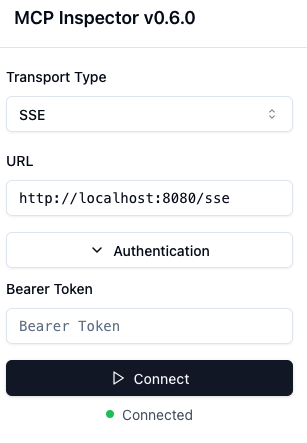
In the MCP inspector, paste your token. Click connect, and voilà!
if you click on the tab "Tools", and then "List Tools" you should see the upload_microsoft_world_file tool available.
You can test it by clicking on the tool and filling in the parameters, then clicking "Run Tool".
Note that the token is only valid for 5 minutes
Logging
Enable Debug Logging
Set environment variable: LOGGING_LEVEL_ROOT=DEBUG
Checking Logs
You can check the logs in the /usr/lib/claude-desktop/target directory of the claude-desktop. The log file is named mcp-google-drive-server.log.
Reference Documentation
For further reference, please consider the following sections:
Due to Maven's design, elements are inherited from the parent POM to the project POM.
While most of the inheritance is fine, it also inherits unwanted elements like <license> and <developers> from the parent.
To prevent this, the project POM contains empty overrides for these elements.
If you manually switch to a different parent and actually want the inheritance, you need to remove those overrides.
Noch keine Tool-Liste. Remote-Server erhalten eine nach dem ersten Health-Check.
FAQ
Fragen
Wie installiere ich MCP Google Drive Server?
Kopieren Sie auf dieser Seite die stdio-Konfiguration für Cursor, Claude Desktop, Claude Code oder VS Code. Sie nutzt die Installation des Herausgebers, keinen PlugMCP-Proxy.
Benötigt MCP Google Drive Server einen API-Schlüssel?
In diesem Eintrag ist keine erforderliche Umgebungsvariable aufgeführt.
Welchen Transport verwendet MCP Google Drive Server?
MCP Google Drive Server läuft lokal über stdio.
Wann wurde MCP Google Drive Server zuletzt geprüft?
Zuletzt geprüft: 2026-11-05. MCP Server for google drive