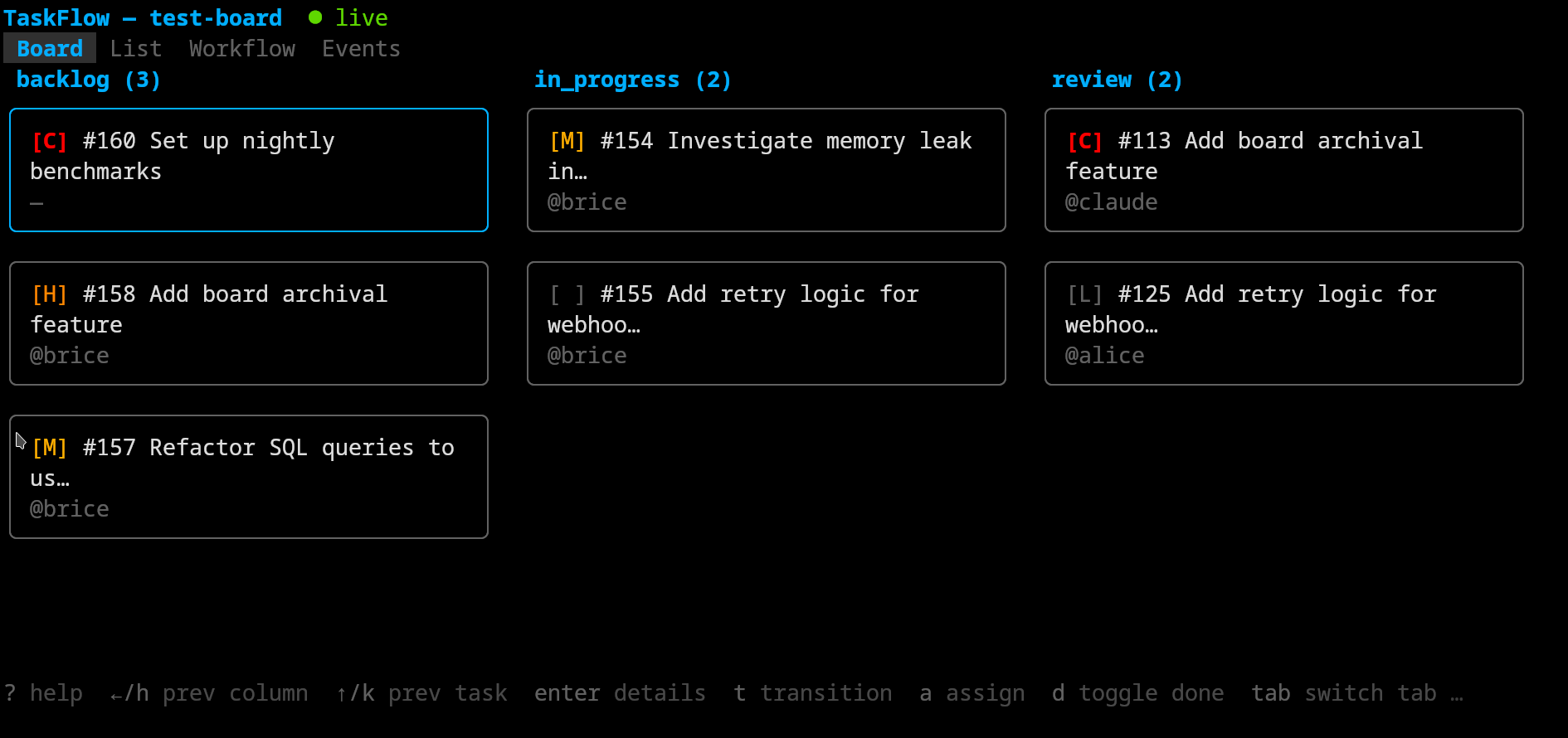
Kanban boards with workflow state machines, built for human + AI collaboration.
TaskFlow is a task tracker where humans and AI agents work side by side. Tasks live on kanban boards with configurable workflow state machines. Every action — by any actor — is recorded in a full audit trail. Access it via CLI, interactive TUI, MCP for AI agents, or the HTTP API directly.
Kanban task tracker with workflow state machines, CLI, TUI, and MCP server — built for human + AI collaboration
Sterne
3
Tools
—
Uptime
—
Install
# Install all binaries
go install github.com/bricef/taskflow/cmd/taskflow-server@latest
go install github.com/bricef/taskflow/cmd/taskflow@latest
go install github.com/bricef/taskflow/cmd/taskflow-tui@latest
go install github.com/bricef/taskflow/cmd/taskflow-mcp@latest

# Or use Docker
docker pull fractallambda/taskflow:latest
Getting Started
1. Start the server
# Option A: Docker Compose
just docker-up

# Option B: Run locally
just build
just run
On first start, the server creates a seed admin actor and writes the API key to seed-admin-key.txt. The admin name defaults to the value of TASKFLOW_SEED_ADMIN_NAME (set to admin in docker-compose.yml).
# Get the seed admin key
cat seed-admin-key.txt                              # local
docker compose exec taskflow cat /data/seed-admin-key.txt  # Docker
To set a specific key instead of a random one (useful for CI/automation):
Create actors for team members and AI agents. Each gets their own API key for identity and audit attribution.
# Create a human member
taskflow actor create --name alice --display_name "Alice Chen" --type human --role member

# Create an AI agent
taskflow actor create --name claude --display_name "Claude" --type ai_agent --role member
The API key is returned in the response (shown once). Share it with the actor for their CLI, TUI, or MCP configuration.
5. Use other interfaces
# TUI — interactive terminal UI (uses same config as CLI)
taskflow-tui

# TUI — connect to a specific board directly
taskflow-tui platform

# MCP — AI agent integration (see docs/mcp.md for Claude Code setup)
TASKFLOW_URL=http://localhost:8374 TASKFLOW_API_KEY=<agent-key> taskflow-mcp
Documentation
Architecture — package structure, dependency flow, design decisions, event system
HTTP API Reference — all endpoints, authentication, error handling, configuration
Every actor (human or AI) has a role that determines what they can do:
Action
admin
member
read_only
Manage actors (create, update roles)
✅
❌
❌
Manage webhooks
✅
❌
❌
Delete/reassign boards
✅
❌
❌
View system stats
✅
❌
❌
Create boards
✅
✅
❌
Update boards and workflows
✅
✅
❌
Create/update/transition/delete tasks
✅
✅
❌
Add comments, dependencies, attachments
✅
✅
❌
Read all data (boards, tasks, audit, etc.)
✅
✅
✅
Requests that exceed the actor's role receive a 403 Forbidden response. Each Resource and Operation in the model declares its minimum required role.
Workflows
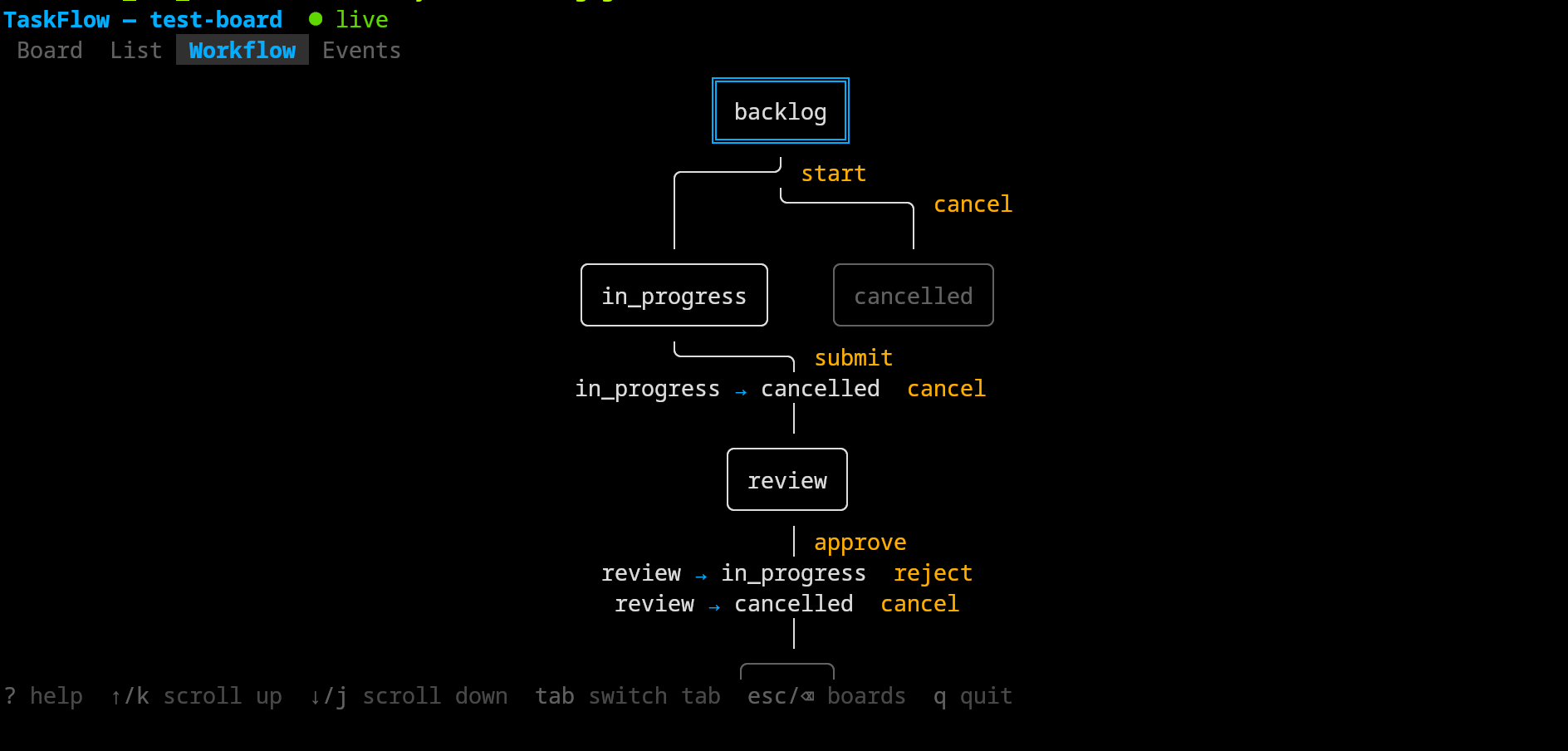
Each board has a workflow — a state machine that defines how tasks move through stages. Workflows are specified as JSON when creating a board. If omitted, a default workflow is used.
backlog → in_progress → review → done
              ↑            │
              └────────────┘ (reject)
         from any → cancelled
Explicit state-to-state transitions with named actions
from_all
Transitions reachable from every non-terminal state
to_all
Transitions from a specific state to every other state
Tasks are moved between states by name (e.g. --transition start), not by target state. Use taskflow workflow get <board> or the TUI's Workflow tab to see available transitions.
Operations are defined once in model.Resources() and model.Operations() and derived into HTTP routes, CLI commands, OpenAPI specs, MCP tools/resources, and the shared httpclient. All clients (CLI, TUI, MCP, simulator) are pure HTTP consumers — they import no server internals.
See ARCHITECTURE.md for the full architectural reference: dependency flow, package responsibilities, event system, query param derivation, and design rationale.
just check          # fmt-check + vet + test (full suite)
just test           # unit + integration + QA smoke test (45 endpoint checks)
just test-unit      # unit + integration tests only (no server startup)
just build          # build all binaries (server, CLI, TUI, MCP)
just run            # start the server locally
just fmt            # format code
just seed           # generate test database

just docker-build   # build Docker image
just docker-up      # start with Docker Compose
just docker-down    # stop
just docker-logs    # follow logs
just clean          # remove build artifacts
Set TASKFLOW_DEV_MODE=true to disable all rate limiting (useful for testing and development). See TESTING.md for the full manual QA checklist.
Releasing
just release v0.1.2
This generates a changelog entry from the git log, commits it, tags, and pushes. CI then:
Runs the full test suite
Cross-compiles binaries for linux/amd64, linux/arm64, darwin/amd64, darwin/arm64
Creates a GitHub Release with downloadable archives and auto-generated release notes
Builds and pushes Docker images tagged :latest, :sha, and :v0.1.2
Watchtower deploys the new image to the VPS within 3 minutes
To build release archives locally: just dist (outputs to dist/).
Deployment
The server must be hosted at the root of a domain (e.g. https://taskflow.example.com). Hosting at a subpath (e.g. /taskflow) is not currently supported — the dashboard, OpenAPI spec, and SSE endpoints generate absolute paths without a configurable prefix.
All binaries embed a version string from git describe at build time. The server exposes it via the X-TaskFlow-Version response header and the /health endpoint. Clients warn on stderr if their version differs from the server.
Testing with the simulator
The activity simulator generates realistic board activity for testing live updates:
# Terminal 1: server with test database
just seed && just run

# Terminal 2: simulator
go run ./cmd/taskflow-sim --board platform

# Terminal 3: TUI
TASKFLOW_API_KEY=seed-admin-key-for-testing taskflow-tui
The simulator performs a weighted mix of creates, transitions, assignments, and comments every 2-8 seconds, acting as multiple actors.
T
Taskflow
bricef·3 Sterne·
Kanban task tracker with workflow state machines, CLI, TUI, and MCP server — built for human + AI collaboration
Noch keine Tool-Liste. Remote-Server erhalten eine nach dem ersten Health-Check.
FAQ
Fragen
Wie installiere ich Taskflow?
Kopieren Sie auf dieser Seite die stdio-Konfiguration für Cursor, Claude Desktop, Claude Code oder VS Code. Sie nutzt die Installation des Herausgebers, keinen PlugMCP-Proxy.
Benötigt Taskflow einen API-Schlüssel?
In diesem Eintrag ist keine erforderliche Umgebungsvariable aufgeführt.
Welchen Transport verwendet Taskflow?
Taskflow läuft lokal über stdio.
Wann wurde Taskflow zuletzt geprüft?
Zuletzt geprüft: 2026-10-27. Kanban task tracker with workflow state machines, CLI, TUI, and MCP server — built for human + AI collaboration