
The problem
You pay for more than one coding agent: a Claude plan or two, Codex, Grok, maybe another.
Every one of them meters you on a clock — five-hour windows, weekly caps, monthly allowances — and unused quota is simply gone when the window resets.
So one plan runs dry mid-task while the others sit idle. You switch tools by hand just to spend what you already paid for. And the agent that wrote the code is usually the one that decides it is done.
What Bullswarm does
Bullswarm turns the agent CLIs already signed in on your machine into one fleet that your main agent can command.
flowchart LR
  you([You]) -->|goal| main["Your main agent<br/>Claude Code · Codex · Grok<br/>+ /bullswarm skill"]
  main -->|"bullswarm run · workflow goal"| bs{{"Bullswarm<br/>pace router + workflow kernel"}}
  bs --> c["claude -p"]
  bs --> x["codex exec"]
  bs --> g["grok -p"]
  bs --> o["contributed providers"]
  c & x & g & o -->|output| v["independent verification"]
  v -->|"verdict + evidence"| main
- Spends quota by pace. Each task goes to the plan with the most spare quota for how far its window has run, so a plan that is behind, or about to reset with quota left, gets used first.
- Picks models for you. Tasks come in three lanes (
analyze,build,chore). Setup asks each CLI which models it offers and suggests the newest one for each effort level, so you don't have to update settings every time a vendor ships a model. - Runs one task or a whole workflow.
bullswarm runis a one-step workflow: one task to one agent, one automatic retry, and an optional answer checked against a JSON schema. For bigger goals your main agent writes a program from four blocks: steps (each with an optional checked answer), phases that group them, gates where the run waits for you, and loops that repeat steps until a condition holds, such as "until the tests pass". Independent steps run in parallel across agents, and a step can be routed away from the agents that did the work it checks. - Checks the work, not the exit code. A delegate saying "done" isn't enough. Bullswarm reads what it actually produced, runs the checks a step declares (a command, a schema), checks each answer itself, and labels every finished step by what backs it:
proven by command(a check Bullswarm ran passed),answer checked(the answer is well formed, which is a claim, not proof), orunproven. A run reports these facts, not a verdict;verifiedrequirements belong to old v2 programs only. - Shows everything live. A terminal dashboard covers quota, history, running workflows and each agent's individual turns.
- Works with the agent you already use. The
/bullswarmskill teaches Claude Code, Codex and Grok when to delegate. There's also an early-access Claude Code Mod that shows runs and usage inside Claude Code. - Lets you steer mid-run. Add steps, gates or loops while a workflow runs (
workflow add, also straight from a step's answer), continue a waiting gate or give a loop more rounds, rerun a step, or pause and resume it. - Extends with providers. Claude Code, Codex and Grok are built in. Other CLIs can be added as providers without touching the core.
See it
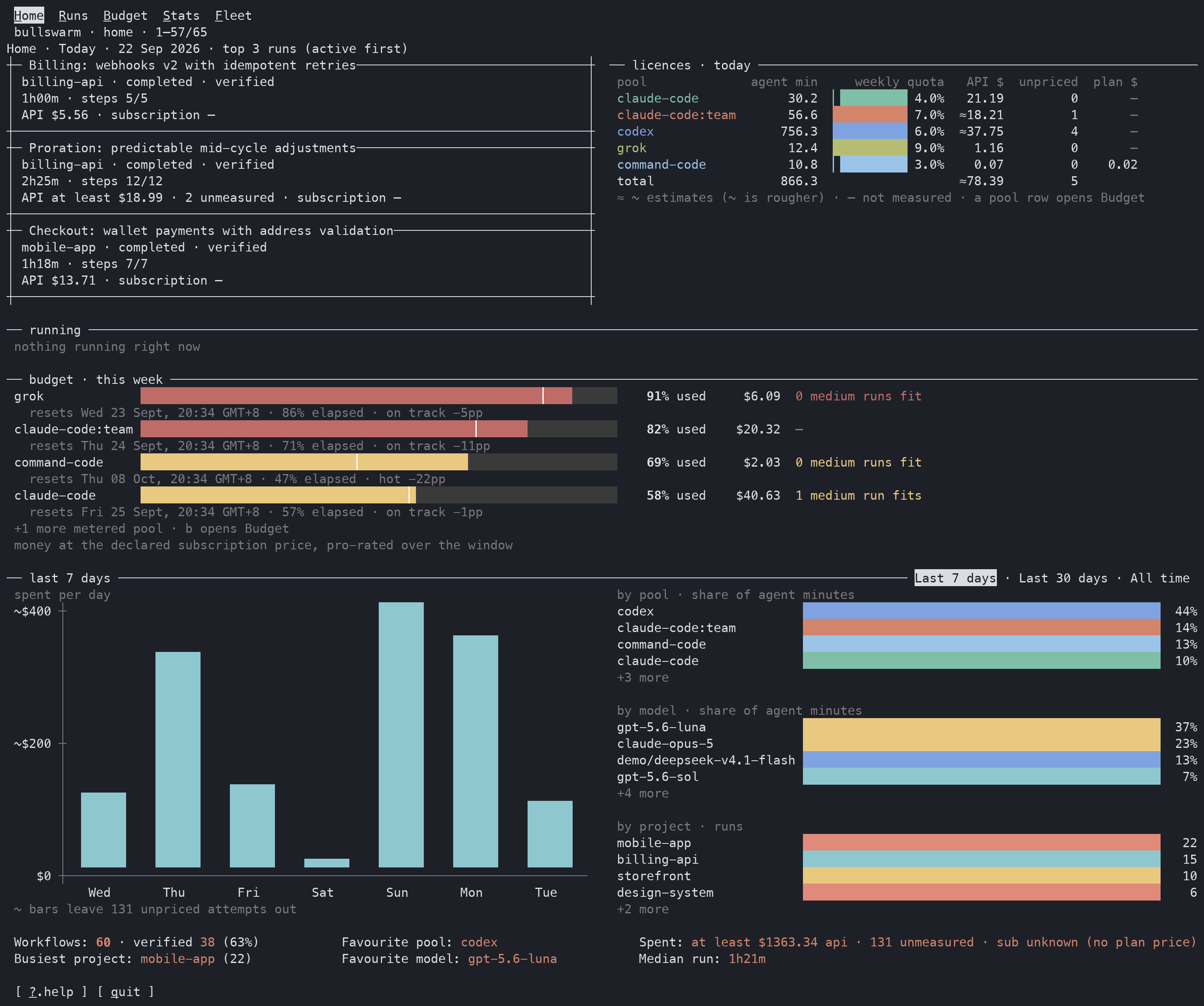
Home: what's running today, how much quota each plan has left, and what you've spent.
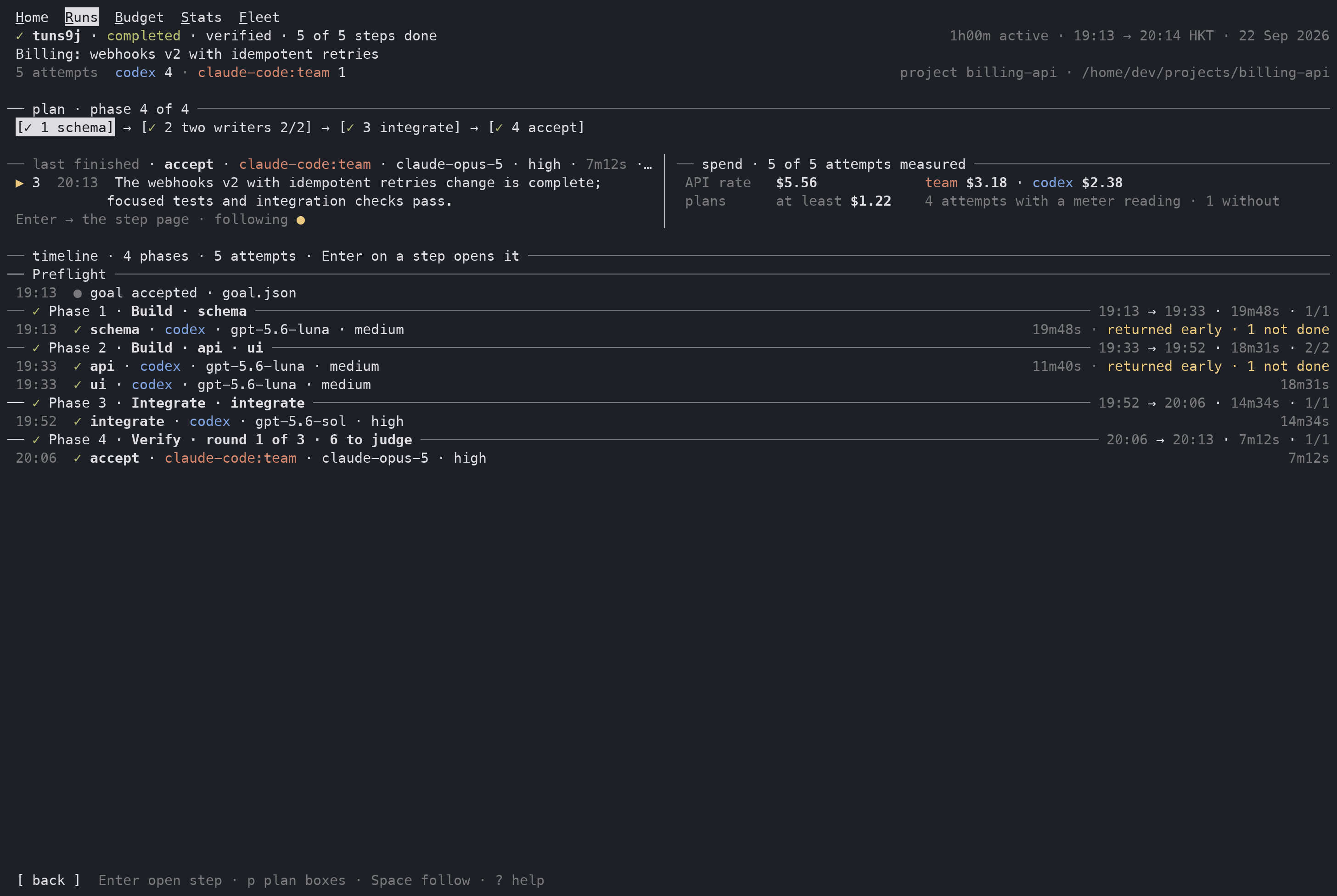
Run: one workflow's plan, which agent took each step, and what it cost.
More screens, including phone-sized ones, are in the gallery.
Why not just…
Bullswarm never proxies a subscription as an API and never collects or shares your vendor credentials.
The controller is portable. Claude Code, Codex, Grok, or any capable caller drives the same CLI and durable workflow kernel, so your workflows are not locked into one vendor's orchestration.
Why now
Agent plans now come with hard weekly limits, and serious work spans hours rather than prompts. A workflow can run for one to two hours across several agents—builders in parallel, an integrator, then independent acceptance—while you keep handing new goals to your main agent.
With Bullswarm routing by pace, running several goals at once no longer means worrying about wasting one plan's scarce quota: the fleet spends whichever plan is furthest behind.
Quick start
You need Node.js 22.12 or later and at least one agent CLI you're signed in to (Claude Code, Codex or Grok).
The easiest way to set up is to let your agent do it. Paste this into Claude Code, Codex or Grok:
Install and set up Bullswarm for me:
1. Run `npm i -g bullswarm`.
2. Run `bullswarm setup --yes --strategy --integrate` to find my agent CLIs,
   pick models, and install the /bullswarm skill for each agent.
3. Run `bullswarm doctor` and tell me which agents are ready and how much
   quota each one has left.
4. Read the installed /bullswarm skill so you know when to use
   `bullswarm run` and when to write a workflow.
After that, just give your agent goals as usual. It will hand work to Bullswarm when that helps. Run bullswarm in a terminal to open the dashboard; closing it doesn't stop anything that's running.
To set things up by hand, or to choose models and reasoning yourself, see Getting started.
Supported agents and meters
Each provider describes how to launch its CLI, read its quota, list its models and read its output. To add one, see Adding a provider.
Learn more
- Documentation
- Getting started
- Day-to-day playbook
- How routing works
- Authoring workflows
- The dashboard and observing runs
- Provider reference
- MIT licence
Reporting a problem or contributing
Bullswarm is open source and gets better through the cases people hit in real use. If you are a person or an agent and you find a real bug or gap in Bullswarm itself, an issue or a pull request is welcome. Nobody is expected to send one.
If you are an agent, check with the person you work for before you post anything. Issues on this repo are public, so leave out task text, file paths, repo or project names, account names, keys and anything else from the person's work. The Bullswarm version, the command, and the error line are usually enough.