
Echo Adapt v5.2
ADAPT — Adaptive Digital Agent Protocol & Tools
Local-first Rust agent runtime with persistent terminal sessions, asynchronous tool supervision, configurable model-provider support, remote tools, memory, and optional Linux isolation.
Just want to try it? See QUICK_START.md.
Echo is the model. Adapt is the runtime.
Adapt gives language models a controlled way to use real operating-system tools over multi-step workflows.
The basic idea is intentionally simple:
If a model understands that it should run a shell command, use a persistent terminal, call a structured function, wait for background work, or clean up after a task, Adapt gives it a way to actually do it.
Adapt is not tied to a large agent framework, a provider-specific tool API, or a hardcoded Jinja chat template.
I primarily use it with my own fine-tuned model, Echo Instroder 14B, but fine-tuning is not required. A sufficiently capable instruct or coding model can learn the included protocol from the example system prompt.
Current status
- Primary platform: Linux
- Windows: Windows 11 through WSL2
- Native Windows: not supported
- Development status: active / experimental
- Current runtime: Adapt v5.2
- v5.2 adds generalized foreground-to-background tool execution, explicit wait semantics, idle wake/re-entry, lifecycle fencing for stale background results, runtime UI/status improvements, and completed MCP/tool-server integration work
Related projects:
What Adapt Is
Adapt is closer to an execution environment for an AI model than a conventional agent abstraction layer.
The model handles reasoning.
Adapt handles execution, state, tool boundaries, persistent sessions, background work, memory, logging, provider routing, and the operating-system interface.
The normal interaction is:
user
  ↓
assistant reasoning
  ↓
tool request
  ↓
Adapt executes
  ↓
tool result
  ↓
assistant reasoning
For long-running work, execution and model reasoning can temporarily diverge. Adapt can move the operation into the background, allow the model to continue working, and later return the completed result as a normal tool observation.
If the model reaches a point where it cannot continue until that result exists, it can explicitly call:
<wait/>
If the model instead goes idle, Adapt can wake the agent loop when completed background work becomes available without fabricating a user message.
That separation between reasoning, execution state, and tool completion is one of the main architectural goals of the project.
Architecture
flowchart TD
    U[User] --> M[Model]

    M --> P[Adapt Tool Parser]

    P -->|command| C[One-shot OS Command]
    P -->|session| S[Persistent tmux Session]
    P -->|JSON| J[Local / Remote JSON Tool]
    P -->|wait| W[Wait for Specific Background Result]
    P -->|cleanup| X[Workspace / Task Cleanup]

    C --> F{Finishes in Foreground Window?}
    S --> F
    J --> F

    F -->|Yes| R[Tool Result]
    F -->|No| B[Background Supervisor / Pending Queue]

    B -->|Model has independent work| M
    B -->|Model calls wait| W
    W -->|Target completes| R

    B -->|Completion while model active| Q[Queue Completion]
    Q --> R

    B -->|Completion while chat idle| I[Background Ready / Idle Wake]
    I --> R

    J --> TS[Optional Adapt Tool Server]
    TS --> AUTH[Server-side Capability Authorization]
    AUTH --> MCP[Optional MCP Server / External Service]
    MCP --> R

    R --> SUM[Optional Tool-output Summarization]
    SUM --> M

    MEM[Semantic Memory] <--> M
    CFG[config.toml] --> P
    CFG --> M
    CFG --> TS

    OS[Linux Permissions / Restricted User / Bubblewrap] --> C
    OS --> S
Design Philosophy
Let the operating system do operating-system things
Adapt does not try to recreate Linux permissions inside an AI framework.
It can run under the current user, a dedicated restricted Linux user, or an optional Bubblewrap-isolated environment.
Linux remains the final authority over what the Adapt process can read, write, execute, or elevate.
Raw commands should remain raw commands
Normal CLI commands do not need a giant JSON schema.
Adapt therefore supports direct command execution and reserves structured JSON for tools where structured arguments make sense.
Persistent tools need persistent sessions
Programs such as:
- Python REPLs
- debuggers
- database shells
- SSH sessions
msfconsole- long-running CLI applications
Do not work well as isolated subprocess calls.
Adapt uses named tmux sessions when persistent state is required.
Long-running work should not unnecessarily block reasoning
Commands, JSON tools, and persistent-session work receive a short foreground execution window.
If an operation continues running, Adapt can supervise it asynchronously while returning control to the model.
The model can then continue independent work, explicitly wait for a required result, or go idle and be resumed when completed background work becomes available.
Tool results should be tool results
Adapt supports a configurable tool-message role.
The human did not produce command output, so Adapt does not need to pretend that tool output was another human message.
The same semantic rule applies to background state and background completion.
The runtime should own execution state
The model should decide what to do.
Adapt should decide how execution state is tracked safely.
That includes:
- foreground versus background execution,
- pending completion queues,
- background-target tracking,
- task-boundary cleanup,
- stale-result rejection,
- session lifecycle,
- and model-loop re-entry.
Configuration should replace recompilation where practical
Provider selection, endpoints, prompts, message roles, tool tags, safety rules, enabled JSON tools, context thresholds, summarization, tool-server configuration, and paths are controlled through config.toml.
Provider differences should stay out of the agent loop
The main agent loop should not need to know whether the model is local, remote, OpenAI-compatible, or accessed through another supported protocol.
Provider-specific request and response handling belongs in the provider layer.
What Changed in v5.2
Adapt v5.2 is primarily a background-execution and lifecycle-hardening release.
The main additions are:
- foreground-to-background handoff for supported command, JSON, and persistent-session work,
- explicit
<wait/>behavior for dependency blocking, - background completion queues,
- automatic model-loop wake/re-entry when work completes while the chat is idle,
- targeted waiting through the most recently relevant background target,
- preservation of unrelated background completions while waiting on a specific dependency,
- stale-background-result protection through runtime epochs,
- cleanup-time pending-state reset,
- cleanup-time clearing of stale wait targets,
- cleanup of Adapt-owned tmux sessions without treating arbitrary external tmux sessions as Adapt state,
- session lifecycle/reaper hardening,
- repeat-call recovery hints for models that attempt the same action again while work is already running,
- improved pending-background-output handling,
- unified/canonical background-result collection paths,
- runtime spinner/status UI for model reasoning and tool execution,
- elapsed waiting display for
<wait/>, - command and sudo logging fixes,
- safety-path cleanup around command execution,
- an HTTP timeout for embedding requests,
- and completed MCP interoperability through the optional standalone tool server.
The core agent loop still accepts one model-generated tool action per model turn.
v5.2 does not convert Adapt into a multi-action concurrent planner. Multiple background operations may exist across turns, but each model turn still produces at most one executable Adapt action.
Core Capabilities
Execution
- one-shot shell commands
- configurable command safety checks
- structured JSON tools
- configurable tool tags
- configurable tool-result role
- one model-generated tool action per model turn
- foreground execution window
- background handoff for long-running supported tools
Persistent terminal sessions
- named tmux sessions
- session reuse
- command-specific start/end markers
- bounded output extraction
- same-session running-command protection
- inactive-session cleanup
- external-session termination detection
- persistent state across tool calls
- Adapt process/session namespacing
Asynchronous execution
- short foreground execution window
- foreground-to-background handoff
- background command supervision
- background JSON-tool supervision
- background persistent-session supervision
- queued completion events
- completed-result reinjection
- idle model wake when background work finishes
- explicit
<wait/>for a specific dependency - unrelated completion preservation while waiting
- soft repeat-call recovery hints
Lifecycle hardening
- background epoch fencing
- stale completion rejection
- cleanup-time pending queue clearing
- cleanup-time wait-target clearing
- cleanup-time background epoch increment
- Adapt-owned session cleanup
- stale wait-target fixes
- canonical pending-result collection
Runtime UI
- reasoning spinner
- command execution spinner
- JSON-tool spinner
- persistent-session spinner
- wait spinner with elapsed time
- cleaner human-visible execution state without changing tool semantics
Runtime services
- semantic cross-thread memory
- Markdown-backed memory storage
- embedding-based retrieval
- embedding HTTP timeout
- optional tool-output summarization
- context compression
- SQLite tool logging
- JSONL conversation logging
- optional external context file
Remote tools
- standalone Rust tool server
- startup tool discovery
- server-side capability enforcement
- global and instance-specific tool permissions
- external credentials kept server-side
- optional MCP interoperability
Isolation
- normal current-user execution
- dedicated restricted Linux user
- optional Bubblewrap lockdown
- configurable deny rules
- obfuscation checks
- controlled sudo configuration
Tool Protocol
The default tool syntax is deliberately small.
One-shot command
<command>ls -lah</command>
Use this for ordinary shell commands that do not need persistent terminal state.
Long-running commands can cross the foreground execution window and be supervised in the background.
Persistent session
<session name="python">python</session>
Subsequent commands can reuse the same session name.
Persistent sessions are useful when shell/process state must survive between tool calls.
End session
<end_session name="python"/>
Terminates an Adapt-managed persistent session.
JSON tool
<json>
{
  "name": "get_current_datetime",
  "arguments": {}
}
</json>
JSON tools are used for structured functions, local integrations, remote tools, memory operations, web operations, and similar capabilities.
Adapt accepts several common JSON function-call envelope styles.
Long-running JSON tools can use the same foreground-to-background execution path rather than forcing the entire model loop to remain blocked.
Wait
<wait/>
<wait/> is a runtime control action for background work.
It means:
The model already knows what it needs to do next, but it requires the result of the most recently relevant backgrounded operation before continuing.
Adapt waits on the current background target rather than blindly waiting for every running operation.
If unrelated background work completes while Adapt is waiting on a specific dependency, that completion remains queued for normal delivery rather than being confused with the awaited result.
If independent work remains, the model should continue working instead of calling <wait/>.
If the model goes idle without calling <wait/>, completed background results can still reopen the agent loop automatically.
Cleanup
<cleanup/>
Cleanup removes temporary workspace artifacts and acts as a task-cleanup boundary for Adapt-managed runtime state.
In v5.2 cleanup also participates in lifecycle isolation by clearing pending background state, clearing the active background target, advancing the runtime background epoch, and cleaning up Adapt-owned tmux sessions.
That prevents stale work from a completed task from being reintroduced into a later task.
Echo is trained to use cleanup behavior directly.
Tool Parsing and Turn Semantics
Adapt accepts one model-generated tool action per model turn.
The parser operates on the newly generated assistant turn rather than repeatedly rescanning old executable content from the entire conversation.
When multiple complete candidate tool tags exist in a single new assistant response, Adapt executes only the final complete valid action selected by the parser.
Executable tool tags are removed from the live retained assistant context after the request has been captured for execution so an old tag is not accidentally rediscovered later.
Persistent logs can still retain the original raw assistant output for debugging and training-data review.
Conceptually:
raw assistant output
        ↓
persist transcript
        ↓
parse current turn
        ↓
capture one executable action
        ↓
remove executable tag from live context
        ↓
execute
        ↓
tool result
        ↓
next model turn
Background Execution
Long-running execution is one of the main differences between Adapt and a simple request/response tool loop.
A supported tool starts normally.
If it finishes within the foreground window, its result is returned immediately.
If it remains active, Adapt returns a background-status tool message and continues supervising it separately.
Conceptually:
assistant requests tool
        ↓
foreground execution window
        ↓
still running
        ↓
background-status tool result
        ↓
model continues reasoning
The model then has two primary choices:
independent work remains
        ↓
continue working
or:
this result is now required
        ↓
<wait/>
        ↓
block until that specific result completes
Background completion does not require the human to manually restart the agent.
If completed work arrives while the chat is idle, Adapt can surface a background-ready event, inject the completed tool result, and call the normal model-processing path again with no fabricated user message.
This preserves the semantic sequence:
assistant
  ↓
tool status
  ↓
assistant
  ↓
tool completion
  ↓
assistant
Even when the tool operation itself completes asynchronously.
Completion order is determined by the work itself rather than the order in which background jobs were started.
Automatic Background Wake
A common problem with asynchronous agents is that background work may finish after the model has stopped generating and the human has not typed another message.
v5.2 adds an idle wake path for that case.
Conceptually:
model starts long operation
        ↓
operation backgrounds
        ↓
model has nothing else to do
        ↓
chat becomes idle
        ↓
background work completes
        ↓
completion marked ready
        ↓
runtime injects completed tool result
        ↓
normal agent loop resumes
No synthetic user message is created merely to wake the model.
The completion remains a tool observation because that is what actually happened.
Wait Targeting
<wait/> does not mean "wait for anything that happens to finish next."
Adapt tracks the most recently relevant background target.
When the model calls <wait/>, the runtime blocks for that target.
Other completed background work remains available through the normal pending-event path.
This matters when several operations exist at once:
job A → background
job B → background
job C → background
If the model's next decision depends specifically on job B, waiting should not accidentally consume job A or job C as if either were B's answer.
Cleanup clears the stored background target so a future task cannot accidentally wait on stale work.
Repeat-call Recovery
Small and local models sometimes respond to "still running" by issuing the same tool call again.
Adapt v5.2 keeps repeat detection intentionally soft.
The runtime can provide a recovery hint when the same action is repeatedly requested, but repeat detection is not treated as a hard execution ban.
The model is still responsible for deciding whether a retry is actually appropriate.
This allows Adapt to discourage accidental duplicate work without turning a heuristic into a rigid control layer.
Background Epoch Fencing
Asynchronous work creates a lifecycle problem: an operation from an old task may complete after the user or model has already cleaned up and moved on.
v5.2 uses a background epoch to separate those lifetimes.
Conceptually:
task epoch 7
    ↓
start background work
    ↓
cleanup
    ↓
clear pending state
clear active wait target
advance to epoch 8
    ↓
old epoch-7 completion arrives
    ↓
drop as stale
Command and JSON background events carry the epoch they were created under.
A completion from an older epoch is not allowed to leak into the new task context.
This is deliberately a runtime boundary rather than something left to the model prompt.
Persistent tmux Sessions
Adapt uses tmux when execution state must survive between commands.
For each requested session, Adapt:
- creates or reuses an Adapt-managed tmux session,
- generates unique command markers,
- sends the command,
- polls the terminal pane,
- extracts only output produced between that command's markers,
- returns immediately if execution finishes quickly,
- otherwise continues monitoring it asynchronously.
A session with a command already running will not accept another command until that operation finishes.
For parallel work, the model can use separate named sessions.
Example:
network_scan  → running
research      → independent session
python        → independent session
Adapt-managed session names are internally namespaced to avoid collisions between separate Adapt processes.
Sessions are intentionally capable of surviving an Adapt chat restart.
v5.2 also hardens session lifecycle handling so externally terminated tmux sessions and inactive Adapt-managed sessions do not leave stale running state behind indefinitely.
Runtime UI and Status Feedback
v5.2 adds a lightweight terminal UI layer using runtime spinners/status indicators.
The goal is not to turn the CLI into a graphical interface. It is to make long operations understandable without flooding the terminal with repeated status text.
Current status displays cover:
- model reasoning / inference,
- command execution,
- JSON-tool execution,
- persistent-session execution,
- and
<wait/>elapsed time.
Sudo authentication remains a normal synchronous human boundary rather than being hidden behind a spinner.
The UI layer does not change tool semantics. It only makes existing runtime state easier for the human to see.
Remote Tool Server and MCP
Adapt includes an optional standalone Rust tool server for capabilities that should not be implemented directly inside the primary runtime.
When enabled, Adapt performs startup discovery through:
GET /tools
And executes permitted remote tools through:
POST /execute
The model continues using the normal Adapt JSON tool format.
It does not need to learn a separate protocol for remote tools.
Example:
{
  "name": "tool_name",
  "arguments": {
    "example": "value"
  }
}
Capability authorization
The server maintains its own registry and permission configuration.
Capabilities can be:
global
+
instance-specific
=
effective tools for that Adapt instance
Example:
[global]
allowed_tools = ["web_search"]

[instances.default]
allowed_tools = ["echo_message"]
GET /tools exposes only capabilities available to the requesting instance.
POST /execute performs authorization again before dispatching the tool.
Discovery is therefore not treated as the security boundary.
An unauthorized client cannot gain access simply by manually constructing the tool call.
Instance configuration
[tool_server]
enabled = true
url = "http://127.0.0.1:9000"
auth_token = "YOUR_TOOL_SERVER_TOKEN"
instance_id = "default"
The Bearer token authenticates access to the server.
The instance ID selects the configured capability set.
The instance ID is an identifier, not an independent secret.
External credentials
External API credentials can remain on the tool-server side.
For example:
model
  ↓
Adapt
  ↓
tool server
  ↓
external API
The model can request:
web_search(query)
Without needing the underlying external-service key.
MCP interoperability
The tool server can optionally act as an MCP client.
This allows existing MCP servers to expose capabilities through Adapt without requiring the main Adapt runtime or the model to switch to an MCP-specific tool grammar.
The tool server translates between Adapt's existing JSON interface and MCP.
Conceptually:
model
  ↓
Adapt JSON tool interface
  ↓
tool server
  ↓
Bearer authentication
  ↓
server-side global / instance authorization
  ↓
MCP translation
  ↓
external MCP server
The primary Adapt process therefore remains relatively small and the model continues to see a single tool vocabulary.
Built-in JSON Tools
The current runtime includes structured tools for:
get_current_datetimeweb_searchbrowse_pageappend_memoryread_memory
Enabled JSON tools are controlled through configuration.
Additional tools can be implemented locally or exposed through the standalone tool server.
The included web search implementation uses Tavily and requires your own API key if enabled.
Model Provider Support
Adapt supports provider protocols, not a giant hardcoded list of model brands.
Current provider modes are:
Local
The primary development path.
Compatible local serving software may include:
- llama.cpp
- vLLM
- SGLang
- LM Studio
- Ollama through its OpenAI-compatible interface
- TabbyAPI
- Aphrodite
- other compatible servers
The model itself can be from any family the selected server supports, provided its message/template behavior is compatible with the configured Adapt protocol.
OpenAI-compatible
Remote APIs exposing a compatible Chat Completions interface can use the generic openai_compatible provider path.
Compatibility does not guarantee identical behavior.
Providers may differ in:
- accepted message roles,
- reasoning fields,
- tool-result requirements,
- image handling,
- context limits,
- supported request fields,
- response envelopes,
- provider-specific features.
If a provider requires a fundamentally different request or response format, that belongs in the provider layer rather than being spread throughout the agent runtime.
Grok
The Grok provider path was derived from an earlier working proof-of-concept.
Current support should be considered experimental.
Provider Configuration
Example:
[endpoint]
provider = "local"
url = "http://localhost:8080/v1/chat/completions"
model = "Echo"
api_key = ""
temperature = 0.7
max_tokens = 2048
If authentication is not required, api_key may remain empty.
Provider endpoints and model identifiers change over time. Check the selected provider's current documentation rather than assuming example URLs remain permanent.
Tool-result Message Role
My own model stack uses the semantic distinction:
system
user
assistant
tool
Rather than presenting tool output as another human message.
Adapt therefore exposes the tool-result role through configuration:
[messages]
tool_role_name = "tool"
Some models and chat templates support additional roles cleanly.
Others are strict.
If a model only accepts user and assistant, the configured Adapt role or the model template may need to be adjusted.
Adapt cannot force an incompatible template to accept a role its parser rejects.
The same semantic model applies to asynchronous execution:
assistant
  ↓ starts work

tool
  ↓ operation is running in background

assistant
  ↓ continues reasoning

tool
  ↓ completed background result
Memory
Adapt includes persistent semantic memory.
Memory entries are stored in a human-readable Markdown file and retrieved through embeddings.
Available memory operations include:
append_memory(category, content)
read_memory(query, limit)
Rather than injecting the entire memory file into every prompt, Adapt embeds the current query and retrieves relevant entries.
The embedding backend is configurable and can use a dedicated embedding endpoint or a compatible model path depending on the deployment.
v5.2 places a bounded HTTP timeout on embedding requests so a dead or unreachable embedding service does not hang that path indefinitely.
Context Management
Adapt can compress long conversation histories once a configured threshold is reached.
The summarization request is a separate inference request.
The resulting context keeps:
- the original system prompt,
- a compressed conversation summary,
- recent turns.
The threshold should leave enough room below the actual model context limit for the summarization request itself.
Adapt does not attempt to protect the user from every invalid context configuration.
Tool-output Summarization
CLI applications can generate large amounts of noisy output.
Adapt can optionally send oversized tool results through a smaller summarizer model before returning them to the main model.
Typical uses include:
- scanners,
- logs,
- package-manager output,
- debugging output,
- verbose commands,
- long terminal-session output,
- completed background operations.
If output remains below the configured raw-output threshold, it is returned directly.
If summarization is disabled, oversized output is also returned directly.
If the summarizer is enabled but fails, Adapt warns the human and falls back to the original output rather than stopping the workflow.
The asynchronous supervisor stores raw results.
Summarization happens only after the result crosses back into the normal model-output processing path.
Logging
Adapt maintains two primary forms of execution history.
SQLite tool log
Tool activity and compact output summaries can be stored in SQLite for runtime inspection and recovery-related state.
v5.2 also tightens logging behavior around command execution and sudo-related paths so runtime records better match the action that actually occurred.
JSONL conversation log
Adapt also stores a sequential transcript preserving role distinctions such as:
user
assistant
tool
assistant
tool
assistant
This is useful for:
- debugging,
- evaluating agent behavior,
- reviewing failure recovery,
- examining tool-use trajectories,
- building or reviewing training data.
Raw assistant responses can be persisted before executable tags are removed from the live model context.
Logs may contain sensitive user or machine information.
Security Model
Adapt's security approach is intentionally layered.
Current layers include:
- model instructions,
- explicit tool syntax,
- Rust-side command safety checks,
- configurable deny rules,
- obfuscation checks,
- Linux filesystem and process permissions,
- optional dedicated model user,
- optional Bubblewrap isolation,
- configurable sudo access,
- capability enforcement on the remote tool server,
- background lifecycle fencing.
No single layer should be treated as perfect protection.
The operating system remains the final authority over what the Adapt process can actually do.
Background epoch fencing is a state-integrity mechanism. It prevents stale asynchronous results from crossing task boundaries, but it does not undo side effects already performed by an old process.
If a long-running process has already modified the machine, dropping its later tool result does not reverse that modification.
Execution Modes
Normal mode
./run.sh
Adapt runs with the permissions of the currently signed-in user.
This provides the greatest host compatibility and the least isolation.
Restricted mode
Configure the dedicated user:
sudo ./setup_restricted_model_user.sh
Run:
./run.sh --restricted
Adapt then executes under the dedicated model-user account.
The restricted environment includes its own runtime files, workspace, database, and persistent Python virtual environment.
The model user's password login is intentionally locked.
Do not manually use:
su - model-user
Use the provided launcher.
Lockdown mode
Configure prerequisites:
sudo ./setup_lockdown.sh
Run:
./run.sh --lockdown
Lockdown combines the restricted Linux user with Bubblewrap namespace/filesystem isolation.
Required runtime files and writable locations are deliberately exposed to the sandbox.
Networking remains available because Adapt may require access to configured model endpoints, remote tools, package repositories, or other external services.
No execution mode makes model-controlled tools risk-free.
Choose a boundary appropriate for the data and authority exposed to the runtime.
Python Virtual Environment Support
The restricted-user setup creates a persistent Python virtual environment at:
/home/model-user/.venv
When Adapt creates a new tmux session, it checks for an Adapt-managed virtual environment under that user's home directory.
If one exists, Adapt exposes:
VIRTUAL_ENV
And prepends:
.venv/bin
To the session PATH.
The model therefore does not need to manually activate the environment every time it opens a persistent session.
Sudo Behavior
Adapt does not collect or store the user's sudo password.
In normal mode, authentication is handled by the terminal and sudo.
Restricted deployments may configure specific administrator-approved sudo commands through Linux sudoers.
Be careful when expanding those permissions.
Allowing package installation as root, for example, can indirectly allow privileged installation scripts to execute.
Sudo remains an intentionally synchronous human boundary in the CLI path.
Cloud Model Warning
Adapt can expose command output, files, logs, memory, paths, network information, and other machine state to the selected model.
When a cloud model provider is used, information sent back to the model may leave the local machine.
If the workflow contains information that must remain local, confidential, proprietary, regulated, or otherwise private, use a local model and local supporting services.
Adapt defaults toward local operation.
Cloud-provider support should not be interpreted as a recommendation to give a remote model unrestricted access to a host.
Workspace
A typical workspace can use:
workspace/
├── temp/
├── human_review/
└── scripts/
Suggested use:
workspace/temp/— scratch files and intermediate artifactsworkspace/human_review/— finished user-facing outputworkspace/scripts/— reusable generated scripts
<cleanup/> removes temporary workspace contents when requested by the model and also resets Adapt-managed task-boundary background state.
Configuration
config.toml controls most runtime behavior.
Configurable areas include:
- model provider,
- endpoint,
- model name,
- API key,
- prompts,
- external context file,
- tool-output summarizer,
- tool tags,
- enabled JSON tools,
- message-role names,
- memory paths,
- tool server,
- context thresholds,
- safety rules,
- command deny lists.
One goal of Adapt v5 is to keep deploy-time differences in configuration instead of requiring Rust changes wherever possible.
Quick Start
1. Clone
git clone https://github.com/charlesericwilson-portfolio/Echo_Adapt_v5
cd Echo_Adapt_v5
2. Make scripts executable
chmod +x build.sh
chmod +x run.sh
chmod +x install_deps.sh
chmod +x setup_restricted_model_user.sh
chmod +x setup_lockdown.sh
3. Install dependencies
./install_deps.sh
The installer includes support for several common Linux package-manager families including:
apt-getdnfpacmanzypper
Not every distribution has been personally tested.
4. Configure the runtime
Edit:
config.toml
At minimum, configure your model endpoint.
Example:
[endpoint]
provider = "local"
url = "http://localhost:8080/v1/chat/completions"
model = "Echo"
api_key = ""
temperature = 0.7
max_tokens = 2048
The included prompt files are:
main_system.txt
summarizer.txt
They are examples and starting points rather than mandatory prompts.
5. Start the model server
Run whatever compatible inference server you intend to use.
If tool-output summarization is enabled, also start the configured summarizer endpoint.
Ports are configurable.
6. Build
./build.sh
The build script performs a locked release build:
cargo build --release --locked
The resulting executable is:
target/release/Adapt_v5
7. Run
Normal:
./run.sh
Restricted:
sudo ./setup_restricted_model_user.sh
./run.sh --restricted
Lockdown:
sudo ./setup_lockdown.sh
./run.sh --lockdown
Terminal Controls
Background-ready events are only surfaced through the idle-input path when the human is not in the middle of entering another request.
The launcher supports several common Linux terminal emulators, including Konsole, GNOME Terminal, Kitty, Alacritty, XFCE Terminal, and xterm.
Multiple Adapt Processes
Separate Adapt processes maintain independent:
- model context,
- process IDs,
- active-session maps,
- internally namespaced tmux sessions,
- background tracking state.
This allows multiple independent conversations to use the same broader machine or workspace without sharing one global session namespace.
Optional Adapt Server
The repository also includes the optional Rust adapt_server component.
It can be built separately and includes a simple browser-based chat interface for interacting with the runtime.
The server is not intended to replace the primary terminal architecture in v5.2.
Future v5.x UI work can build on the same underlying runtime while keeping the actual Adapt process and execution model intact.
Operating System Support
Linux
Linux is the primary target.
Adapt relies heavily on Unix/Linux behavior including:
sh,- tmux,
- process execution,
- users and groups,
- filesystem permissions,
- sudo,
- common CLI utilities.
Windows 11
Adapt can run through:
Windows 11
    ↓
WSL2
    ↓
Linux
    ↓
Adapt
I have used Adapt in this configuration.
Native Windows
Not supported.
The runtime architecture relies heavily enough on Linux/Unix primitives that a native Windows port is not currently a design goal.
macOS
The Linux-specific restricted-user and isolation setup should not be assumed to work on macOS.
Other parts of the runtime may work with modification, but macOS is not currently a tested platform.
What Is Actually Tested
I primarily test Adapt with:
Linux
+
local model server
+
my own local model stack
+
my own hardware
I have also used Adapt through WSL2 on Windows 11.
The local provider path is the primary regression-tested configuration.
The v5.2 release was also tested against the current background execution, wait, lifecycle, tool-server, MCP, UI, and portability changes in the environments available to me.
That does not mean every combination of:
- Linux distribution,
- model,
- model server,
- GPU stack,
- cloud provider,
- chat template,
- tool-message role,
- terminal emulator,
- MCP server,
- or external tool service
Has been validated.
It has not.
If something works differently on your environment, please open an issue.
Useful reports include:
OS:
Distribution:
WSL2 or native Linux:
Terminal emulator:
Model:
Model server / provider:
Configured provider:
Configured tool role:
GPU / accelerator:
What you tried:
What worked:
What failed:
Error output:
Even a short report such as:
"Works on Fedora."
Or:
"This template rejects role: tool."
Is useful.
Why Echo Is Fine-Tuned for Adapt
Fine-tuning is not required to use Adapt.
The included prompt can teach a capable model the protocol.
However, one goal of the Echo project is to train tool behavior deeply enough that the runtime protocol is already familiar to the model rather than requiring a large prompt explaining every tool decision.
Echo training examples include multi-step workflows involving:
- commands,
- persistent sessions,
- background execution,
- wait behavior,
- research,
- structured tools,
- web access,
- memory,
- debugging,
- file creation,
- error recovery,
- document workflows,
- autonomous multi-tool tasks.
The current Echo Instroder model can follow the Adapt protocol with considerably less explicit protocol explanation than an untrained base model.
Autonomous Workflow Example
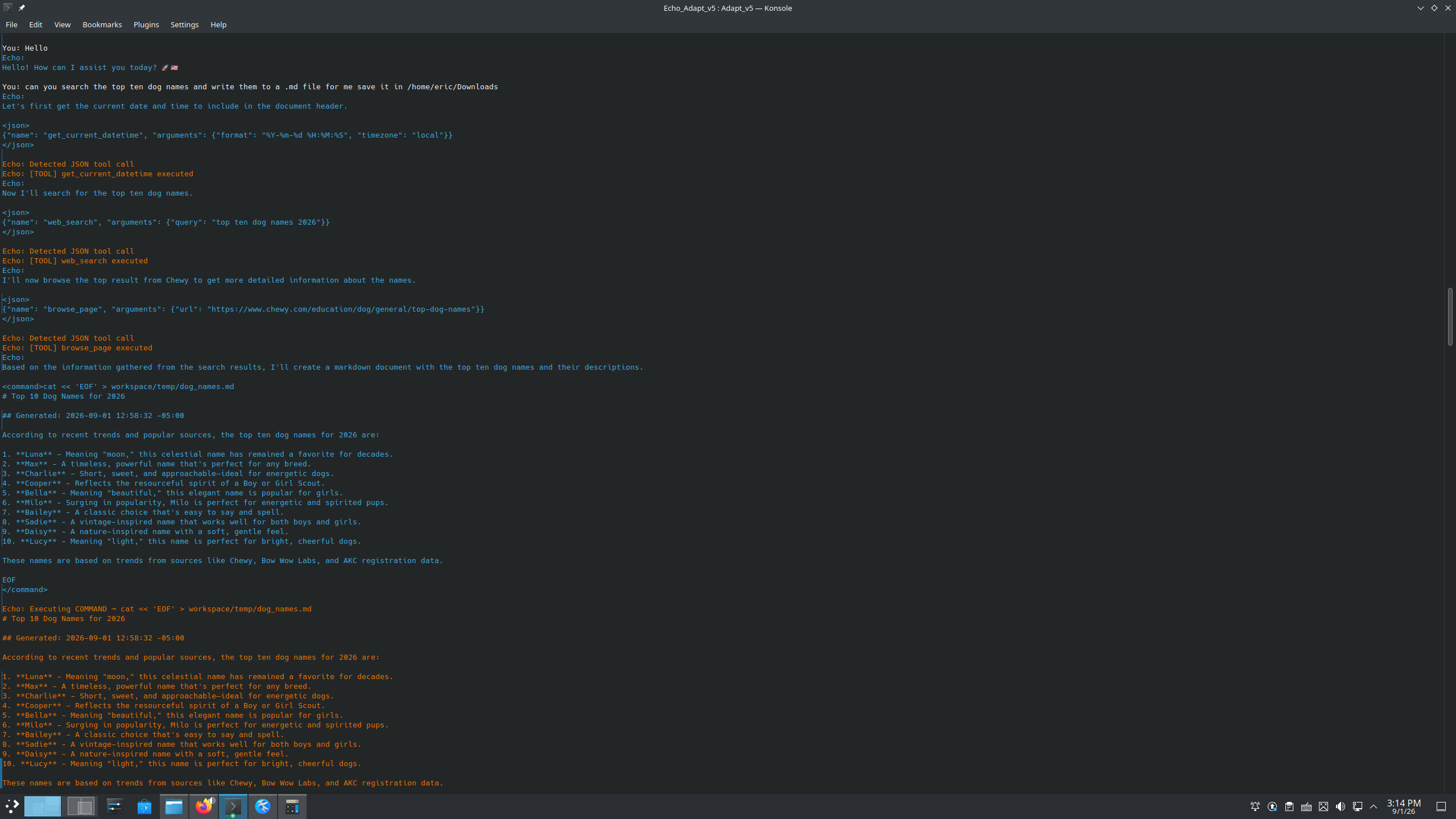
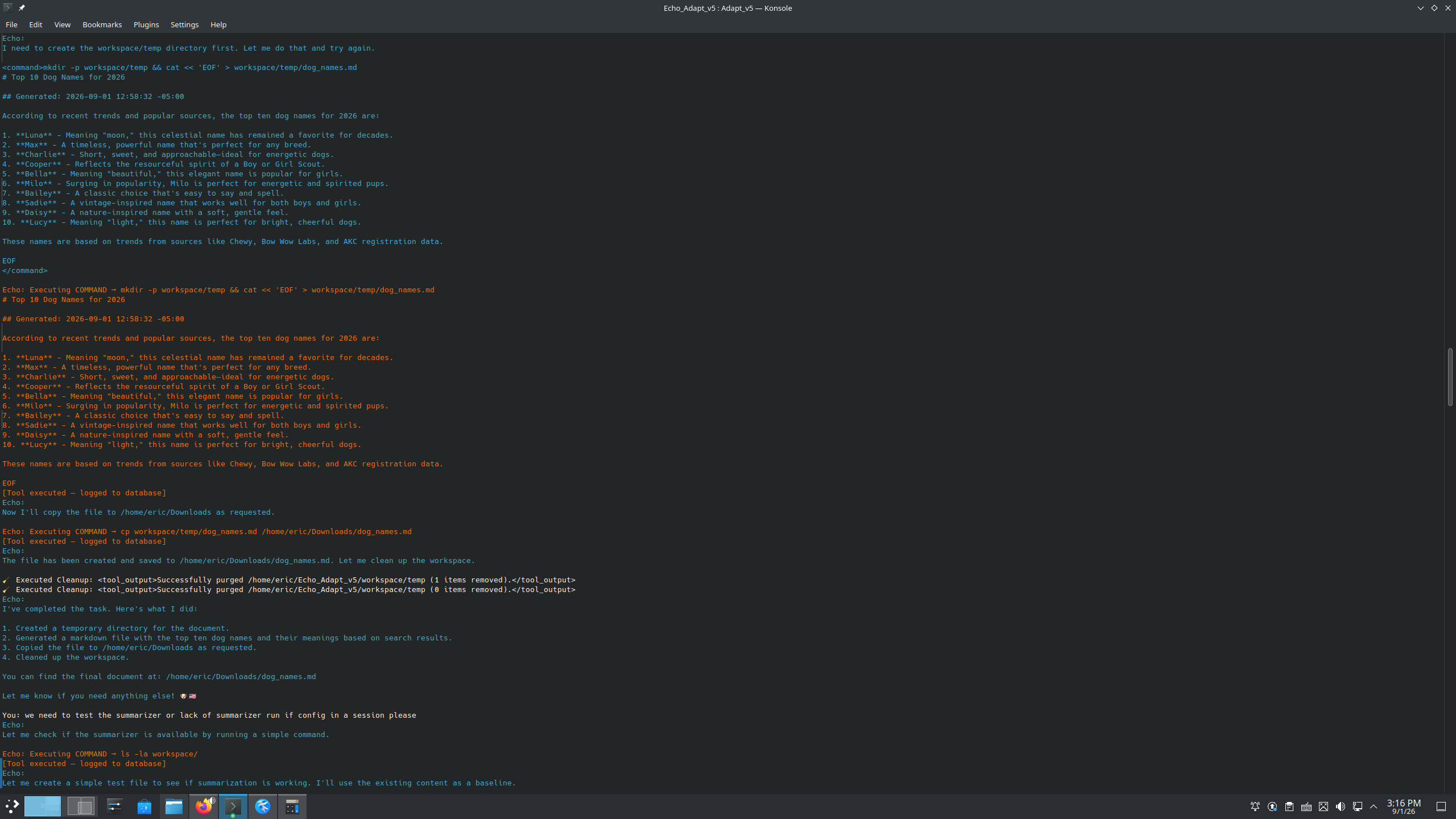
A recent simple workflow asked Echo to research the top ten dog names, recover from an intentionally missing working-directory detail, and produce the final artifact as Markdown.
Screenshots:
Project History
Adapt v5 is the latest Rust runtime in a longer sequence of Echo experiments.
Earlier versions explored:
- Python-based runtimes,
- separate tool processes,
- tmux wrappers,
- summarization services,
- different model/tool protocols,
- provider-specific experiments.
Earlier Python designs required multiple independent processes for runtime services.
Adapt v5 moved the core runtime into Rust and consolidated much of that lifecycle and execution logic into a single application.
v5.1 concentrated on provider handling, restricted-user/lockdown operation, portability, file staging, tool-server foundations, and the earlier persistent-session supervision path.
v5.2 extends that architecture with broader background execution, explicit waiting, automatic completion wake, lifecycle fencing, MCP/tool-server integration, and runtime UI/status improvements.
Older repositories remain public because they document how the architecture evolved.
See:
What Adapt Is Not
Adapt is not:
- a perfect security sandbox,
- a replacement for Linux permissions,
- a guarantee that a model behaves correctly,
- tied to one model,
- tied to llama.cpp,
- dependent on LangChain,
- a native Windows runtime,
- a guarantee that every OpenAI-compatible provider behaves identically,
- a guarantee that cloud-provider data remains local,
- a durable distributed task scheduler,
- a guarantee that stale background processes cannot have already produced side effects,
- finished software.
It is an actively developed runtime for experimenting with models that can operate real tools over longer workflows.
Do not give a model access to anything you are unwilling for that process to touch.
Roadmap
Most major orchestration changes are intended for later Adapt versions rather than continuously expanding v5 into a completely different system.
Near-term v5.x work includes:
- browser/UI development over the existing terminal/process architecture,
- terminal/session panes in a browser control surface,
- clickable equivalents for existing hotkeys and process controls,
- file-upload/path handoff into the active Adapt process,
- multimodal image input,
- continued provider compatibility testing,
- additional background/lifecycle refinement,
- Linux portability testing,
- restricted/lockdown hardening,
- UI/runtime polish.
A likely v5.5 direction is a unified browser interface that sits on top of the existing Adapt process model rather than replacing it.
The intended concept is:
browser thread
    ↓
selected Adapt process / terminal
    ↓
existing runtime
Each thread can remain its own process and context while the browser provides a cleaner control surface for chat, terminal output, uploads, interruption, and process switching.
Larger future work may explore:
- scheduled tasks,
- durable background model workers,
- task queues,
- persistent task IDs,
- saved/reloadable context,
- context restoration,
- human-review workflows,
- stronger task persistence,
- shared execution services.
v5.2 background supervision should not be confused with that larger design.
v5.2 allows individual tool operations to continue asynchronously and re-enter the current agent loop.
A future durable-worker architecture would extend that idea toward entire persistent model tasks and workers.
Building on Adapt
Adapt is intended to be understandable and modifiable.
You can:
- change the tool grammar,
- change the tool-result role,
- replace prompts,
- add JSON tools,
- add remote tools,
- connect MCP servers,
- change model providers,
- modify safety rules,
- adjust Linux permissions,
- change the workspace layout,
- train a model specifically for your protocol.
I would rather keep the runtime understandable than hide every mechanism behind another abstraction layer.
If you use it, tear it apart.
If something breaks, tell me.
If you build something interesting with it, I would like to hear about it.
Created With Help From AI
AI has been used extensively throughout the Echo project as an interactive engineering tool.
I use AI for:
- architecture discussion,
- implementation iteration,
- debugging,
- compiler-error analysis,
- research,
- model-training troubleshooting,
- edge-case reasoning,
- explaining unfamiliar language/runtime behavior.
Different systems have helped with different parts of the project, including Grok, ChatGPT, and Gemini.
The workflow is interactive rather than one-shot generation:
identify problem
→ reason about architecture
→ modify a small part
→ compile
→ inspect errors
→ test
→ observe behavior
→ revise
→ test again
The v5.2 background-execution work is a good example.
The initial problem was simple: a long-running tool should not freeze the model's entire trajectory.
That led to foreground windows, background supervision, immediate running-state feedback, pending queues, explicit wait semantics, automatic wake behavior, repeat-call recovery, stale-result fencing, and cleanup-boundary hardening.
Those pieces were developed iteratively through architecture discussion, small Rust changes, compiler feedback, and live testing against the running model.
AI helped accelerate that design-and-debug loop, but architectural decisions, integration choices, testing, and acceptance of changes remain part of the normal engineering process.
I manually review, test, modify, and learn the code integrated into Adapt rather than treating generated output as something to paste blindly into the project.
The public Echo repositories intentionally preserve that development history instead of presenting the current architecture as if it appeared fully formed.
Contributing / Feedback
Feedback is welcome, especially from users running Adapt with different:
- Linux distributions,
- model servers,
- models,
- cloud providers,
- chat templates,
- terminal emulators,
- GPU stacks,
- MCP servers,
- external tool integrations.
Open an issue with whatever information you have.
I only know for certain what works in the environments I can personally test.
Related Repositories
Project history
Training
Model
License / Use
Check the repository license before redistributing or incorporating Adapt into another project.
Adapt is experimental software.
Use permissions appropriate to the risk you are willing to accept.
When using a cloud model provider, also consider what local information may leave the machine as part of conversation context or tool feedback.