🤖 Daily Job Search Bot
Automated job search + tailored resume generator — runs every morning while you sleep
📖 MCP API Reference — tool schemas, parameters, and connection snippets
Agenten stärken
Installation vom Herausgeber. Kein PlugMCP-Endpunkt.
Host a copy with our keys and logs.
Noch kein paketiertes Release in der Registry. Folgen Sie der README des Repositorys.
Remote-URL oder ein Befehl auf Ihrem Rechner? Worin sich die beiden Installationen unterscheiden
Auf PlugMCP ausführen
A new server you create. It is not this listing's official endpoint. Use the publisher install when you want their URL and their credentials.
StartenVom Herausgeber
📖 MCP API Reference — tool schemas, parameters, and connection snippets
Automated daily job search + tailored resume generator. Runs every morning via GitHub Actions. 100% free.
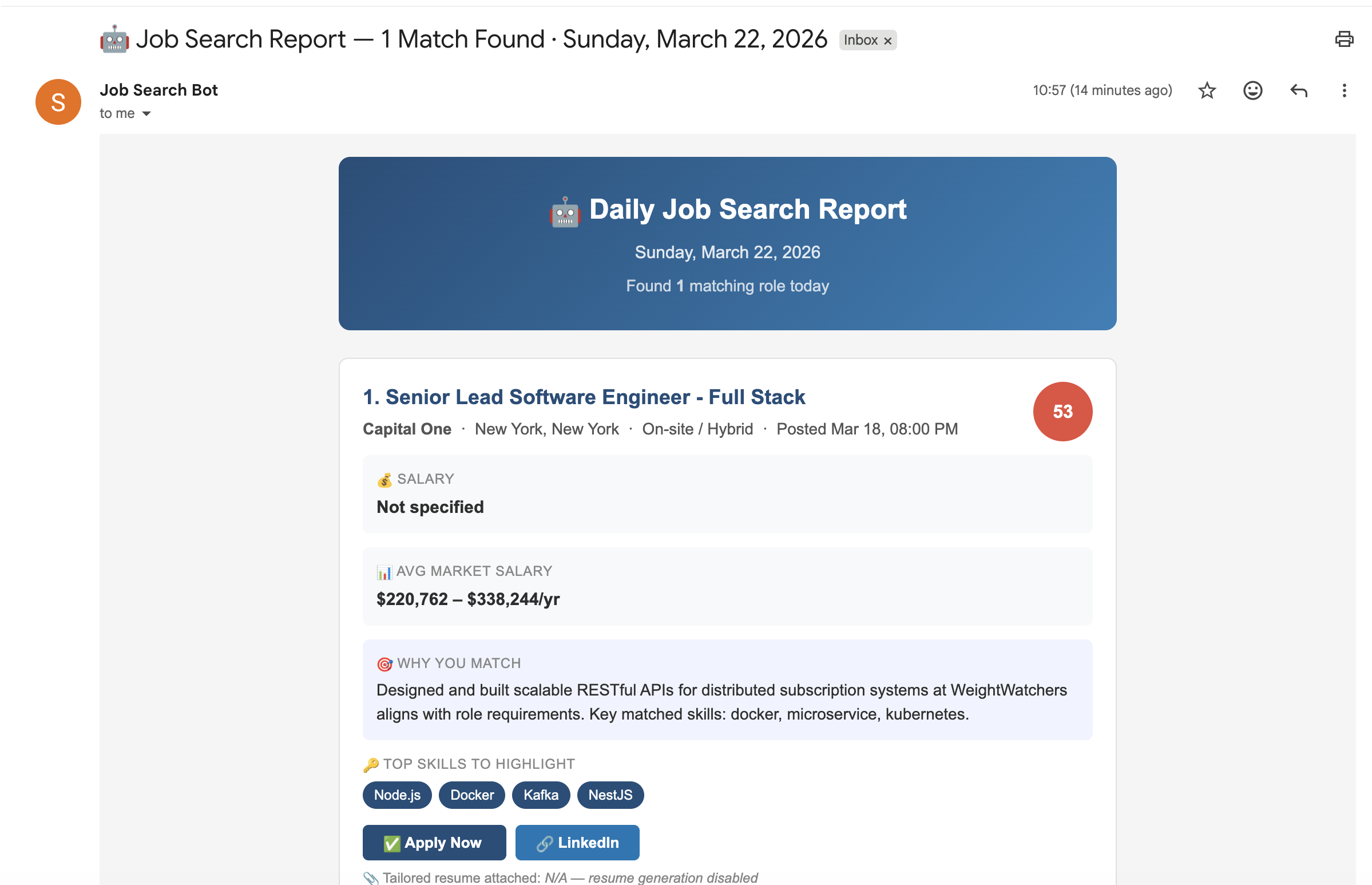
Daily Email Report
Job Tracker Dashboard
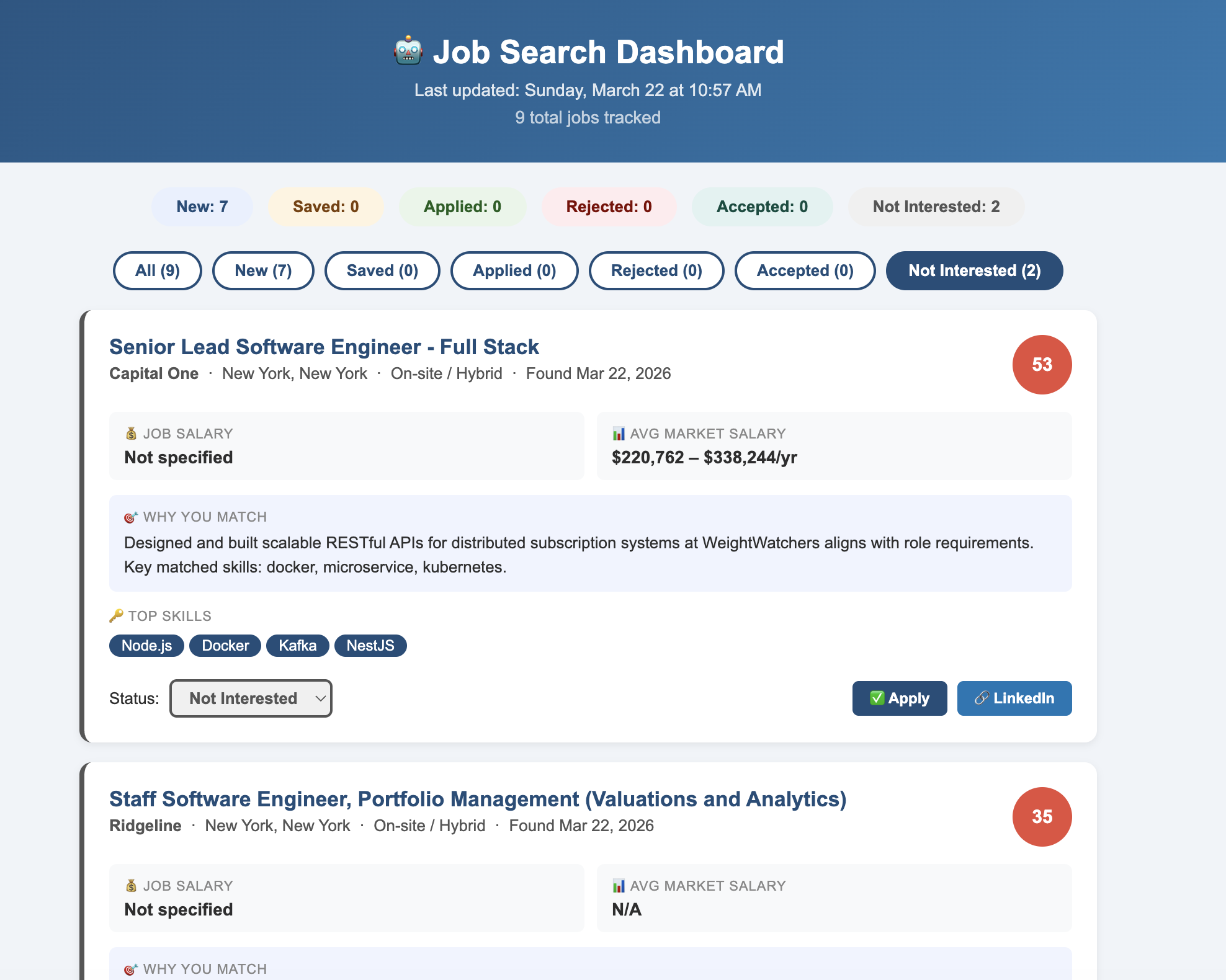
Every weekday morning, this bot automatically:
.docx resume for every strong matchdata/dashboard.html) to track job statuses (New, Saved, Applied, Rejected, Accepted, Not Interested)You wake up, open your email, and your job search is already done. ☕
⚠️ Watch your monthly request limit on the free tier. Want more searches? Check JSearch pricing to upgrade.
🔒 Keep your copy private.
config/profile.jsonholds your name, email, phone number and work history, and the workflow reads it straight from the repo. A public repo exposes all of it — and rewriting git history later doesn't fully remove it (forks, clones and caches keep old commits).GitHub does not let you make a fork of a public repo private, so don't rely on Fork → Private. Instead, create a new private repository on GitHub, then clone this project and push it there:
git clone https://github.com/dahboorSa/daily-job-search-bot.git
cd daily-job-search-bot
git remote set-url origin https://github.com/YOUR_USERNAME/YOUR_PRIVATE_REPO.git
git push -u origin main
Also set a git identity before committing (
git config --global user.name/user.email, ideally your GitHub[email protected]address), otherwise git guesses one from your computer's username and hostname. Don't commit your resume file (config/resume.docx) either.
npm install
cp .env.example .env
# Add a free Groq API key from https://console.groq.com/keys to .env as GROQ_API_KEY

npm run setup path/to/your/resume.docx
This parses your .docx resume and fills in personal, skills, experience, education, and certifications in config/profile.json for you (job_preferences and search_config are left untouched — see Option B for those). Review the result, then keep going.
⚠️ The full text of your resume is sent to Groq's API to be parsed, and the command overwrites those five fields in
config/profile.json. Only.docxfiles are supported.The model's reply is checked against the shape the bot expects (e.g.
educationmust be a single object,experiencea list). If it doesn't match,profile.jsonis left untouched — just run the command again.
Edit config/profile.json with your own information — the file is fully commented with example values. Key fields:
{
  "personal": { "name": "John Smith", "email": "[email protected]", "..." },

  "skills": {
    "backend": ["Node.js", "NestJS", "..."],
    "languages": ["TypeScript", "Python", "..."]
  },

  "experience": [
    {
      "title": "Senior Software Engineer",
      "company": "Company Name",
      "dates": "Jan 2023 – Present",
      "bullets": ["Built X using Y...", "..."]
    }
  ],

  "job_preferences": {
    "search_titles": ["Senior Software Engineer", "Senior Backend Engineer"],
    "locations": ["New York, NY", "remote"],
    "min_salary": 130000,
    "title_include": ["senior", "lead", "..."],
    "title_exclude": ["junior", "intern", "..."]
  },

  "search_config": {
    "themes": {
      "payments": {
        "keywords": ["payment", "billing", "..."],
        "skills": ["Node.js", "Kafka", "..."],
        "score": 10
      }
    },
    "summaries": { "payments": "Your payments-focused summary...", "default": "Your general summary..." },
    "match_reasons": { "payments": "Your X years in payments aligns with...", "default": "..." }
  }
}
💡 Tips:
experience.bullets— use action verbs and add numbers/metrics where possible (%, $, users, etc.). The bot reorders them per job to highlight the most relevant ones first.min_salary— jobs below this value are filtered out automatically.title_include— (optional) job title must contain at least one of these words to be included. Omit the field entirely to skip this filter.title_exclude— jobs with any of these words in the title are filtered out.client— set tonullfor direct employment, or add client name if consulting.search_config— controls how jobs are themed, scored, and summarized. See the "Personalize the search engine" section below.
📍 Can't find the key? Go to the JSearch page → look for
"X-RapidAPI-Key"in the Code Snippets panel on the right
JobBotRepo → Settings → Secrets and variables → Actions → New repository secret
The workflow is already included in the repo. To enable automatic daily runs, uncomment the schedule in .github/workflows/daily_job_search.yml:
on:
  # ✏️ Uncomment the lines below to enable daily scheduling
  # schedule:
  #   - cron: '0 13 * * 1-5' # Mon–Fri 9:00 AM EDT / 8:00 AM EST (UTC-based, always)
  workflow_dispatch:
Edit search_titles and locations in config/profile.json — the bot automatically searches every title × location combination:
"job_preferences": {
  "search_titles": ["Senior Software Engineer", "Senior Backend Engineer"],
  "locations": ["New York, NY", "remote"]
}
The example above generates 4 searches (2 titles × 2 locations).
Supported countries:
Edit config/settings.js:
export const MIN_MATCH_SCORE = 50;
export const MAX_JOBS_PER_RUN = 5;
export const GENERATE_RESUMES = true;
export const DATE_POSTED = '3days';
export const FETCH_JSEARCH = true;
export const SEND_EMAIL = true;
export const FETCH_GLASSDOOR = true;
export const DAYS_AGO = 7;
export const FETCH_ASHBY = true;
export const FETCH_GREENHOUSE = true;
export const FETCH_LEVER = true;
export const FETCH_SMARTRECRUITERS = true;
export const FETCH_GEM = true;
scripts/ashbyCompanies.js exports a plain array of company board slugs (the part of jobs.ashbyhq.com/<slug>). Add a company by appending its slug, or trim the list to just the companies you care about — fewer companies means a faster run.
scripts/greenhouseCompanies.js works the same way, with Greenhouse board tokens (the part of job-boards.greenhouse.io/<token>). To check a token before adding it, open https://boards-api.greenhouse.io/v1/boards/<token>/jobs in a browser — a working board returns JSON, a wrong token returns 404. The list is a starter set, not an official directory.
scripts/leverCompanies.js uses Lever site names (the part of jobs.lever.co/<name>). To check one before adding it, open https://api.lever.co/v0/postings/<name>?mode=json in a browser — a working board returns a JSON list, a wrong name returns an error. The list is a starter set, not an official directory.
scripts/smartRecruitersCompanies.js uses SmartRecruiters company identifiers (the part of jobs.smartrecruiters.com/<identifier>, case-sensitive for some companies, e.g. LinkedIn3). To check one, open https://api.smartrecruiters.com/v1/companies/<identifier>/postings in a browser. A wrong identifier doesn't return an error, just "totalFound": 0, so check that the count isn't zero. The list is a starter set, not an official directory.
scripts/gemCompanies.js uses Gem job board slugs (the part of jobs.gem.com/<slug>). To check one before adding it, open https://api.gem.com/job_board/v0/<slug>/job_posts/ in a browser — a working board returns a JSON list, a wrong slug returns 404. The list is a starter set, not an official directory.
All customizable data lives in one file — config/profile.json, under the search_config key.
You don't need to touch any script files to personalize the bot!
The search_config section has 3 fields — each clearly marked with what to change:
Example — personalizing match_reasons:
"match_reasons": {
  "payments": "Your X years in payments/fintech at [Company] handling X transactions/day aligns with this role.",
  "eventDriven": "Your Kafka/event-driven work at [Company] reducing processing time by X% matches this role's focus.",
  "devex": "Your CI/CD and platform engineering experience at [Company] improving deploy speed by X% fits this role.",
  "default": "Your engineering background matches several key requirements in this job description."
}
Once enabled, you can adjust the timing in .github/workflows/daily_job_search.yml:
on:
  # ✏️ Uncomment the lines below to enable daily scheduling
  # schedule:
  #   - cron: '0 13 * * 1-5' # Mon–Fri 9:00 AM EDT / 8:00 AM EST (UTC-based, always)
  workflow_dispatch: # manual trigger always stays on
Common schedule options (GitHub Actions cron always runs in UTC):
# Format: minute hour * * days (1-5 = Mon–Fri)
- cron: '0 14 * * 1-5' # 9:00 AM EST / 10:00 AM EDT
- cron: '30 13 * * 1-5' # 8:30 AM EST / 9:30 AM EDT
- cron: '0 9 * * 1-5' # 9:00 AM UTC (adjust for your timezone)
- cron: '0 14 * * *' # 9:00 AM EST every day including weekends
daily-job-search-bot/
├── .github/
│   └── workflows/
│       ├── daily_job_search.yml    # GitHub Actions scheduler
│       └── test.yml                # Runs the tests on push to main
├── scripts/
│   ├── jobSearch.js                # Main orchestrator
│   ├── jobUtils.js                 # Job ids, filters, scoring and normalizing (pure helpers)
│   ├── jobDefaults.js              # Fallback values shared by the job normalizers
│   ├── searchEngine.js             # Matching logic (don't edit)
│   ├── resumeGenerator.js          # Builds tailored .docx resumes
│   ├── emailSender.js              # Gmail HTML report sender
│   ├── glassdoorClient.js          # Glassdoor rating & salary insights
│   ├── ashbyClient.js              # Fetches + filters jobs from Ashby-hosted company boards
│   ├── ashbyCompanies.js           # ✏️ List of company slugs to search on Ashby
│   ├── greenhouseClient.js         # Fetches + filters jobs from Greenhouse-hosted boards
│   ├── greenhouseCompanies.js      # ✏️ List of board tokens to search on Greenhouse
│   ├── leverClient.js              # Fetches + filters jobs from Lever-hosted boards
│   ├── leverCompanies.js           # ✏️ List of Lever site names to search
│   ├── smartRecruitersClient.js    # Fetches + filters jobs from SmartRecruiters-hosted boards
│   ├── smartRecruitersCompanies.js # ✏️ List of SmartRecruiters company identifiers to search
│   ├── gemClient.js                # Fetches + filters jobs from Gem-hosted boards
│   ├── gemCompanies.js             # ✏️ List of Gem job board slugs to search
│   ├── jobsMcpTool.js              # Shared tool schema, location filter, and createGetJobs — used by the Cloudflare Worker
│   ├── htmlUtils.js                # HTML/JSON escaping for job text in the email and dashboard
│   ├── setupProfile.js             # Parses a .docx resume into config/profile.json via Groq
│   ├── jobsTracker.js              # Persists all jobs to data/jobs.json
│   ├── dashboardGenerator.js       # Generates static HTML dashboard
│   ├── generateDashboard.js        # CLI entry point to rebuild the dashboard from saved data
│   └── dashboardClient.js          # Dashboard browser-side JS
├── worker/
│   └── index.js                    # Cloudflare Worker — all 5 sources as one remote MCP server
├── wrangler.toml                   # Cloudflare Worker config (name, entry point, nodejs_compat)
├── templates/
│   └── dashboard.html              # Dashboard HTML/CSS template
├── test/                           # node:test suites (run with `npm test`)
├── config/
│   ├── profile.json                # ✏️ Your personal data, skills, experience & search config
│   └── settings.js                 # ✏️ Bot tunables: score threshold, max jobs, resumes on/off
├── data/
│   ├── searched_jobs.json          # Auto-created: no duplicate alerts
│   ├── jobs.json                   # Auto-created: all tracked jobs with status
│   ├── ashby_jobs_record.csv       # Auto-created: only when MCP_WRITE_CSV=true
│   ├── greenhouse_jobs_record.csv  # Auto-created: only when MCP_WRITE_CSV=true
│   ├── lever_jobs_record.csv       # Auto-created: only when MCP_WRITE_CSV=true
│   ├── smartrecruiters_jobs_record.csv # Auto-created: only when MCP_WRITE_CSV=true
│   ├── gem_jobs_record.csv         # Auto-created: only when MCP_WRITE_CSV=true
│   └── dashboard.html              # Auto-created: open in browser to track jobs
├── output/
│   └── YYYY-MM-DD/                 # Auto-created: daily resume files
├── .env.example                    # Template for local testing
├── package.json
└── README.md
# 1. Clone the repo
git clone https://github.com/YOUR_USERNAME/daily-job-search-bot.git
cd daily-job-search-bot

# 2. Install dependencies
npm install

# 3. Set up local secrets
cp .env.example .env
# Edit .env with your keys

# 4. Run it!
npm start
Other useful commands:
npm run setup path/to/resume.docx   # (Re)generate config/profile.json from a resume
npm run dashboard                   # Rebuild data/dashboard.html from saved job data, without a full search
npm run worker:dev                  # Run the MCP server locally via Wrangler
npm run worker:deploy               # Deploy the MCP server to Cloudflare
All five job-board searches are also bundled into a single Cloudflare Worker — a remote MCP server you can point any MCP-compatible client at without running anything locally.
Each source is a separate tool on the same server:
All tools accept the same parameters:
npm install -g wrangler
wrangler login   # opens browser — authorize with your Cloudflare account
npm run worker:dev
This starts the Worker at http://localhost:8787. To test it with Claude Desktop, temporarily point it at localhost:
{
  "mcpServers": {
    "job-boards": {
      "url": "http://localhost:8787"
    }
  }
}
npm run worker:deploy
Cloudflare prints your live URL:
https://job-boards-mcp.<your-account>.workers.dev
Claude Desktop — add to claude_desktop_config.json:
{
  "mcpServers": {
    "job-boards": {
      "url": "https://job-boards-mcp.<your-account>.workers.dev/sse"
    }
  }
}
Claude Code (CLI):
claude mcp add job-boards --transport sse https://job-boards-mcp.<your-account>.workers.dev/sse
Claude.ai — go to Settings → Integrations → Add and paste the URL.
💡 The Worker is stateless and runs at Cloudflare's edge — no cold starts, free tier supports 100,000 requests/day which is far more than you'll ever use.
.docx resume per jobconfig/profile.json)get_jobs tool: dynamic title filter, company filter, limit/offset pagination, markdown table outputlocation filter param — city, country name, or "remote"; country names normalized to ISO codes; remote matched across all board-specific flags (isRemote, remote, workplaceType, locationType, location string)If this project helped you, please give it a star on GitHub — it helps other developers find it and motivates me to keep improving it!
Made with 🌸 by Sebaa Dahboor
MIT — free to use, modify, and share.
Automated daily job search + tailored resume generator. Runs every morning via GitHub Actions. 100% free.
Tools
Noch keine Tool-Liste. Remote-Server erhalten eine nach dem ersten Health-Check.
FAQ
Kopieren Sie auf dieser Seite die stdio-Konfiguration für Cursor, Claude Desktop, Claude Code oder VS Code. Sie nutzt die Installation des Herausgebers, keinen PlugMCP-Proxy.
In diesem Eintrag ist keine erforderliche Umgebungsvariable aufgeführt.
Daily Job Search Bot läuft lokal über stdio.
Zuletzt geprüft: 2026-10-28. Automated daily job search + tailored resume generator. Runs every morning via GitHub Actions. 100% free.
