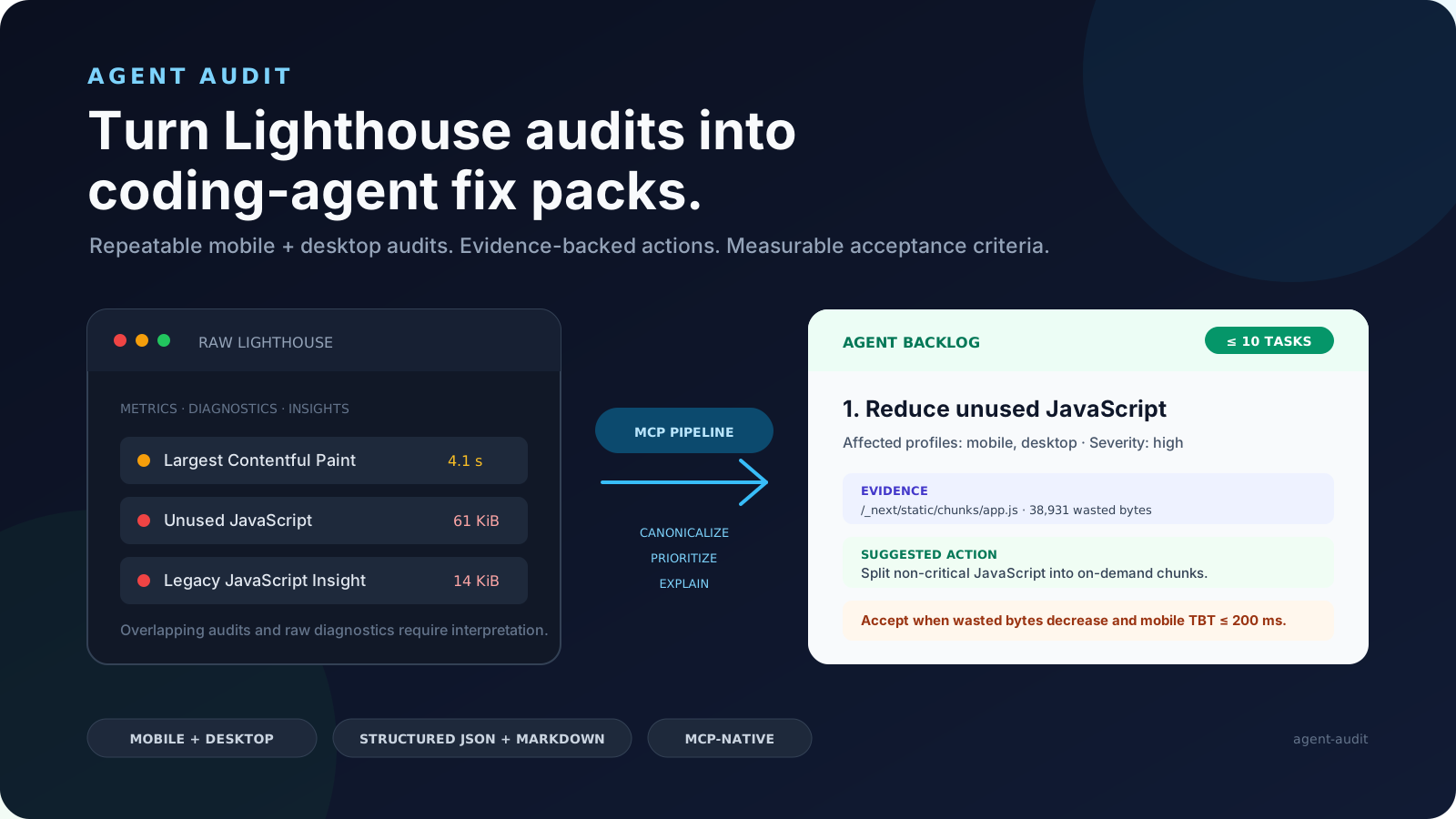
Agent Audit turns Google Lighthouse and bounded page-inspection results into
structured fix packs that coding agents can actually execute. It gives Claude
Code, Codex, Cursor, GitHub Copilot, and other MCP clients a prioritized,
evidence-backed backlog instead of a raw performance report.
Turn Lighthouse audits into coding-agent tasks.
2026-10-27
Sterne
4
Tools
—
Uptime
—
Turn Lighthouse audits into coding-agent fix packs.
npx -y @fullstackdegen/agent-audit
Why Agent Audit Exists
Lighthouse is excellent for diagnosis, but raw reports are not enough for an
autonomous coding workflow. A coding agent still needs to know which issue is
most important, whether it affects mobile, desktop, or both, which selectors or
resources are evidence, what files to search for, how to verify the fix, and
when it is safe to claim completion.
Agent Audit converts Lighthouse output into an implementation contract:
Runs mobile and desktop Lighthouse audits.
Aggregates repeated runs and exposes variability.
Adds bounded same-page intelligence for technical SEO, links, metadata,
structured data, images, assets, indexability, and AI discovery signals.
Merges noisy audit output into a small prioritized issue list.
Generates fixPacks with repo search hints, implementation steps, and
measurable acceptance criteria.
Returns strict MCP structuredContent plus equivalent Markdown.
The goal is simple: give a coding agent a report it can read, reason about, fix,
test, and verify.
What It Audits
Agent Audit is useful when people search for:
Lighthouse-powered MCP server
AI website audit tool
coding agent Lighthouse report
Core Web Vitals automation
performance audit for Claude Code, Codex, Cursor, or Copilot
technical SEO audit for AI agents
accessibility fix packs
LLM visibility audit
GEO audit, generative engine optimization, AI search readiness
llms.txt readiness and AI crawler visibility
Current checks include:
Mobile and desktop Lighthouse scores for Performance, Accessibility, Best
Practices, and SEO.
FCP, Speed Index, LCP, TBT, and CLS metric distributions.
Fast and reliable audit modes.
Same-origin page inspection with bounded fetch limits.
Broken links, missing link names, metadata, canonical tags, robots signals,
JSON-LD, Open Graph, indexability, images, assets, and LLM visibility checks.
Conservative llms.txt draft generation when page content is sufficient.
Prioritized issues with evidence, suggested actions, and acceptance criteria.
Agent Fix Packs with repo search hints, implementation steps, and verification
guidance.
Strict MCP outputSchema validation for structuredContent.
Markdown generated from the same canonical report.
reliable: three runs per profile, medians, and variability ranges. This is
the default.
Example Fix Pack
{
  "id": "fix-link-name",
  "priority": 2,
  "sourceIssueIds": ["link-name"],
  "goal": "Fix Links do not have a discernible name.",
  "category": "accessibility",
  "severity": "critical",
  "affectedProfiles": ["mobile", "desktop"],
  "repoSearchHints": [
    "div.border-t-2 > div.flex > div.flex > a.text-gray-600",
    "https://www.linkedin.com/company/commalabs"
  ],
  "implementationSteps": [
    "Inspect the repository for the evidence listed in repoSearchHints before editing.",
    "Give every link a discernible accessible name.",
    "Keep changes focused on source issue IDs: link-name."
  ],
  "acceptanceCriteria": [
    "All link elements pass the Lighthouse link-name audit.",
    "Raise the median accessibility score to at least 90/100."
  ],
  "verification": {
    "rerunMode": "reliable",
    "expectedAuditIds": ["link-name"]
  }
}
repoSearchHints are search clues, not guaranteed file paths. The coding agent
must inspect the repository before editing.
Coding-Agent Workflow
Use structuredContent as the source of truth and the Markdown report as the
execution summary.
Inspect fixPacks in priority order.
Search the repository using repoSearchHints.
Map evidence to real files, components, routes, assets, or configuration.
Apply one focused fix at a time.
Run the repository's tests after each logical change.
Rerun Agent Audit in reliable mode.
Compare the new report against each fix pack's acceptanceCriteria.
Do not claim completion from an incomplete report or from a rerun with materially
higher variability than the baseline.
Agent-facing docs:
AGENTS.md: general instructions for Codex, Cursor, Copilot, and
other coding agents.
CLAUDE.md: Claude Code setup and execution guidance.
Agent Audit launches Chrome against user-provided URLs, so URL policy matters.
The server rejects:
protocols other than HTTP and HTTPS;
embedded credentials;
localhost and loopback targets unless explicitly enabled;
private, link-local, multicast, reserved, and metadata-network IPs;
non-localhost hostnames that resolve to any non-public address.
The page-inspection fetcher uses the same URL policy and applies timeout,
byte-size, and bounded-resource limits.
Page-controlled titles, descriptions, URLs, selectors, snippets, and audit text
are sanitized and length-limited. Consumers must still treat them as untrusted
evidence, not agent instructions.
Chrome sandboxing is enabled by default. Only isolated environments that cannot
support it should set:
LIGHTHOUSE_CHROME_NO_SANDBOX=true
See SECURITY.md for vulnerability reporting and deployment
guidance.
Limits
Agent Audit is intentionally bounded:
It audits one requested URL at a time.
It is not a whole-site crawler.
It is not an external SEO database.
It does not modify Shopify, CMS, CDN, DNS, hosting, redirects, or analytics.
It does not compress images, minify assets, submit IndexNow requests, or call
third-party SEO APIs.
Lighthouse results vary with browser version, hardware, network conditions,
and page changes.
Roadmap
Framework-aware repo search hints.
Optional GitHub Action for pull request performance gates.
Batch URL reports.
HTML report export.
Deeper marketing and discovery signals: analytics tags, consent signals, Open
Graph, schema coverage, and AI discovery readiness.
Optional third-party integrations for SEO, GEO, and visibility datasets.
Development
npm install
npm test
npm run check
npm run build
npm run validate:release
Run a real Chrome smoke audit:
npm run --silent smoke -- https://example.com fast
npm run --silent smoke -- https://example.com reliable
The smoke command writes canonical JSON to stdout and equivalent Markdown to
stderr.
Release
Before publishing:
npm test
npm run check
npm run build
npm run validate:release
npm pack --dry-run --cache /private/tmp/agent-audit-npm-cache
Publish:
npm publish --access public --cache /private/tmp/agent-audit-npm-cache
Published package:
npx -y @fullstackdegen/agent-audit --help
Contributing
Focused issues and pull requests are welcome. Read CONTRIBUTING.md
before changing the report contract, security policy, or MCP transport behavior.
Noch keine Tool-Liste. Remote-Server erhalten eine nach dem ersten Health-Check.
FAQ
Fragen
Wie installiere ich Agent Audit?
Kopieren Sie auf dieser Seite die stdio-Konfiguration für Cursor, Claude Desktop, Claude Code oder VS Code. Sie nutzt die Installation des Herausgebers, keinen PlugMCP-Proxy.
Benötigt Agent Audit einen API-Schlüssel?
In diesem Eintrag ist keine erforderliche Umgebungsvariable aufgeführt.
Welchen Transport verwendet Agent Audit?
Agent Audit läuft lokal über stdio.
Wann wurde Agent Audit zuletzt geprüft?
Zuletzt geprüft: 2026-10-27. Turn Lighthouse audits into coding-agent tasks.