LibKa Design Platform
Write a document once in Markdown. Get a web page, an A4 PDF, 16:9 slides and an editable Word file, each checked for accessibility, with a signed record of what was checked.
Agenten stärken
Der eigene Befehl des Herausgebers. Kein PlugMCP-Endpunkt.
Host a copy with our keys and logs.
npx -y @libka/[email protected]Claude Code hat keinen Installationslink für einen lokalen Befehl. Kopieren Sie den Befehl unten und führen Sie ihn in einem Terminal aus.
claude mcp add io.github.aivigator-ai-libka -- npx -y @libka/mcp@2.0.3In einem Terminal ausführen.
{ "mcpServers": { "io.github.aivigator-ai-libka": { "command": "npx", "args": [ "-y", "@libka/[email protected]" ] } }}claude_desktop_config.json
Remote-URL oder ein Befehl auf Ihrem Rechner? Worin sich die beiden Installationen unterscheiden
Auf PlugMCP ausführen
A new server you create. It is not this listing's official endpoint. Use the publisher install when you want their URL and their credentials.
StartenVom Herausgeber
LibKa is a design system (W3C DTCG design tokens) and a document platform. You write one Markdown file with LibKa blocks: steps, callouts, tables, charts, diagrams, timelines, comparisons, release notes and more (35 block types in all). The build renders the outputs the document asks for. Guard then checks each one, the pages in a real browser, and signs a manifest of the checks for the outputs that pass. LibKa Studio lets anyone write the same documents visually, without touching Markdown.

docs/, starting with getting started and the block catalogStatus: version 2.0.1. Developed and tested on Windows; CI runs the full test suite on Linux (Ubuntu) and the health check on Windows; macOS is not tested.
Markdown publishing tools already turn one source into web pages, PDFs and slides. LibKa's difference is that it checks every output and says exactly what it checked:
file:line messages, Guard measures the rendered result in Chrome, not the source, and the conformance report names what a person still has to review.LibKa is a good fit for manuals, guides, policies, reports and decks that must be accessible and consistent. It is not a page-layout tool: you choose blocks, not positions.
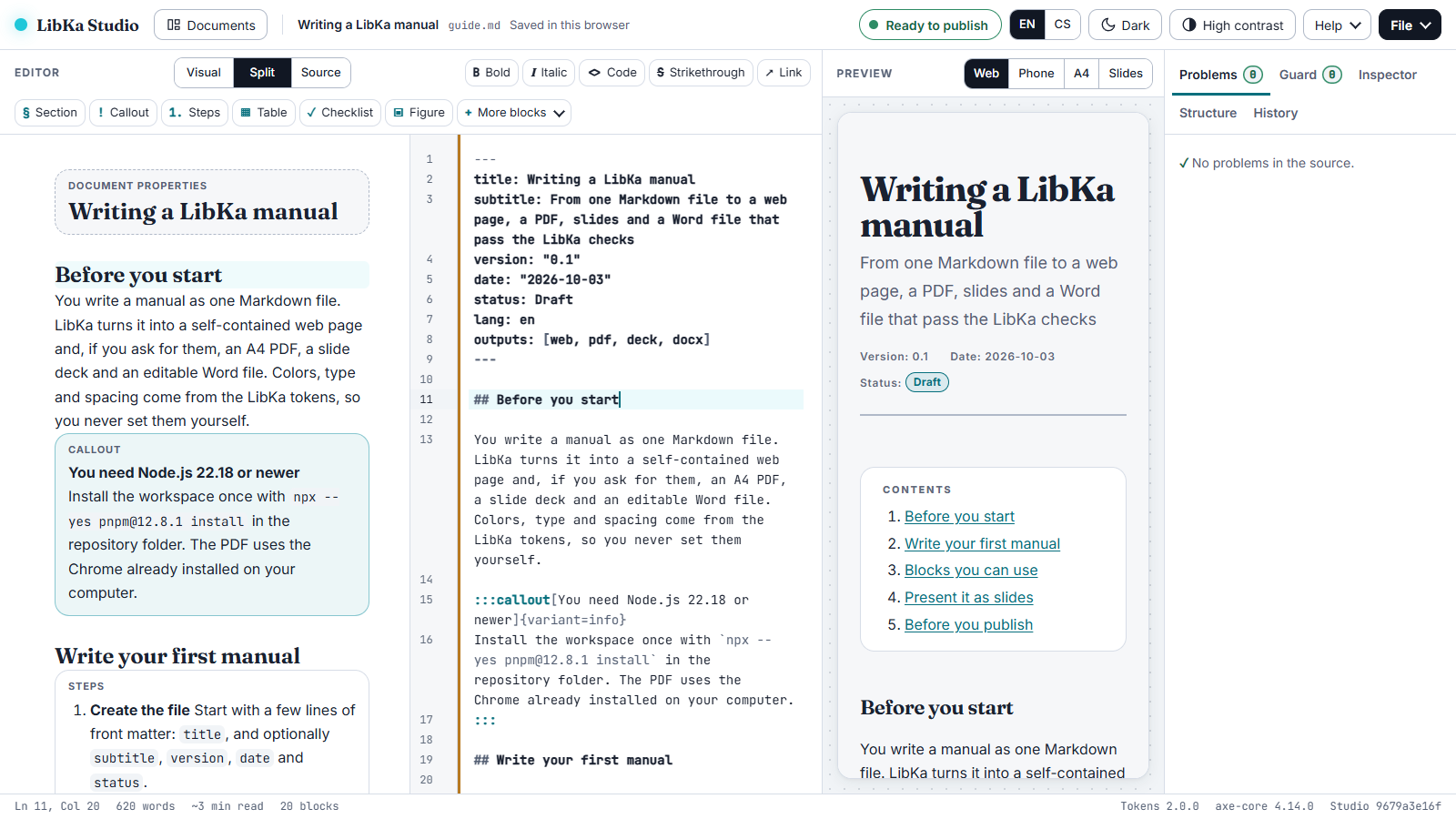
An installable web app that keeps documents on your own device: a visual editor, a source editor, or both side by side; a live preview of the web page, phone, A4 and slides; the same Guard checks while you type, with one-click fixes where a fix is safe and plain-word explanations otherwise; versions, a command palette, English and Czech, light, dark and high contrast, offline once opened. The Studio has its own accessibility self-audit (docs/acr/studio.md), tested with the keyboard alone, NVDA, forced colours, reflow and touch emulation.
Run it locally: npx -y @libka/cli studio, and open the address it prints.
Start a project:
npm create libka@latest my-docs        # add -- --lang cs for the example in Czech
cd my-docs
npm install
npm run build                          # web page, PDF, slides and Word file in dist/, checked and signed
npm run verify                         # the files (the slides too) are the ones that were checked and signed
The starter has an example document, npm run check (the source only, in a couple of seconds, without a browser), a GitHub Actions workflow that checks every push and pull request with the LibKa Guard action, marking each problem on its line, and a README of next steps. A document chooses its outputs in its front matter, outputs: [web, pdf, deck, docx]; without that line it gets the web page and the PDF. Each project signs with its own key, made by its first build in .libka/ and trusted in .libka/trusted-keys.json (signing keys).
From a clone of this repository:
git clone https://github.com/aivigator-ai/open-libka-design-platform.git && cd open-libka-design-platform
npx --yes [email protected] install
node packages/cli/src/libka.ts build examples/manual/guide.md     # the outputs land in examples/manual/dist/
A document is Markdown with front matter and blocks:
---
title: Setting up the router
lang: en
outputs: [web, pdf, docx]
---

## Connect it

:::steps
1. **Plug in the power** The light turns orange.
2. **Connect the cable** Use the yellow port.
:::

:::callout[Before you start]{variant=important}
Keep the box: the Wi-Fi password is on its label.
:::
examples/manual/guide.md is a short example that explains the syntax; examples/open-source-guide/guide.md is a real, long guide: two of GitHub's Open Source Guides (CC BY 4.0) as a manual and a deck.packages/blocks: syntax, attributes, a JSON schema, accessibility rules, anti-patterns, and what the web page, PDF, slides and Word file do with it.## and ### is a slide, :::notes holds speaker notes, and overfull slides are shrunk a little or continued.lang: cs) get Czech labels and Czech typography.What LibKa does not claim. Automated checks cover part of accessibility. An output that passes is "checked by these tests", not "accessible" or "compliant": the conformance report says what a person still has to review. The draft report for LibKa's outputs is docs/acr/libka-outputs.md.
.claude/skills/libka-author/: the workflow, and the exact syntax of every block (generated from the registry).@libka/mcp (in packages/mcp): list and describe blocks, check a document, build it./plugin marketplace add aivigator-ai/open-libka-design-platform, then /plugin install libka@libka. Claude Desktop, claude.ai, the API and other MCP clients: docs/ai-tools.md.Issues and pull requests are welcome: read CONTRIBUTING.md first; AI coding agents start from AGENTS.md. Questions and ideas go to Discussions (SUPPORT.md says what to expect); new blocks and features are listed in CHANGELOG.md when they ship. Two things to know up front:
git commit -s). The Signed-off-by line certifies the Developer Certificate of Origin: that you may contribute the change under the project's licence. A check on the pull request asks for it; there is no separate agreement to sign.check.py runs everything a pull request must pass: the Python tests, the strict TypeScript type check, every test (Chrome tests included), the token build and a check that no generated file is stale.
Apache License 2.0 (LICENSE); third-party material is listed in NOTICE. The fonts are under the SIL Open Font License. LibKa, LibKa Design Platform and LibKa Studio are the publisher's product names, which the licence does not grant: a modified version you publish needs its own name (NOTICE).
Created by aivigator.ai
One LibKa Markdown file to web pages, PDFs, slides and Word files, each checked and signed.
{ "mcpServers": { "io.github.aivigator-ai-libka": { "command": "npx", "args": [ "-y", "@libka/[email protected]" ] } }}Tools
Noch keine Tool-Liste. Remote-Server erhalten eine nach dem ersten Health-Check.
FAQ
Kopieren Sie auf dieser Seite die stdio-Konfiguration für Cursor, Claude Desktop, Claude Code oder VS Code. Sie nutzt die Installation des Herausgebers, keinen PlugMCP-Proxy.
In diesem Eintrag ist keine erforderliche Umgebungsvariable aufgeführt.
LibKa läuft lokal über stdio.
Zuletzt geprüft: 2026-11-16. One LibKa Markdown file to web pages, PDFs, slides and Word files, each checked and signed.

