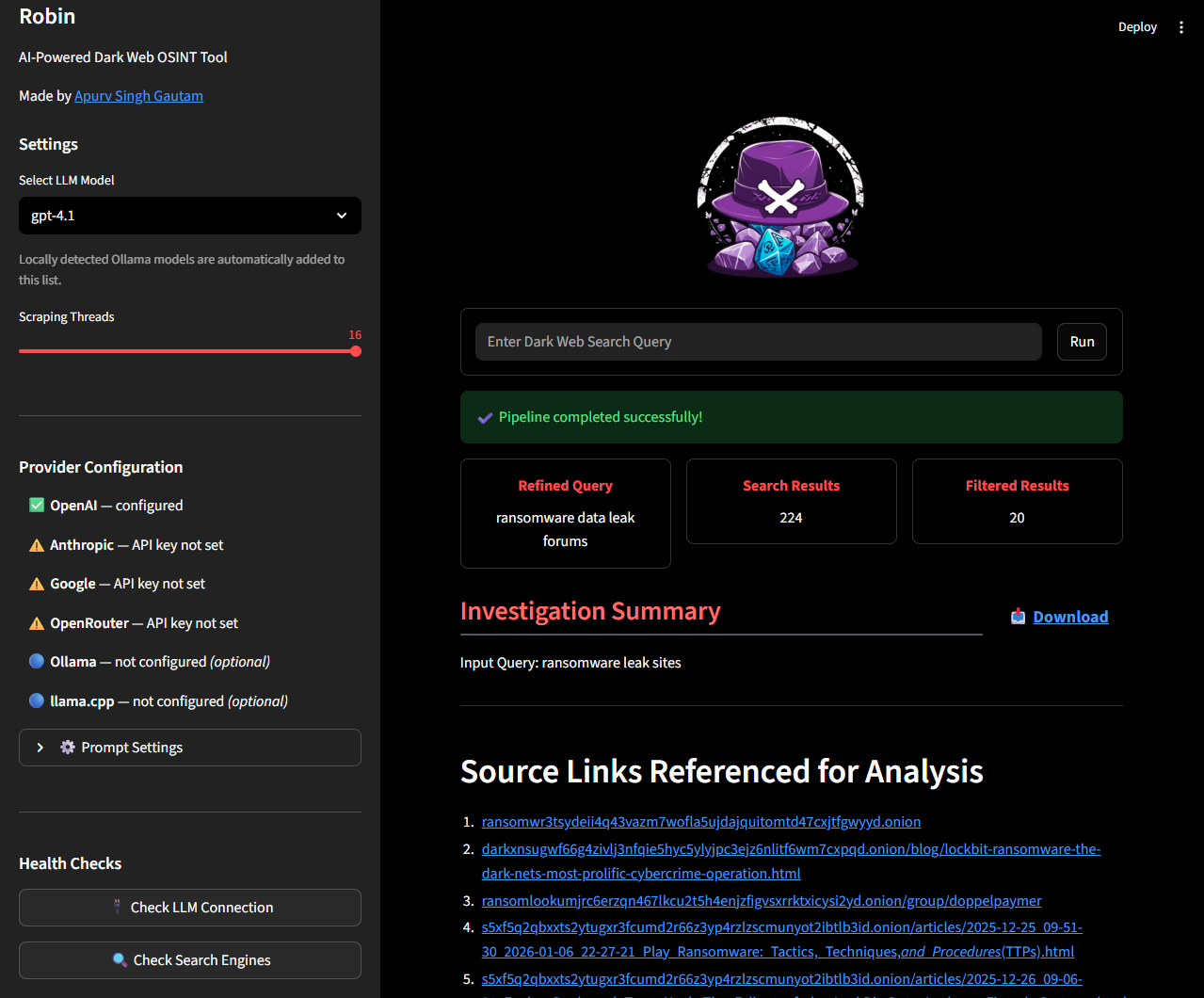
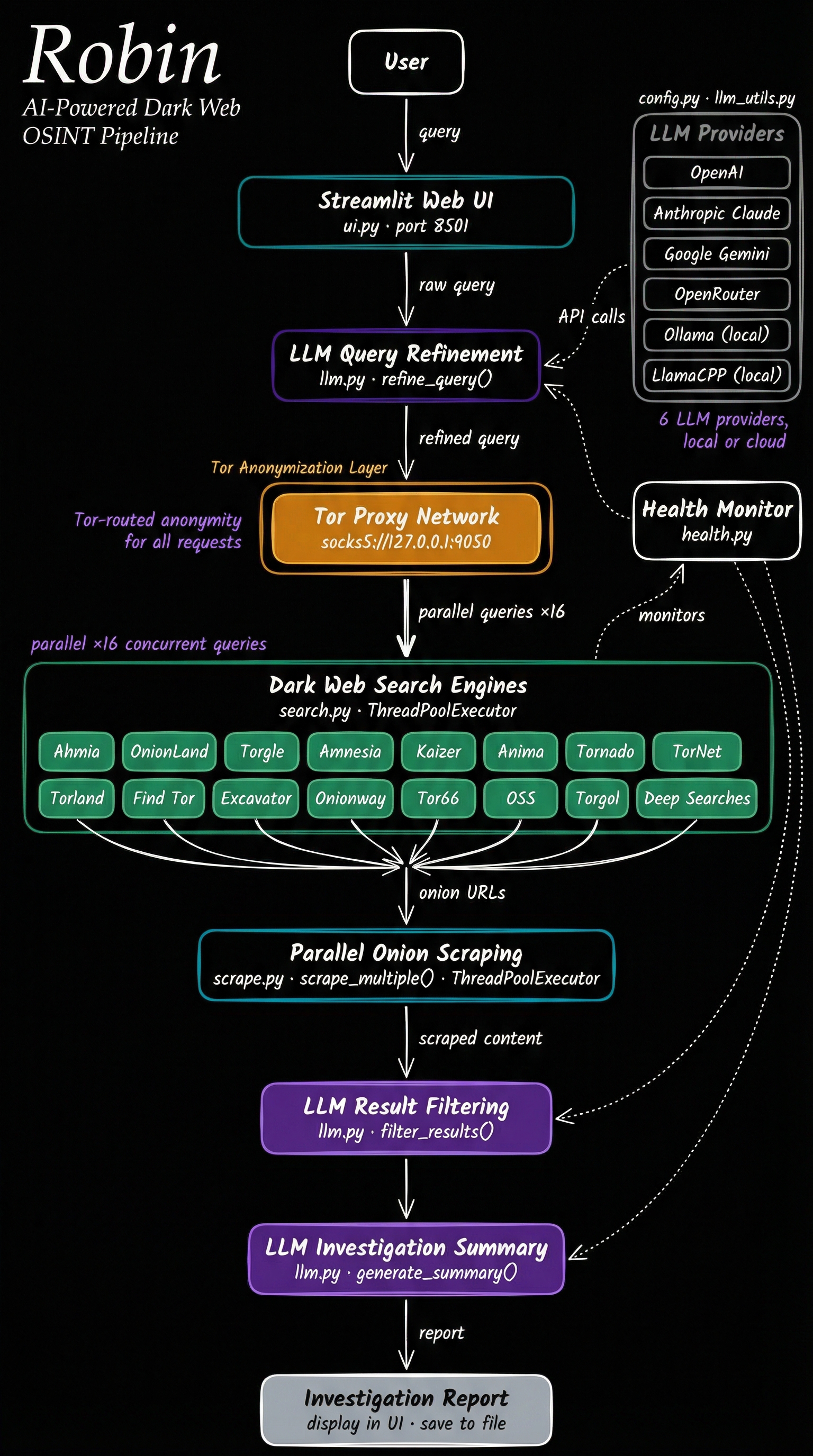
Architecture
Agenten stärken
Der eigene Befehl des Herausgebers. Kein PlugMCP-Endpunkt.
Host a copy with our keys and logs.
docker run -i --rm docker.io/apurvsg/robin:v3.1Claude Code hat keinen Installationslink für einen lokalen Befehl. Kopieren Sie den Befehl unten und führen Sie ihn in einem Terminal aus.
claude mcp add io.github.apurvsinghgautam-robin -- docker run -i --rm docker.io/apurvsg/robin:v3.1In einem Terminal ausführen.
{ "mcpServers": { "io.github.apurvsinghgautam-robin": { "command": "docker", "args": [ "run", "-i", "--rm", "docker.io/apurvsg/robin:v3.1" ] } }}claude_desktop_config.json
Remote-URL oder ein Befehl auf Ihrem Rechner? Worin sich die beiden Installationen unterscheiden
Auf PlugMCP ausführen
A new server you create. It is not this listing's official endpoint. Use the publisher install when you want their URL and their credentials.
StartenVom Herausgeber
Dark web OSINT over Tor: search onion engines, scrape pages, report with your own model.
This tool is intended for educational and lawful investigative purposes only. Accessing or interacting with certain dark web content may be illegal depending on your jurisdiction. The author is not responsible for any misuse of this tool or the data gathered using it.
Use responsibly and at your own risk. Ensure you comply with all relevant laws and institutional policies before conducting OSINT investigations.
Additionally, Robin leverages third-party APIs (including LLMs). Be cautious when sending potentially sensitive queries, and review the terms of service for any API or model provider you use.
[!NOTE] The tool needs Tor to do the searches. You can install Tor using
apt install toron Linux/Windows(WSL) orbrew install toron Mac. Once installed, confirm if Tor is running in the background.
[!TIP] Provide your API key either in a
.envfile (copy.env.example) or as environment variables. One key is enough: Robin lists models for whichever providers it finds. Supported keys areOPENAI_API_KEY,ANTHROPIC_API_KEY,GOOGLE_API_KEY,MISTRAL_API_KEYandOPENROUTER_API_KEY.For Ollama, nothing goes in your
.env. Robin defaults tohttp://host.docker.internal:11434, which is what the recommended Docker install needs. Two things are still on you:
- Run the container with
--add-host=host.docker.internal:host-gateway(the README command already does).- Make Ollama listen on all interfaces, since it binds to
127.0.0.1by default and a container cannot reach that. If you start it yourself,OLLAMA_HOST=0.0.0.0 ollama serve &. If it runs under systemd,sudo systemctl edit ollama.service, add[Service]andEnvironment="OLLAMA_HOST=0.0.0.0", thensudo systemctl daemon-reload && sudo systemctl restart ollama.See TROUBLESHOOTING.md if it still doesn't appear.
For any other OpenAI-compatible provider (LM Studio, llama.cpp, Groq, etc.), use the 🔌 Custom API Provider expander in the sidebar — no
.envchanges required. Enter the base URL, an optional API key, and optionally a model name if the provider doesn't expose/v1/modelsfor auto-discovery.
docker pull apurvsg/robin:latest
.env file in the folder you run from, with your API key in it (see .env.example). Create it before the first run: if it does not exist, Docker mounts an empty folder in its place and Robin starts with no keys.touch .env # then add your API key to it
docker run --rm \
   -v "$(pwd)/.env:/app/.env" \
   --add-host=host.docker.internal:host-gateway \
   -p 8501:8501 \
   apurvsg/robin:latest
[!TIP] To persist saved investigations across Docker restarts, mount a named volume or a local directory at
/app/investigations.A named volume works the same on every OS and needs no host path. It is also the volume the agent commands in Robin as MCP mount, so the UI shows the same reports your agent saved:
docker run --rm \
   -v "$(pwd)/.env:/app/.env" \
   -v robin-investigations:/app/investigations \
   --add-host=host.docker.internal:host-gateway \
   -p 8501:8501 \
   apurvsg/robin:latest
Or mount a local directory, if you want the JSON files on your own disk:
docker run --rm \
   -v "$(pwd)/.env:/app/.env" \
   -v "$(pwd)/investigations:/app/investigations" \
   --add-host=host.docker.internal:host-gateway \
   -p 8501:8501 \
   apurvsg/robin:latest
Investigations are saved to the
investigations/folder in your working directory and can be loaded from the Past Investigations panel in the sidebar.Create the folder yourself first (
mkdir -p investigations) so Docker does not create it as root. The container runs as UID 1000, and on Linux a folder owned by anyone else is read-only to it — Robin prints one warning and the save fails, though the investigation still runs. If you hit that, or your own UID isn't 1000, use the named volume above, or see Saved investigations fail with permission denied on Linux.
http://localhost:8501To run your own build instead of the published image, clone the repository and build it:
docker build -t robin .
Then use the same run commands with robin in place of apurvsg/robin:latest:
docker run --rm \
   -v "$(pwd)/.env:/app/.env" \
   --add-host=host.docker.internal:host-gateway \
   -p 8501:8501 \
   robin
docker run --rm \
   -v "$(pwd)/.env:/app/.env" \
   -v "$(pwd)/investigations:/app/investigations" \
   --add-host=host.docker.internal:host-gateway \
   -p 8501:8501 \
   robin
http://localhost:8501Any LLM service that speaks MCP can run it, using its own model. The sections below are worked examples for the common hosts; a host that is not listed works the same way, with whatever wording it uses for "add an MCP server".
claude mcp add robin -- docker run -i --rm -v robin-investigations:/app/investigations apurvsg/robin mcp
Or check it into the project in .mcp.json. A Tor investigation takes minutes,
so raise the per-server timeout:
{
  "mcpServers": {
    "robin": {
      "command": "docker",
      "args": ["run", "-i", "--rm", "-v", "robin-investigations:/app/investigations", "apurvsg/robin", "mcp"],
      "timeout": 600000
    }
  }
}
codex mcp add robin -- docker run -i --rm -v robin-investigations:/app/investigations apurvsg/robin mcp
The ChatGPT desktop app shares this host: adding Robin under Settings → MCP servers there writes the same configuration, and its tools appear in Codex sessions rather than in an ordinary ChatGPT chat.
A Tor search usually takes a couple of minutes, which can outlast Codex's default
MCP tool timeout, so raise the limits in ~/.codex/config.toml:
[mcp_servers.robin]
command = "docker"
args = ["run", "-i", "--rm", "-v", "robin-investigations:/app/investigations", "apurvsg/robin", "mcp"]
tool_timeout_sec = 600
startup_timeout_sec = 60

# Only for non-interactive runs (`codex exec`): Codex declines MCP tool calls
# that would need approval, so pre-approve Robin's read-only tools.
default_tools_approval_mode = "approve"
Pull the image first (docker pull apurvsg/robin:latest) so the first start is
not also a download.
Add this to claude_desktop_config.json and restart the app:
{
  "mcpServers": {
    "robin": {
      "command": "docker",
      "args": ["run", "-i", "--rm", "-v", "robin-investigations:/app/investigations", "apurvsg/robin", "mcp"]
    }
  }
}
In ~/.hermes/config.yaml:
mcp_servers:
  robin:
    command: docker
    args: [run, -i, --rm, -v, "robin-investigations:/app/investigations", apurvsg/robin, mcp]
    timeout: 600
openclaw mcp add robin --command docker --arg run --arg -i --arg --rm --arg -v --arg robin-investigations:/app/investigations --arg apurvsg/robin --arg mcp
Or in the config, under mcp.servers:
{
  "mcp": {
    "servers": {
      "robin": {
        "transport": "stdio",
        "command": "docker",
        "args": ["run", "-i", "--rm", "-v", "robin-investigations:/app/investigations", "apurvsg/robin", "mcp"],
        "requestTimeoutMs": 600000
      }
    }
  }
}
The desktop app's Settings → MCP servers configures the Codex host that the app, the Codex CLI and the IDE extension share, so add Robin there and it appears in Codex sessions: see Codex. An ordinary ChatGPT chat cannot run it, because chat reaches MCP servers through connectors that run in OpenAI's infrastructure rather than on your machine.
investigations/ under a filename Robin picks; the agent never names a
path.Dark web OSINT over Tor: search onion engines, scrape pages, report with your own model.
{ "mcpServers": { "io.github.apurvsinghgautam-robin": { "command": "docker", "args": [ "run", "-i", "--rm", "docker.io/apurvsg/robin:v3.1" ] } }}Tools
Noch keine Tool-Liste. Remote-Server erhalten eine nach dem ersten Health-Check.
FAQ
Kopieren Sie auf dieser Seite die stdio-Konfiguration für Cursor, Claude Desktop, Claude Code oder VS Code. Sie nutzt die Installation des Herausgebers, keinen PlugMCP-Proxy.
In diesem Eintrag ist keine erforderliche Umgebungsvariable aufgeführt.
Robin: AI Powered Dark Web OSINT läuft lokal über stdio.
Zuletzt geprüft: 2026-11-09. Dark web OSINT over Tor: search onion engines, scrape pages, report with your own model.
