English | 中文
🔍 Baidu API: Structured Baidu Search Results in Clean JSON
The most efficient, reliable, and developer-friendly way to use the Baidu API.
Actor page: apify.com/johnvc/Baidu-Search-Scraper
Agenten stärken
Die eigene URL des Herausgebers. Kein PlugMCP-Endpunkt.
Host a copy with our keys and logs.
https://mcp.apify.com/?tools=johnvc/Baidu-Search-ScraperDie Claude-Schaltfläche oben öffnet Claude mit ausgefülltem Namen und ausgefüllter URL. Sie bestätigen dort noch.
claude mcp add --transport http io.github.johnisanerd-baidu-search https://mcp.apify.com/?tools=johnvc/Baidu-Search-ScraperRun in a terminal.
{ "mcpServers": { "io.github.johnisanerd-baidu-search": { "command": "npx", "args": [ "-y", "mcp-remote", "https://mcp.apify.com/?tools=johnvc/Baidu-Search-Scraper" ] } }}claude_desktop_config.json
Remote-URL oder ein Befehl auf Ihrem Rechner? Worin sich die beiden Installationen unterscheiden
Auf PlugMCP ausführen
A new server you create. It is not this listing's official endpoint. Use the publisher install when you want their URL and their credentials.
StartenVom Herausgeber
English | 中文
The most efficient, reliable, and developer-friendly way to use the Baidu API.
Actor page: apify.com/johnvc/Baidu-Search-Scraper
Baidu web search results for China SEO and research. Paid, on Apify's hosted MCP.
The Baidu API (百度) runs a Baidu search for any keyword and returns clean, structured JSON. Each run gives you organic results (title, link, snippet, position), answer boxes, related videos, "people also search for" suggestions, related searches, and trending top searches, plus per-page metadata and pagination details. It supports desktop, mobile, and tablet results, Simplified and Traditional Chinese localization, time-range filtering, and multi-page pagination.
Clone the repository
git clone https://github.com/johnisanerd/Apify-Baidu-Search-Scraper.git
cd Apify-Baidu-Search-Scraper
Install dependencies with UV
# Install UV if you do not have it:
curl -LsSf https://astral.sh/uv/install.sh | sh

# Install project dependencies:
uv sync
Configure your API key
cp .env.example .env
# Edit .env and add your Apify API key
# Get your free API key at: https://apify.com?fpr=9n7kx3
Run the example
uv run python baidu-search-scraper.py
export APIFY_API_TOKEN="your_api_key_here"
uv run python baidu-search-scraper.py
Complete SERP coverage. One call returns the full Baidu results page as structured data: organic listings, answer boxes, related videos, "people also search for", related searches, and trending top searches. You get the whole page, not just ten blue links.
Built for China-market research. Target Simplified or Traditional Chinese results, switch between desktop, mobile, and tablet, and filter by a precise date range. That makes it practical for SEO, market research, and brand monitoring in Chinese-language markets.
Predictable, pay-per-use pricing. Billing is per run plus per page processed, with no monthly rental. You pay for the searches you actually make, and you control cost directly with the page limit.
Clean, consistent JSON. Every response uses the same shape, so you parse results once and reuse the code across queries. Per-page metadata and pagination details make it easy to page through larger result sets.
Easy to automate. Call it from Python in a few lines, or load it as an MCP tool so assistants like Claude and Cursor can run Baidu searches for you on demand.
A single-page desktop search for one keyword. This is the cheapest way to try the API.
{
  "query": "machine learning",
  "device": "desktop",
  "max_pagination": 1
}
A multi-field search with Simplified Chinese localization, more results per page, and a date-range filter.
{
  "query": "机器学习",
  "device": "desktop",
  "localization": 2,
  "page": 1,
  "num_results": 20,
  "time_period": "stf=1748994000,1749600000|stftype=1",
  "max_pagination": 3
}
A representative response for the query machine learning. Some related arrays are trimmed here for readability; they are returned with the same per-item structure shown for organic_results.
{
  "query": "machine learning",
  "device": "desktop",
  "localization": 1,
  "page": 1,
  "num_results": 10,
  "filter_results": null,
  "time_period": null,
  "max_pagination": 3,
  "total_results_found": 29,
  "pages_processed": 3,
  "search_metadata": {
    "device": "desktop",
    "localization": 1,
    "filter_results": null,
    "time_period": null,
    "max_pagination": 3,
    "pagination_limit_reached": true
  },
  "pagination_info": {
    "total_pages": 3,
    "current_page": 1,
    "max_pagination_set": 3,
    "pagination_stopped_by_limit": true
  },
  "organic_results": [
    {
      "position": 2,
      "title": "机器学习 - 百度百科",
      "link": "https://baike.baidu.com/item/机器学习/217599",
      "displayed_brand": "百度百科",
      "snippet": "机器学习是一门多领域交叉学科,涉及概率论、统计学、逼近论、凸分析、算法复杂度理论等多门学科。"
    },
    {
      "position": 6,
      "title": "MACHINE LEARNING Definition & Meaning - Merriam-Webster",
      "link": "https://www.merriam-webster.com/dictionary/machine%20learning",
      "snippet": "machine learning noun: a computational method that is a subfield of artificial intelligence and that enables a computer to learn to perform tasks by analyzing a large dataset."
    }
  ],
  "answer_box": [],
  "related_videos": [],
  "people_also_search_for": [],
  "related_searches": [],
  "top_searches": []
}
You can load the Baidu API as an MCP tool so assistants call it for you. The MCP server URL preloads just this one Actor:
https://mcp.apify.com/?tools=actors,docs,johnvc/Baidu-Search-Scraper
Authenticate with OAuth in the browser when offered, or with your Apify API token (the same APIFY_API_TOKEN used by the Python example). Get a token at https://console.apify.com/settings/integrations and a free Apify account at https://apify.com?fpr=9n7kx3 .
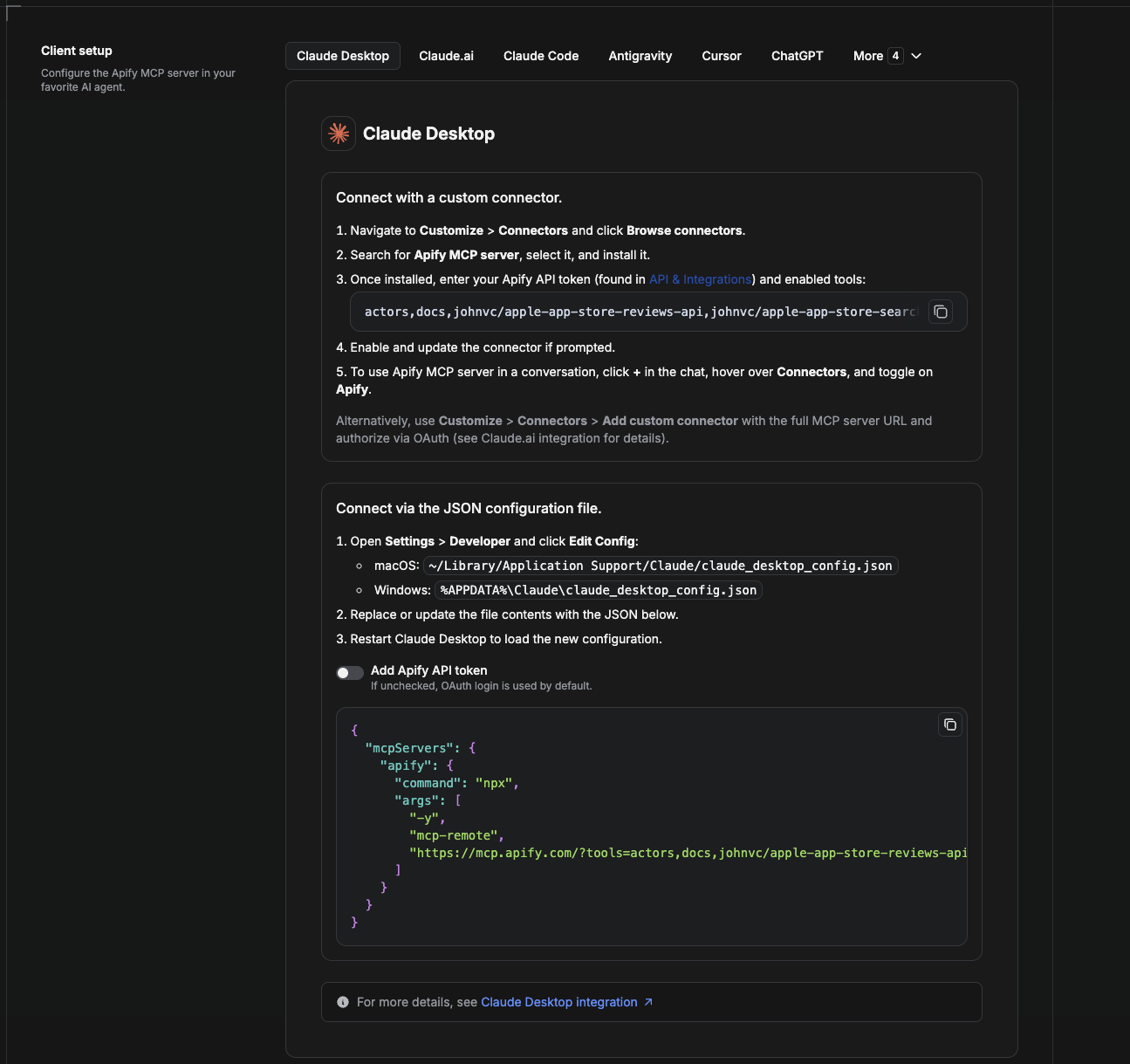
Cowork is the desktop app's automation mode. To give it the Baidu API as a tool, add the Apify MCP server as a connector.
claude_desktop_config.json directly).
~/Library/Application Support/Claude/claude_desktop_config.json%APPDATA%\Claude\claude_desktop_config.json{
"mcpServers": {
"apify": {
"command": "npx",
"args": [
"-y",
"mcp-remote",
"https://mcp.apify.com/?tools=actors,docs,johnvc/Baidu-Search-Scraper"
]
}
}
}
Download the desktop app and start a free trial: https://claude.ai/referral/uIlpa7nPLg More help: https://docs.apify.com/platform/integrations/claude-desktop
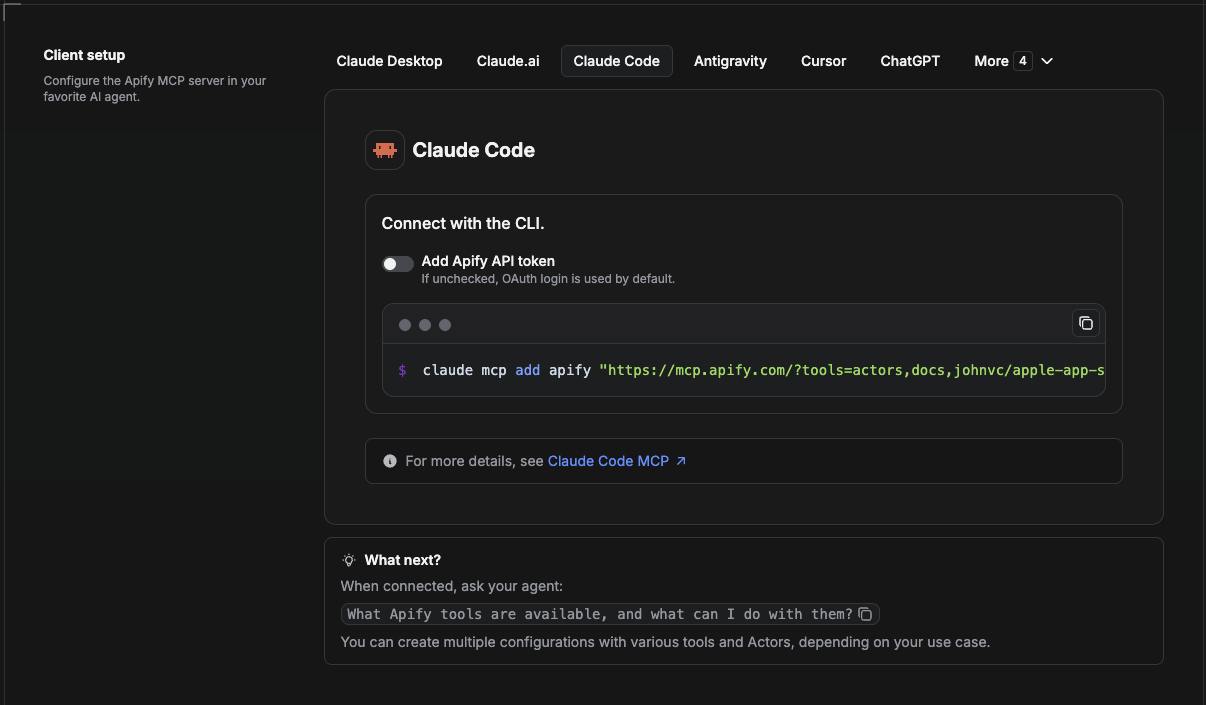
Claude Code is the command-line tool. Add the Actor's MCP server with one command:
claude mcp add --transport http apify \
  "https://mcp.apify.com/?tools=actors,docs,johnvc/Baidu-Search-Scraper"
To use a token instead of browser OAuth:
claude mcp add --transport http apify \
  "https://mcp.apify.com/?tools=actors,docs,johnvc/Baidu-Search-Scraper" \
  --header "Authorization: Bearer YOUR_APIFY_TOKEN"
Then verify with claude mcp list, or run /mcp inside a session. Ask Claude Code to call the Baidu API.
Try Claude Code free: https://claude.ai/referral/uIlpa7nPLg Claude Code MCP docs: https://code.claude.com/docs/en/mcp
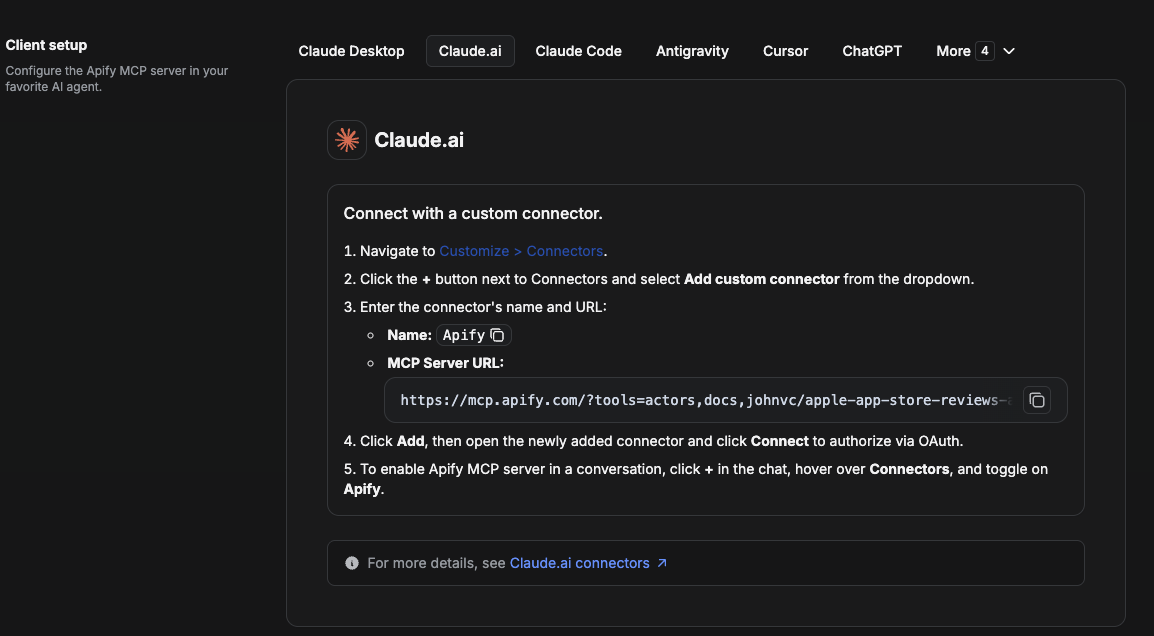
On claude.ai you add Apify as a connector, then enable just this Actor's tool.
johnvc/Baidu-Search-Scraper.https://mcp.apify.com/?tools=actors,docs,johnvc/Baidu-Search-Scraper, using OAuth when prompted.Open Claude on the web: https://claude.ai/referral/uIlpa7nPLg
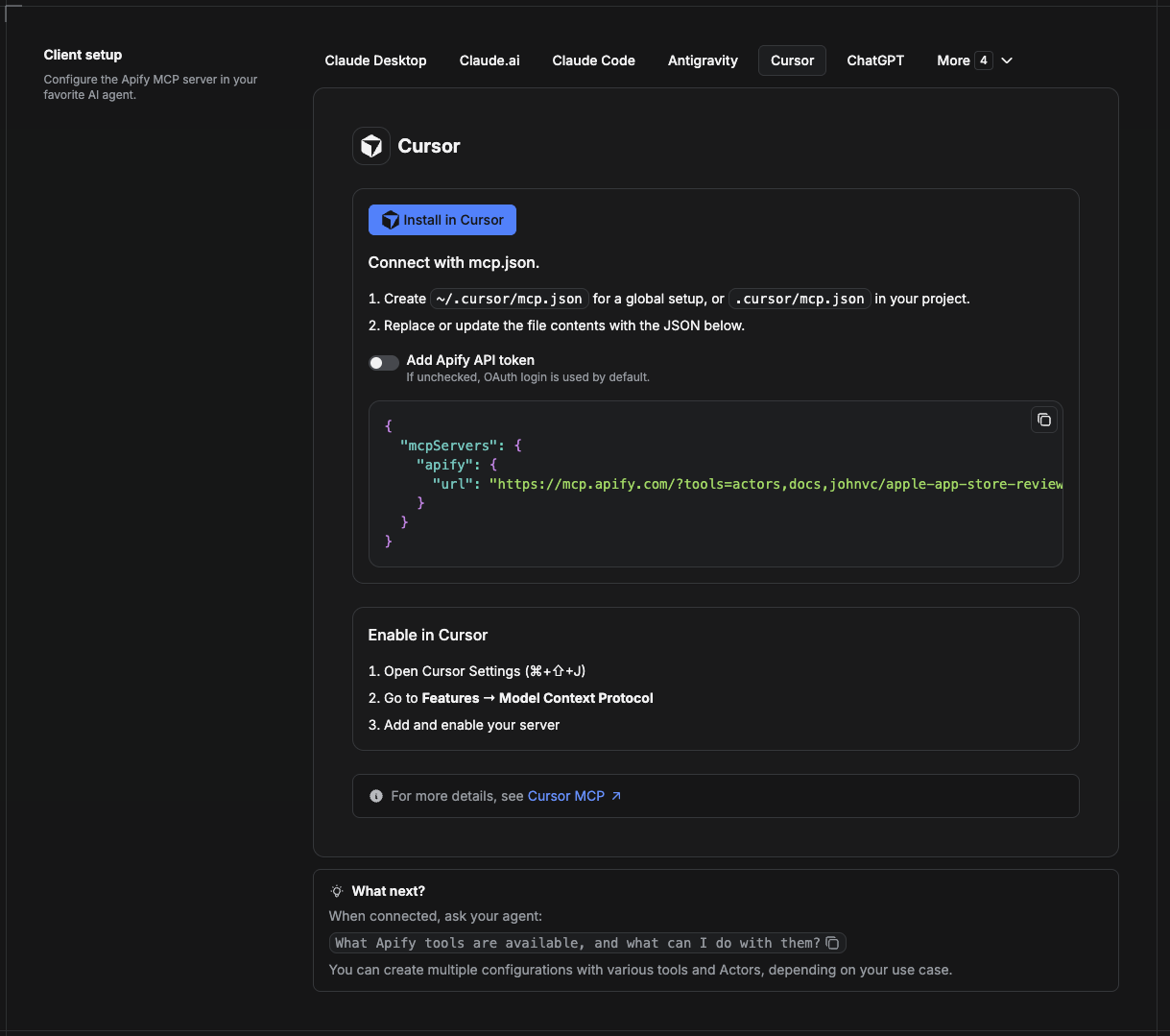
Cursor reads MCP servers from a project file at .cursor/mcp.json.
.cursor/mcp.json:{
"mcpServers": {
"apify": {
"url": "https://mcp.apify.com/?tools=actors,docs,johnvc/Baidu-Search-Scraper"
}
}
}
{
  "mcpServers": {
    "apify": {
      "url": "https://mcp.apify.com/?tools=actors,docs,johnvc/Baidu-Search-Scraper",
      "headers": { "Authorization": "Bearer YOUR_APIFY_TOKEN" }
    }
  }
}
New to Cursor? Get it here: https://cursor.com/referral?code=XQP4VBLI3NNX
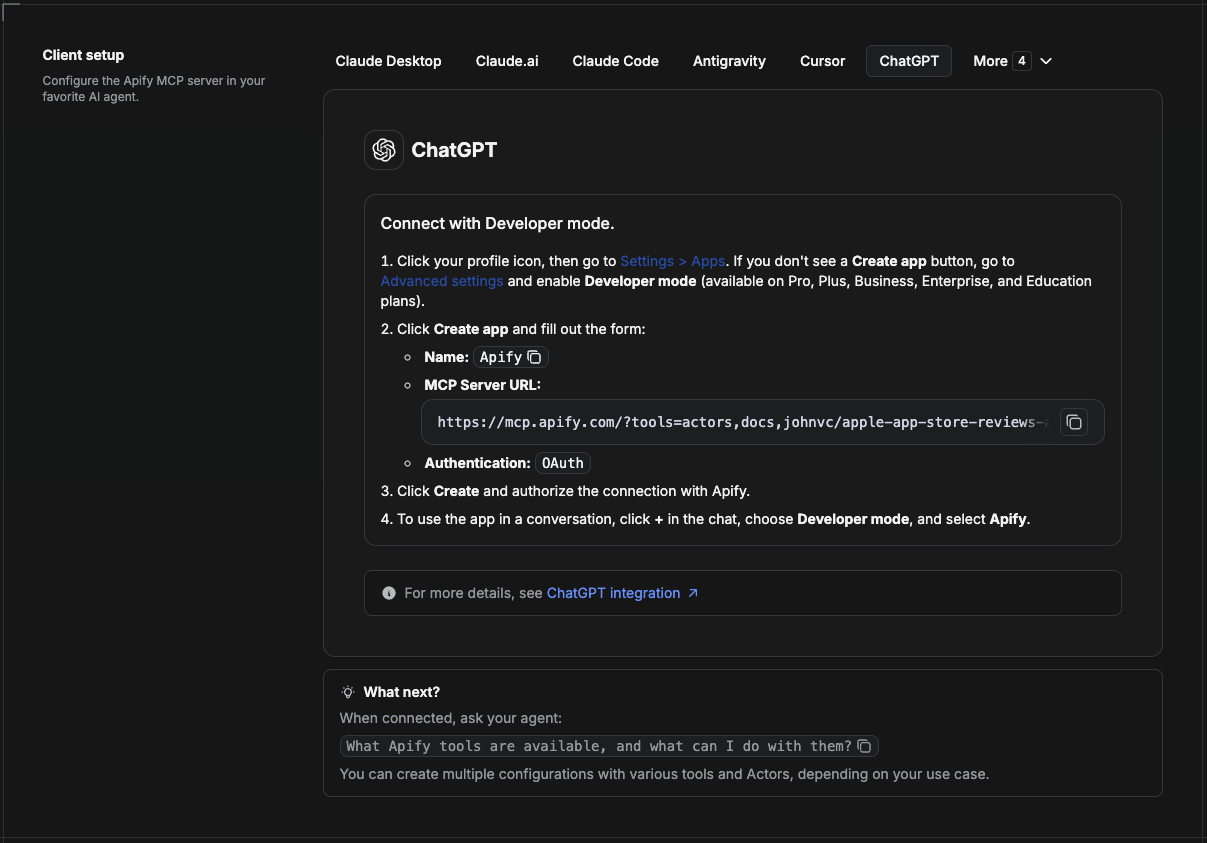
ChatGPT connects to the Apify MCP server through Developer mode (available on ChatGPT Pro, Plus, Business, Enterprise, and Education plans).
https://mcp.apify.com/?tools=actors,docs,johnvc/Baidu-Search-ScraperUse the Baidu API to power your search and SEO workflows with reliable, structured results.
Ready-to-run examples on the Apify Store.
Open a ready-to-send prompt about the 百度 Baidu Actor in the AI of your choice:
Last Updated: 2026.10.27
Baidu web search results for China SEO and research. Paid, on Apify's hosted MCP.
{ "mcpServers": { "io.github.johnisanerd-baidu-search": { "url": "https://mcp.apify.com/?tools=johnvc/Baidu-Search-Scraper", "headers": {} } }}Tools
Noch keine Tool-Liste. Remote-Server erhalten eine nach dem ersten Health-Check.
FAQ
Kopieren Sie auf dieser Seite die http-Konfiguration für Cursor, Claude Desktop, Claude Code oder VS Code. Sie nutzt die Installation des Herausgebers, keinen PlugMCP-Proxy.
In diesem Eintrag ist keine erforderliche Umgebungsvariable aufgeführt.
Baidu Search wird über HTTP erreicht.
Zuletzt geprüft: 2026-11-16. Baidu web search results for China SEO and research. Paid, on Apify's hosted MCP.