DB Gateway MCP Server
English |
Agenten stärken
Der eigene Befehl des Herausgebers. Kein PlugMCP-Endpunkt.
Host a copy with our keys and logs.
npx -y [email protected]Claude Code hat keinen Installationslink für einen lokalen Befehl. Kopieren Sie den Befehl unten und führen Sie ihn in einem Terminal aus.
DBS=<value> READ_ONLY=<value> MYSQL=<secret> POSTGRESQL=<secret> REDSHIFT=<secret> MONGODB=<secret> REDIS=<secret> ELASTICSEARCH=<secret> KAFKA=<secret> DYNAMODB_REGION=<value> DYNAMODB_ACCESS_KEY_ID=<secret> DYNAMODB_SECRET_ACCESS_KEY=<secret> claude mcp add io.github.sijunkim-db-gateway -- npx -y db-gateway@1.0.4In einem Terminal ausführen.
{ "mcpServers": { "io.github.sijunkim-db-gateway": { "command": "npx", "args": [ "-y", "[email protected]" ], "env": { "DBS": "<value>", "READ_ONLY": "<value>", "MYSQL": "<secret>", "POSTGRESQL": "<secret>", "REDSHIFT": "<secret>", "MONGODB": "<secret>", "REDIS": "<secret>", "ELASTICSEARCH": "<secret>", "KAFKA": "<secret>", "DYNAMODB_REGION": "<value>", "DYNAMODB_ACCESS_KEY_ID": "<secret>", "DYNAMODB_SECRET_ACCESS_KEY": "<secret>" } } }}claude_desktop_config.json
Remote-URL oder ein Befehl auf Ihrem Rechner? Worin sich die beiden Installationen unterscheiden
Auf PlugMCP ausführen
A new server you create. It is not this listing's official endpoint. Use the publisher install when you want their URL and their credentials.
StartenAn MCP server that gives AI agents direct access to your databases — 145+ tools across 8 engines.
The point is that the agent reads your schema itself instead of you pasting DDL into a prompt:
You: "Find users who signed up last month and never placed an order"

  1. mysql_get_all_schemas          → reads every table definition
  2. mysql_get_table_relationships  → finds the users ↔ orders foreign key
  3. mysql_execute_query            → runs the LEFT JOIN
Most database MCP servers cover one engine, or a handful of relational ones. If your stack is MySQL for the app, Redshift for analytics, Redis for cache, and Kafka for events, that means four servers with four different config styles.
This is one server, one config block:
DBS decides which of them are enabled — only those tools get registered, so a MySQL-only setup stays a MySQL-only tool list.
Every screenshot below is one real session against a development MySQL database holding 249 rows — unedited output, not mock data. The agent calls a single tool, mysql_execute_query, and never sees a host, port, or password: those stay in the client config, and the agent only ever names the alias.
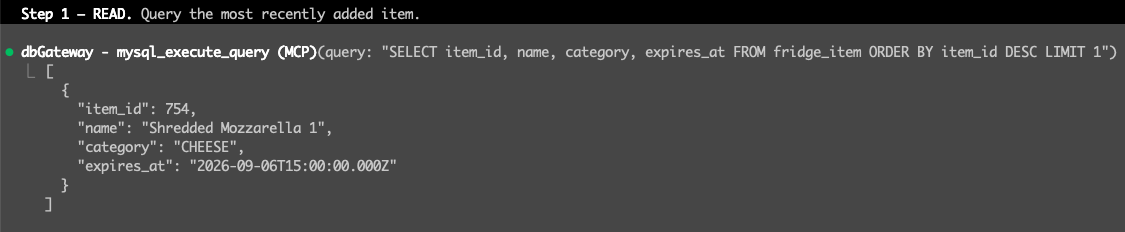

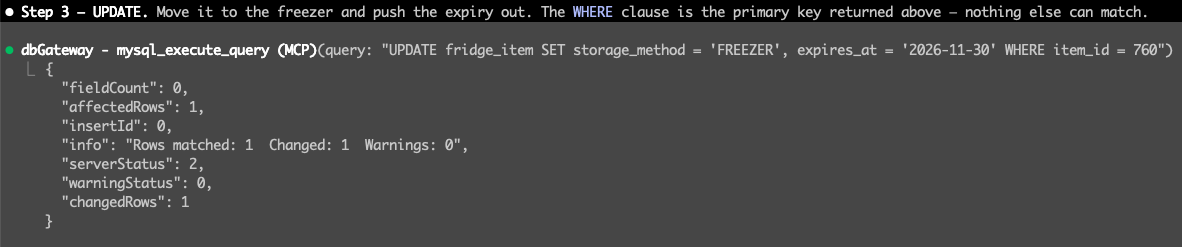
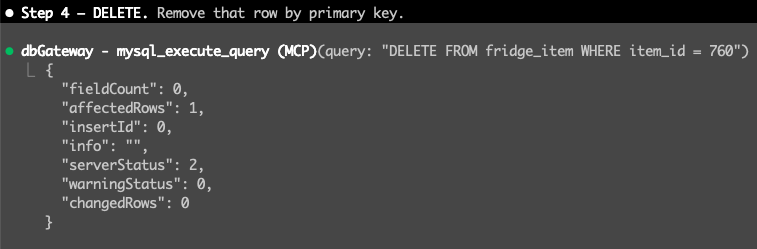
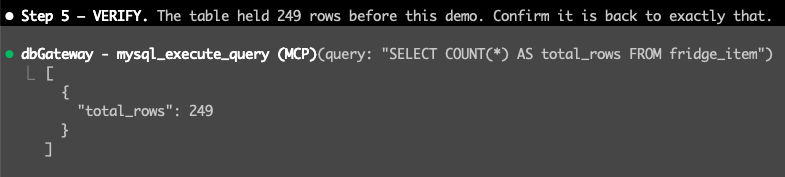
Point the same server at production with READ_ONLY=true and steps 2 through 4 simply do not exist — the write tools are never registered, so the agent cannot see them to call them.
Requires Node.js 18+. Register it with your MCP client — no install step:
{
  "mcpServers": {
    "db-gateway": {
      "command": "npx",
      "args": ["-y", "db-gateway"],
      "env": {
        "DBS": "mysql,redis",
        "MYSQL": "mysql://<user>:<password>@<host>:3306/<database>?alias=dev&default=true",
        "REDIS": "redis://:@<host>:6379/0?alias=dev&default=true"
      }
    }
  }
}
DBS decides which engines are enabled — only those tools get registered.
One string per engine. Semicolons separate multiple instances.
aliasis required. It is how tools address a specific instance — omit it and that engine fails to connect.
Several instances of the same engine — separate their connection strings with a semicolon. The agent picks one by passing an alias argument to any tool; default=true marks the one used when no alias is given:
MYSQL="mysql://<user>:<password>@<dev-host>:3306/<db>?alias=dev&default=true;mysql://<user>:<password>@<prod-host>:3306/<db>?alias=prod"
DynamoDB is the exception — it takes DYNAMODB_REGION, DYNAMODB_ACCESS_KEY_ID, and DYNAMODB_SECRET_ACCESS_KEY instead. See .env.example for every option.
READ_ONLY=true hides write tools from the tool list entirely and restricts *_execute_query to SELECT-style statements.
Register production as a second MCP server with this flag on. The agent then cannot modify production data — the write tools do not exist as far as it can see.
"db-gateway-prod": {
  "command": "npx",
  "args": ["-y", "db-gateway"],
  "env": { "READ_ONLY": "true", "DBS": "mysql", "MYSQL": "..." }
}
connectionLimit multiplies per sessionMIT
145+ tools across 8 databases: MySQL, PostgreSQL, Redshift, MongoDB, Redis, Kafka, and more
{ "mcpServers": { "io.github.sijunkim-db-gateway": { "command": "npx", "args": [ "-y", "[email protected]" ], "env": { "DBS": "<value>", "READ_ONLY": "<value>", "MYSQL": "<secret>", "POSTGRESQL": "<secret>", "REDSHIFT": "<secret>", "MONGODB": "<secret>", "REDIS": "<secret>", "ELASTICSEARCH": "<secret>", "KAFKA": "<secret>", "DYNAMODB_REGION": "<value>", "DYNAMODB_ACCESS_KEY_ID": "<secret>", "DYNAMODB_SECRET_ACCESS_KEY": "<secret>" } } }}Tools
Noch keine Tool-Liste. Remote-Server erhalten eine nach dem ersten Health-Check.
FAQ
Kopieren Sie auf dieser Seite die stdio-Konfiguration für Cursor, Claude Desktop, Claude Code oder VS Code. Sie nutzt die Installation des Herausgebers, keinen PlugMCP-Proxy.
Der Herausgeber nennt diese Umgebungsvariablen: DBS, READ_ONLY, MYSQL, POSTGRESQL, REDSHIFT, MONGODB, REDIS, ELASTICSEARCH, KAFKA, DYNAMODB_REGION, DYNAMODB_ACCESS_KEY_ID, DYNAMODB_SECRET_ACCESS_KEY.
Db Gateway läuft lokal über stdio.
Zuletzt geprüft: 2026-11-10. 145+ tools across 8 databases: MySQL, PostgreSQL, Redshift, MongoDB, Redis, Kafka, and more
