Agenten stärken
Der eigene Befehl des Herausgebers. Kein PlugMCP-Endpunkt.
Host a copy with our keys and logs.
npx -y @tharanabopearachchi/[email protected]Claude Code hat keinen Installationslink für einen lokalen Befehl. Kopieren Sie den Befehl unten und führen Sie ihn in einem Terminal aus.
claude mcp add io.github.tharanabope-sql-server-mcp -- npx -y @tharanabopearachchi/sql-server-mcp@1.0.4In einem Terminal ausführen.
{ "mcpServers": { "io.github.tharanabope-sql-server-mcp": { "command": "npx", "args": [ "-y", "@tharanabopearachchi/[email protected]" ] } }}claude_desktop_config.json
Remote-URL oder ein Befehl auf Ihrem Rechner? Worin sich die beiden Installationen unterscheiden
Auf PlugMCP ausführen
A new server you create. It is not this listing's official endpoint. Use the publisher install when you want their URL and their credentials.
StartenA Model Context Protocol (MCP) server implementation for SQL Server that enables AI assistants to explore and query SQL Server databases through natural language. Built as a RAG (Retrieval-Augmented Generation) system optimized for database knowledge exploration.
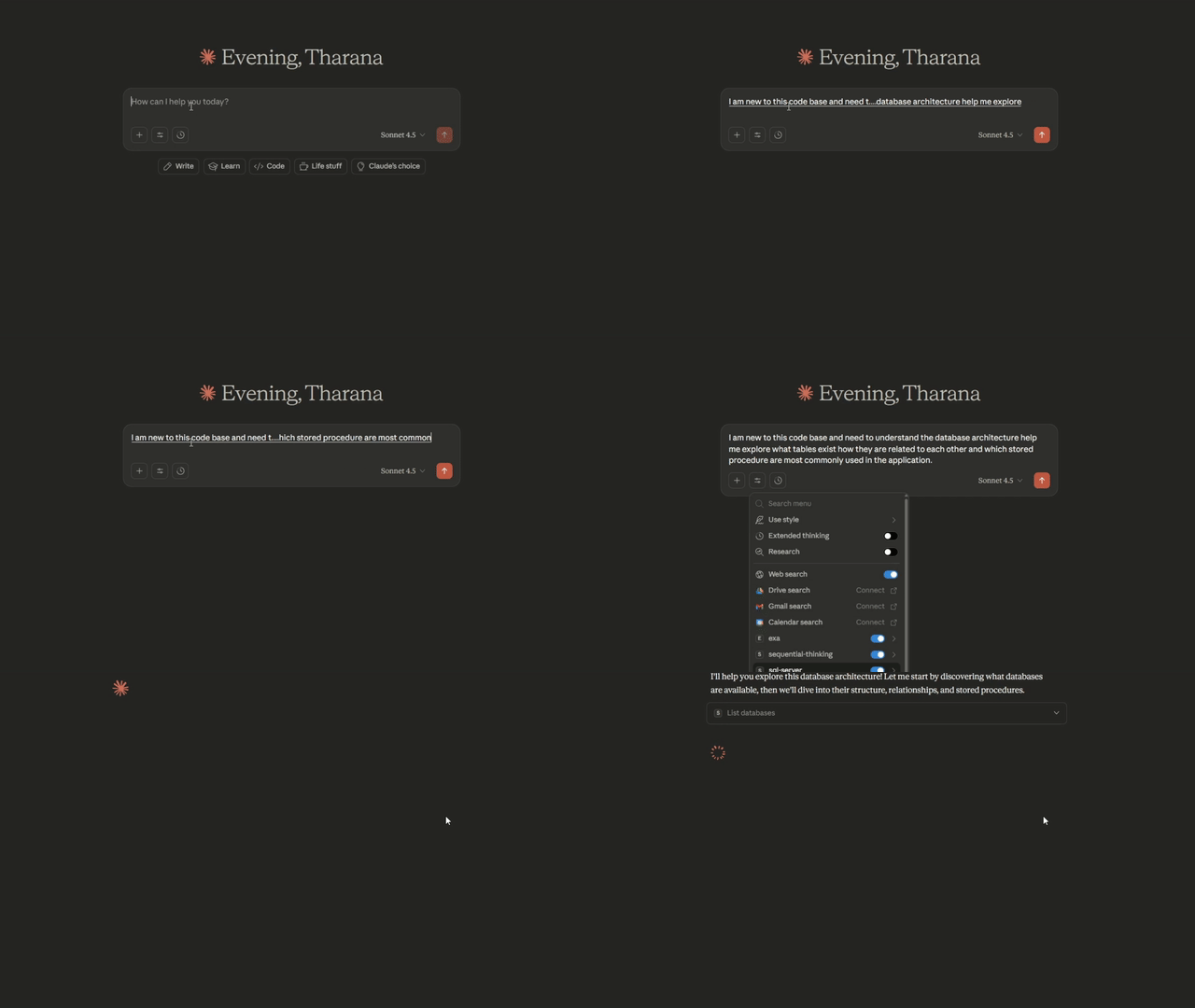
See SQL Server MCP in action with AI assistant integration:
Note: Watch how natural language queries instantly explore database schemas, find relationships, and retrieve data - all without leaving your AI assistant!
This repository contains two platform-specific implementations:
sql-server-mcp/msnodesqlv8 driver for optimal performancesql-server-mcp-mac/mssql driver (no native dependencies)This server is officially published in the Model Context Protocol Registry:
io.github.TharanaBope/sql-server-mcpio.github.TharanaBope/sql-server-mcp-macosNo installation needed! Just add to your AI assistant's configuration:
Config Location: %APPDATA%\Claude\claude_desktop_config.json
{
  "mcpServers": {
    "sql-server": {
      "command": "npx",
      "args": ["-y", "@tharanabopearachchi/sql-server-mcp@latest"],
      "env": {
        "SQL_SERVER": "localhost",
        "SQL_DATABASE": "master",
        "SQL_USE_WINDOWS_AUTH": "true"
      }
    }
  }
}
Config Location: ~/Library/Application Support/Claude/claude_desktop_config.json
{
  "mcpServers": {
    "sql-server": {
      "command": "npx",
      "args": ["-y", "@tharanabopearachchi/sql-server-mcp-macos@latest"],
      "env": {
        "SQL_SERVER": "localhost",
        "SQL_DATABASE": "master",
        "SQL_USE_WINDOWS_AUTH": "false",
        "SQL_USERNAME": "sa",
        "SQL_PASSWORD": "your_password"
      }
    }
  }
}
Config Location: Varies by platform
%USERPROFILE%\.lmstudio\config.json~/.lmstudio/config.json{
"mcpServers": {
"sql-server": {
"command": "npx",
"args": ["-y", "@tharanabopearachchi/sql-server-mcp@latest"],
"env": {
"SQL_SERVER": "localhost",
"SQL_DATABASE": "master",
"SQL_USE_WINDOWS_AUTH": "true",
"SQL_USERNAME": "",
"SQL_PASSWORD": ""
}
}
}
}
Config Location: ~/.continue/config.json
{
  "experimental": {
    "modelContextProtocolServers": [
      {
        "transport": {
          "type": "stdio",
          "command": "npx",
          "args": ["-y", "@tharanabopearachchi/sql-server-mcp@latest"]
        },
        "env": {
          "SQL_SERVER": "localhost",
          "SQL_DATABASE": "master",
          "SQL_USE_WINDOWS_AUTH": "true"
        }
      }
    ]
  }
}
Config Location: Cursor Settings → Features → Model Context Protocol
{
  "mcpServers": {
    "sql-server": {
      "command": "npx",
      "args": ["-y", "@tharanabopearachchi/sql-server-mcp@latest"],
      "env": {
        "SQL_SERVER": "localhost",
        "SQL_DATABASE": "master",
        "SQL_USE_WINDOWS_AUTH": "true"
      }
    }
  }
}
Config Location: VS Code Settings → Cline → MCP Settings
{
  "mcpServers": {
    "sql-server": {
      "command": "npx",
      "args": ["-y", "@tharanabopearachchi/sql-server-mcp@latest"],
      "env": {
        "SQL_SERVER": "localhost",
        "SQL_DATABASE": "master",
        "SQL_USE_WINDOWS_AUTH": "true"
      }
    }
  }
}
Restart your AI assistant and you're ready to go!
For development or local modifications:
cd sql-server-mcp
npm install
npm run build
cd sql-server-mcp-mac
npm install
npm run build
The server provides 12 powerful tools for database exploration:
list_databases - Discover all available databaseslist_tables - View tables with row countsdescribe_table - Get detailed schema (columns, types, constraints, indexes)list_views - List all viewslist_stored_procedures - List stored procedures with metadataget_procedure_definition - Get full SQL definitionget_database_overview - High-level statisticsget_table_relationships - Get foreign key relationships (incoming & outgoing)get_related_tables - Find directly connected tablessearch_schema - Search across tables, columns, views, proceduresfind_column_usage - Find all tables containing a specific columnexecute_query - Execute read-only SELECT queries safelyOnce configured, you can ask your AI assistant:
"What databases are available on this server?"

"Show me all tables in the Sales database"

"What's the schema of the Orders table?"

"Find all tables that reference the Customers table"

"Search for any columns related to 'email'"

"Execute: SELECT TOP 10 * FROM Products ORDER BY Price DESC"
Both versions use environment variables for configuration:
SQL_SERVER=localhost
SQL_DATABASE=master
SQL_PORT=1433
SQL_USE_WINDOWS_AUTH=true          # Windows only
SQL_USERNAME=                       # For SQL Auth
SQL_PASSWORD=                       # For SQL Auth
QUERY_TIMEOUT=30
MAX_RESULT_ROWS=1000
ENABLE_SCHEMA_CACHE=true
CACHE_TTL_MINUTES=60
See platform-specific READMEs for detailed configuration instructions.
MCP/
├── sql-server-mcp/              # Windows implementation
│   ├── src/
│   │   ├── index.ts             # MCP server entry point
│   │   ├── database/            # Connection, caching, queries
│   │   ├── tools/               # 12 MCP tools
│   │   └── types/               # TypeScript interfaces
│   ├── dist/                    # Compiled output
│   ├── package.json
│   └── README.md                # Windows documentation
│
├── sql-server-mcp-mac/          # macOS implementation
│   ├── src/                     # Same structure as Windows
│   └── README.md                # macOS documentation
│
├── LICENSE                      # MIT License
└── README.md                    # This file
Contributions are welcome! Please feel free to submit a Pull Request. For major changes, please open an issue first to discuss what you would like to change.
This project is licensed under the MIT License - see the LICENSE file for details.
sql-server-mcp/README.mdsql-server-mcp-mac/README.mdTROUBLESHOOTING.md filesMade with ❤️ for the MCP community
⭐ Star this repo if you find it useful! 🐛 Report bugs via Issues 💬 Questions? Check the Discussions
SQL Server MCP with RAG capabilities for Windows (native ODBC support)
{ "mcpServers": { "io.github.tharanabope-sql-server-mcp": { "command": "npx", "args": [ "-y", "@tharanabopearachchi/[email protected]" ] } }}Tools
Noch keine Tool-Liste. Remote-Server erhalten eine nach dem ersten Health-Check.
FAQ
Kopieren Sie auf dieser Seite die stdio-Konfiguration für Cursor, Claude Desktop, Claude Code oder VS Code. Sie nutzt die Installation des Herausgebers, keinen PlugMCP-Proxy.
In diesem Eintrag ist keine erforderliche Umgebungsvariable aufgeführt.
SQL Server MCP (Windows) läuft lokal über stdio.
Zuletzt geprüft: 2026-11-09. SQL Server MCP with RAG capabilities for Windows (native ODBC support)
