
Agenten stärken
Der eigene Befehl des Herausgebers. Kein PlugMCP-Endpunkt.
Host a copy with our keys and logs.
uvx agent-memory-sdk==0.1.5Claude Code hat keinen Installationslink für einen lokalen Befehl. Kopieren Sie den Befehl unten und führen Sie ihn in einem Terminal aus.
AGENT_MEMORY_DIR=<value> AGENT_MEMORY_COLLECTION=<value> claude mcp add io.github.theprodsde-agent-memory -- uvx agent-memory-sdk==0.1.5In einem Terminal ausführen.
{ "mcpServers": { "io.github.theprodsde-agent-memory": { "command": "uvx", "args": [ "agent-memory-sdk==0.1.5" ], "env": { "AGENT_MEMORY_DIR": "<value>", "AGENT_MEMORY_COLLECTION": "<value>" } } }}claude_desktop_config.json
Remote-URL oder ein Befehl auf Ihrem Rechner? Worin sich die beiden Installationen unterscheiden
Auf PlugMCP ausführen
A new server you create. It is not this listing's official endpoint. Use the publisher install when you want their URL and their credentials.
StartenPersistent semantic memory for AI agents with intelligent decision-making.
🚀 Created by: TheProdSDE
Most AI memory systems retrieve and inject past context into every prompt. This leads to wasted tokens, inconsistent responses, and agents that blindly replay stale or wrong answers.
Agent Memory adds a decision layer:
flowchart TD
    A[User Query] --> B[Resolve Memory]
    B --> C[Decision Engine]
    C -->|High confidence match| D[🔄 Replay — return stored answer]
    C -->|Moderate match| E[📋 Restore — inject as context]
    C -->|Needs validation| F[✅ Verify — validate before reuse]
    C -->|No match| G[❌ None — answer from scratch]

    style D fill:#0d47a1,color:#fff
    style E fill:#e65100,color:#fff
    style F fill:#1b5e20,color:#fff
    style G fill:#b71c1c,color:#fff
Every resolve() returns an explicit action with a scored, explainable rationale —
not just a retrieved chunk.
Adversarial eval: 34/36 (94%) on trap queries — the 2 misses return VERIFY (cautious), never a wrong REPLAY — see benchmarks.
Context rot is the measured degradation of LLM accuracy as the context window fills — long before the token limit. Stale chunks, irrelevant retrievals, and unbounded conversation history don't just waste tokens; they actively degrade answers ("lost in the middle", instruction drift, distractor sensitivity).
Context rot has two causes. Agent Memory addresses the first; nothing outside the model itself can address the second.
1. What goes into the context — controllable, and this SDK's job:
2. How the model attends over tokens already in its context — not controllable from outside. Attention degradation over long context is a property of the model. No memory layer changes that. What Agent Memory does is keep the context small and relevant enough that the model rarely enters the degraded regime in the first place.
The honest claim: Agent Memory prevents context pollution — the dominant
controllable cause of context rot in agentic systems. It doesn't change model attention
behavior, and it only helps if your agent routes context through resolve() /
PagedMemory instead of concatenating history by hand.
Today you need three tools wired together to get what resolve() does in one call:
a semantic cache (GPTCache) for replay, a memory layer (Mem0 / Zep) for context, and
custom staleness logic for verification. No existing tool decides — at read time —
whether and how a memory should be used.
Cells about other projects are capability checks against their own source or
docs (mem0 checked on 2026-09-27), not measured behaviour; ❔ means we have not
tested it rather than that it is absent. Corrections welcome — see
docs/comparison.md for sourcing and the
benchmark RFC for the review process.
Because hosted or model-backed configurations can add an LLM or embedding API round-trip per memory operation, their latency includes provider, model, and network costs. Exact latency depends on each project's configuration; this repository does not publish a universal 100ms–2s floor. Agent Memory resolves in-process in SQLite-only mode; measured latency depends on corpus shape and cache state (see performance and stress-testing details).
On retrieval, we publish a cleaned-release retrieval-proxy measurement below. On end-to-end accuracy (LLM answering + judge, where Mem0 and Zep publish), we don't quote numbers we haven't measured yet — that stage is next on the roadmap. → Full feature matrix and trade-offs (including where they're better): docs/comparison.md
LongMemEval is a benchmark for conversational-history retrieval. These results measure Agent Memory's RESTORE/retrieval tier, not REPLAY, VERIFY, TTL, or end-to-end answer correctness. Each question runs against a separate SQLite store containing that question's haystack; aggregate ingestion totals are not the size of one queried store. All ingestion uses zero LLM calls and $0 in API charges:
LongMemEval_S (500 independent ~48-session haystacks; 124K turn-pair entries across all runs): 98.1% session Recall@5 with local ONNX embeddings, 96.0% lexical-only, 10.04ms lexical / 19.56ms semantic p50 retrieval. The report includes p90/p95/p99 and run-resource measurements.
LongMemEval_M (500 independent ~500-session haystacks; ~2,500 turn-pair entries per queried store): 87.0% session Recall@5 with lexical retrieval, 12.05ms p50. This uses the official cleaned re-release and turn-pair indexing; it is not directly comparable with the paper's original-release session-index baselines.
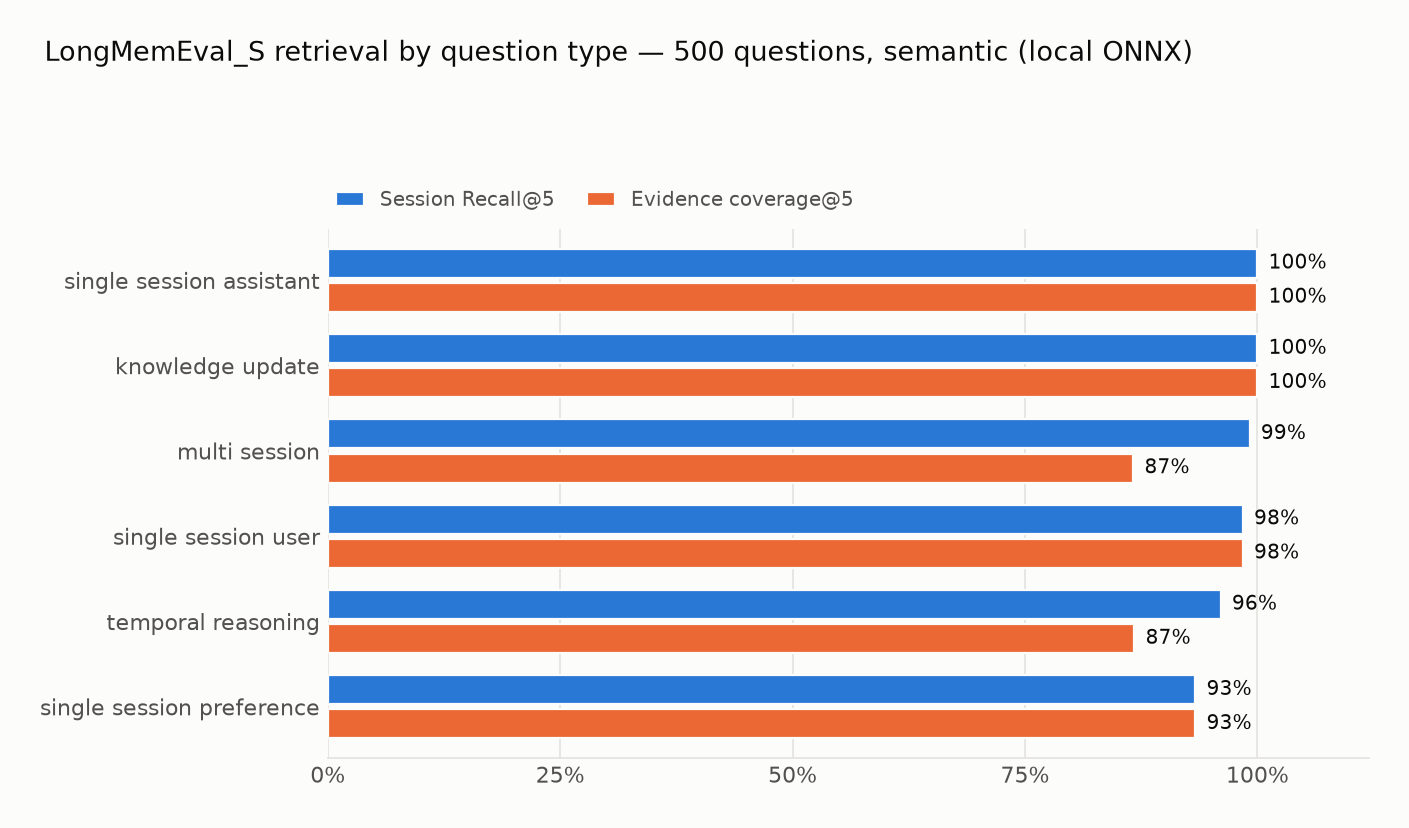
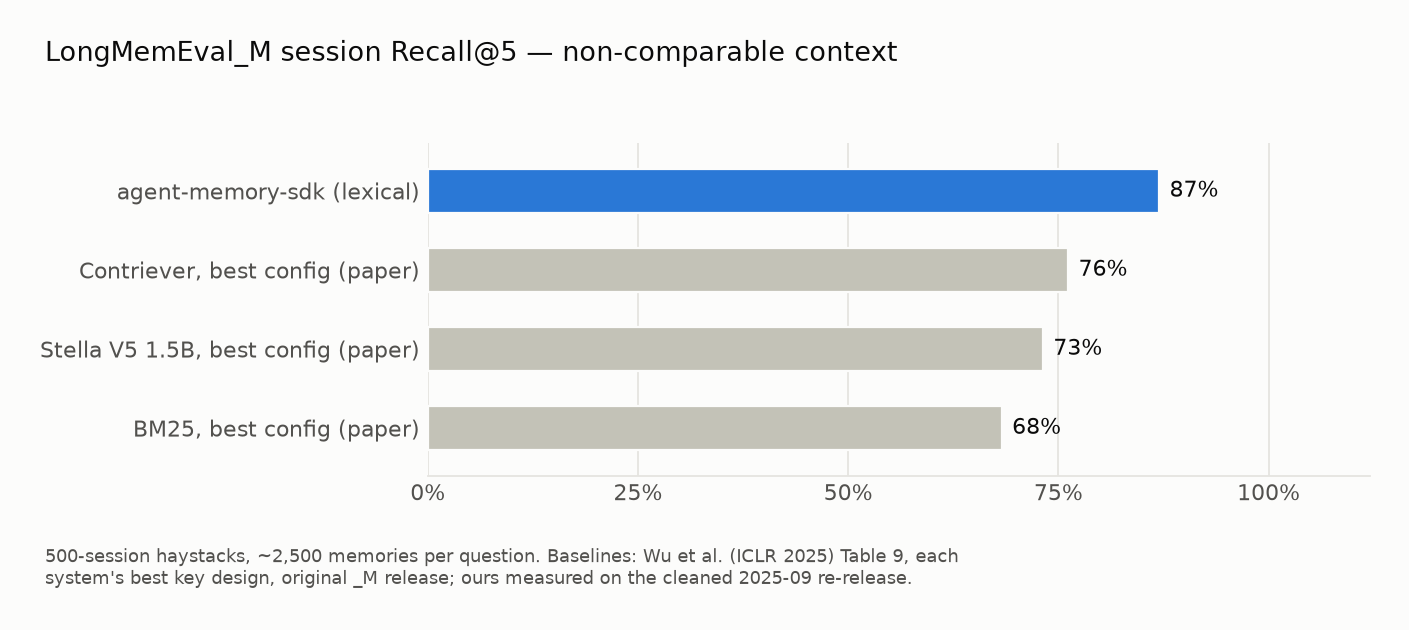
Full methodology, per-type tables, scope notes (what this benchmark does and
doesn't test), and negative results are in the
benchmark report. Reproduce the semantic
_S result with uv run python benchmarks/longmemeval/run_retrieval.py --semantic.
Every claim below is reproducible from this repo:
agent-memory eval (methodology)A GPT-4o call costs ~$0.005. A support agent handling 50,000 queries/day with 70% repeat rate:
REPLAY avoids an LLM call when policy permits it. The latency and cost difference depends on the local workload, provider, model, and network; measure both paths in your own pipeline.
Good fit:
Not the right tool:
→ Full feature reference: docs/features.md
Latency, CPU, and memory use depend on the corpus, query distribution, cache state, embedding mode, machine, and operating system. The bundled harness uses a repeatable synthetic workload; it does not establish a production SLA.
The current lexical FTS5 benchmark results and charts are archived with their source JSON in the stress-test methodology. See that document for commands, workload scope, and guidance on interpreting results.
Use Agent Memory when:
Don't use it for:
pip install agent-memory-sdk
from agent_memory import Memory, MemoryAction

memory = Memory(persist_dir=".agent_memory")

# Store once after a good answer
memory.remember(
    "How do I reset my password?",
    "Go to Settings → Security → Reset Password.",
    type="conversation", tags=["auth"],
)

# Decide before every LLM call
decision = memory.resolve("How do I reset my password?")

if decision.action == MemoryAction.REPLAY:
    return decision.response          # exact match — no LLM call needed

if decision.action == MemoryAction.RESTORE:
    context = memory.format_restore_context(decision)
    return call_llm(query, system_extra=context)

# VERIFY or NONE — validate or answer fresh
→ Full integration pattern and API reference: docs/usage.md
pip install agent-memory-sdk

# Store something
agent-memory remember "How do I reset my password?" \
  "Go to Settings → Security → Reset Password." \
  --type conversation --tags auth,faq

# Ask the exact question back → REPLAY (no LLM call needed)
agent-memory resolve "How do I reset my password?"
# ✅ REPLAY   confidence: 0.88
# response: Go to Settings → Security → Reset Password.

# Ask a paraphrase → RESTORE (inject as context, don't answer verbatim)
agent-memory resolve "I forgot my password"
# 📋 RESTORE  confidence: 0.77
# [1] score=0.77  How do I reset my password? → Go to Settings → …

# See what's stored
agent-memory stats
# Spin up the services
docker compose -f docker-compose.dev.yml up -d

# Install the backend extra
pip install "agent-memory-sdk[redis]"      # or [postgres]

# Use it
agent-memory --backend redis remember "API limit" "1000 req/min" --type fact
agent-memory --backend redis resolve "What is the rate limit?"
pip install "agent-memory-sdk[dashboard]"

# Seed demo data (optional)
python scripts/seed_demo.py --data-dir .agent_memory

# Open the dashboard
AGENT_MEMORY_DIR=.agent_memory agent-memory-dashboard
# → http://localhost:8501
git clone https://github.com/TheProdSDE/agent-memory-sdk.git
cd agent-memory-sdk
python -m venv .venv && source .venv/bin/activate
pip install -e ".[dev]"
make test          # run all tests
make check         # lint + type check
An interactive Streamlit dashboard for exploring memories, testing the resolve sandbox, and monitoring stats.
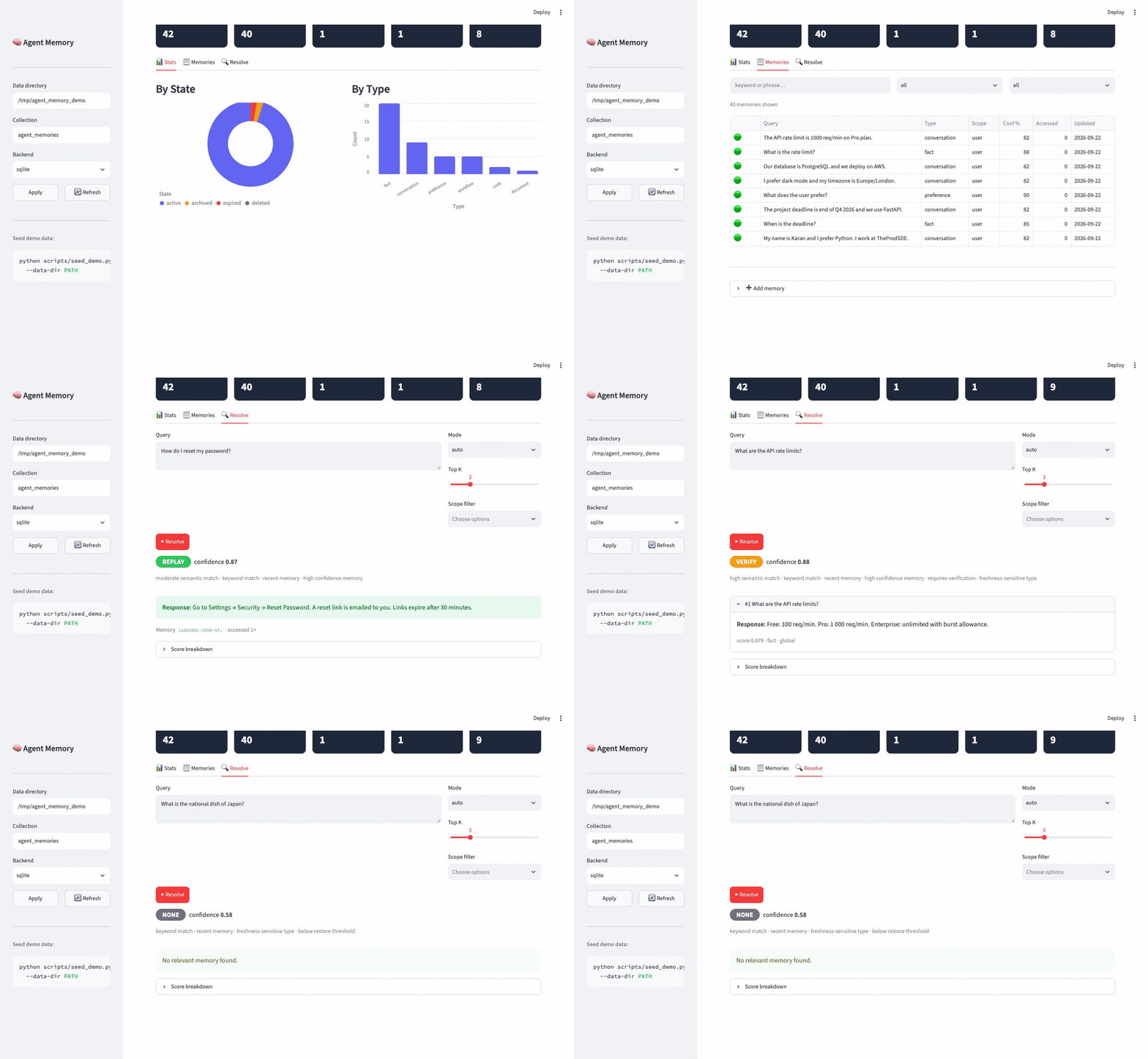
| Stats — KPIs + charts | Memories — searchable table |
|---|---|
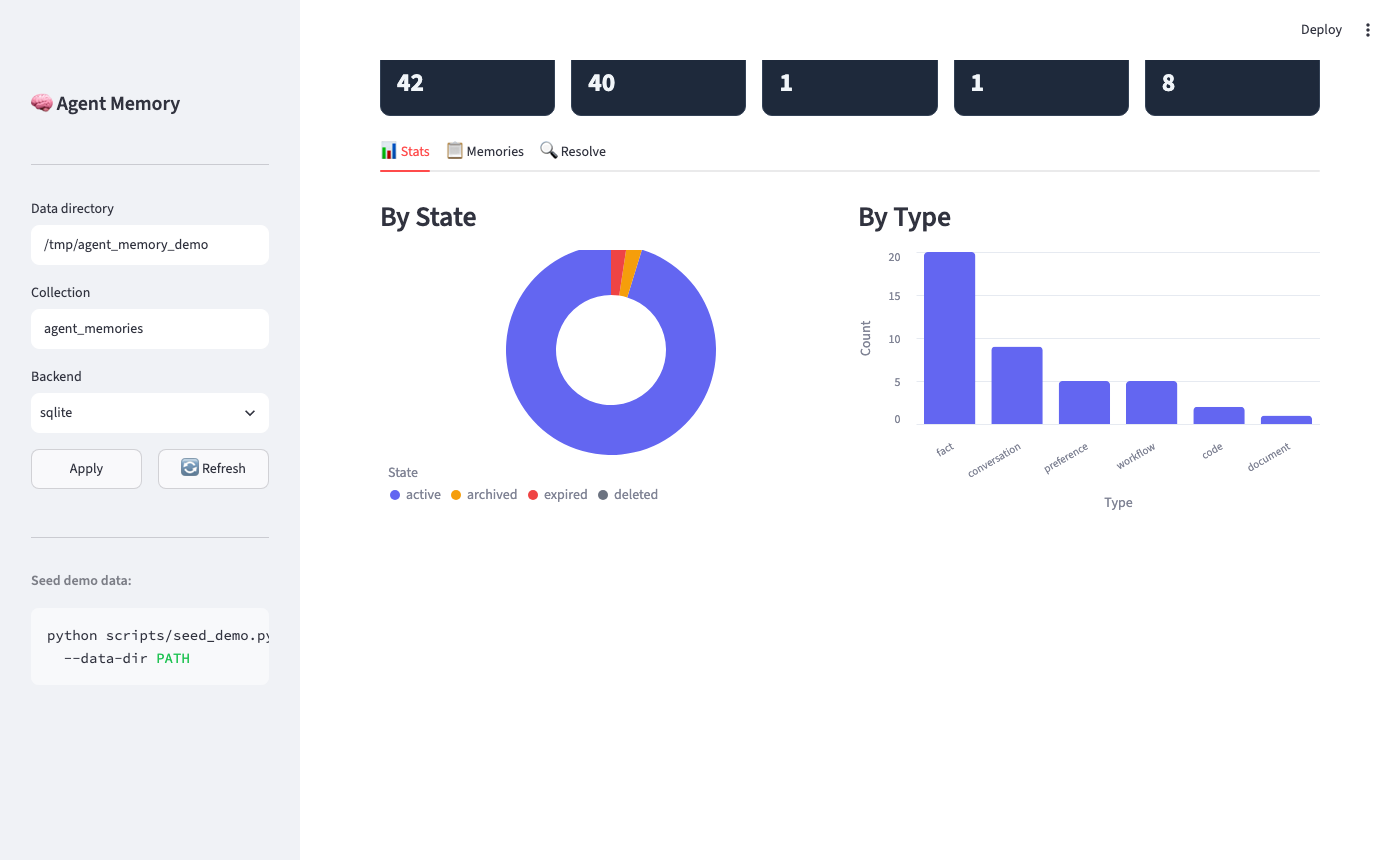 | 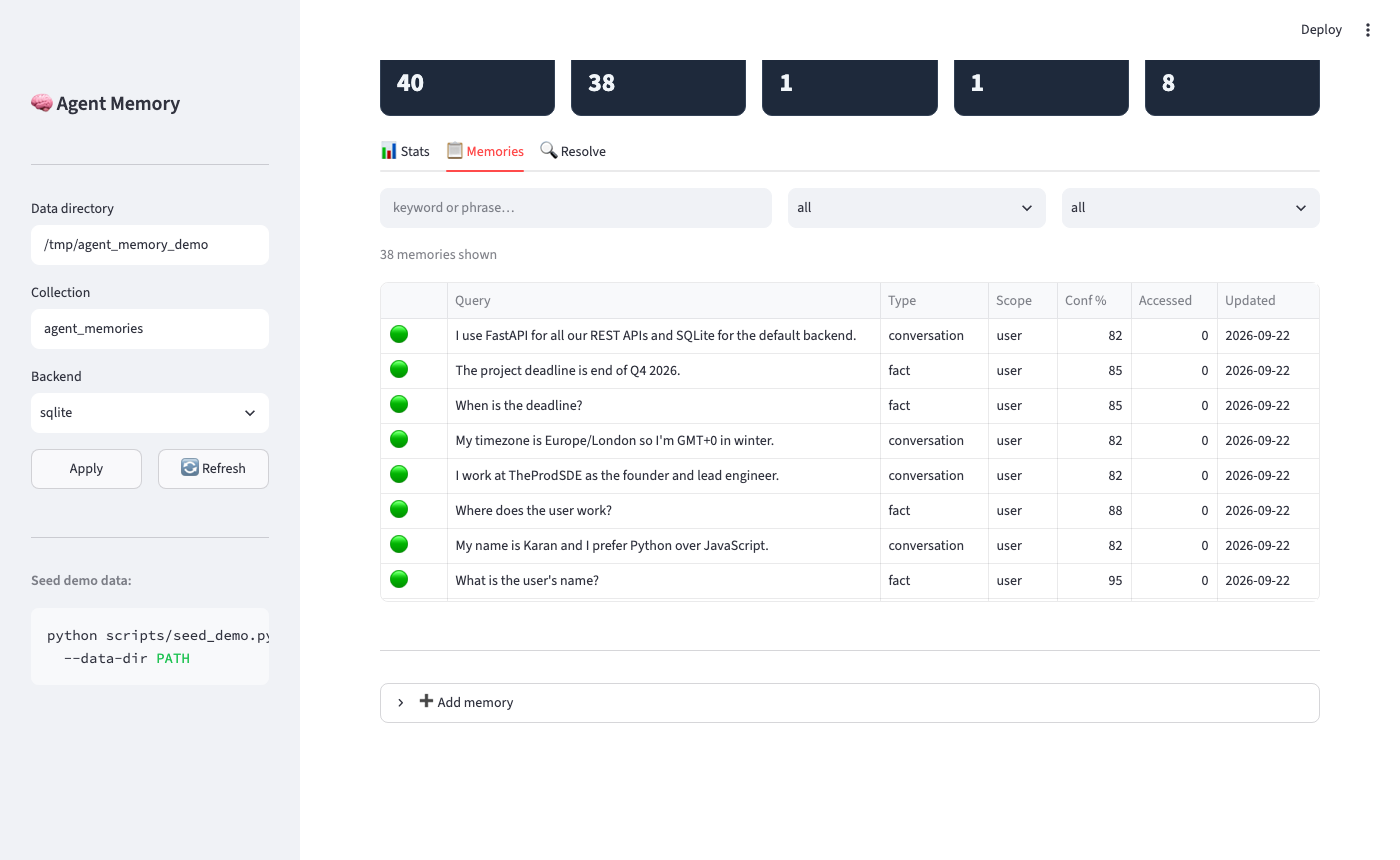 |
| Resolve → REPLAY | Resolve → VERIFY |
|---|---|
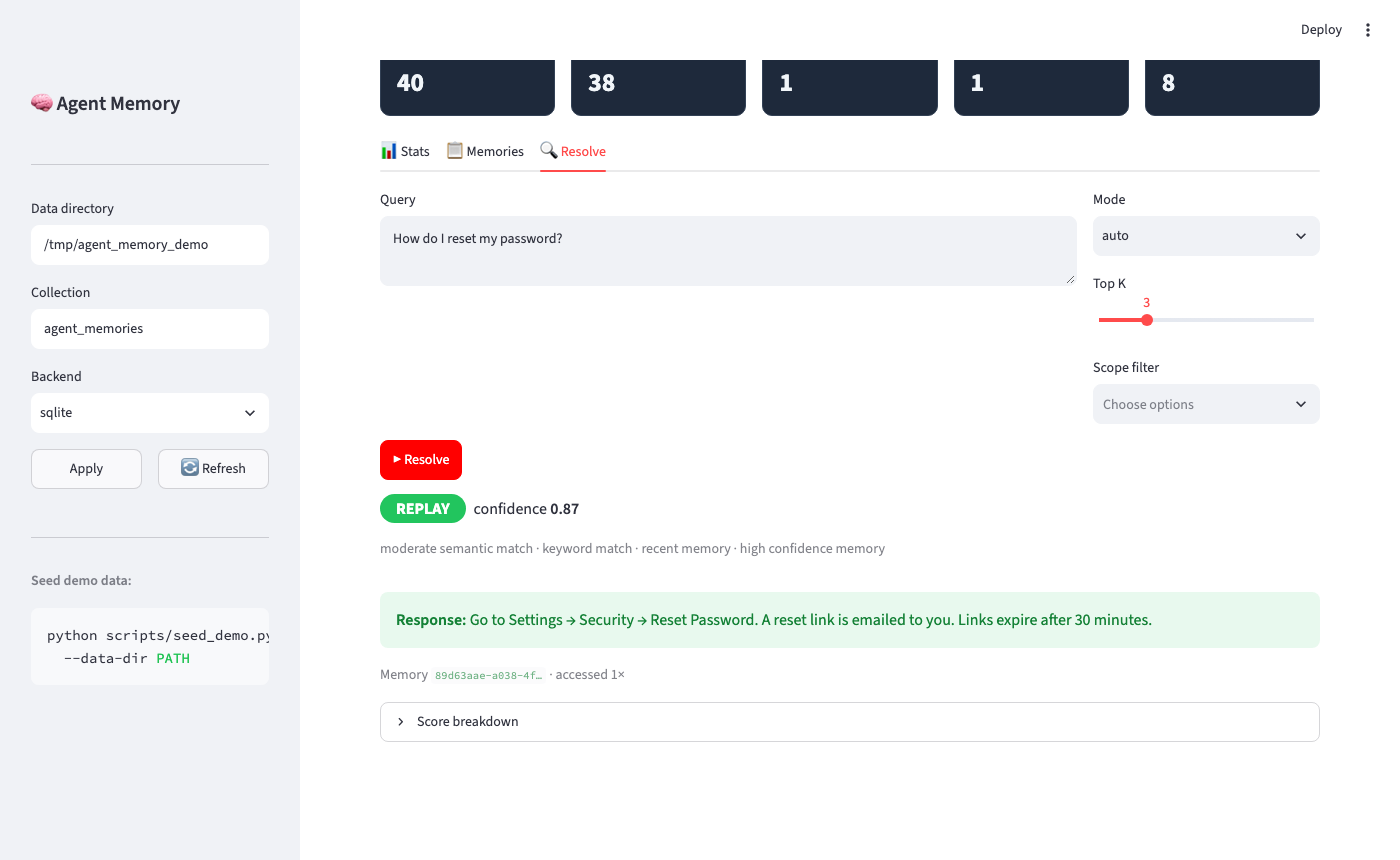 | 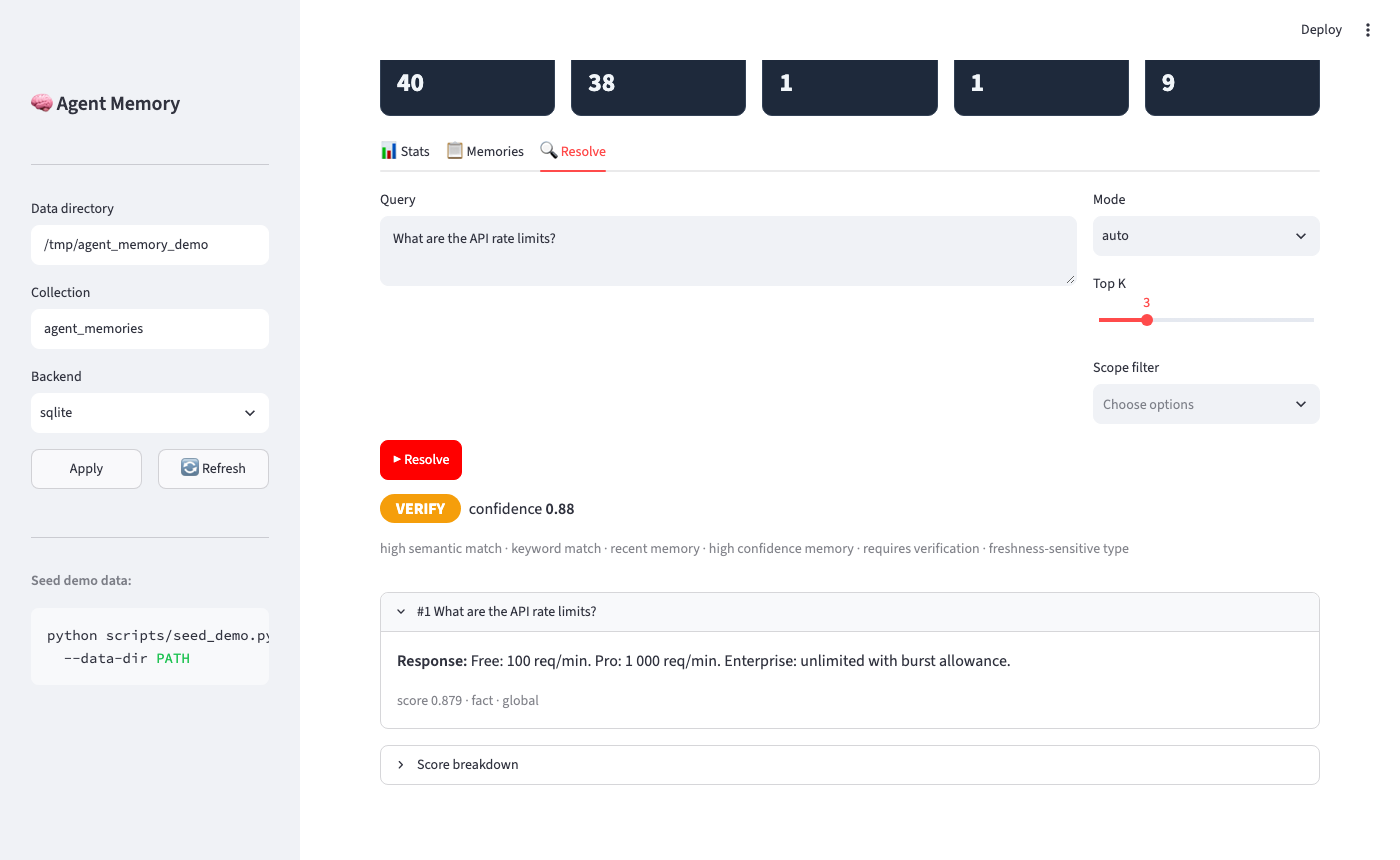 |
pip install "agent-memory-sdk[dashboard]"
AGENT_MEMORY_DIR=.agent_memory agent-memory-dashboard   # → http://localhost:8501

# Seed demo data (optional — run only when you want it)
python scripts/seed_demo.py --data-dir .agent_memory
Agent Memory is published on the MCP Registry — install it in any MCP-compatible client with zero manual setup.
Cursor — add to .cursor/mcp.json in your project, or ~/.cursor/mcp.json globally:
{
  "mcpServers": {
    "agent-memory": {
      "command": "uvx",
      "args": ["agent-memory-sdk"]
    }
  }
}
Claude Desktop — add to ~/Library/Application Support/Claude/claude_desktop_config.json (macOS) or %APPDATA%\Claude\claude_desktop_config.json (Windows):
{
  "mcpServers": {
    "agent-memory": {
      "command": "uvx",
      "args": ["agent-memory-sdk"]
    }
  }
}
Claude Code — add to .claude/settings.json in your project:
{
  "mcpServers": {
    "agent-memory": {
      "command": "uvx",
      "args": ["agent-memory-sdk"]
    }
  }
}
uvx installs the package on first run — no pip install needed.
{
  "mcpServers": {
    "agent-memory": {
      "command": "uvx",
      "args": ["agent-memory-sdk"],
      "env": {
        "AGENT_MEMORY_DIR": "/path/to/your/memory",
        "AGENT_MEMORY_COLLECTION": "my_project"
      }
    }
  }
}
→ Full MCP setup guide and Docker config: docs/mcp.md
agent-memory-sdk is the core — every integration delegates to Memory.
→ Setup instructions and code snippets for each: examples/README.md
No API keys required — everything runs locally.
All planned features through v0.5.0 are shipped. Track what's next on the GitHub Project →
Tag-triggered, fully CI-gated: git tag v0.x.y && git push origin v0.x.y
See CONTRIBUTING.md for dev setup, test commands, and the PR checklist.
If you use Agent Memory SDK or its benchmark suite in your research, articles, or projects, please cite this repository using GitHub's Cite this repository button.
For reproducible benchmark comparisons, reference the exact SDK version, benchmark dataset version, configuration, and Git commit.
Apache-2.0 — see LICENSE.
Agent Memory helps agents decide: Replay → Restore → Verify → Ignore
Built with ❤️ by TheProdSDE
mcp-name: io.github.theprodsde/agent-memory
Persistent agent memory with a decision layer: replay, restore, verify, or none — explainable.
{ "mcpServers": { "io.github.theprodsde-agent-memory": { "command": "uvx", "args": [ "agent-memory-sdk==0.1.5" ], "env": { "AGENT_MEMORY_DIR": "<value>", "AGENT_MEMORY_COLLECTION": "<value>" } } }}Tools
Noch keine Tool-Liste. Remote-Server erhalten eine nach dem ersten Health-Check.
FAQ
Kopieren Sie auf dieser Seite die stdio-Konfiguration für Cursor, Claude Desktop, Claude Code oder VS Code. Sie nutzt die Installation des Herausgebers, keinen PlugMCP-Proxy.
Der Herausgeber nennt diese Umgebungsvariablen: AGENT_MEMORY_DIR, AGENT_MEMORY_COLLECTION.
Agent Memory läuft lokal über stdio.
Zuletzt geprüft: 2026-11-10. Persistent agent memory with a decision layer: replay, restore, verify, or none — explainable.
