Agenten stärken
Der eigene Befehl des Herausgebers. Kein PlugMCP-Endpunkt.
Host a copy with our keys and logs.
npx -y @tychilabs/[email protected]Claude Code hat keinen Installationslink für einen lokalen Befehl. Kopieren Sie den Befehl unten und führen Sie ihn in einem Terminal aus.
TYI_PASSWORD=<secret> TYCHI_BRAIN_URL=<value> claude mcp add io.github.tychiwallet-tyi-mcp -- npx -y @tychilabs/tyi-mcp@1.0.0-beta.8In einem Terminal ausführen.
{ "mcpServers": { "io.github.tychiwallet-tyi-mcp": { "command": "npx", "args": [ "-y", "@tychilabs/[email protected]" ], "env": { "TYI_PASSWORD": "<secret>", "TYCHI_BRAIN_URL": "<value>" } } }}claude_desktop_config.json
Remote-URL oder ein Befehl auf Ihrem Rechner? Worin sich die beiden Installationen unterscheiden
Auf PlugMCP ausführen
A new server you create. It is not this listing's official endpoint. Use the publisher install when you want their URL and their credentials.
StartenGive your AI agent a wallet — onboard, hold funds, send, and pay under policy.
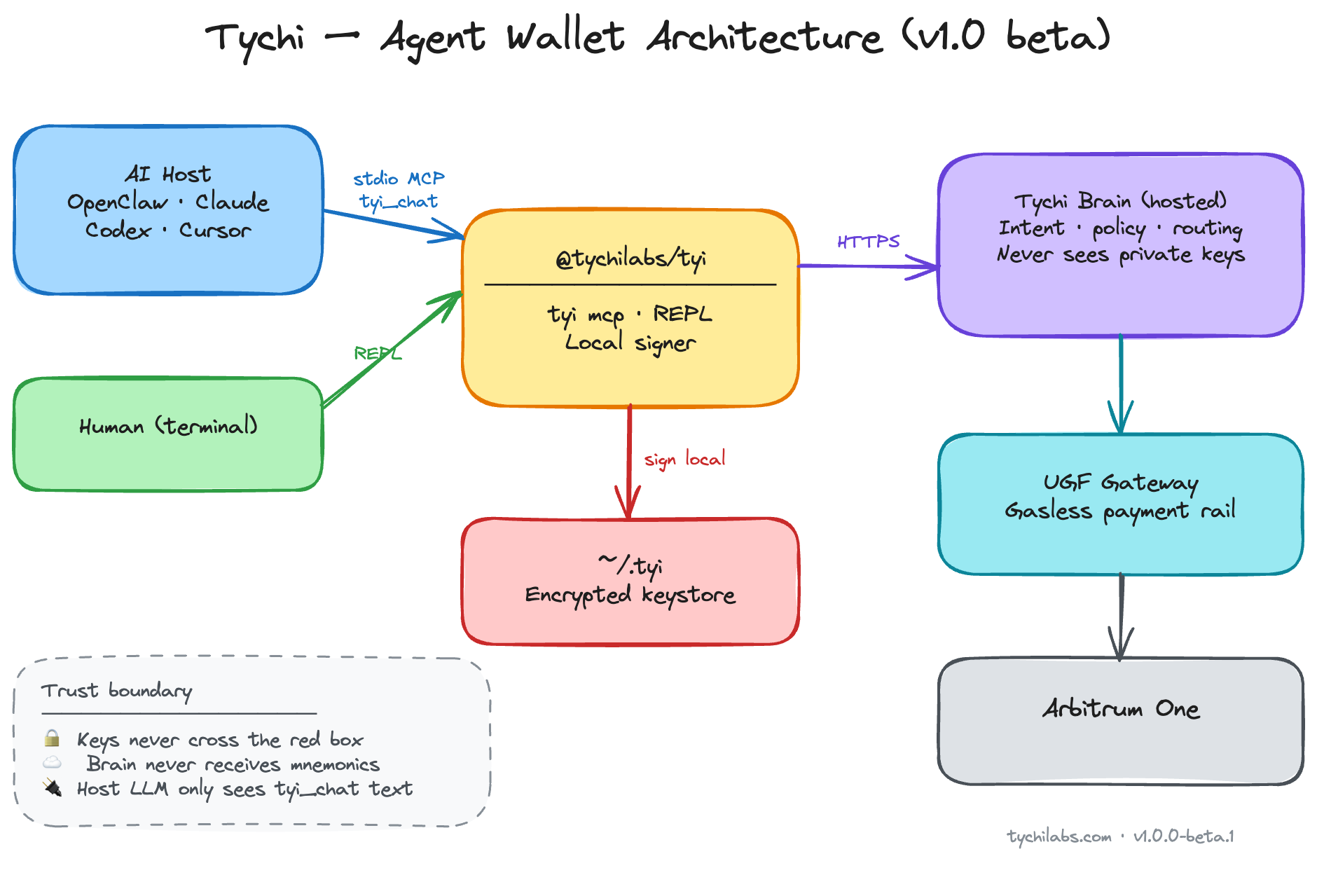
Agent-native MCP server (stdio) for Cursor and other hosts. Nine tools: routing (tyi_route), readiness (tyi_status), onboarding, fast wallet lifecycle (create / import / switch), and tyi_chat for balances, sends, and policy-gated payments on Arbitrum One. Private keys encrypted in ~/.tyi on the operator machine; signing never leaves the device. Hosted Tychi brain parses intent and runs the LLM — configure TYCHI_BRAIN_URL (HTTPS recommended; see SECURITY.md).
Agents → @tychilabs/[email protected] · Humans → @tychilabs/tyi
tyi_route maps intent → correct tool (avoids slow misuse of tyi_chat)tyi_status checks mode before any wallet actiontyi_onboard + tyi_onboard_schema for first-time setup (password, LLM provider, API key)tyi_create_wallet, tyi_import_wallet, tyi_switch_wallet (fast, no brain loop)tyi_chat for balances, sends, transfers, payments, policy, limits, history~/.tyityi_reset wipes local data when operator confirmsBeta ships on Arbitrum One (chain id 42161) — EVM balances, sends, and UGF gasless payments. More chains in registry; Solana/Sui import supported.
Onchain agent wallet on Arbitrum One — self-custody, local signing, UGF gas routing today:
tyi_route → tyi_status
  → direct tool (onboard / create / import / switch / reset)   ← FAST
  → tyi_chat (balance / send / pay / policy only)              ← SLOW
Never call tyi_chat when tyi_status.ready is false.
Import seed or private key → tyi_import_wallet only (never via tyi_chat).
Pin the release (do not use floating @beta in production):
npx @tychilabs/[email protected]
npx @tychilabs/[email protected] --tools
See SECURITY.md — trust model, brain transport (HTTP beta endpoint), sensitive tools, supply-chain pinning. No install scripts.
Repo includes .mcp.json (Open Plugins) for Cursor Directory. Set TYI_PASSWORD and TYCHI_BRAIN_URL in host env (HTTPS brain recommended).
{
  "mcpServers": {
    "tychi": {
      "command": "npx",
      "args": ["@tychilabs/[email protected]"],
      "env": {
        "TYI_PASSWORD": "<from tyi_onboard>",
        "TYCHI_BRAIN_URL": "<https brain URL — required>"
      }
    }
  }
}
Beta default if unset in code: http://hosted_brain.tychilabs.com — use HTTPS self-host or trusted network only.
OpenClaw:
openclaw mcp set tychi '{"command":"npx","args":["@tychilabs/[email protected]"],"env":{"TYI_PASSWORD":"<password>","TYCHI_BRAIN_URL":"<https brain URL>"}}'
openclaw mcp reload
Operator provides (never invent): keystore password, LLM provider + API key, optional mnemonic for import.
Prefer MCP env for TYI_PASSWORD over chat after onboard.
tyi_reset with { "confirm": true } — wipes ~/.tyiTYI_PASSWORD from MCP envopenclaw mcp unset tychi then openclaw mcp reloadApache License 2.0 — see LICENSE. Runtime dependency: @tychilabs/tyi.
Agent-native self-custody wallet MCP: onboard, wallets, Arbitrum sends, policy-gated payments.
{ "mcpServers": { "io.github.tychiwallet-tyi-mcp": { "command": "npx", "args": [ "-y", "@tychilabs/[email protected]" ], "env": { "TYI_PASSWORD": "<secret>", "TYCHI_BRAIN_URL": "<value>" } } }}Tools
Noch keine Tool-Liste. Remote-Server erhalten eine nach dem ersten Health-Check.
FAQ
Kopieren Sie auf dieser Seite die stdio-Konfiguration für Cursor, Claude Desktop, Claude Code oder VS Code. Sie nutzt die Installation des Herausgebers, keinen PlugMCP-Proxy.
Der Herausgeber nennt diese Umgebungsvariablen: TYI_PASSWORD, TYCHI_BRAIN_URL.
Tychi MCP läuft lokal über stdio.
Zuletzt geprüft: 2026-11-09. Agent-native self-custody wallet MCP: onboard, wallets, Arbitrum sends, policy-gated payments.
