when-free
Someone asks when you're free. This reads your calendar and gives you the answer, ready to paste.
Agenten stärken
Der eigene Befehl des Herausgebers. Kein PlugMCP-Endpunkt.
Host a copy with our keys and logs.
uvx when-free==0.4.1Claude Code hat keinen Installationslink für einen lokalen Befehl. Kopieren Sie den Befehl unten und führen Sie ihn in einem Terminal aus.
WHENFREE_CALENDARS=<secret> WHENFREE_TZ=<value> claude mcp add io.github.yauhenbichel-when-free -- uvx when-free==0.4.1In einem Terminal ausführen.
{ "mcpServers": { "io.github.yauhenbichel-when-free": { "command": "uvx", "args": [ "when-free==0.4.1" ], "env": { "WHENFREE_CALENDARS": "<secret>", "WHENFREE_TZ": "<value>" } } }}claude_desktop_config.json
Remote-URL oder ein Befehl auf Ihrem Rechner? Worin sich die beiden Installationen unterscheiden
Auf PlugMCP ausführen
A new server you create. It is not this listing's official endpoint. Use the publisher install when you want their URL and their credentials.
Starten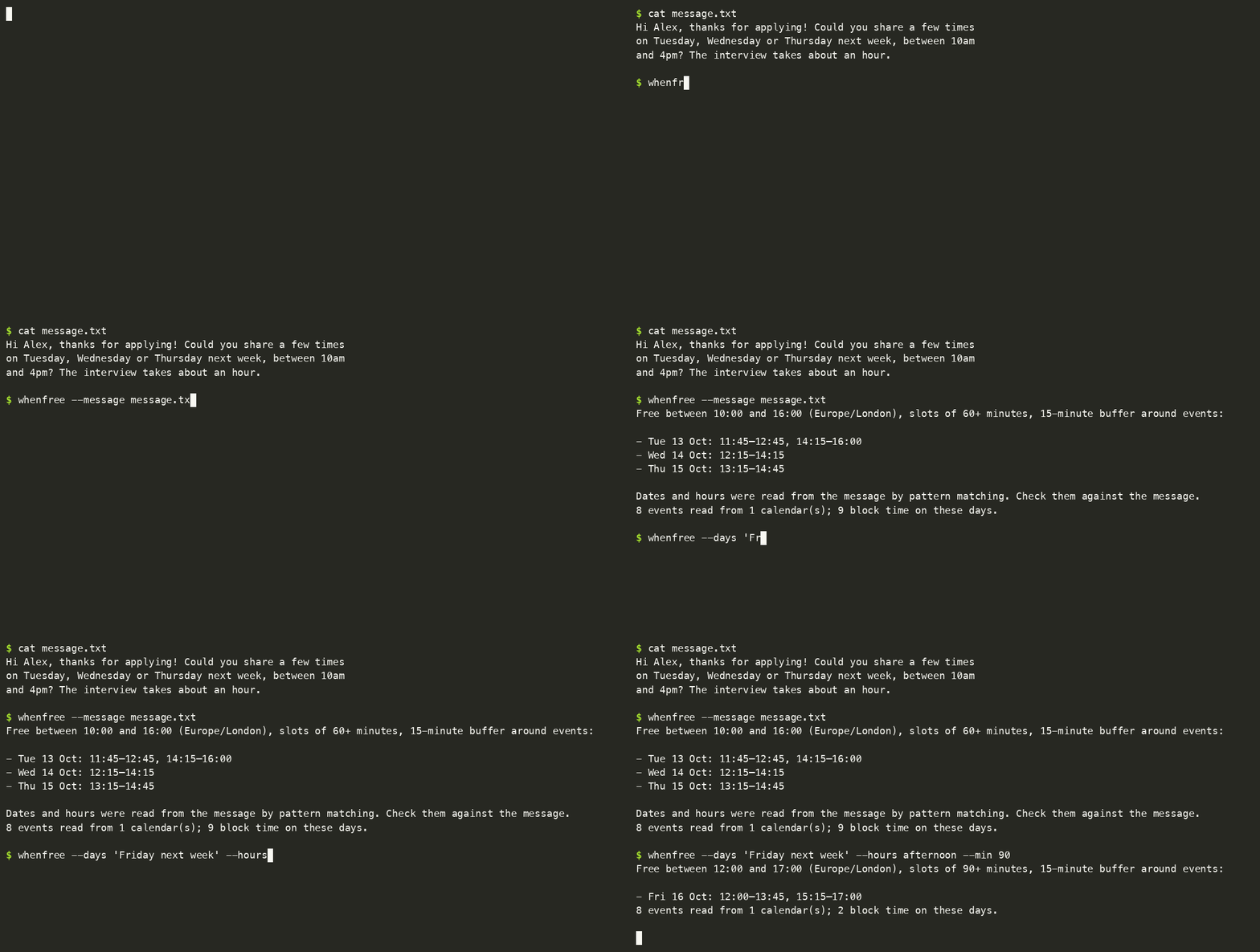
.ics file. Several calendars at once.Try it · Add your calendar · Everyday use · Reading a message · Use it from other tools · Other devices · Privacy · Settings · What counts as busy · Limits · Problems · Where it is listed
With uv, nothing to install first:
uvx when-free demo
To keep it (needs Python 3.11 or newer):
uv tool install when-free          # or: pipx install when-free
whenfree demo
Using Claude Desktop? You can skip all of this: install the one-click extension.
whenfree demo makes up a calendar for next week and answers a recruiter's message from it. It reads none of your data and saves nothing:
  > Hi! Thanks for applying. Could you share a few times on Tuesday, Wednesday or Thursday next week,
  > between 10am and 4pm? The interview takes about an hour.

  Free between 10:00 and 16:00 (Europe/London), slots of 60+ minutes, 15-minute buffer around events:
  - Tue 13 Oct: 11:45–12:45, 14:15–16:00
  - Wed 14 Oct: 12:15–14:15
  - Thu 15 Oct: 13:15–14:45
Copy your calendar's private address. It's a link that ends in .ics:
Run whenfree add and paste it. The address isn't shown while you paste. It's checked first, and saved only if it works:
$ whenfree add
Paste the address and press Enter (it is not shown):
Added 'personal': 412 events, 9 block time in the next 14 days.
Saved in /Users/you/.config/when-free/config.toml, readable only by you. Now run: whenfree
Run whenfree. You'll see your free time for the next working days.
On a Mac, pbpaste | whenfree add takes the address straight from the clipboard.
Keep the address secret. It works like a password: anyone who has it can read that calendar. Give it to
whenfree addand to nothing else, so not to a chat, a shell command or a repository. If it leaks, reset it in your calendar's settings.
Do this in a browser, because the phone app doesn't show the address.
basic.ics. Don't take "Public address in iCal format", which only works for a calendar you've made public.whenfree add and paste it when asked.No "Secret address"? Work and school accounts can have it switched off. Export the calendar instead (Settings → Import & export → Export), unzip it, and run whenfree add ~/calendars/work.ics. An export is a snapshot, so export again when your calendar changes.
A slot counts as free only if it's free in every calendar you add.
whenfree add --name work                 # a second calendar: asks for its address
whenfree add ~/calendars/family.ics      # an exported file instead of an address
whenfree check                           # can every calendar be read?
They're kept in ~/.config/when-free/config.toml, one [[calendar]] block each, with a name and a url or path. You can edit that file by hand. whenfree init creates an empty one.
Only the slot lines go to standard output. The context goes to standard error, so | pbcopy copies exactly what you'd paste into a reply.
--message finds the days and hours in ordinary text. It understands:
Thu 1 Oct · Thursday the 1st of October · Monday, October 5th · 5 October · 2026-10-05 · Wednesday 30thbetween 10:00am and 4:00pm · 10:00–16:00 · 9-5pm · 2 to 4 pmIt always tells you how it read the dates, so you can check them against the message. A few rules keep it from guessing:
--days.when-free never connects to your mailbox. You paste the message, pipe it in, or save it to a file.
If you run a model yourself, it can do the reading instead. Add this to the settings file:
[extract]
command = ["ollama", "run", "llama3.2"]          # the prompt is sent on standard input
# command = ["my-cli", "ask", "{prompt}"]        # or placed where {prompt} is
The command receives the message and must print JSON: {"days": ["2026-10-05"], "hours": "10:00-16:00", "minutes": 60}. If it fails, pattern matching is used instead. Nothing runs unless you configure it, and --no-extract skips it for one run. The message goes to whatever that command talks to, so use a local model for private text.
Every way gives the same answer, only reads, and leaves event titles out unless asked.
The plugin bundles the MCP server with a skill that tells Claude when to use it: when you ask about your availability, paste a message asking when you can meet, or before it proposes a time.
/plugin marketplace add YauhenBichel/when-free
/plugin install when-free@when-free
Then add your calendar once, if you have not yet: uvx when-free add.
claude mcp add when-free -- uvx when-free mcp # Claude Code
For Cursor and other MCP clients, add this to their server list. uvx fetches when-free the first time, so there's nothing to install:
{
  "mcpServers": {
    "when-free": { "command": "uvx", "args": ["when-free", "mcp"] }
  }
}
If you installed it with uv tool install, use "command": "whenfree", "args": ["mcp"] instead. It's also listed in the MCP registry as io.github.YauhenBichel/when-free, on mcprush and in the M8ven Trust Index.
Then just ask: "Here's the recruiter's message. Which of those times can I do?" The assistant calls free_slots and answers from your real calendar.
If a tool can't do its job, the assistant gets an error it can read ("could not read the calendar 'work'"), never a guess.
whenfree serve # http://127.0.0.1:8765, only reachable from this computer
curl -H "Authorization: Bearer $(cat ~/.config/when-free/token)" \
  'http://127.0.0.1:8765/free_slots?days=next%20week&hours=afternoon'
POST /free_slots with a JSON body, or GET with a query string. Same for /check_calendars.{"ok": true, "text": "...", "data": {...}}, or {"ok": false, "error": "..."} with status 400./openapi.json. To set up Open WebUI, n8n or Shortcuts, see the recipes.~/.config/when-free/token, readable only by you. Or set your own with WHENFREE_TOKEN. Every tool call needs it.whenfree serve --allow-origin http://localhost:3000. With --host 0.0.0.0 it's reachable from your network, and the token alone protects it, so use that only on a network you trust.whenfree schema # the tool definitions: name, description, inputSchema
whenfree schema --format openai # the same, as {"type": "function", "function": {...}}
whenfree call free_slots --args '{"days": "next week", "hours": "10:00-16:00"}'
whenfree call prints {"ok": true, "text": "...", "data": {...}}, or {"ok": false, "error": "..."} with exit code 1. Arguments can also come on standard input.
from whenfree import api

result = api.find_free(api.Query(days="next week", hours="10:00-16:00", min_minutes=45))
for day in result["days"]:
    print(day["label"], day["free"])          # for example: Mon 12 Oct [['10:00', '11:45'], ['13:15', '16:00']]
find_free returns plain dicts and lists, ready for json.dumps, and raises api.Problem with a message that's safe to show. Pass reader= to supply calendar text yourself instead of fetching it.
$ whenfree now
Busy until 15:30 · next free 15:45–17:00
Devices see whether you're free and your free slots, never event titles. Each phone has its own token that you can revoke, and an unreadable calendar shows as "unknown", never "free".
include_busy, and that option's description tells the model that titles are private. No tool can add, change or delete anything, and no tool takes a calendar address, which goes from you to whenfree add only.All optional except a calendar. They live in ~/.config/when-free/config.toml, and command-line flags win over the file.
For scripts, containers and MCP client configurations. All optional.
WHENFREE_CALENDARS holds passwords. A private calendar address lets anyone who has it read that calendar. Treat the variable like an API key: keep it out of shared shell profiles, committed MCP configurations, CI logs and screenshots. The settings file whenfree add writes is readable only by you, so use it instead where you can.
A slot shorter than min_minutes after the buffers isn't offered. For today, the day starts at the next quarter hour, not in the past.
whenfree --busy to see what it saw.BYSETPOS, week numbers) aren't. For those the first date is blocked and a note says so.io.github.YauhenBichel/when-freewhen-freeIf you use it somewhere, or wrote about it, open an issue and it goes here.
uv run --with pytest pytest -q # a few seconds; no network
The tests use a small calendar in tests/data/sample.ics and a fixed clock (WHENFREE_NOW). The code is grouped by component:
tests/test_structure.py fails if a component imports one it may not, so the domain stays free of front ends.
See CONTRIBUTING.md.
Apache-2.0.
Which days and times am I free? Reads your calendar feeds and answers with the slots you can offer.
{ "mcpServers": { "io.github.yauhenbichel-when-free": { "command": "uvx", "args": [ "when-free==0.4.1" ], "env": { "WHENFREE_CALENDARS": "<secret>", "WHENFREE_TZ": "<value>" } } }}Tools
Noch keine Tool-Liste. Remote-Server erhalten eine nach dem ersten Health-Check.
FAQ
Kopieren Sie auf dieser Seite die stdio-Konfiguration für Cursor, Claude Desktop, Claude Code oder VS Code. Sie nutzt die Installation des Herausgebers, keinen PlugMCP-Proxy.
Der Herausgeber nennt diese Umgebungsvariablen: WHENFREE_CALENDARS, WHENFREE_TZ.
When Free läuft lokal über stdio.
Zuletzt geprüft: 2026-11-09. Which days and times am I free? Reads your calendar feeds and answers with the slots you can offer.

