Yahboom Raspbot v2 (Boomy) — MCP Server, Webapp & Documentation
📖 Installation Guide — quick start, manual setup, and troubleshooting
Agenten stärken
Der eigene Befehl des Herausgebers. Kein PlugMCP-Endpunkt.
Host a copy with our keys and logs.
mcpb https://github.com/sandraschi/yahboom-mcp/releases/download/v2.5.0b1/yahboom-mcp-v2.5.0b1.mcpbClaude Code hat keinen Installationslink für einen lokalen Befehl. Kopieren Sie den Befehl unten und führen Sie ihn in einem Terminal aus.
claude mcp add sandraschi-yahboom-mcp -- mcpb https://github.com/sandraschi/yahboom-mcp/releases/download/v2.5.0b1/yahboom-mcp-v2.5.0b1.mcpbIn einem Terminal ausführen.
{ "mcpServers": { "sandraschi-yahboom-mcp": { "command": "mcpb", "args": [ "https://github.com/sandraschi/yahboom-mcp/releases/download/v2.5.0b1/yahboom-mcp-v2.5.0b1.mcpb" ] } }}claude_desktop_config.json
Remote-URL oder ein Befehl auf Ihrem Rechner? Worin sich die beiden Installationen unterscheiden
Auf PlugMCP ausführen
A new server you create. It is not this listing's official endpoint. Use the publisher install when you want their URL and their credentials.
StartenVom Herausgeber
📖 Installation Guide — quick start, manual setup, and troubleshooting
FastMCP 3.2 server plus Webapp for Yahboom Raspbot v2 robot car, ros2, raspberry pi
Download for Windows:
yahboom-mcp-2.5.0-setup.exe— installer with webapp + embedded backend, one shortcut. The installer is unsigned: SmartScreen will warn — click More info > Run anyway. Claude Desktop users can instead install the MCP bundle (one-liner below).
Claude Desktop only (MCPB bundle):
irm https://github.com/sandraschi/yahboom-mcp/releases/latest/download/install.ps1 | iex
Every other client (Cursor, Windsurf, OpenCode, Claude Code) — stdio via uvx:
{
  "mcpServers": {
    "yahboom-mcp": {
      "command": "uvx",
      "args": ["--from", "git+https://github.com/sandraschi/yahboom-mcp", "yahboom-mcp", "--mode", "stdio"],
      "env": { "YAHBOOM_IP": "192.168.1.11" }
    }
  }
}
Developers from source:
git clone https://github.com/sandraschi/yahboom-mcp
cd yahboom-mcp
just
This opens an interactive dashboard showing all available commands. Run just bootstrap to install dependencies, then just serve or just dev to start.
If you don't have just installed:
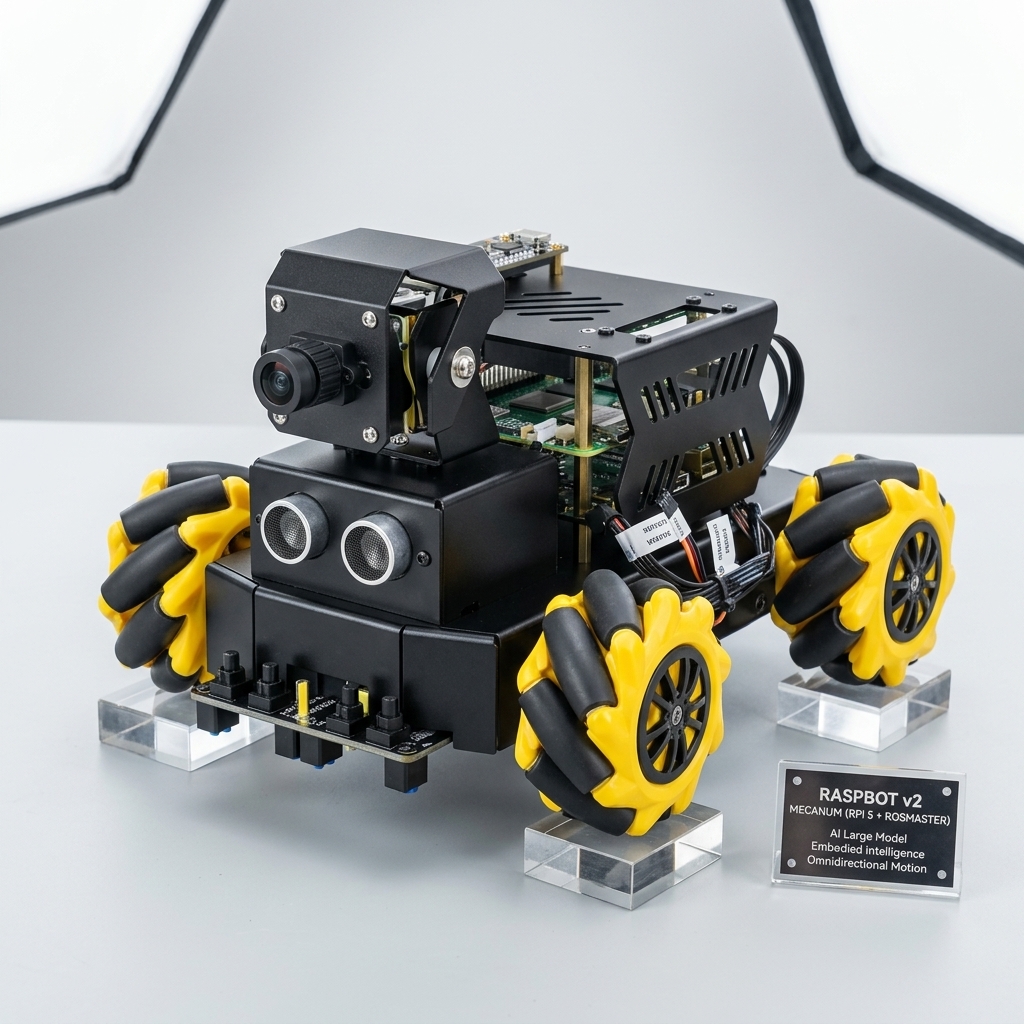
Boomy is a Yahboom Raspbot v2 (Mecanum Version) robot car. Weighing in at approximately 1.0 kg and costing roughly $300 (fully loaded with a Raspberry Pi 5 16GB), it provides a unified platform for testing sensor integration, ROS 2 orchestration, and agentic (AI-driven) robotics. It's also great fun for kids of all ages.
Yahboom is a prominent player in the Chinese robotics and STEM education industry. They offer a diverse range of hardware platforms:
Boomy utilizes a "Double-Stack" controller model to bridge real-time physical reliability with high-level cognitive tasks:
For scaled deployments, Boomy can operate in a Pi-less Swarm mode:
This project clearly distinguishes between human-operable controls and machine-optimized interfaces:
yahboom-mcp works completely standalone. You can optionally connect it with companion servers in the sandraschi fleet to unlock extended features:
Self-Contained Companions: Fleet companions operate independently. Installing companions does not trigger transitive dependency chains.
/dashboard) — First page: basic robot link (gateway, target IP, ROS · SSH · video) and operator hints when the Raspbot is off or Goliath has no AP/Ethernet path./diagnostics) — Detail: ROS topic explorer, node list, resync / hard reset, SSH shell, stack health table (same stack payload as the dashboard when available)./logs) — Live yahboom-mcp log stream (SSE) on Goliath.Historical status logs and legacy research are preserved in the docs/archive/ directory.
This project adheres to SOTA 2026 industrial standards for high-fidelity agentic orchestration:
print statements in core handlers (T201).:11434) and LM Studio (:1234). GPU metrics via nvidia-smi.just lint, just fix, just dev).FastMCP 3.2 server plus Webapp for Yahboom Raspbot v2 robot car, ros2, raspberry pi
{ "mcpServers": { "sandraschi-yahboom-mcp": { "command": "mcpb", "args": [ "https://github.com/sandraschi/yahboom-mcp/releases/download/v2.5.0b1/yahboom-mcp-v2.5.0b1.mcpb" ] } }}Tools
Noch keine Tool-Liste. Remote-Server erhalten eine nach dem ersten Health-Check.
FAQ
Kopieren Sie auf dieser Seite die stdio-Konfiguration für Cursor, Claude Desktop, Claude Code oder VS Code. Sie nutzt die Installation des Herausgebers, keinen PlugMCP-Proxy.
In diesem Eintrag ist keine erforderliche Umgebungsvariable aufgeführt.
Yahboom läuft lokal über stdio.
Zuletzt geprüft: 2026-10-28. FastMCP 3.2 server plus Webapp for Yahboom Raspbot v2 robot car, ros2, raspberry pi
