Rapidly MCP
Test the idea before you build it
Rapidly works inside your AI agent. Bring an idea you already have, or ask it to generate one from a company website. In about five minutes, you get a build prompt for the smallest Pretotyping experiment worth running.
Rapidly builds the Lean Canvas, turns the riskiest assumption into a measurable hypothesis, researches a pass mark and designs practical experiments. Your agent builds the test. Real customers give you the evidence.
Rapidly MCP is generally available.
Version 2.0.0 is published in the official MCP Registry.
Works with Claude, Codex, ChatGPT and Hermes. OpenClaw, Grokbot and other agents can also use Rapidly if they support remote MCP.
Connect Rapidly · Let your agent set it up · Manual setup
Here's what a first run looks like
A suburban independent bookshop wants to grow weekday foot traffic and build a younger, regular customer base.
Rapidly generated three ideas. We chose the Third-Place Pass: a $19 monthly membership with a guaranteed two-hour weekday seat, a rotating perk and a members' shelf.
Rapidly built the Lean Canvas, turned the riskiest demand assumption into a measurable hypothesis and proposed five Pretotyping experiments. The simplest started with staff asking warm, local customers to pay. The next used a counter card and landing page, with a proposed pass mark of 15%.
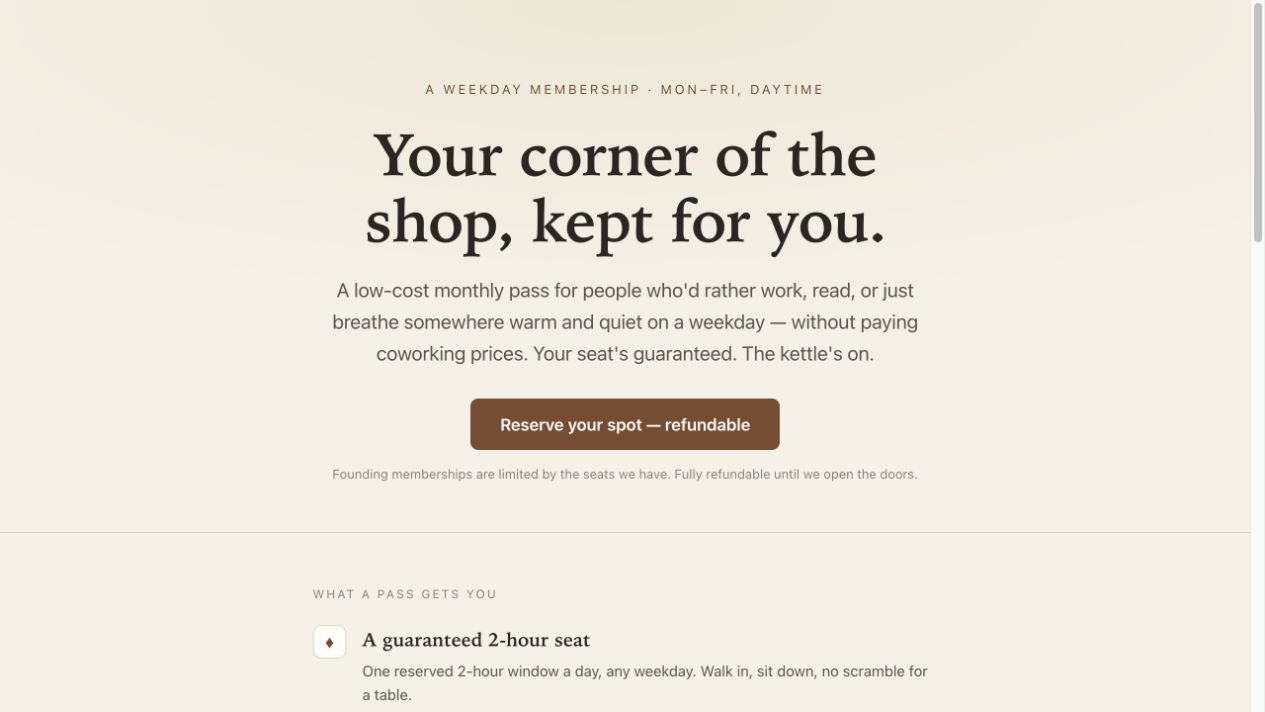
See the complete Rapidly run · Open the customer-facing landing page
This was a demonstration for a hypothetical bookshop. The pass mark was a proposal to test, not a measured result. No customer results are claimed.
Why can't I just ask Claude or Codex?
You can. We do. The answer will probably look reasonable.
Rapidly is useful because the method is already there. For one idea, the core run:
- saves the idea and builds its full Lean Canvas;
- turns the riskiest assumption into a measurable hypothesis and researches the pass threshold;
- saves three to five complete experiment options, recommends the easiest credible first test and generates one build prompt for that recommendation.
Your agent handles that complete run through test_idea. The other experiment options stay saved with the idea, ready to use later. See the seven standard tools and three advanced method tools.
Successful work is also saved with the idea in your Rapidly team instead of disappearing in a chat thread. You can bring the result back later and decide whether to fund it, fix it, stop it or run another test.
The method combines Alberto Savoia's Pretotyping with our own practice through 4,000+ experiments with client teams and 200+ workshops.
Install the Rapidly plugin
The plugin bundles the Rapidly MCP connection with four skills that tell your agent when and how to use it: test an idea, record a test result, choose the next idea, and setup.
In Claude Code:
/plugin marketplace add Exponentially-Platform/Rapidly-MCP
/plugin install rapidly@rapidly
Then run /mcp, choose Rapidly and sign in.
In Codex:
codex plugin marketplace add Exponentially-Platform/Rapidly-MCP
Then open the Plugins Directory in the ChatGPT desktop app or Codex, choose the Rapidly marketplace and install Rapidly. Sign in when Rapidly asks.
In Cursor, the repository carries a Cursor marketplace manifest that points at the same plugin. Install Rapidly from the Cursor marketplace once it is listed, then sign in when Rapidly asks.
The plugin lives in plugins/rapidly. scripts/package-openai-plugin.sh builds the ZIP for OpenAI's plugin directory.
Connect Rapidly
If you're new to Rapidly
Open rapidly.co/rapidly-mcp and enter your name, email and team name. Rapidly creates the account and team, then shows your personal token once.
The page gives you copy-ready setup for Codex CLI and Claude Code. Follow the steps, start a fresh conversation and you're ready to try an idea.
If you already use Rapidly
Connect with OAuth, choose your Rapidly team and approve access. You don't need to create another account or personal token.
The exact steps differ between Codex, Claude and ChatGPT. Use the setup instructions for your agent.
If you're using another agent
Give your agent this address and ask it to connect Rapidly:
https://www.rapidly.co/mcp
Use OAuth if the agent supports it. Otherwise, follow the agent setup instructions to keep your personal token out of chat and project files.
Start with an idea
To generate three ideas and fully test all three in one request:
Ask Rapidly for three ideas for [company], focused on [opportunity], and fully test all three in one go.
Rapidly should save all three ideas, complete each Canvas and hypothesis, save three to five experiment options for each idea, and return one build prompt for each recommended first test.
Use one you already have:
Ask Rapidly to test this idea: [describe the customer, problem and proposed change].
Or ask Rapidly to generate one from a company and its website:
Ask Rapidly to generate [one or more] ideas for [company name] using [website URL]. Focus on [optional customer, problem or opportunity].
Rapidly researches the company, returns grounded ideas with sources and offers to take one through the method. If you're bringing your own idea, add anything you already know, where that information came from and any constraints that matter.
Rapidly works through the method one saved stage at a time. Your agent should continue the same test_idea automatically while Rapidly reports that work is still in progress. Keep the returned project link; if the conversation stops, include that link or project ID when asking Rapidly to continue. You don't need to choose stages, decide whether to save or manage a retry key.
By the end, you should have:
- sources you can open and facts you can review;
- a full Lean Canvas;
- a measurable hypothesis and decision rule suited to the idea's riskiest assumption;
- three to five saved experiment options, GO and NO-GO rules, and a recommended first experiment;
- one build prompt for the recommended test asset.
Review the output, ask your agent to build the asset, then put the test in front of real customers.
Help us improve Rapidly MCP
We're looking for the points where this becomes confusing or stops being useful.
After your run, please tell us:
- Did the connection work the first time?
- Where did you hesitate or get stuck?
- Was the proposed experiment small enough to run?
- What did you keep, and did it change what you planned to do next?
Email [email protected] with the subject Rapidly MCP feedback. Tell us which agent you used and where you stopped. We won't share your idea, feedback or results publicly without asking you first. Please remove tokens and customer data from feedback, logs and screenshots.
Current limits
- A trial includes five new ideas. Taking one idea through its Canvas, hypothesis and experiments still counts as one idea.
- Paid plans include ten ideas per paid seat per calendar month.
- Need more? Email [email protected] to discuss the right next step for your team.
- Generated facts, cited sources and proposed targets need human review before use.