Skip to content
plugmcp
DirectorySkillsCategoriesBlog
EN/中文
Sign inSign up
Home/Servers/Rocuronium

Rocuronium

by glass.kagerou

Drive macOS apps without taking the cursor: read, click, type, scroll, each with evidence.

Power your agent

Add this server

The publisher's own command. Not a PlugMCP endpoint.

Local command
mcpb https://github.com/kageroumado/rocuronium/releases/download/v1.6.0/rocuronium-1.6.0.mcpb
Provider
Claude Code
claude mcp add glass.kagerou-rocuronium -- mcpb https://github.com/kageroumado/rocuronium/releases/download/v1.6.0/rocuronium-1.6.0.mcpb

Run in a terminal.

Claude Desktop
{
  "mcpServers": {
    "glass.kagerou-rocuronium": {
      "command": "mcpb",
      "args": [
        "https://github.com/kageroumado/rocuronium/releases/download/v1.6.0/rocuronium-1.6.0.mcpb"
      ]
    }
  }
}

claude_desktop_config.json

Step-by-step: add this in Claude

Remote URL or a command on your machine? How the two installs differ

Run on PlugMCP

Host a copy with our keys and logs.

A new server you create. It is not this listing's official endpoint. Use the publisher install when you want their URL and their credentials.

Launch

Related MCP

View more
  • Firecrawl🔥 Official Firecrawl MCP Server - Adds powerful web scraping and search to Cursor, Claude and any other LLM clients.
  • N
    NotionToken-auth Notion MCP: pages, databases, blocks, comments, files. Runs headless in CI and agents.
  • Context7Context7 Platform -- Up-to-date code documentation for LLMs and AI code editors

Related skills

View all
  • reaReverse engineer anything with agents, from app behavior down to native binaries.
  • rea-changelog-updatePrepare or rewrite REA release changelogs and GitHub release notes from pinned Git history, with verified contributor thanks and Release Please synchronization.
  • rea-tool-designDesign or change REA investigation tools, CLI/MCP contracts, provider capabilities, and Evidence semantics.

Questions

How do I install Rocuronium?
Copy the stdio config for Cursor, Claude Desktop, Claude Code, or VS Code on this page. It uses the publisher's install, not a PlugMCP proxy.
Does Rocuronium need an API key?
No required environment variable is listed on this record.
What transport does Rocuronium use?
Rocuronium runs locally over stdio.
When was Rocuronium last checked?
Last checked 2026-10-16. Drive macOS apps without taking the cursor: read, click, type, scroll, each with evidence.

Drive macOS apps without taking the cursor: read, click, type, scroll, each with evidence.

Rocuronium

Rocuronium gives an AI agent a separate macOS login session with its own desktop and cursor. Local vision models help find UI elements when accessibility data is missing, and each interaction returns evidence of what actually changed: confirmed, noEffect, or unverifiable.
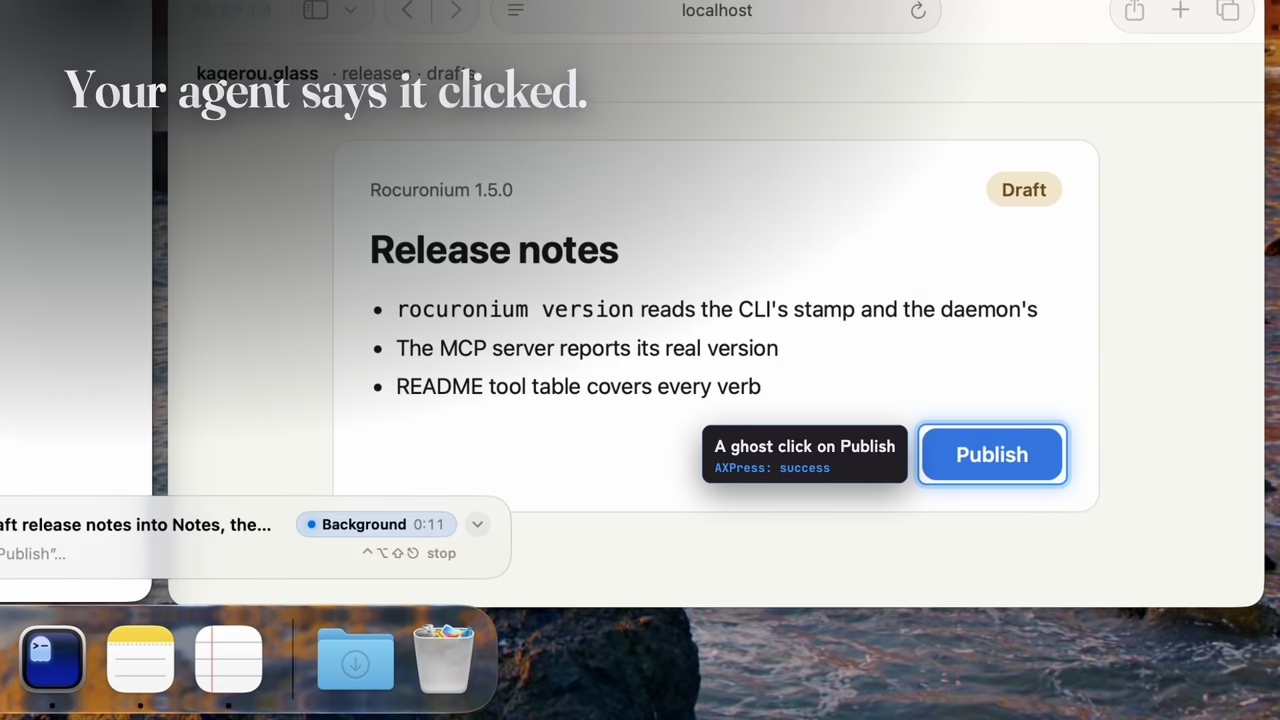
Rocuronium reports an unchanged click, requests cursor approval, then confirms the interaction

Highlights

  • Work in a separate login session while the agent uses its own desktop and cursor.
  • Detect failed interactions even when macOS reports that the API call succeeded.
  • Find controls with local vision models when an app exposes little accessibility information.
  • Observation: accessibility trees, element search, on-device OCR, window screenshots, and structural or pixel diffs.
  • Interactions: click, type, keys, shortcuts, menus, scrolling, app launch, and window controls.
  • Evidence: confirmed, noEffect, or unverifiable, with read-back, focus, window, selection, or pixel changes.
  • Isolation: a dedicated agent session, virtual displays, and window parking.
  • Plans: sequential actions with postconditions and abort, continue, pause-for-human, or fallback policies.
  • Human control: visible activity, approval before taking the human cursor, and emergency stop ⌃⌥⇧⎋. Resume requires the app’s popover.
  • Automation: CLI and MCP tools. Session creation requires human approval; MCP can inspect or stop a session.

Notes

  • Apple silicon · macOS 26.5+ · Accessibility permission; Screen Recording for screenshots and OCR.
  • Homebrew: brew install kageroumado/tap/rocuronium.
  • Commands and model reference · Agent setup and MCP configuration, also available through rocuronium guide.
How do I install Rocuronium?
Copy the stdio config for Cursor, Claude Desktop, Claude Code, or VS Code on this page. It uses the publisher's install, not a PlugMCP proxy.
Does Rocuronium need an API key?
No required environment variable is listed on this record.
What transport does Rocuronium use?
Rocuronium runs locally over stdio.
When was Rocuronium last checked?
Last checked 2026-10-16. Drive macOS apps without taking the cursor: read, click, type, scroll, each with evidence.

No tool list yet. Remote servers get one after the first health check.

plugmcp

Plug any tool into any agent. MCP servers for people who do not write servers. Gateway for volume, n8n for apps.

  • github.com/TODO
  • x.com/TODO
  • linkedin.com/company/TODO

PlugMCP, 2026

Product
  • Browse
  • Install
  • Host your own
  • Pricing
  • Voice mode
  • Browser
Directory
  • All MCP servers
  • MCP Apps
  • Tools
  • Agent skills
  • Categories
  • New
  • Voice
  • Submit a server
Developers
  • Docs
  • Blog
  • Club
  • Work with us
  • What is MCP
  • What is WebMCP
  • Status
Company
  • About
  • Contact
  • Terms
  • Privacy
  • DPA